Category: Linux

  • Container Escape Vectors: A Practical Walkthrough of Namespace and Cgroup Weaknesses

    Container Escape Vectors: A Practical Walkthrough of Namespace and Cgroup Weaknesses

    Containers aren’t a security boundary. They’re a convenient packaging of several Linux kernel primitives that happen to produce process isolation as a side effect. Treat a container like a VM and you’ll get burned eventually. This post covers what actually enforces container isolation, two escape techniques that have shown up in production, and the mitigations worth bothering with.

    What’s actually isolating the container
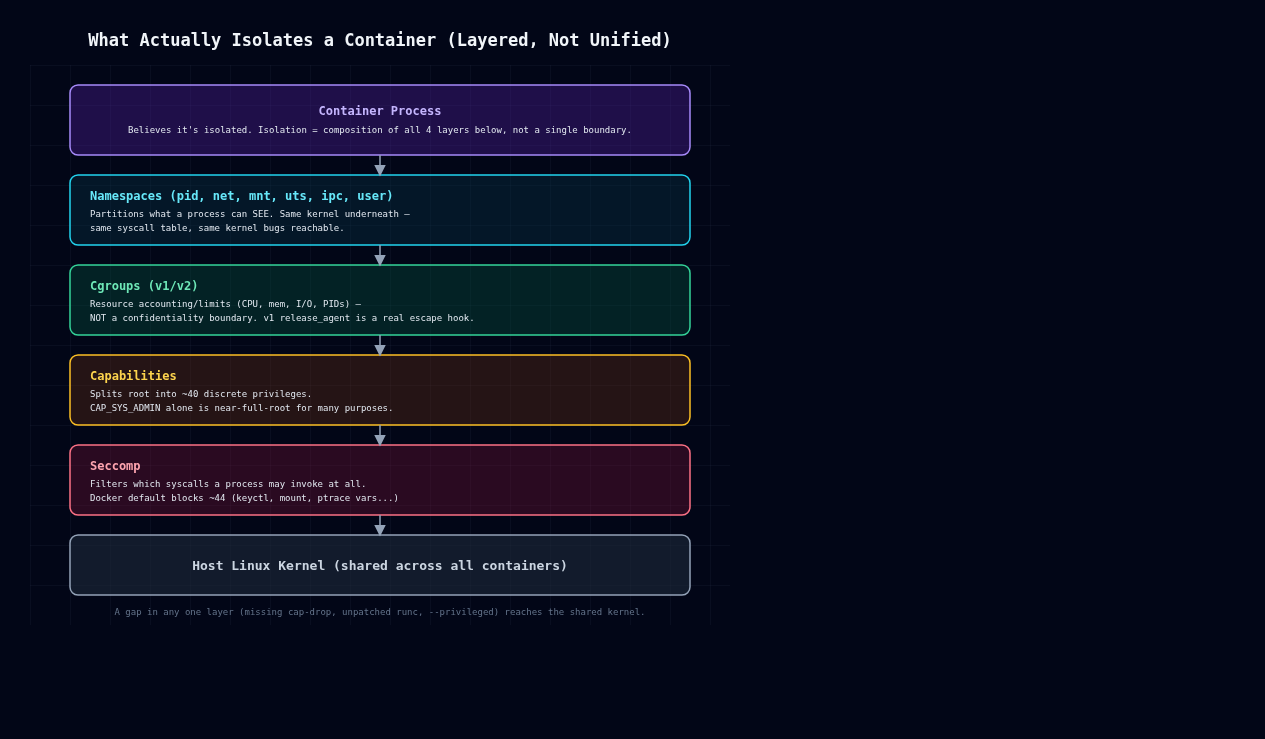
    Layered diagram of container isolation: namespaces, cgroups, capabilities, seccomp

    There’s no single “container” kernel object. Docker, containerd, and friends compose four separate mechanisms.

    Namespaces partition what a process can see: pid (process tree), net (network stack), mnt (filesystem mounts), uts (hostname), ipc, and user (UID/GID mapping). A process in a new PID namespace sees itself as PID 1 and can’t see host processes, but it’s still the same kernel, same syscall table, same vulnerabilities.

    Cgroups (v1 or v2) limit and account for resource usage: CPU, memory, I/O, PIDs. They control resources, not confidentiality or integrity. Cgroup v1’s release_agent mechanism in particular is a privileged hook that has nothing to do with isolation and everything to do with host compromise, as we’ll see below.

    Capabilities split root’s omnipotence into roughly 40 discrete privileges (CAP_SYS_ADMIN, CAP_NET_ADMIN, CAP_SYS_PTRACE, and so on). A container running as UID 0 with a reduced capability set isn’t the same as host root, but Docker’s default set is still broad, and CAP_SYS_ADMIN alone gets you close to full root for a lot of practical purposes: mount manipulation, cgroup control, some device operations.

    Seccomp filters which syscalls a process can invoke at all, independent of capabilities. Docker ships a default profile blocking around 44 syscalls (keyctl, add_key, mount, umount2 in some paths, ptrace variants, kernel module loading, etc). Disabling it with –security-opt seccomp=unconfined is one of the most common ways people remove a real security control while chasing a build error they don’t fully understand.

    None of these four mechanisms were designed together as a sandbox. Each one closes off a slice of the host kernel’s attack surface, and the escapes live in the gaps between them.

    Escape 1: privileged containers and /dev access

    docker run –privileged disables almost everything above: full capability set, no seccomp, no AppArmor or SELinux confinement, and access to host devices. If the container can see host block devices under /dev, it can mount the host root filesystem directly:

    # inside a --privileged container
    mkdir /mnt/hostfs
    mount /dev/sda1 /mnt/hostfs
    chroot /mnt/hostfs /bin/bash
    # now you are root on the host filesystem

    This isn’t a bug. It’s documented behavior of –privileged. But it shows up constantly anyway: CI runners, “just make it work” Kubernetes manifests, Docker-in-Docker setups that grab –privileged to avoid debugging a permissions error. The fix is never “use –privileged.” It’s finding the one or two specific capabilities or device mounts the workload actually needs (–cap-add SYS_PTRACE, –device=/dev/foo), which is almost always possible once you bother to check.

    Escape 2: CVE-2019-5736, runc file descriptor overwrite

    This one’s a genuine kernel/runtime race, not a misconfiguration. runc versions before 1.0-rc7 (used under the hood by Docker, containerd, Kubernetes) were vulnerable to an attack where a malicious container could overwrite the host runc binary itself.

    Here’s the mechanism: when runc exec enters a running container, it briefly opens its own binary via /proc/self/exe inside the container’s mount namespace, to re-exec itself with dropped privileges. A container process controls its own /proc/self/exe target. Replace your own binary with a malicious ELF that, when run as the container’s entrypoint, opens /proc/self/exe for writing and holds the fd open, and you can race runc into writing to that fd instead of a temp file. Since the host runc binary is mapped in during this handoff, the attacker overwrites the actual runc executable on the host with their own payload. The next container started or exec’d into on that host runs the attacker’s code as root.

    What makes this one sting is that it broke the assumption that “non-privileged container, default config” was safe against a malicious image or a compromised process. The fix was having runc copy itself to a memfd (memfd_create) and exec from there instead of touching a path on disk, which kills the overwritable target entirely. Patch your container runtime, runc, containerd, crun, on the same schedule as your kernel. Don’t treat it as an afterthought.

    Escape 3: cgroup v1 release_agent abuse

    Cgroup v1 supports a release_agent file: a host-side executable path the kernel invokes, as root, on the host, whenever a cgroup becomes empty. Give a container CAP_SYS_ADMIN and write access to a cgroup hierarchy’s release_agent, which happens with –privileged or with mounted cgroupfs and relaxed capabilities, and it can point that path at a script of its choosing and trigger it:

    mkdir /tmp/cgrp && mount -t cgroup -o memory cgroup /tmp/cgrp
    mkdir /tmp/cgrp/x
    echo 1 > /tmp/cgrp/x/notify_on_release
    host_path=$(sed -n 's/.*\perdir:\([^,]*\).*/\1/p' /proc/self/cgroup)
    echo "$host_path/cmd" > /tmp/cgrp/release_agent
    echo '#!/bin/sh' > /cmd
    echo 'ps aux > /output' >> /cmd   # runs as host root
    chmod +x /cmd
    sh -c "echo \$\$ > /tmp/cgrp/x/cgroup.procs"

    Researchers including Felix Wilhelm have written this one up extensively, and it works for a simple reason: cgroups were never an isolation mechanism. release_agent is a host-wide control hook, and a sufficiently privileged container process can just reach out and grab it. Cgroup v2’s unified hierarchy scopes release_agent differently and closes off this specific path, one of several reasons to be on v2 by now.

    Mitigations that actually reduce risk

    Drop capabilities aggressively. Start from –cap-drop=ALL and add back only what you’ve actually measured as needed. CAP_SYS_ADMIN, CAP_SYS_PTRACE, and CAP_SYS_MODULE have no business being default-on.

    Don’t use –privileged in production, period. A workload that “needs” it almost always needs one specific capability or device, not the entire host.

    Run containers rootless (Podman rootless, or Docker’s rootless mode). User namespace remapping maps “root” inside the container to an unprivileged UID on the host, so a full in-container compromise doesn’t hand over host root.

    Keep the runtime patched. CVE-2019-5736-class bugs live in runc, containerd, crun, not in your application code. Track your container runtime’s CVEs with the same priority you give kernel CVEs.

    Use seccomp, and don’t disable it just to make an error go away. If a syscall is genuinely blocked and genuinely needed, add it explicitly to a custom profile instead of going unconfined.

    Prefer cgroup v2, where the release_agent host-hook vector doesn’t apply the same way.

    For genuinely untrusted workloads, reach for a sandboxing runtime. gVisor (runsc) intercepts syscalls in userspace and reimplements the kernel surface; Kata Containers runs each container in a lightweight VM with its own kernel. Both add real isolation boundaries that namespaces and cgroups alone can’t provide, and the performance hit is usually worth it for multi-tenant or untrusted-input workloads.

    Every technique above has been public for years, and every mitigation here is a config change, not a research project. In my experience the gap between “container” and “isolated” is almost always one of three things: a missing –cap-drop, an unpatched runc, or a –privileged flag somebody added to make an error go away. Check those three first.

  • Patching without fear: unattended upgrades, live patching and coordinated reboots

    Patching without fear: unattended upgrades, live patching and coordinated reboots

    Part 4 of 4 in the Hardening a Linux server series. Earlier parts: Part 1, SSH hardening, Part 2, systemd sandboxing and Part 3, auditd.

    The first three parts of this series were about making a compromise harder and easier to investigate. This one is about the boring thing that prevents most compromises in the first place. Equifax is still the example I reach for. The Apache Struts bug (CVE-2017-5638) was disclosed and patched in early March 2017, attackers were in by mid-May, and they weren’t discovered until the end of July. Nobody needed a zero-day. They needed one unpatched server.

    Most teams don’t skip patching because they think it’s unimportant. They skip it because they’re afraid of it: an update broke something once, a reboot took down a service once, and now patching is a quarterly ritual with a change ticket. The fix for that fear isn’t courage. It’s a process where updates are small, automatic, staged and reversible.

    Let the machine install security updates

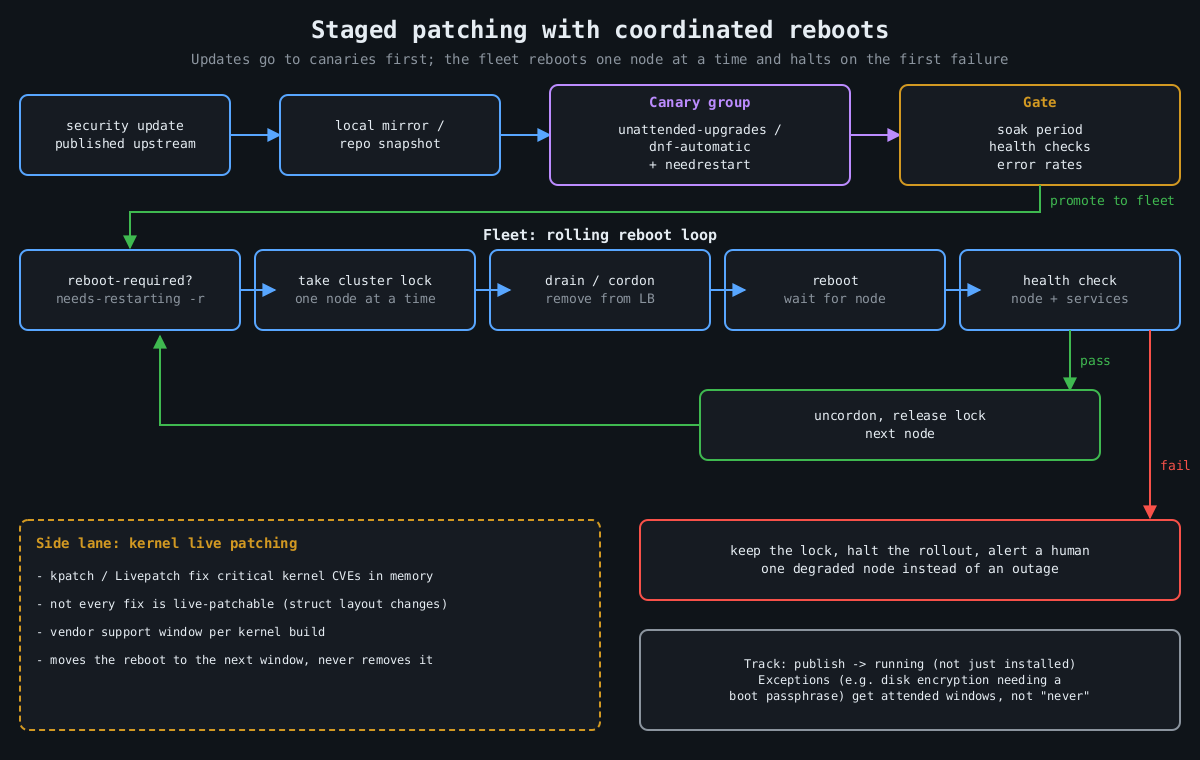
    Flowchart: updates go through a mirror to a canary group and a health gate, then a rolling reboot loop takes a lock, drains, reboots and health checks each node, halting on failure

    On Debian and Ubuntu, unattended-upgrades does this out of the box. Two files matter. /etc/apt/apt.conf.d/20auto-upgrades turns it on:

    APT::Periodic::Update-Package-Lists "1";
    APT::Periodic::Unattended-Upgrade "1";

    And 50unattended-upgrades decides what gets installed and what happens afterwards:

    Unattended-Upgrade::Origins-Pattern {
        "origin=Debian,codename=${distro_codename}-security,label=Debian-Security";
    };
    Unattended-Upgrade::Automatic-Reboot "false";
    Unattended-Upgrade::Remove-Unused-Kernel-Packages "true";

    On RHEL and its relatives, dnf-automatic is the equivalent:

    # /etc/dnf/automatic.conf
    [commands]
    upgrade_type = security
    apply_updates = yes
    
    sudo systemctl enable --now dnf-automatic.timer

    I’ve heard every objection to this, and the one with real weight is “an update could break production”. That’s true. A security update from a stable distribution branch is about the most conservative change your servers will ever receive, though. Debian security and RHEL errata backport fixes rather than shipping new upstream versions, exactly so behaviour doesn’t change. The risk from a backported fix is smaller than the risk of running a known-vulnerable OpenSSL for a quarter. And the staging below handles the rest.

    Installing isn’t the same as running

    Here’s the trap. A library update replaces the file on disk, but every process that already mapped the old version keeps running it. Your server says “OpenSSL updated” while nginx happily serves TLS from the vulnerable copy in memory. Kernel updates don’t take effect at all until a reboot.

    Check what’s actually stale:

    # Debian/Ubuntu
    sudo needrestart -b          # batch output: stale services and kernel status
    cat /var/run/reboot-required.pkgs
    
    # RHEL family
    sudo dnf needs-restarting -r   # exit code 1 means a reboot is needed
    sudo dnf needs-restarting -s   # services still using old files

    needrestart can restart affected services automatically after each upgrade, which closes the userspace gap with no human involved. The kernel still needs a reboot, and that’s where live patching comes in.

    Live patching buys time, not immunity

    Kernel live patching (kpatch on RHEL, Canonical Livepatch on Ubuntu, both built on the upstream livepatch infrastructure merged in Linux 4.0) replaces vulnerable kernel functions in memory using ftrace redirection. For a critical kernel CVE on a Friday afternoon, it is excellent.

    It has limits that vendors are honest about if you read the fine print. Not every fix can be live patched. Changes to data structure layouts are hard or impossible, so some CVEs simply don’t get a live patch. Live patches are also cumulative patches against a specific kernel build, and vendors only produce them for a support window per kernel. Eventually you’re running a kernel that’s been patched in memory a dozen times and isn’t getting new patches. So treat live patching as a way to move the reboot from “tonight, in a panic” to “next scheduled window”. It doesn’t remove the reboot.

    Reboots should be routine, which means coordinated

    If rebooting a server is scary, that’s a finding about your architecture. A service that can’t survive one node restarting can’t survive one node dying either, and hardware doesn’t schedule its failures for maintenance windows. Once services can tolerate it, reboots should happen on a cadence, automatically, one node at a time.

    The coordination logic is the same everywhere:

    1. Is a reboot needed? (reboot-required, needs-restarting -r)
    2. Take a cluster-wide lock so only one node reboots at a time.
    3. Drain: remove the node from the load balancer / cordon it.
    4. Reboot, wait for it to come back.
    5. Health check the node and its services.
    6. Only on success: put it back, release the lock.
    7. On failure: keep the lock, stop the rollout, alert a human.

    For Kubernetes nodes, kured (the Kubernetes Reboot Daemon) does exactly this: it watches for the reboot sentinel file, takes a lock, cordons and drains the node, reboots, and uncordons it. For VMs and bare metal, the same loop fits in a small Ansible playbook with serial: 1 and max_fail_percentage: 0, or whatever orchestration you already have. The important part is step 7. A rollout that stops itself after the first failed health check turns a bad update into one degraded node instead of an outage.

    Keep one exception list and keep it short. Machines that can’t reboot unattended (anything with full-disk encryption that needs a passphrase at boot, for example) should get a scheduled human-attended window, not “never”.

    Stage it like any other deploy

    The last piece is ordering. Updates should hit a small group of servers first, ideally the ones that look most like production without being the most important, and only spread after those survive a soak period. If you run a local mirror or use repository snapshots (Pulp, Aptly, or your cloud provider’s equivalent), the fleet installs the exact package set the canaries tested, not whatever landed in the repository an hour later. For VMs, take a hypervisor snapshot before the update on anything stateful, so a bad update is a rollback rather than a restore.

    Put numbers on it. Track the time from a fix being published to it running (not just installed) on every host. When the next regreSSHion lands, as covered in part 1, the teams that patch in a day are the ones that already patch every week.

    That wraps up this series. None of it is exotic, and together it’s most of what separates a server that gets popped by commodity tooling from one that doesn’t.

  • auditd and what to log so an investigation is possible

    auditd and what to log so an investigation is possible

    Part 3 of 4 in the Hardening a Linux server series. Earlier parts: Part 1, SSH hardening and Part 2, systemd sandboxing.

    The first question in almost every Linux intrusion investigation is “what did they run?”, and the honest answer on most servers is “no idea”. Shell history is a file the attacker controls; clearing it is common enough to have its own MITRE ATT&CK entry (T1070.003). The application logs show the request that got them in and then nothing. The auth log shows a sudo or two. Everything in between is gone.

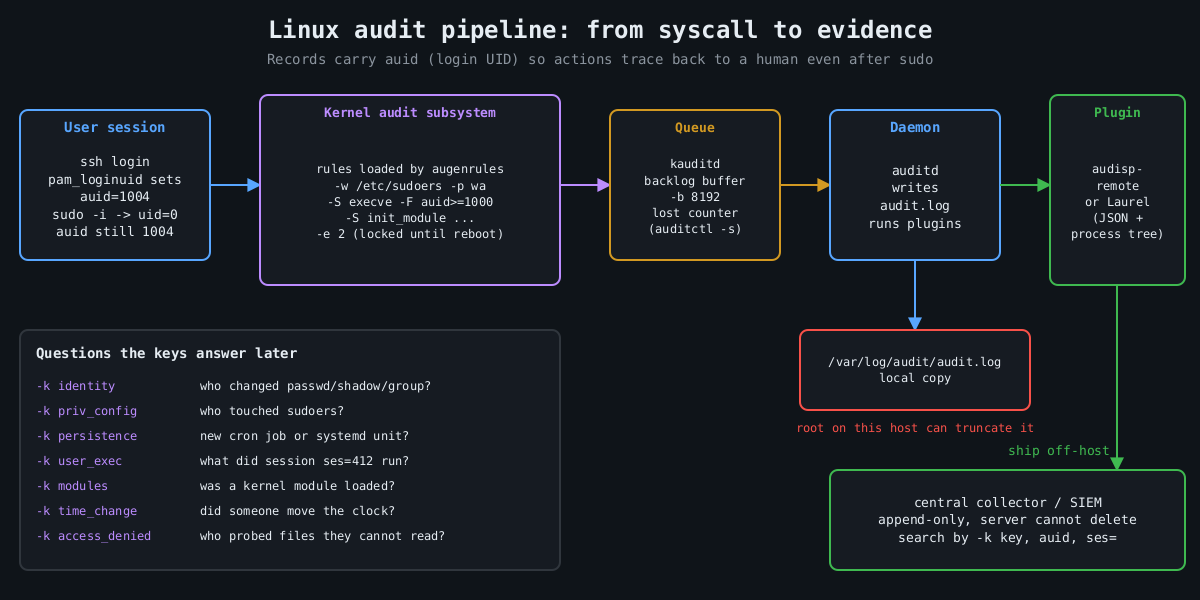
    The Linux audit subsystem fixes that, and it’s been in the kernel since 2.6. The kernel emits records for the events you ask about, auditd writes them to disk, and the records carry the one field that makes them worth having: the audit UID.

    Why auid is the whole point

    Pipeline diagram: user session with auid, kernel audit rules, kauditd backlog, auditd writing audit.log, plugins shipping events to an append-only central collector

    When a user logs in, pam_loginuid stamps their session with a login UID, auid in audit records. It survives sudo, su, setuid binaries and daemonizing. So when someone runs sudo -i and then deletes a log file, the event says uid=0 and also auid=1004, which is the human who logged in. Syslog can’t give you that.

    Services started by systemd at boot have no login UID. Unset shows up as 4294967295 (newer auditctl also accepts unset). Filtering on auid>=1000 -F auid!=4294967295 therefore means “actions traceable to a human session”, which is how you keep the volume sane.

    A rule set that answers real questions

    Rules live in /etc/audit/rules.d/*.rules and are compiled by augenrules --load. Here is a compact starting point. I’m not trying to be exhaustive; Florian Roth’s public auditd rule set on GitHub is a good, much longer reference.

    ## buffer and failure behaviour
    -D
    -b 8192
    --backlog_wait_time 60000
    -f 1
    
    ## identity and privilege configuration
    -w /etc/passwd -p wa -k identity
    -w /etc/shadow -p wa -k identity
    -w /etc/group -p wa -k identity
    -w /etc/sudoers -p wa -k priv_config
    -w /etc/sudoers.d/ -p wa -k priv_config
    -w /etc/ssh/sshd_config -p wa -k sshd_config
    -w /etc/ssh/sshd_config.d/ -p wa -k sshd_config
    
    ## persistence locations
    -w /etc/cron.d/ -p wa -k persistence
    -w /etc/crontab -p wa -k persistence
    -w /var/spool/cron/ -p wa -k persistence
    -w /etc/systemd/system/ -p wa -k persistence
    -w /root/.ssh/ -p wa -k persistence
    
    ## commands run by humans (both ABIs)
    -a always,exit -F arch=b64 -S execve -F auid>=1000 -F auid!=4294967295 -k user_exec
    -a always,exit -F arch=b32 -S execve -F auid>=1000 -F auid!=4294967295 -k user_exec
    
    ## kernel modules, time, tracing
    -a always,exit -F arch=b64 -S init_module -S finit_module -S delete_module -k modules
    -a always,exit -F arch=b64 -S adjtimex -S settimeofday -S clock_settime -k time_change
    -a always,exit -F arch=b64 -S ptrace -k tracing
    
    ## access denied to humans
    -a always,exit -F arch=b64 -S open -S openat -S truncate -S ftruncate -F exit=-EACCES -F auid>=1000 -F auid!=4294967295 -k access_denied
    -a always,exit -F arch=b64 -S open -S openat -S truncate -S ftruncate -F exit=-EPERM -F auid>=1000 -F auid!=4294967295 -k access_denied
    
    ## lock the configuration until reboot
    -e 2

    Every rule has a -k key. That’s what you search by later, and it’s what your SIEM will alert on. Name them for the question they answer.

    The arch=b32 execve rule is there on purpose. A 64-bit kernel with 32-bit compatibility still accepts 32-bit syscalls, and a rule that only matches b64 misses a statically linked 32-bit binary entirely. Older hardening benchmarks list both for this reason.

    Choices that matter more than the rules

    -e 2 makes the audit configuration immutable until the next reboot. Without it, an attacker who gets root runs auditctl -D and your logging stops silently. With it, they have to reboot the machine to change the rules, and a reboot is loud.

    -f sets what happens when the kernel can’t log: 0 is silent, 1 logs a kernel message, 2 panics the machine. Panic-on-audit-failure sounds strict and is occasionally a compliance requirement, but on most servers it hands an attacker who can flood the audit backlog a way to crash the box. I use 1 and alert on lost events instead. auditctl -s shows the lost counter, and it should stay at zero.

    -b and --backlog_wait_time size the kernel buffer and how long a process blocks when that buffer is full. Too small and you drop events during a burst, which is exactly when the attacker is busy.

    Then there’s volume. Full execve logging on a build server or a box running a lot of short-lived processes generates enormous logs. That’s why the rule above only covers human sessions. If a service account matters (the one your web app runs as, say), add a targeted rule with -F uid= for that account rather than logging every process on the machine.

    Reading it back

    Raw audit.log is famously unpleasant, one event split across several records. ausearch stitches them together and -i translates numeric IDs to names:

    ausearch -k user_exec --start today -i
    ausearch -k identity -ts 10/09/2026 06:00:00 -i
    aureport -x --summary
    aureport --login --failed

    For anything beyond a single host, send the records somewhere else. The audisp-remote plugin ships them over the network to a central auditd, or you can have a log shipper tail the file. Laurel, a plugin from the threathunters.io folks, rewrites the multi-record mess into one JSON line per event with the process tree attached, which SIEMs handle much better.

    Following a session

    Here’s why the keys and the auid field pay off. Say the persistence key fires because something wrote into /etc/cron.d/. The event shows the executable that did the write, the working directory, auid, and a ses= value, which is the kernel’s ID for that login session. That session number is the thread you pull:

    ausearch -k persistence --start recent -i
    ausearch --session 412 --raw | aureport -x -i
    ausearch -ua 1004 --start today -k user_exec -i

    The second command lists every executable that login session ran, in order, including the ones run through sudo. In practice that’s the difference between “someone added a cron job” and “this account logged in from this address, downloaded this file, ran it as root, then added a cron job”, which is the story an incident report needs.

    The things auditd doesn’t cover

    A few more pieces round it out. Make the journal persistent (Storage=persistent in journald.conf), otherwise it lives in /run and disappears at reboot. Set LogLevel VERBOSE in sshd so logins record the key fingerprint, as covered in part 1. Make sure every host runs chrony or another NTP client, because an investigation across five machines with clocks four minutes apart turns into an argument about ordering.

    And send everything off the host quickly. Logs that sit only on the compromised machine are evidence the attacker can edit. The immutable flag stops them changing the rules. It doesn’t stop root from truncating /var/log/audit/audit.log after the fact. A remote copy that the server can append to and never delete from is what turns these logs into evidence.

    The final part of this series is about patching, which is how you keep most of these investigations from being needed in the first place.

    Other parts of the Hardening a Linux server series: Part 1: SSH hardening beyond “disable root login”, Part 2: Least privilege with systemd sandboxing, Part 4: Patching without fear.