Every organisation I’ve worked with had infrastructure nobody remembered. A staging environment from a project that got cancelled. A marketing microsite from a 2019 campaign, still running a CMS that hasn’t been patched since. A DNS record pointing at a cloud resource someone deleted two years ago. A test tenant with a service account whose password hasn’t changed since it was created.
None of it shows up in the asset inventory, because if it did, someone would have turned it off. That’s what makes it dangerous. You can’t patch, monitor or decommission something you don’t know exists, and attackers are very good at finding exactly those things. It’s Halloween, so let’s talk about the undead.
Why this keeps causing breaches
Two incidents make the case better than any vendor slide.
In the 2017 Equifax breach, attackers came in through CVE-2017-5638 in Apache Struts on an online dispute portal. The patch had been out since early March. Equifax had an internal alert about it and ran a scan, and the scan didn’t find the vulnerable system. Then, per the US House Oversight Committee’s report, an SSL certificate on a device that inspected outbound traffic had expired months earlier, so data left the network uninspected for weeks. The vulnerable app and the blind monitoring device were both things the organisation owned and had lost track of.
In January 2024, Microsoft disclosed that the group it tracks as Midnight Blizzard had password-sprayed its way into a legacy, non-production test tenant account that didn’t have MFA. From there the attackers used a legacy test OAuth application with elevated access to reach corporate mailboxes, including senior leadership. The attack didn’t need anything clever. It needed one forgotten account in one forgotten tenant.
The pattern is consistent. The production system everyone watches is usually fine. The breach starts in the thing that was supposed to be temporary.
The common kinds of zombie
Forgotten hosts and services are the obvious ones: old VMs, test environments, a jump box someone built for a migration. They’re unpatched because no patching process knows about them, and they often have weaker auth because they were “only for testing”.
Dangling DNS is subtler and, in my experience, more common. A CNAME for promo.example.com points at example-promo.s3-website-us-east-1.amazonaws.com, or an Azure App Service hostname, or a Heroku app. The cloud resource gets deleted, but the DNS record stays. If the provider lets anyone claim that name, an attacker registers it and now serves content on your subdomain, with your cookies in scope if they’re set on the parent domain. The community-maintained “can-i-take-over-xyz” project on GitHub tracks which services are vulnerable to this and how to fingerprint them.
Released IP addresses are the same problem one layer down. An A record still points at an Elastic IP or public IP you released. The cloud provider hands that IP to another customer, and your hostname now resolves to their server.
Then there are identities: service accounts, API keys, OAuth apps and test tenants that outlived their project. These don’t show up in a port scan, which is why they get forgotten even by teams that do external scanning well.
Find what you have from the outside first
Start where an attacker starts, because that view is free of your assumptions.
Certificate Transparency (RFC 6962) logs every publicly trusted TLS certificate, and every hostname you ever got a certificate for is in there. That’s usually the single best source of forgotten subdomains:
curl -s 'https://crt.sh/?q=%25.example.com&output=json' \
  | jq -r '.[].name_value' | tr 'A-Z' 'a-z' | sed 's/^\*\.//' | sort -u > ct-hosts.txt
Passive DNS and enumeration tools such as subfinder or OWASP Amass add hostnames from other sources. Then check which of them resolve and answer:
subfinder -d example.com -silent | sort -u > enum-hosts.txt
sort -u ct-hosts.txt enum-hosts.txt | dnsx -silent -a -cname -resp > resolved.txt
cut -d' ' -f1 resolved.txt | sort -u | httpx -silent -status-code -title -tech-detect > live.txt
Only run active probing against domains and IP ranges you own or are authorised to test. CT logs will happily list hostnames that belong to a vendor or a former subsidiary.
For dangling DNS specifically, look at every CNAME pointing at a cloud provider’s namespace and check whether the target still exists. An NXDOMAIN on the target, or a provider’s “no such bucket” or “app not found” page, is the signal:
dig +short CNAME promo.example.com
# example-promo.s3-website-us-east-1.amazonaws.com.
curl -s http://promo.example.com/ | grep -o 'NoSuchBucket'
Then compare against what you think you have
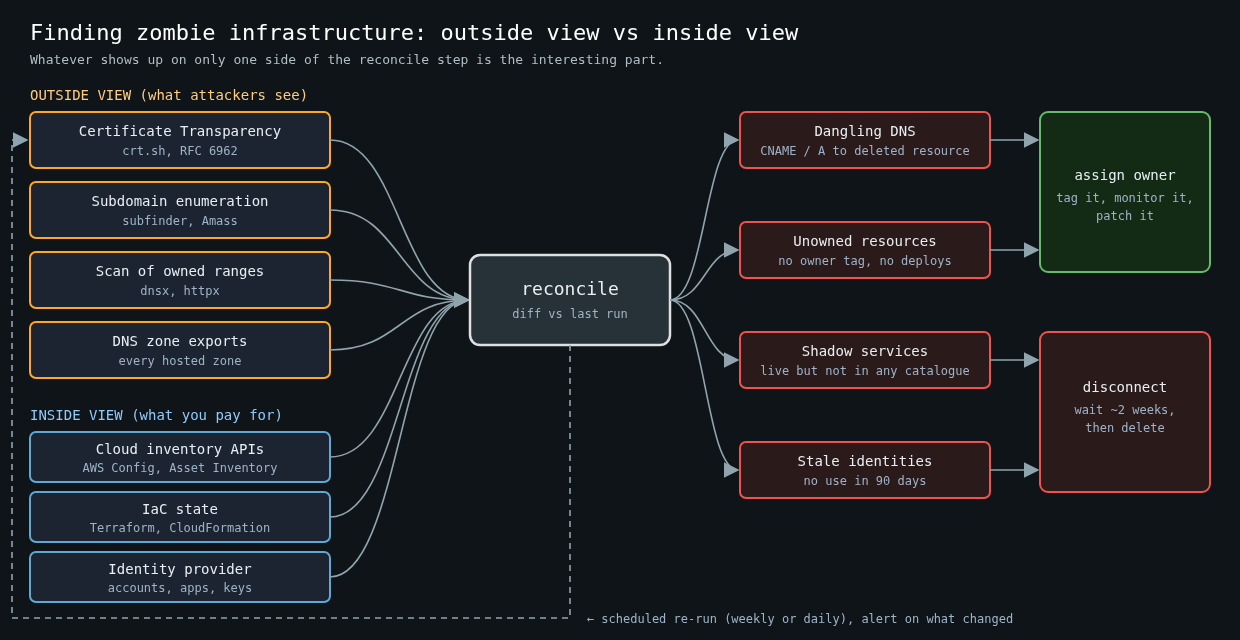
The outside view tells you what’s exposed. The inside view tells you what you’re paying for. Pull both and reconcile them.
Every cloud provider has an inventory API. On AWS, the resource groups tagging API or AWS Config lists resources across services, and Route 53 can export every record you host. On GCP, Cloud Asset Inventory does the same with gcloud asset search-all-resources, and Azure has Resource Graph. Run them across every account and subscription, including the ones in the “sandbox” OU nobody looks at.
The reconciliation is where the value is:
- Hostnames in DNS or CT with no matching cloud resource are dangling records or something hosted elsewhere you didn’t know about.
- Cloud resources with no owner tag and no recent deploys are zombie candidates.
- Public IPs and load balancers that answer on the internet but aren’t in any service catalogue are shadow services.
- Identities with no sign-in or API use in 90 days are accounts to disable.
Give everything an owner, or a death date
Discovery without ownership just produces a spreadsheet that’s wrong next month. The policy that works is simple to state and annoying to enforce: every asset has an owning team, and anything without one is scheduled for shutdown.
Enforce it at creation time. Require an owner tag through AWS Service Control Policies or tag policies, Azure Policy or GCP organisation policy constraints, so untagged resources can’t be created in the first place. Give temporary environments an expires tag and a job that deletes them when it passes. Delete DNS records in the same change that deletes the resource they point to. Infrastructure as code helps a lot here, because removing a resource from Terraform can remove its DNS record in the same apply.
For decommissioning, I like a two-step approach. First, disconnect the asset: remove it from DNS, block inbound traffic, disable the account. Wait a couple of weeks. If nobody screams, delete it. If someone does, you’ve just found the owner.
Make it continuous
A one-time sweep finds a pile of zombies and then the pile slowly grows back. Run the external discovery on a schedule, diff the results against the previous run, and alert on new hostnames, new open ports and new dangling CNAMEs. Commercial attack surface management products do this with more sources and nicer dashboards, but the core loop of discover, diff, assign an owner and decommission works fine with open-source tools and a cron job.
The test is easy. Pick a random hostname from your CT log results and ask who owns it. If the answer takes more than a minute, you’ve got zombies.