Tag: Authentication done right series

  • Session management: cookies, SameSite, revocation, and where JWTs go wrong

    Session management: cookies, SameSite, revocation, and where JWTs go wrong

    Part 4 of 4 in the Authentication done right series. Part 1: Password storage in 2026. Part 2: MFA that survives phishing. Part 3: OAuth 2.0 vs OpenID Connect.

    This series started with storing passwords, moved through MFA, then OAuth and OpenID Connect. All of that work produces one thing at the end: a session. From then on, every request is authenticated by whatever token the browser sends, and the password and the security key are no longer involved. If the session is weak, everything before it was ceremony.

    What a session token needs to be
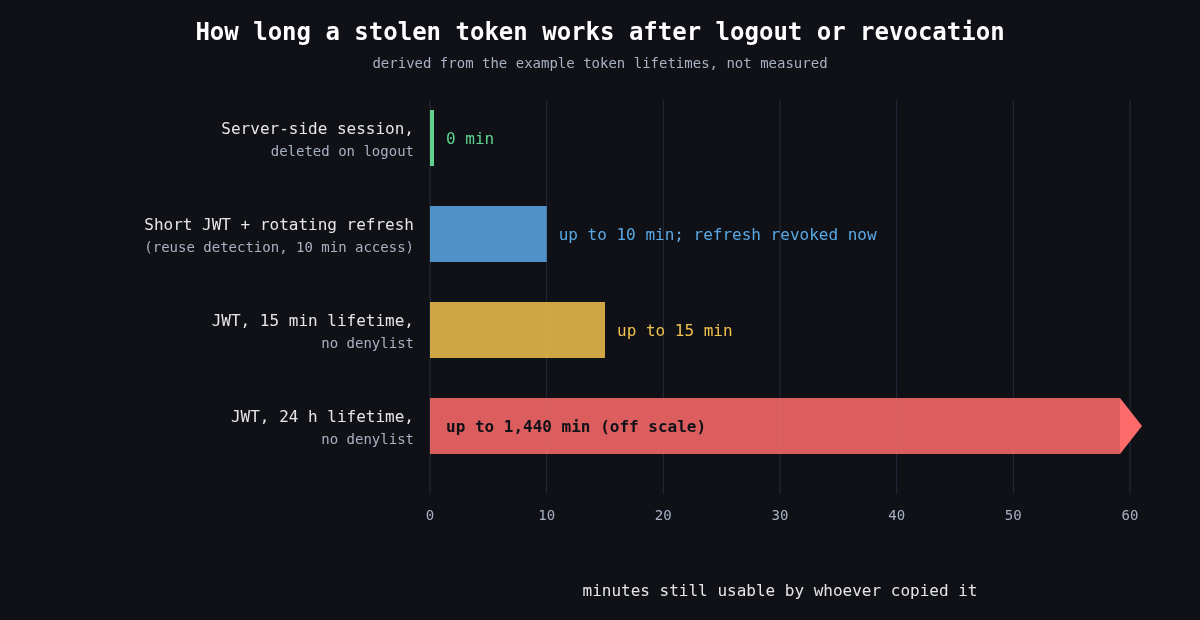
    Bar chart: a server-side session stops working immediately on logout, a short JWT with rotating refresh tokens works up to 10 minutes, a 15 minute JWT up to 15 minutes, and a 24 hour JWT without a denylist up to 1,440 minutes

    Whatever form it takes, a session token has to be unguessable, bound to one login, and revocable. For a classic server side session that means a random identifier with at least 128 bits from a CSPRNG, stored in a server side table or cache, with all the state kept on the server. OWASP’s floor is 64 bits of entropy. I don’t see a reason to stop there when 128 costs nothing.

    Two lifecycle rules catch a lot of bugs. Issue a new session identifier on every privilege change, especially login, or you’re open to session fixation, where an attacker plants a known session ID in the victim’s browser before they log in and then shares the authenticated session. And enforce both an idle timeout and an absolute lifetime, so a session that’s been stolen doesn’t stay useful for months just because something keeps it busy.

    Cookie attributes that matter

    The browser is where sessions get stolen, and cookie attributes are how you tell the browser to protect them. A good default looks like this:

    Set-Cookie: __Host-session=Xq3...; Path=/; Secure; HttpOnly; SameSite=Lax; Max-Age=28800

    Secure keeps the cookie off plaintext HTTP. HttpOnly stops JavaScript from reading it, which won’t prevent an XSS payload from making requests as the user but does stop it from shipping the token off to be used from elsewhere, hours later. The __Host- prefix is underused. The browser only accepts a cookie with that name if it has Secure, Path=/ and no Domain attribute, which means a sibling subdomain can’t overwrite or shadow it. That closes off a whole family of cookie tossing attacks for free.

    What SameSite does and doesn’t do

    SameSite controls whether the browser attaches a cookie to requests that start on another site. Strict never sends it cross site, including when a user follows a link to your app from an email, which makes them look logged out. Lax sends it on top level GET navigations but not on cross site POSTs, iframes or subresource requests. None always sends it and requires Secure. Chrome began treating cookies with no SameSite attribute as Lax in 2020, and other browsers have moved in similar directions, though not identically.

    That made classic CSRF much harder, but I wouldn’t remove CSRF tokens because of it. Three reasons. Lax still sends cookies on top level GETs, so any state changing GET endpoint is still exposed. Chrome’s default-Lax behaviour includes a two minute window in which a freshly set cookie without an explicit attribute is still sent on cross site top level POSTs, to avoid breaking some login flows. And “site” means registrable domain, not origin. evil.example.com and app.example.com are the same site, so a subdomain takeover or an XSS on a marketing subdomain bypasses SameSite completely. Keep the anti-CSRF token or check the Origin header on state changing requests, and treat SameSite as defence in depth.

    Revocation is the real requirement

    Logging out has to end the session on the server. A logout that only deletes the cookie leaves the token valid for whoever copied it. Users also need “sign out of all devices”, support staff need to kill sessions for a compromised account, and a password change or MFA reset should invalidate every other session. With server side sessions all of that is a delete query.

    This is where JWTs get awkward. A signed, self contained token is valid until its exp unless the server checks something on every request. The usual answer is short lived access tokens (5 to 15 minutes) plus a refresh token that the server does track. RFC 9700 describes refresh token rotation: each refresh returns a new refresh token and invalidates the old one, and if an old one is ever presented again you assume theft and revoke the whole family.

    def refresh(presented_token):
        rec = db.refresh_tokens.find(hash(presented_token))
        if rec is None:
            raise Unauthorized()
        if rec.used:
            # a rotated token came back: someone has a copy
            db.refresh_tokens.revoke_family(rec.family_id)
            alert("refresh token reuse", rec.user_id)
            raise Unauthorized()
        rec.used = True
        new_rt = issue_refresh_token(rec.user_id, family_id=rec.family_id)
        return issue_access_token(rec.user_id, ttl=600), new_rt

    Notice that this is a database lookup on every refresh. Once you need revocation, and you will, you have server side state again. That’s fine. Just be honest that a JWT session isn’t really stateless.

    Where JWTs go wrong

    Most JWT vulnerabilities come from verification code trusting the token’s own header. The alg field says how the token claims to be signed, and early libraries used it to choose the verification method. That allowed alg: none tokens with no signature at all, and algorithm confusion, where a token signed with HS256 using the server’s RSA public key as the HMAC secret passed verification. CVE-2015-9235 in Node’s jsonwebtoken is the well known instance of the latter. The fix is to pin the expected algorithms on the server and never read them from the token:

    claims = jwt.decode(
        token,
        public_key,
        algorithms=["ES256"],
        audience="https://api.example.com",
        issuer="https://auth.example.com",
    )

    Library bugs happen even when you do this. CVE-2022-21449, nicknamed Psychic Signatures, made Java 15 through 18 accept ECDSA signatures with both values set to zero as valid for any message, which broke ES256 JWT verification on those runtimes until the April 2022 patch. Keep the JWT library and the runtime patched, and test that a garbage signature is rejected.

    RFC 8725, the JWT Best Current Practices, covers the rest: validate iss and aud, use explicit typing so one kind of token can’t be replayed as another, and don’t put secrets in the payload, since a signed JWT is encoded, not encrypted.

    Storage is the last trap. Single page apps often put tokens in localStorage, where any XSS can read them and send them elsewhere. A backend-for-frontend that holds the tokens server side and gives the browser an HttpOnly, __Host- cookie avoids that, and it fits the OAuth guidance from the previous part of this series.

    What I’d use

    For a typical web app with its own backend, I’d use opaque server side sessions in a hardened cookie. They’re simpler, revocation is trivial, and nothing about them is clever. I reach for JWTs when a token really has to be verified by services that can’t share a session store, and then I keep them short lived, pin the algorithm, and pair them with rotating refresh tokens. Choosing JWTs because they sound modern is how teams end up rebuilding server side sessions badly, one denylist at a time.

  • OAuth 2.0 vs OpenID Connect: what each one solves, PKCE, and the end of the implicit flow

    OAuth 2.0 vs OpenID Connect: what each one solves, PKCE, and the end of the implicit flow

    Part 3 of 4 in the Authentication done right series. Part 1: Password storage in 2026. Part 2: MFA that survives phishing.

    The first two parts of this series were about proving a person is who they say they are. This one is about what happens next, when one piece of software needs to act on that person’s behalf or another service needs to know who logged in. Those are two different problems, and a lot of security bugs I’ve seen come from using the tool for one to solve the other.

    OAuth 2.0 is about delegation

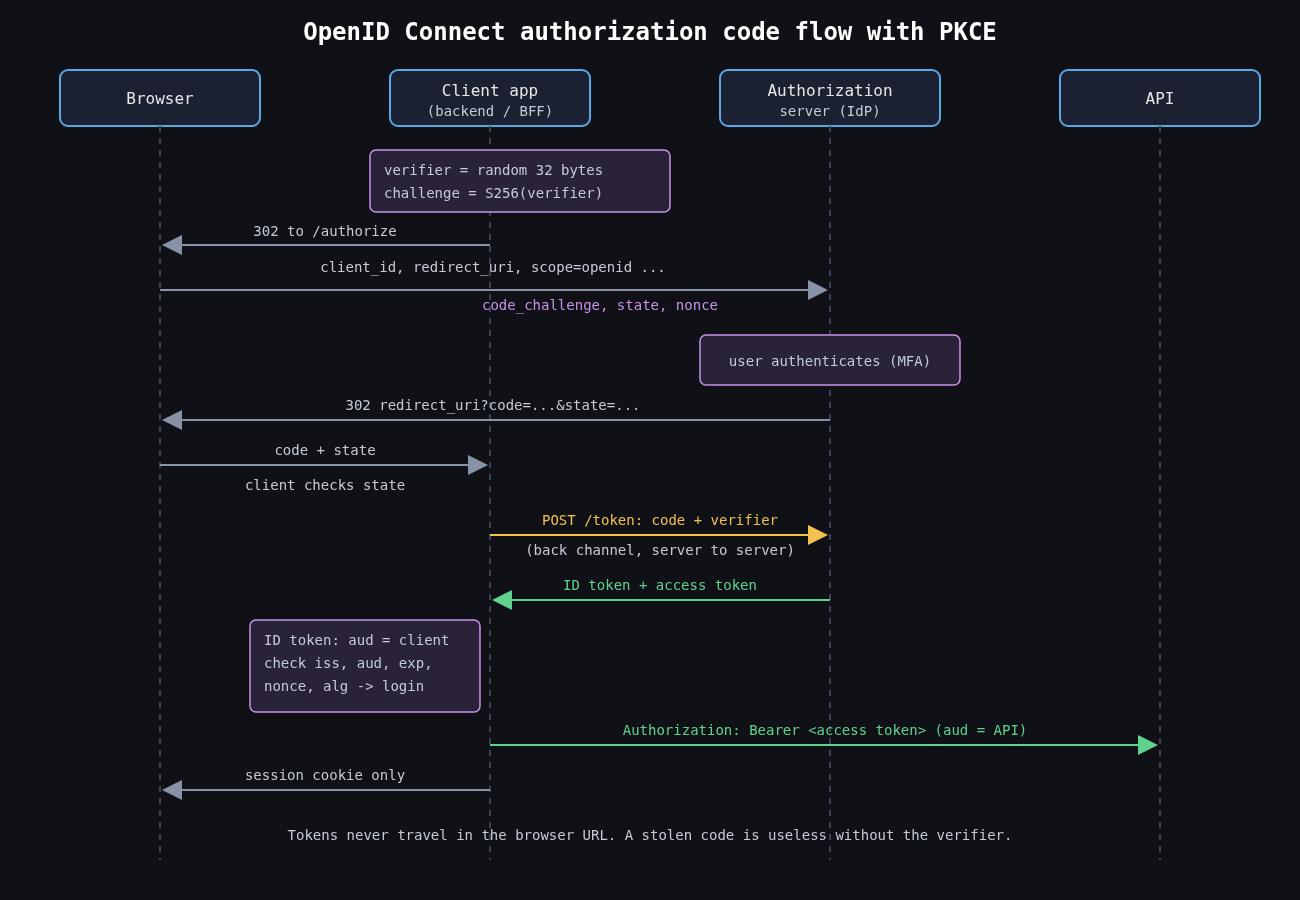
    Sequence diagram of the OIDC authorization code flow with PKCE between browser, client backend, authorization server and API, showing the code challenge, the back-channel token exchange with the verifier, the ID token used for login and the access token sent to the API

    OAuth 2.0 (RFC 6749) answers one question: how does a user let an application access an API without giving the application their password? The user authenticates to an authorization server, approves a set of scopes, and the application gets an access token it presents to a resource server. The resource server cares that the token is valid and grants the right scopes. It doesn’t necessarily care, or learn, who the user is.

    That’s the important part. An access token is a capability, like a valet key for a car. It says “the holder may do these things”. It isn’t a statement about identity, and it isn’t addressed to your application in any cryptographic sense. RFC 6750 calls them bearer tokens because whoever bears one can use it.

    OpenID Connect is about authentication

    OpenID Connect (OIDC Core 1.0, finalised in 2014) is a layer on top of OAuth that adds what OAuth deliberately left out. When the client asks for the openid scope, the authorization server also returns an ID token: a signed JWT with an issuer (iss), a subject (sub), an audience (aud) that is your client ID, an expiry, and a nonce that ties it to the login request your app started.

    The ID token is addressed to your application. That’s what makes it safe to use for login, and it’s why “Sign in with” buttons should be OIDC rather than plain OAuth plus a call to some profile endpoint.

    Token confusion

    The classic mistake is using an OAuth access token as proof of login. The app receives an access token, calls the provider’s user info endpoint, sees a user ID, and logs that user in. The problem is that the app never checked that the token was issued to it. Any other application that integrates with the same provider receives access tokens for its own users. If one of those applications is malicious, or simply compromised, it can replay a user’s token against your login endpoint and become that user in your app. This pattern hit a lot of mobile apps that implemented social login in the early 2010s, and I still see it in internal tools.

    The fix is to authenticate with the ID token and validate it properly, or, if you must accept access tokens, to use the provider’s token introspection and verify the client the token was issued to. Validating an ID token means checking everything, not just the signature:

    import hmac
    import jwt
    from jwt import PyJWKClient
    
    jwks = PyJWKClient("https://idp.example.com/.well-known/jwks.json")
    
    def validate_id_token(id_token, expected_nonce):
        key = jwks.get_signing_key_from_jwt(id_token).key
        claims = jwt.decode(
            id_token,
            key,
            algorithms=["RS256"],          # never take the alg from the token
            audience=CLIENT_ID,            # issued to us, not some other app
            issuer="https://idp.example.com",
            options={"require": ["exp", "iat", "iss", "aud", "sub", "nonce"]},
        )
        if not hmac.compare_digest(claims["nonce"], expected_nonce):
            raise ValueError("nonce mismatch")
        return claims["sub"]

    Key the user record on iss plus sub, not on email. Email addresses get reassigned and some providers let users set unverified ones.

    The reverse confusion matters too. APIs should not accept ID tokens as access tokens. An ID token’s audience is the client, not the API, and treating it as an API credential throws away scopes entirely.

    The authorization code flow, with PKCE

    The standard flow redirects the user to the authorization server, which redirects back with a short lived authorization code. The client then exchanges that code for tokens over a direct back channel request. Tokens never pass through the browser’s address bar.

    The weak point was the code itself. On mobile, other apps could register the same custom URL scheme and intercept the redirect. PKCE (RFC 7636) fixes this. The client generates a random secret, sends only its hash in the authorization request, and proves it knows the original when redeeming the code:

    import base64, hashlib, secrets
    
    def b64url(b):
        return base64.urlsafe_b64encode(b).rstrip(b"=").decode()
    
    code_verifier = b64url(secrets.token_bytes(32))
    code_challenge = b64url(hashlib.sha256(code_verifier.encode()).digest())
    
    # authorization request
    #   ...&code_challenge=<code_challenge>&code_challenge_method=S256
    # token request
    #   ...&code=<code>&code_verifier=<code_verifier>

    An attacker who steals the code doesn’t have the verifier, so the code is useless. PKCE also blocks authorization code injection, where an attacker pushes a code from their own session into the victim’s client. RFC 9700, the OAuth 2.0 Security Best Current Practice published in January 2025, recommends PKCE for every client type, confidential server side apps included. Use S256, never plain.

    Why the implicit flow is gone

    The implicit flow was designed for browser apps in 2012, when cross origin requests to a token endpoint weren’t practical. The authorization server put the access token directly in the redirect URL fragment. That meant tokens ended up in browser history, could leak through referrers and open redirects, could be injected by an attacker, and couldn’t be bound to the client that requested them. There was also no safe way to issue refresh tokens.

    CORS has been universal for a long time, so none of those trade-offs are needed anymore. RFC 9700 says clients should not use the implicit grant, and OAuth 2.1 drops it entirely, along with the resource owner password credentials grant. Single page apps should use the code flow with PKCE. Better still, use a backend-for-frontend: a small server side component that performs the OAuth flow, keeps tokens out of JavaScript entirely, and gives the browser a session cookie. That’s where the next part of this series picks up.

    Smaller things that cause real incidents

    Redirect URIs must be matched exactly. Prefix or wildcard matching has led to codes being sent to attacker controlled paths more than once. The state parameter still matters for CSRF on the redirect endpoint if you’re not relying on PKCE for that. If your client talks to more than one authorization server, check the iss parameter in the authorization response (RFC 9207) to stop mix-up attacks, where one server’s code is redeemed at another. And for high value APIs, consider sender constrained tokens with DPoP (RFC 9449) or mutual TLS (RFC 8705), so a stolen access token is useless without the client’s private key.

    Keep access tokens short lived, scope them narrowly, and give APIs a way to tell them apart from ID tokens. Most OAuth problems I’ve cleaned up were not protocol flaws. They were one token type being trusted for a job it was never meant to do.

    Other parts: Part 1: Password storage in 2026, Part 2: MFA that survives phishing, Part 4: Session management.

  • MFA that survives phishing: TOTP, push and FIDO2 passkeys compared

    MFA that survives phishing: TOTP, push and FIDO2 passkeys compared

    Part 2 of 4 in the Authentication done right series. Part 1: Password storage in 2026.

    In the first part of this series I covered how to store passwords so a database leak doesn’t hand attackers working credentials. This part assumes the password is already gone, because sooner or later it will be. Phished, reused, scraped off an infostealer log. The question is what your second factor does when someone is actively trying to get past it, and the honest answer for most deployed MFA is “less than you’d think”.

    Not all second factors are the same control

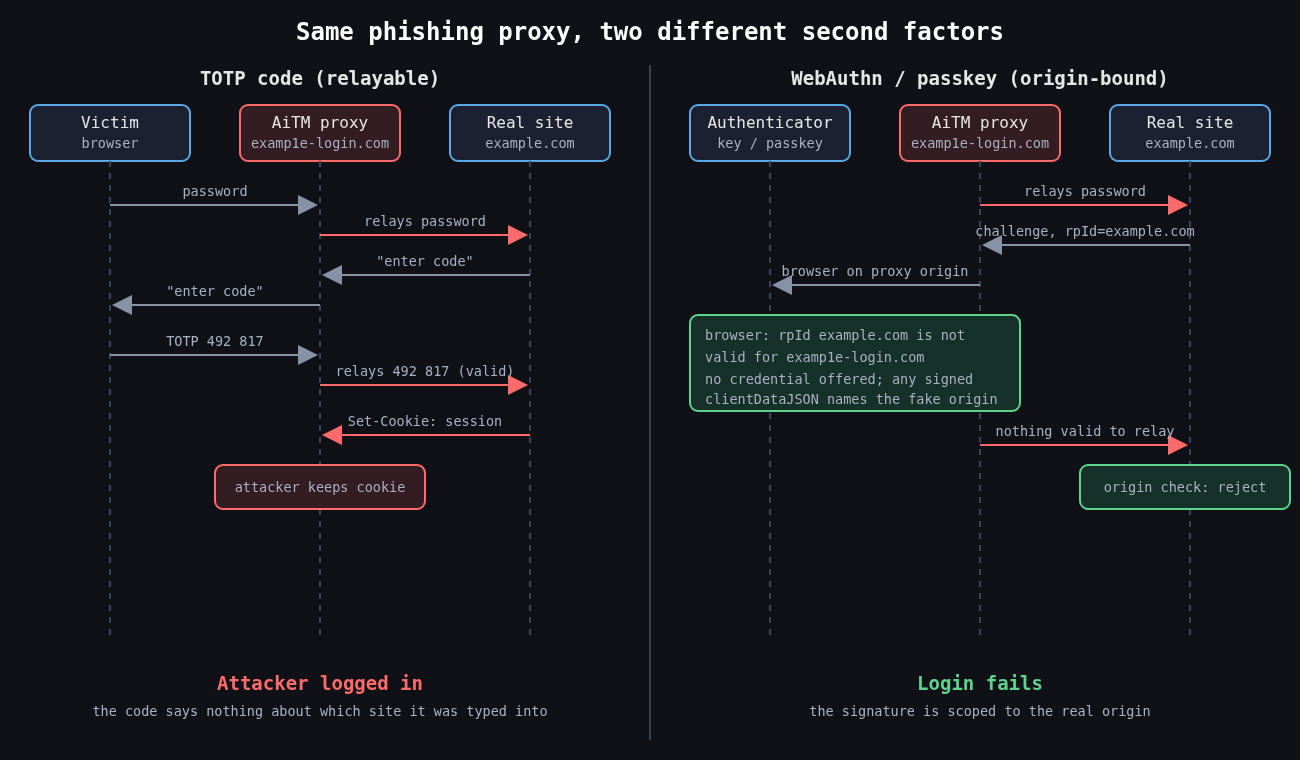
    Two sequence diagrams side by side: a phishing proxy relays a password and TOTP code to the real site and steals the session cookie, while with WebAuthn the origin-bound credential is not offered on the fake domain and the login fails

    People talk about MFA as if it were one thing. In practice the methods fall into two groups. Shared secret and approval based factors (SMS codes, TOTP apps, push notifications) prove the user has a device, but the proof can be relayed by whoever the user is talking to. Public key factors bound to an origin (FIDO2/WebAuthn security keys and passkeys) produce proof that only works for the site that asked for it. That distinction is what CISA means by phishing resistant MFA in its 2022 guidance, and it’s what OMB memo M-22-09 required US federal agencies to adopt.

    SMS is the weakest of the first group. SIM swaps and number porting fraud move the phone number to an attacker, and NIST SP 800-63B has long classed SMS and voice as a restricted authenticator. I’d still take SMS over no second factor, but I wouldn’t let it protect anything I cared about.

    TOTP and the relay problem

    TOTP (RFC 6238, built on HOTP from RFC 4226) derives a six digit code from a shared secret and the current 30 second time step. It’s offline, cheap and works everywhere. It also has nothing in it that identifies which website the user is typing it into.

    That’s the whole weakness. An adversary-in-the-middle kit like Evilginx sits between the victim and the real login page as a reverse proxy. The victim sees what looks like the real site, types their password and their TOTP code, and the proxy forwards both in real time and keeps the resulting session cookie. The code was valid. It just went to the wrong party.

    The 2022 “0ktapus” campaign worked this way at scale. SMS messages pointed employees of Twilio and many other companies to lookalike Okta pages that captured credentials and one time codes as they were typed. Cloudflare was targeted by the same campaign, and some of its employees did enter their credentials. The attack still failed there, because Cloudflare required FIDO2 hardware keys and the fake domain couldn’t get a valid assertion from them. Cloudflare’s own write-up of that incident is one of the clearest arguments for WebAuthn I know of.

    If you do run TOTP, at least implement it properly. Accept a small clock skew window and reject codes that have already been used.

    from datetime import datetime, timezone
    import pyotp
    
    def check_totp(user, code):
        totp = pyotp.TOTP(user.totp_secret)
        # accept the current step and one on either side for clock drift
        if not totp.verify(code, valid_window=1):
            return False
        step = totp.timecode(datetime.now(timezone.utc))
        if user.last_totp_step is not None and step <= user.last_totp_step:
            return False  # replayed code
        user.last_totp_step = step
        user.save()
        return True

    Rate limit verification attempts too. A six digit code has a million values, which is not a lot if an endpoint lets someone try thousands of codes per account.

    Push approval and MFA fatigue

    Push MFA looked like an upgrade because the user doesn’t type anything. It created a different failure. If an attacker has the password, they can trigger approval prompts over and over until the user taps Approve to make it stop, or until someone calls pretending to be IT and asks them to accept.

    That’s what happened at Uber in September 2022. According to Uber’s own statement, the attacker had a contractor’s password, sent repeated push requests, and the contractor eventually accepted one. Cisco’s breach that year, disclosed in August, combined voice phishing with the same kind of repeated push prompts. In both cases the MFA product behaved exactly as designed.

    The fixes are real but partial. Number matching shows a code on the login screen that the user has to enter in the authenticator app, so a blind tap no longer works; Microsoft made it mandatory for Authenticator push in May 2023. Showing the location and application in the prompt helps a little. Limiting how many prompts can be sent per hour and alerting on bursts helps more. None of it stops a real-time phishing proxy, because the user is looking at a page that displays the number too.

    Why WebAuthn is different

    With WebAuthn, the browser builds a clientDataJSON structure that includes the challenge and the origin the user is actually on, and the authenticator signs it along with the relying party ID hash. Credentials are scoped to the relying party ID, so an authenticator won’t even offer a credential for example.com to a page on examp1e-login.com. There’s no code for the user to copy, so there is nothing to relay.

    The server side still has to do its part. Every serious library makes you pass the expected origin and RP ID, and you should never loosen those to make a test environment work.

    from webauthn import verify_authentication_response
    
    verification = verify_authentication_response(
        credential=assertion_from_browser,
        expected_challenge=session.pop("webauthn_challenge"),
        expected_rp_id="example.com",
        expected_origin="https://example.com",
        credential_public_key=stored.public_key,
        credential_current_sign_count=stored.sign_count,
        require_user_verification=True,
    )
    stored.sign_count = verification.new_sign_count

    The challenge must be random, single use and tied to the session that requested it. I’ve reviewed implementations that reused a static challenge, which turns a signature scheme back into something replayable.

    Passkeys, synced and device bound

    Passkeys are WebAuthn credentials, usually discoverable ones, and most are synced through a platform account such as iCloud Keychain or Google Password Manager. That’s great for adoption, because users who lose a phone don’t lose their credentials. It also means the security of the passkey now depends on the security of that cloud account and its recovery process.

    For most consumer apps, synced passkeys are a large improvement over passwords plus TOTP. For administrators and production access I still want device bound credentials on hardware keys, and I want attestation checked so I know what kind of authenticator registered.

    Recovery is part of your MFA

    Attackers go where the controls are weakest, and that’s usually account recovery. A strong factor with a “lost your key? we’ll send an SMS” fallback is an SMS factor with extra steps. Help desk resets are the same problem with a human in the loop. The MGM Resorts intrusion in 2023 was widely reported to have started with a call to the help desk.

    So register at least two strong authenticators per user, make recovery require something stronger than knowledge of public facts, and log and alert on every factor reset. Treat a new factor enrolled right after a password reset as a high priority event.

    The next part moves from authenticating a person to delegating access between systems, which means OAuth 2.0, OpenID Connect and the token mistakes that come with them.

    Other parts: Part 1: Password storage in 2026, Part 3: OAuth 2.0 vs OpenID Connect, Part 4: Session management.