Part 4 of 5 in the Flipper Zero series. Part 1: what it actually is and what it can’t do. Part 2: why so many office badges are weaker than they look. Part 3: Sub-GHz remotes, rolling codes and how gates should be built.
A keyboard is the most trusted thing you can plug into a computer. There’s no driver prompt and no consent dialog, and the operating system has no way to ask whether whatever is typing is a person. Keystroke injection exploits exactly that. Anything that enumerates as a USB keyboard can type at machine speed into whichever window has focus.
Same rules as the earlier parts: my own device, a machine I own, a defender’s goal. Typing into a computer you aren’t authorized to test is unauthorized access in most places, whatever the script says.
What the Flipper does here
The Bad USB app turns the Flipper into a USB keyboard and plays a script from the SD card. The script format is DuckyScript style, named after the Hak5 USB Rubber Ducky, which made the idea popular. Here’s my Flipper’s main menu with Bad USB highlighted.
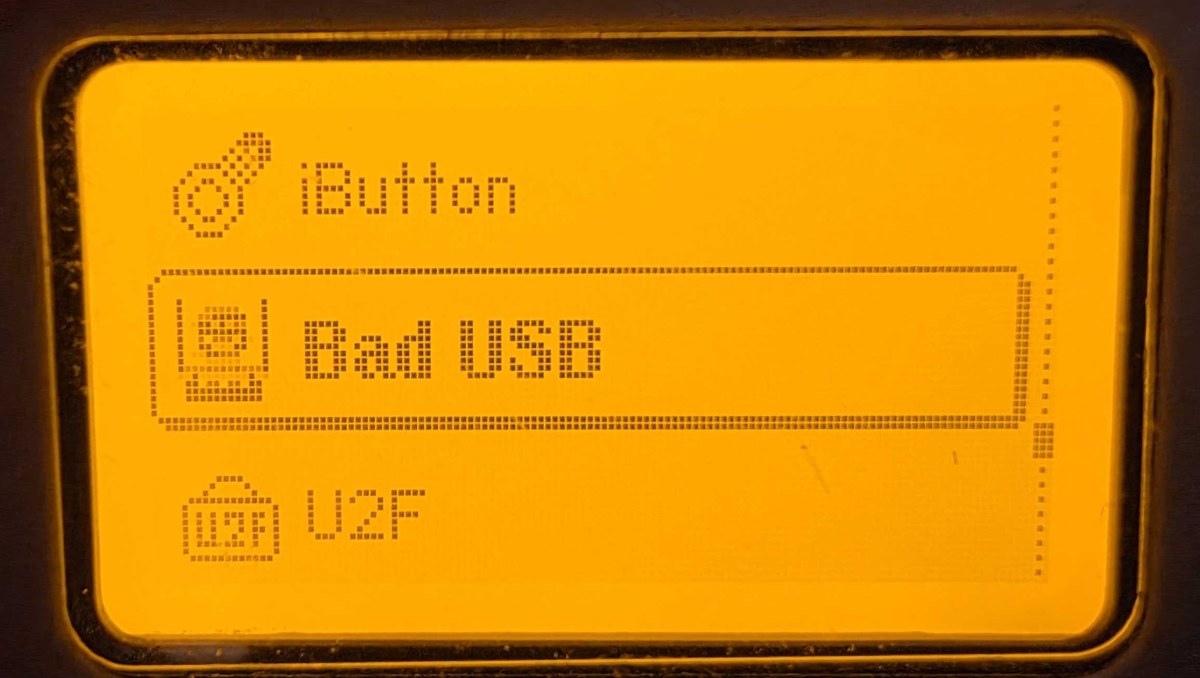
A harmless script looks like this:
REM types one line into the focused window and nothing else
DELAY 1000
STRING hello from a keyboard that isn't one
ENTER
Each STRING becomes a series of HID key presses, translated through a keyboard layout. Keys are sent as positions rather than characters, so a script written for a US layout types the wrong characters on a machine set to another layout, unless you pick the matching one.
The Flipper isn’t special. A Rubber Ducky, a Raspberry Pi Pico, a Digispark-style board or a phone in gadget mode does the same job. In 2014, Karsten Nohl and Jakob Lell showed at Black Hat that the firmware in common USB controller chips could be rewritten so an ordinary thumb drive presented itself as a keyboard. They called it BadUSB. In January 2022 the FBI warned that the FIN7 group was mailing parcels to US businesses containing USB devices that acted as keyboards. So this happens outside conference talks too.
Why the host goes along with it
A USB device describes itself with descriptors. A keyboard claims interface class 0x03 (HID), subclass 1 (boot interface), protocol 1 (keyboard), and the host loads its built-in HID driver. Nothing authenticates the device. The vendor ID, product ID and serial number are all self-reported, so anyone who has seen the IDs of your approved keyboard can claim the same ones.
I think that’s the weak spot in most USB policies. An allow list keyed on VID:PID stops the casual attacker and the unmodified gadget, and does very little against someone who prepared for your site. I rank controls that don’t depend on device identity higher.
What the attack needs
It needs an unlocked session. Keystrokes arriving at a lock screen go to the password field, not to a shell. It then needs a way to run something, usually the Run dialog or a terminal, followed by a command. The payload runs as the logged-in user.
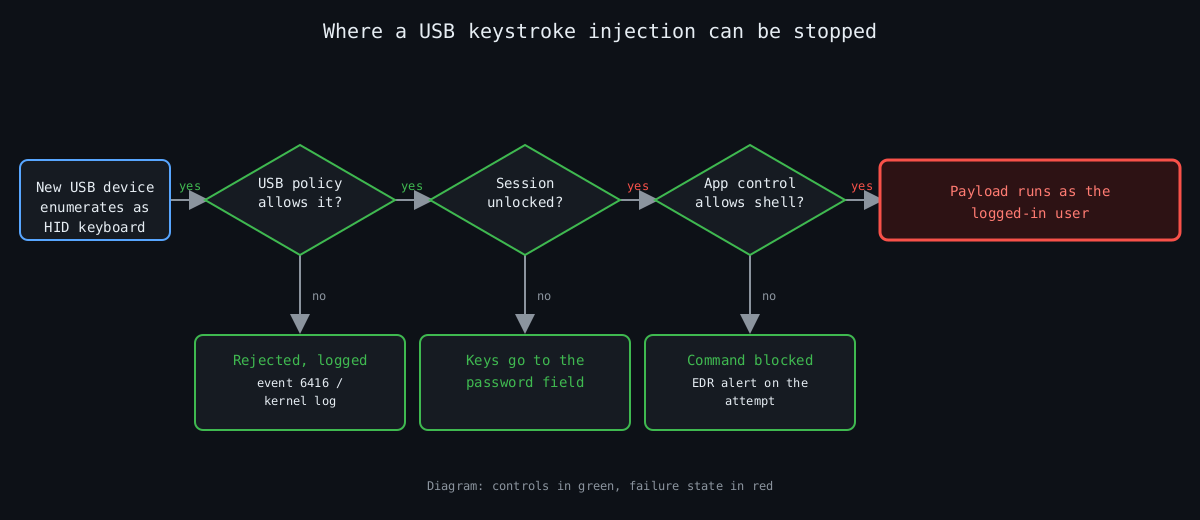
That gives three places to cut: refuse the device, make sure the session is locked, or make a freshly opened shell unable to do anything useful.
The flowchart shows those cuts in order. I drew it. It isn’t a capture from any tool.
Refusing the device on Linux
The kernel authorizes new USB devices by default. You can flip that for a bus so nothing is trusted until something approves it:
echo 0 | sudo tee /sys/bus/usb/devices/usb1/authorized_defaultUSBGuard is the practical way to manage this. usbguard generate-policy writes a rule set from whatever is plugged in right now, so run it only when your known-good devices are attached. After that, tighten it by hand. Two rules from my own template:
# one specific keyboard, and only as a keyboard
allow id 046d:c31c with-interface 03:01:01
# anything claiming to be mass storage and HID at the same time
reject with-interface all-of { 08:*:* 03:*:* }
The first ID is an example (a Logitech K120), so substitute your own from usbguard list-devices. The second rule matters more than it looks. Composite devices that present a drive and a keyboard are the classic disguise.
Windows and macOS
Windows has Device Installation Restrictions under Computer Configuration, Administrative Templates, System, Device Installation in Group Policy. You can block by device setup class or allow only listed hardware IDs. It has the same identity weakness as above. A blanket block on keyboards will also block your own the next time someone replaces one, so test on a pilot group first.
On Apple silicon laptops, macOS 13 and later can ask before a new accessory connects (Settings, Privacy & Security, Allow accessories to connect). It’s a prompt for the user. That makes it a decent control for people who read it and a poor one for people who click through everything.
Making the typing useless
If the device gets through, the next control is what a shell can do. On Windows, application control with WDAC or AppLocker, and PowerShell in Constrained Language Mode, turn most pasted one-liners into error messages. A screen lock after five minutes or less closes the window for the unattended-desk case. This helps least on developer laptops, since developers legitimately need shells, and those are usually the machines worth attacking.
Detection
Windows logs new external devices as event 6416 when the Audit PNP Activity policy is on, with the hardware IDs and device class. On Linux, the kernel log line is New USB device found with idVendor, idProduct and the manufacturer and product strings. A keyboard whose product string reads like a development board stands out. A new HID keyboard on a server or a kiosk is a signal by itself, since nobody types on those.
Typing speed is the obvious second signal, and I’d be careful with it. Barcode scanners are HID keyboards and send hundreds of characters in a fraction of a second, as do macro keyboards and some password-manager hardware. A rule that fires on speed alone will page you for the warehouse. Pair it with a process event: a shell started from the Run dialog within seconds of a 6416 event for a new keyboard is a much better thing to alert on.
What I would do first
On any machine that holds something worth stealing, start with the USB allow list, because it removes the attack before anything else matters. The lock timeout and application control come next, since they hold when the allow list is bypassed. Event 6416 logging costs almost nothing and gives you evidence afterwards. Reception desks and kiosks get physical port blockers, which are cheap and work.
Part 5 moves from the USB port to the radio side, with the Wi-Fi dev board and what rogue access points look like from a defender’s chair.
Other parts of the Flipper Zero series: part 1, part 2, part 3, part 4, part 5.