Part 1 of 4 in the Authentication done right series.
Most teams I talk to already know they shouldn’t store passwords with plain SHA-256. Fewer can tell me what cost parameters their hash uses, when those were last revisited, or what happens to the users who signed up five years ago under weaker settings. Picking the algorithm is the easy part. The parameters and the upgrade path are where real systems fall behind.
Why fast hashes fail
A password hash has one job: make each guess expensive for someone who has stolen your database. General purpose hashes like SHA-256 are designed to be fast, and a single modern GPU computes billions of them per second. When LinkedIn’s 2012 dump of unsalted SHA-1 hashes surfaced publicly in 2016 with roughly 117 million credentials, most of it was cracked quickly. Salting would have stopped the precomputed table attacks. It would not have helped much against brute force, because each individual guess still cost almost nothing.
Adobe’s 2013 breach is the other cautionary tale. Those passwords were encrypted with 3DES in ECB mode, not hashed, so identical passwords produced identical ciphertext and the plaintext password hints sitting next to them did the rest. Encryption is the wrong tool here. You never need to recover a password, only to check one.
So the requirements are a unique random salt per password and a function that is deliberately slow and, ideally, memory hungry. Memory hardness matters because GPUs and ASICs have lots of compute but limited fast memory per core. Forcing every guess to touch tens of megabytes destroys their parallelism advantage.
The three you should consider
bcrypt dates from 1999 and is still fine. It’s CPU hard with a tunable cost (each increment doubles the work), it’s in every language, and it has a long track record. It has two sharp edges. It is not memory hard in any meaningful sense (it uses about 4 KB), and it silently ignores input past 72 bytes.
That second one is not academic. In late 2024 Okta disclosed that its AD/LDAP delegated authentication cache keys were bcrypt hashes of the user ID, username and password concatenated together. With a username long enough (52 characters or more), the password fell past the 72 byte cutoff, so a cached login could succeed with any password. Nothing was wrong with bcrypt’s math. The input simply got truncated without an error.
scrypt (RFC 7914) was the first widely used memory hard function. It’s tunable through N (CPU/memory cost), r (block size) and p (parallelism), and memory use is roughly 128 x N x r bytes. N=2^17, r=8, p=1 works out to 128 MiB per hash, which is the OWASP baseline.
Argon2id won the Password Hashing Competition in 2015 and is specified in RFC 9106. It takes memory in KiB, a number of passes, and a degree of parallelism. The “id” variant mixes data independent and data dependent memory access, giving reasonable resistance to both side channel and GPU attacks. It’s my default for anything new.
PBKDF2 stays on the list only because FIPS-140 environments sometimes require it. If you’re stuck with it, OWASP currently says 600,000 iterations of HMAC-SHA256. It is not memory hard, so treat it as the compliance option, not the good one.
Choosing parameters with real numbers
The published recommendations are a floor, not a target. OWASP’s Password Storage Cheat Sheet lists Argon2id at a minimum of m=19 MiB, t=2, p=1, with equivalent tradeoffs like m=46 MiB, t=1. RFC 9106 is more aggressive: its second recommended option is t=3, m=64 MiB, p=4, and the first option uses 2 GiB, which is meant for settings like disk encryption rather than a login endpoint.
What I actually do is benchmark on the production hardware and work backwards from two constraints. The first is latency: how long can a login take before users notice? Somewhere around 100 to 500 ms of hashing is usually acceptable. The second is concurrency: memory cost times the number of simultaneous logins you need to survive. At 64 MiB per hash, 50 concurrent logins need 3.2 GiB just for hashing. Get that wrong and a credential stuffing wave becomes an out-of-memory event on your auth service.
The reference argon2 CLI makes the measurement easy. Note that -m is the base-2 log of the memory in KiB, so 16 means 64 MiB.
$ echo -n 'correct horse battery staple' | argon2 somesaltvalue -id -t 3 -m 16 -p 4
Type:           Argon2id
Iterations:     3
Memory:         65536 KiB
Parallelism:    4
Hash:           ...
Encoded:        $argon2id$v=19$m=65536,t=3,p=4$...
0.183 seconds
Increase memory first until you hit your concurrency budget, then add passes until you hit your latency budget. Memory is what hurts attackers most.
Store parameters with the hash, and rehash on login
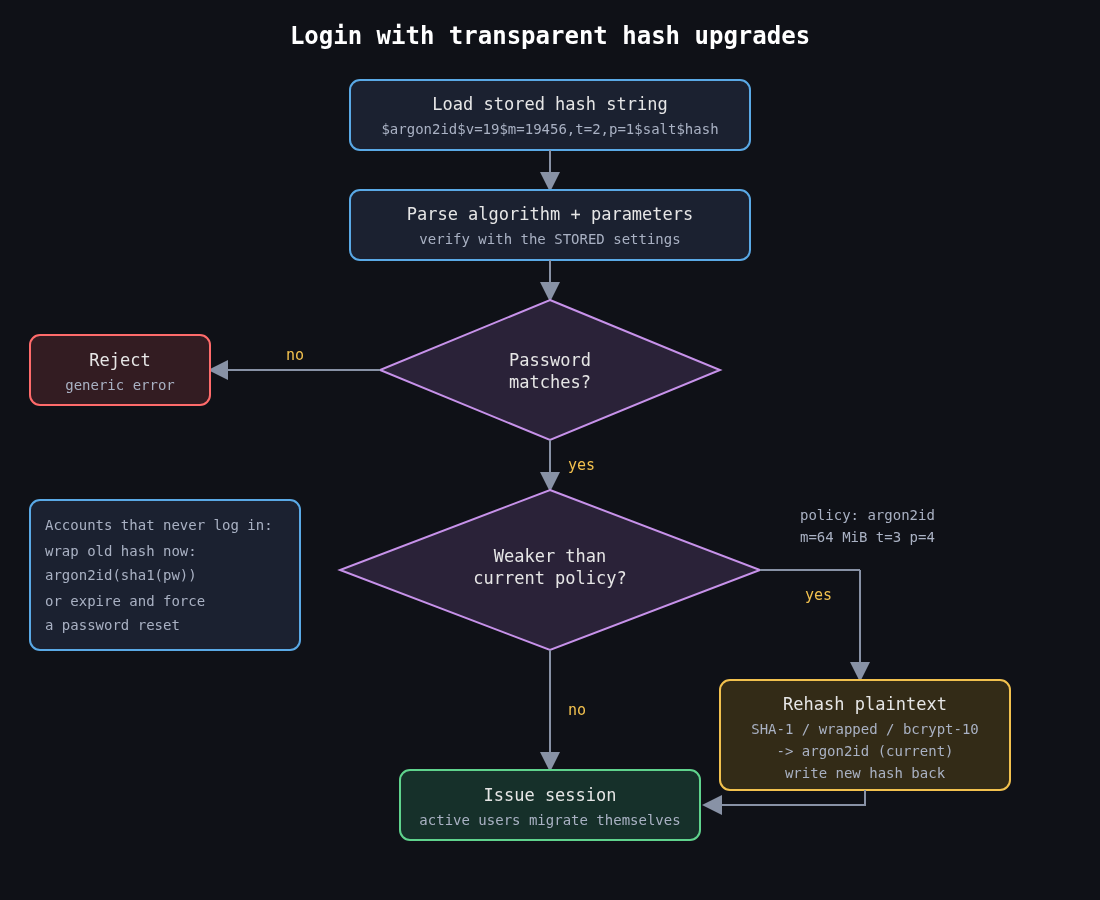
The encoded string format (the $argon2id$v=19$m=65536,t=3,p=4$salt$hash form above) carries the algorithm and parameters alongside the salt and hash. That’s what makes upgrades possible. You verify with whatever parameters the stored hash says, and if they’re weaker than your current policy, you rehash the plaintext you just verified and write the new value back.
from argon2 import PasswordHasher
from argon2.exceptions import VerifyMismatchError

ph = PasswordHasher(time_cost=3, memory_cost=65536, parallelism=4)

def login(user, password):
    try:
        ph.verify(user.password_hash, password)
    except VerifyMismatchError:
        return False
    if ph.check_needs_rehash(user.password_hash):
        user.password_hash = ph.hash(password)
        user.save()
    return True
Active users migrate themselves within a few months. For the long tail of accounts that never log in, you have two options. You can wrap the old hash (store argon2id(old_sha1_hash) and verify by computing both layers), which upgrades everyone immediately without needing their passwords. Or you can expire those passwords and force a reset. I’ve used wrapping for legacy MD5 and SHA-1 tables and it works well, as long as you mark which rows are wrapped.
Peppers and pre-hashing
A pepper is a secret key applied to every password, kept outside the database, ideally in a KMS or HSM. The common construction is to HMAC the password with the pepper before hashing it. If an attacker gets a SQL injection dump but not the application secrets, the hashes are useless to them. The cost is operational: rotating a pepper means keeping old keys around and tracking which one each hash used.
Pre-hashing is also how people get around bcrypt’s 72 byte limit, and it’s easy to get wrong. If you bcrypt a raw SHA-256 digest, the binary output can contain NUL bytes that some bcrypt implementations treat as the end of the string. Base64 encode the digest first. And use HMAC with a pepper rather than a bare hash, otherwise an attacker holding a separate leak of unsalted SHA-256 hashes can test them directly against your bcrypt values without cracking anything, a technique known as password shucking.
The cleaner answer is to use Argon2id and not need any of this. If you’re on bcrypt and staying there, at least reject or explicitly handle inputs over 72 bytes so the truncation is never silent.
What I’d check on any existing system
Open the users table and look at a few hash prefixes. $2b$10$ is bcrypt at cost 10, $argon2id$ tells you parameters inline, and a bare 40 or 64 character hex string is a fast hash you need to fix this quarter. Then check whether the login path rehashes, whether the memory cost was ever benchmarked against peak concurrency, and whether anything concatenates fields before passing them to bcrypt. Most of what I find in reviews sits in that last check.
Storing passwords well protects users after a breach. Next in this series is about making a stolen or phished password much less useful in the first place, which means MFA that holds up against phishing.
Other parts: Part 2: MFA that survives phishing, Part 3: OAuth 2.0 vs OpenID Connect, Part 4: Session management.