
Tag: containers

  • Container image hardening: minimal images, non-root, read-only filesystems

    Container image hardening: minimal images, non-root, read-only filesystems

    Most container images in production are a full Linux distribution wearing a trench coat. A Debian or Ubuntu base, a package manager, a shell, curl, and an application running as root with a writable filesystem. It works, it’s easy to debug, and it hands an attacker who gets code execution everything they need for the next step.

    Hardening an image isn’t one big change. It’s a handful of small ones that each remove a capability the application never needed, and that an attacker would very much like to have. None of them are new, and every one of them gets skipped all the time.

    Start with less: minimal and distroless bases
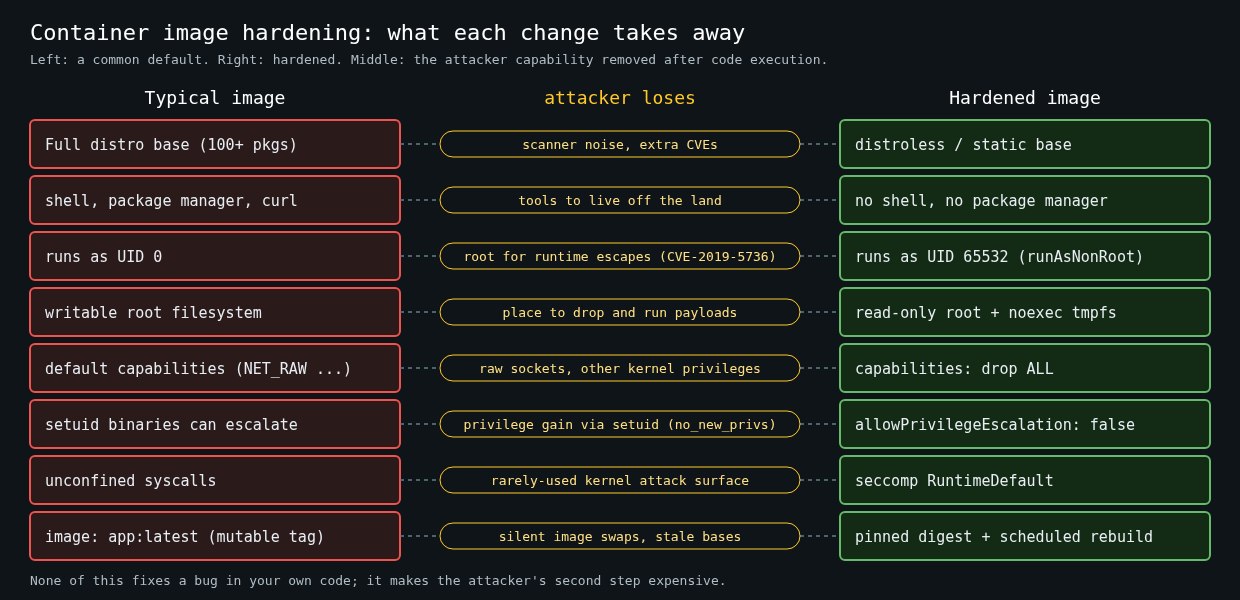
    Side-by-side comparison of a typical container image and a hardened one: distroless base, no shell, non-root UID 65532, read-only root with noexec tmpfs, all capabilities dropped, no privilege escalation, seccomp RuntimeDefault and pinned digests, with the attacker capability each change removes

    The fastest win is shipping fewer things. A typical debian or ubuntu base pulls in a hundred-odd packages, and your scanner will report CVEs against all of them, whether or not your app ever touches them. That noise has a real cost, which I covered in the vulnerability management series earlier this week. Every finding in a package you don’t use is triage time you’re not spending on one that matters.

    There are a few levels of minimal:

    • scratch is empty. Good for fully static binaries, like Go built with CGO_ENABLED=0. You have to bring your own CA certificates and timezone data if you need them.
    • Google’s distroless images contain the runtime pieces an app needs (libc, CA certs, tzdata, sometimes a language runtime) and no shell or package manager.
    • Wolfi-based images from Chainguard and minimal Alpine images sit somewhere in between, with a package manager available at build time.

    For a Go service, a multi-stage build onto distroless looks like this:

    FROM golang:1.25 AS build
    WORKDIR /src
    COPY go.mod go.sum ./
    RUN go mod download
    COPY . .
    RUN CGO_ENABLED=0 go build -trimpath -ldflags="-s -w" -o /out/app ./cmd/app
    
    FROM gcr.io/distroless/static-debian12:nonroot
    COPY --from=build /out/app /app
    USER 65532:65532
    ENTRYPOINT ["/app"]

    The compiler, the source and the module cache stay in the build stage. The final image is your binary plus a few megabytes of support files.

    The objection I always hear is debugging. “How do I exec into it without a shell?” On Kubernetes you don’t need to: an ephemeral debug container shares the target’s process namespace and brings its own tools.

    kubectl debug -it pod/payments-api-7d9f8c --image=busybox:1.36 --target=app

    That’s better than a shell baked into every image anyway, because the tools only exist while someone is actually debugging.

    Don’t run as root

    Containers running as UID 0 are the default, and it’s a bad default. Root inside a container isn’t the same as root on the host, since namespaces and dropped capabilities limit it, but it’s much closer than people assume, and it turns every container runtime bug into a bigger problem.

    CVE-2019-5736 is the classic example. A malicious process in a container could overwrite the host’s runc binary and get root on the host the next time runc ran. The exploit needed root inside the container. A container running as an unprivileged user wasn’t exploitable that way.

    Set the user in the image, with a numeric UID so Kubernetes can verify it:

    USER 65532:65532

    Then enforce it at the platform level so an image that forgets doesn’t get scheduled. In Kubernetes that’s runAsNonRoot: true in the security context, which makes the kubelet refuse to start a container whose user resolves to 0.

    If the app needs to bind to port 80 or 443, don’t give it root. Bind to 8080 and let the Service or the load balancer map the port, or add only NET_BIND_SERVICE.

    Make the root filesystem read-only

    An attacker with code execution usually wants to write something: a downloaded tool, a modified config, a web shell, a cron entry. A read-only root filesystem takes that away, and it catches a surprising number of bugs where an app was quietly writing logs or caches into its own image.

    Most apps need somewhere to write, usually /tmp or a cache directory. Give them exactly that as a tmpfs or an emptyDir volume and nothing else. With plain Docker:

    docker run --read-only \
      --tmpfs /tmp:rw,noexec,nosuid,size=64m \
      --cap-drop=ALL \
      --security-opt=no-new-privileges:true \
      --user 65532:65532 \
      registry.example.com/payments-api@sha256:<digest>

    The noexec on the tmpfs matters. A writable directory that can also execute binaries is half of what an attacker needed from a writable root.

    The Kubernetes security context

    All of this comes together in the pod spec. This is the block I start every deployment from:

    securityContext:
      runAsNonRoot: true
      runAsUser: 65532
      runAsGroup: 65532
      seccompProfile:
        type: RuntimeDefault
    containers:
      - name: app
        image: registry.example.com/payments-api@sha256:<digest>
        securityContext:
          allowPrivilegeEscalation: false
          readOnlyRootFilesystem: true
          capabilities:
            drop: ["ALL"]
        volumeMounts:
          - name: tmp
            mountPath: /tmp
    volumes:
      - name: tmp
        emptyDir:
          medium: Memory
          sizeLimit: 64Mi

    allowPrivilegeEscalation: false sets the kernel’s no_new_privs flag, so setuid binaries can’t raise privileges. Dropping all capabilities removes things like CAP_NET_RAW, which some runtimes still grant by default and which lets a process craft raw packets. RuntimeDefault seccomp blocks a set of syscalls that normal apps never make.

    Kubernetes Pod Security Admission’s restricted profile enforces most of this for you: non-root, no privilege escalation, all capabilities dropped and a seccomp profile. It doesn’t require a read-only root filesystem, so that one you have to enforce with your own policy (Kyverno, Gatekeeper or a ValidatingAdmissionPolicy). Turn restricted on in warn mode for a namespace first, see what breaks, and fix those workloads before switching to enforce.

    Pin what you ship, rebuild what you pin

    Reference images by digest in deployment manifests, not by tag. A tag is a mutable pointer, and :1.42.0 can be repushed. The digest is a hash of the content and can’t.

    Pinning has a cost, though. A pinned base image never gets its security fixes unless you rebuild. Pair digest pinning with an automated job that rebuilds images on a schedule against fresh bases and opens the PR to bump the digest. Pinning without rebuilding is how you end up running a two-year-old OpenSSL with perfect reproducibility.

    What this doesn’t fix

    None of this stops an exploit in your own code. A read-only, non-root, distroless container with a SQL injection bug still has a SQL injection bug, and the attacker still reaches whatever the app’s database credentials can reach. Container runtime escapes still happen too. CVE-2024-21626, the runc file descriptor leak fixed in runc 1.1.12, allowed escape through a crafted working directory, and the fix was patching runc, not anything in the image.

    What hardening does is make the second step expensive. The attacker lands with no shell, no package manager, no writable path that can execute, no root and no extra capabilities. I’ve read enough incident reports to know that “the attacker had a foothold but couldn’t do much with it” is one of the better sentences you can have in one.

  • Container Escape Vectors: A Practical Walkthrough of Namespace and Cgroup Weaknesses

    Container Escape Vectors: A Practical Walkthrough of Namespace and Cgroup Weaknesses

    Containers aren’t a security boundary. They’re a convenient packaging of several Linux kernel primitives that happen to produce process isolation as a side effect. Treat a container like a VM and you’ll get burned eventually. This post covers what actually enforces container isolation, two escape techniques that have shown up in production, and the mitigations worth bothering with.

    What’s actually isolating the container

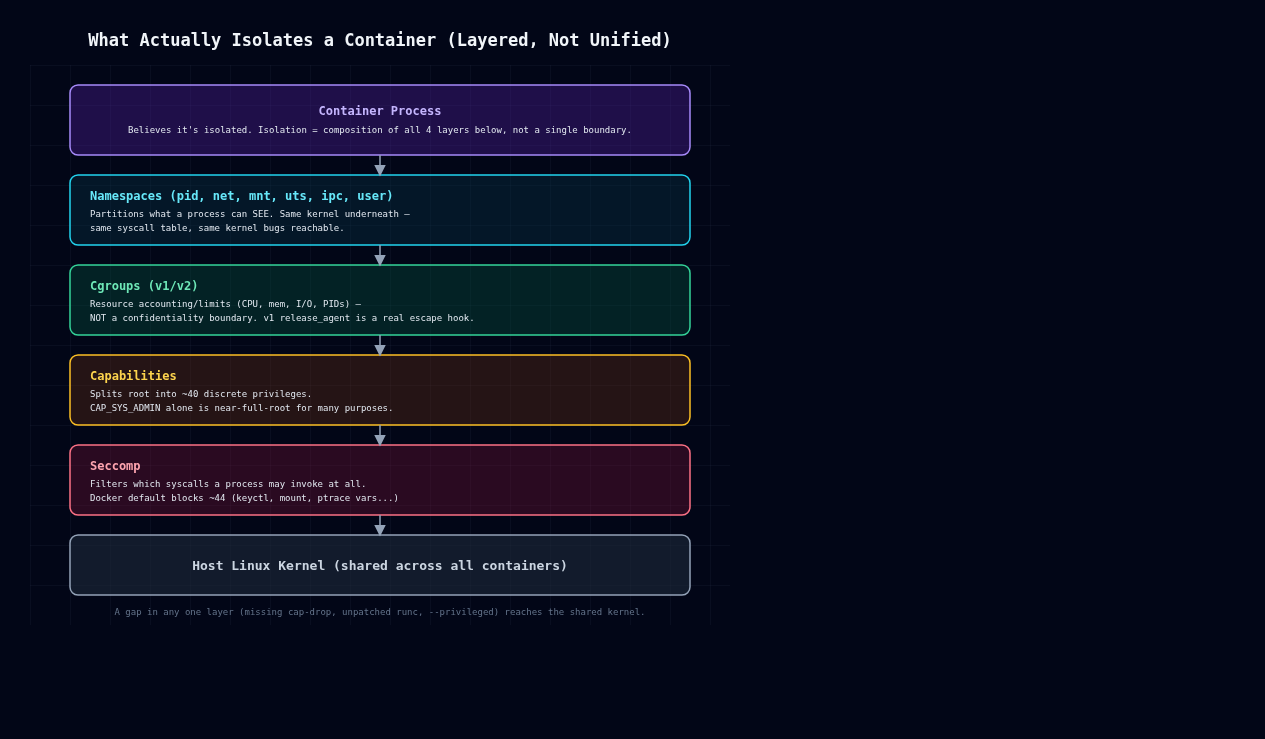
    Layered diagram of container isolation: namespaces, cgroups, capabilities, seccomp

    There’s no single “container” kernel object. Docker, containerd, and friends compose four separate mechanisms.

    Namespaces partition what a process can see: pid (process tree), net (network stack), mnt (filesystem mounts), uts (hostname), ipc, and user (UID/GID mapping). A process in a new PID namespace sees itself as PID 1 and can’t see host processes, but it’s still the same kernel, same syscall table, same vulnerabilities.

    Cgroups (v1 or v2) limit and account for resource usage: CPU, memory, I/O, PIDs. They control resources, not confidentiality or integrity. Cgroup v1’s release_agent mechanism in particular is a privileged hook that has nothing to do with isolation and everything to do with host compromise, as we’ll see below.

    Capabilities split root’s omnipotence into roughly 40 discrete privileges (CAP_SYS_ADMIN, CAP_NET_ADMIN, CAP_SYS_PTRACE, and so on). A container running as UID 0 with a reduced capability set isn’t the same as host root, but Docker’s default set is still broad, and CAP_SYS_ADMIN alone gets you close to full root for a lot of practical purposes: mount manipulation, cgroup control, some device operations.

    Seccomp filters which syscalls a process can invoke at all, independent of capabilities. Docker ships a default profile blocking around 44 syscalls (keyctl, add_key, mount, umount2 in some paths, ptrace variants, kernel module loading, etc). Disabling it with –security-opt seccomp=unconfined is one of the most common ways people remove a real security control while chasing a build error they don’t fully understand.

    None of these four mechanisms were designed together as a sandbox. Each one closes off a slice of the host kernel’s attack surface, and the escapes live in the gaps between them.

    Escape 1: privileged containers and /dev access

    docker run –privileged disables almost everything above: full capability set, no seccomp, no AppArmor or SELinux confinement, and access to host devices. If the container can see host block devices under /dev, it can mount the host root filesystem directly:

    # inside a --privileged container
    mkdir /mnt/hostfs
    mount /dev/sda1 /mnt/hostfs
    chroot /mnt/hostfs /bin/bash
    # now you are root on the host filesystem

    This isn’t a bug. It’s documented behavior of –privileged. But it shows up constantly anyway: CI runners, “just make it work” Kubernetes manifests, Docker-in-Docker setups that grab –privileged to avoid debugging a permissions error. The fix is never “use –privileged.” It’s finding the one or two specific capabilities or device mounts the workload actually needs (–cap-add SYS_PTRACE, –device=/dev/foo), which is almost always possible once you bother to check.

    Escape 2: CVE-2019-5736, runc file descriptor overwrite

    This one’s a genuine kernel/runtime race, not a misconfiguration. runc versions before 1.0-rc7 (used under the hood by Docker, containerd, Kubernetes) were vulnerable to an attack where a malicious container could overwrite the host runc binary itself.

    Here’s the mechanism: when runc exec enters a running container, it briefly opens its own binary via /proc/self/exe inside the container’s mount namespace, to re-exec itself with dropped privileges. A container process controls its own /proc/self/exe target. Replace your own binary with a malicious ELF that, when run as the container’s entrypoint, opens /proc/self/exe for writing and holds the fd open, and you can race runc into writing to that fd instead of a temp file. Since the host runc binary is mapped in during this handoff, the attacker overwrites the actual runc executable on the host with their own payload. The next container started or exec’d into on that host runs the attacker’s code as root.

    What makes this one sting is that it broke the assumption that “non-privileged container, default config” was safe against a malicious image or a compromised process. The fix was having runc copy itself to a memfd (memfd_create) and exec from there instead of touching a path on disk, which kills the overwritable target entirely. Patch your container runtime, runc, containerd, crun, on the same schedule as your kernel. Don’t treat it as an afterthought.

    Escape 3: cgroup v1 release_agent abuse

    Cgroup v1 supports a release_agent file: a host-side executable path the kernel invokes, as root, on the host, whenever a cgroup becomes empty. Give a container CAP_SYS_ADMIN and write access to a cgroup hierarchy’s release_agent, which happens with –privileged or with mounted cgroupfs and relaxed capabilities, and it can point that path at a script of its choosing and trigger it:

    mkdir /tmp/cgrp && mount -t cgroup -o memory cgroup /tmp/cgrp
    mkdir /tmp/cgrp/x
    echo 1 > /tmp/cgrp/x/notify_on_release
    host_path=$(sed -n 's/.*\perdir:\([^,]*\).*/\1/p' /proc/self/cgroup)
    echo "$host_path/cmd" > /tmp/cgrp/release_agent
    echo '#!/bin/sh' > /cmd
    echo 'ps aux > /output' >> /cmd   # runs as host root
    chmod +x /cmd
    sh -c "echo \$\$ > /tmp/cgrp/x/cgroup.procs"

    Researchers including Felix Wilhelm have written this one up extensively, and it works for a simple reason: cgroups were never an isolation mechanism. release_agent is a host-wide control hook, and a sufficiently privileged container process can just reach out and grab it. Cgroup v2’s unified hierarchy scopes release_agent differently and closes off this specific path, one of several reasons to be on v2 by now.

    Mitigations that actually reduce risk

    Drop capabilities aggressively. Start from –cap-drop=ALL and add back only what you’ve actually measured as needed. CAP_SYS_ADMIN, CAP_SYS_PTRACE, and CAP_SYS_MODULE have no business being default-on.

    Don’t use –privileged in production, period. A workload that “needs” it almost always needs one specific capability or device, not the entire host.

    Run containers rootless (Podman rootless, or Docker’s rootless mode). User namespace remapping maps “root” inside the container to an unprivileged UID on the host, so a full in-container compromise doesn’t hand over host root.

    Keep the runtime patched. CVE-2019-5736-class bugs live in runc, containerd, crun, not in your application code. Track your container runtime’s CVEs with the same priority you give kernel CVEs.

    Use seccomp, and don’t disable it just to make an error go away. If a syscall is genuinely blocked and genuinely needed, add it explicitly to a custom profile instead of going unconfined.

    Prefer cgroup v2, where the release_agent host-hook vector doesn’t apply the same way.

    For genuinely untrusted workloads, reach for a sandboxing runtime. gVisor (runsc) intercepts syscalls in userspace and reimplements the kernel surface; Kata Containers runs each container in a lightweight VM with its own kernel. Both add real isolation boundaries that namespaces and cgroups alone can’t provide, and the performance hit is usually worth it for multi-tenant or untrusted-input workloads.

    Every technique above has been public for years, and every mitigation here is a config change, not a research project. In my experience the gap between “container” and “isolated” is almost always one of three things: a missing –cap-drop, an unpatched runc, or a –privileged flag somebody added to make an error go away. Check those three first.