Most of the firewall rules I review are about what can get in. The rule sets are long, argued over, and audited every year. Outbound is usually one line: allow any to any. Then an incident happens, the attacker’s implant calls home over 443 or 53, and nobody is surprised except the people who owned the firewall.
Egress control is the cheapest high-value change a mid-sized network can make, and most teams put it off because it breaks things in the first week. This post is about doing it anyway, and about the outbound protocol almost nobody can block outright: DNS.
Why default allow outbound hurts
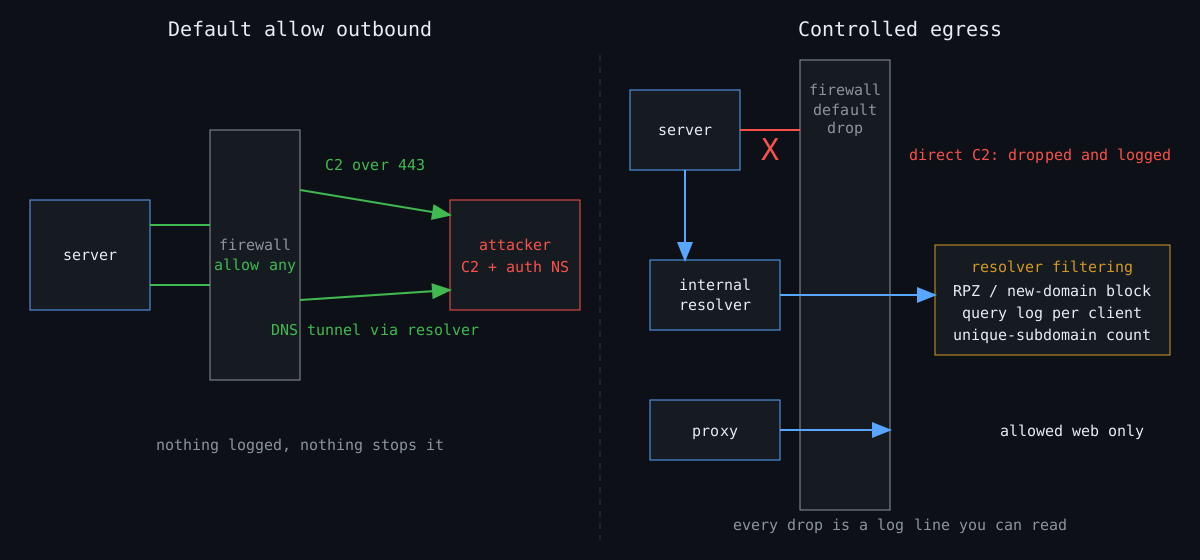
The diagram compares a network with default allow outbound against one with controlled egress, showing where direct connections are dropped and where DNS queries get filtered and logged.
An intrusion has to talk to something. Initial access might come through a phished laptop or an exposed service, but after that the attacker needs command and control, tooling downloaded from somewhere, and a path to carry data out. Inbound filtering does nothing about any of those.
Servers are the easy case. A database host has no business browsing the web. An application server needs a handful of destinations: its database, a package mirror, a payment API, maybe a metrics endpoint. If you can name those, you can write a default-deny outbound policy and the attacker’s reverse shell to a random VPS simply fails. Log4Shell (CVE-2021-44228) made this concrete for a lot of people. Exploitation needed the vulnerable server to make an outbound LDAP or RMI connection to the attacker. Hosts with tight egress were far harder to exploit in practice, even before patching.
Workstations are harder because people browse. For those I’d settle for forcing all web traffic through a proxy or a filtering resolver and blocking direct outbound on everything else.
A default-deny starting point
Here is a minimal nftables ruleset for an application server. The addresses are examples, replace them with your own resolver and proxy.
table inet egress {
  set resolvers { type ipv4_addr; elements = { 10.0.0.2, 10.0.0.3 } }
  set proxies   { type ipv4_addr; elements = { 10.0.1.10 } }

  chain output {
    type filter hook output priority 0; policy drop;
    oifname "lo" accept
    ct state established,related accept
    ip daddr @resolvers udp dport 53 accept
    ip daddr @resolvers tcp dport 53 accept
    ip daddr @proxies tcp dport 3128 accept
    limit rate 5/minute log prefix "egress-drop "
  }
}
The last rule earns its place. Every outbound packet that matches nothing above gets logged just before the policy drops it, rate limited so a noisy host doesn’t flood the journal. In the first week that log is your to-do list: each entry is either a legitimate dependency you forgot or something you should be worried about. I’ve found a forgotten telemetry agent and a cron job posting to a defunct webhook this way, both on hosts I thought I understood.
Run it in log-only mode first (swap the policy to accept and keep the log rule) for a week or two. Then flip it.
Why DNS is different
Everything above leaves the resolver alone, because the host has to be able to resolve names. And a resolver is a program that forwards arbitrary questions to arbitrary servers on the internet. If an attacker controls the authoritative server for a domain they registered, every query for a name under that domain is delivered to them by your own infrastructure.
That is DNS tunneling. The client encodes data into the query name, for example `mfrggzdfmztwq2lk.a1.t.example.net`, and the attacker’s authoritative server decodes it and replies with data in a TXT, CNAME or NULL record. Tools like iodine and dnscat2 do exactly this, and so does a fair amount of real malware.
The protocol limits shape what it looks like. A label can be 63 octets and a full name 253 characters in text form (RFC 1035). Names are case-insensitive, so the encoding is usually base32 or hex, which gives about 5 or 4 bits per character rather than 6. In practice that means a few dozen bytes of payload per query, so a tunnel needs a lot of queries to move anything. That volume is your best detection signal.
What tunnels look like in the logs
A tunnel tends to show three things, and none of them is reliable alone.
Many unique subdomains under one parent domain. A CDN may generate some, but a tunnel generates thousands that are never repeated, so caching does not help the attacker or hide the traffic.
Long, high-entropy labels. Legitimate names are made of words. Base32 payloads are not.
Unusual record types and response sizes. A host that suddenly asks for lots of TXT or NULL records, or gets large responses, deserves a look.
With Zeek writing JSON dns.log, the first signal is a one-liner. It counts distinct names per parent domain. The “last two labels” shortcut breaks on suffixes like co.uk, so use a public suffix list if you turn this into a real detection.
jq -r '.query' dns.log \
  | awk -F. 'NF>2 && !($0 in seen) {seen[$0]=1; n[$(NF-1)"."$NF]++}
             END {for (d in n) print n[d], d}' \
  | sort -rn | head -20
And a small entropy check you can bolt onto a pipeline:
import math
from collections import Counter

def entropy(label: str) -> float:
    counts = Counter(label)
    total = len(label)
    return -sum(c / total * math.log2(c / total) for c in counts.values())

def suspicious(name: str) -> bool:
    first = name.split(".")[0]
    return len(first) >= 20 and entropy(first) > 3.5
Those thresholds are mine, picked from eyeballing my own traffic, not from a paper. Treat them as a starting point and tune them against a week of your real logs, because CDN and anti-virus lookups will trip a naive version. I’d alert on the combination: many unique names to one parent domain from one host, plus long high-entropy labels.
Controls that work better than detection
Detection is the backstop. Shrinking what DNS can reach is the better investment.
Force every client to use your internal resolver and block outbound 53 from everything else. Hosts that hardcode 8.8.8.8 are either misconfigured or hiding something, and the drop log will tell you which.
Run the resolver with response policy zones (RPZ) or a filtering service so newly registered and known-bad domains don’t resolve. Domain age is a surprisingly good signal because attackers register throwaway names.
Close the side doors. DNS over TLS (RFC 7858) uses port 853 and DNS over HTTPS (RFC 8484) uses 443, so a client can bypass your resolver entirely. Block 853 outright. For DoH, you can disable it in browsers by policy and block the well-known public DoH endpoints, but I won’t pretend that is complete, since anything on 443 can be a DoH server. This is the argument for forcing web traffic through a proxy, too.
Pin the resolver’s own upstream. If the resolver can forward to the whole internet, restrict it to the recursion it needs and log its queries centrally. Query logs from the resolver are far better than logs from a tap, because they show which internal client asked.
Expect it to break things
I haven’t seen a first egress rollout that went without surprises. Package managers, license servers, NTP, OCSP and CRL fetches, and cloud metadata endpoints all show up as drops. That is the point of the log-only period. Budget a couple of weeks, start with the servers that matter most, and keep the allow list in version control so changes get reviewed like any other firewall change.
If you do one thing this month, turn on logging for outbound drops and for resolver queries. A week of that data will teach you more about your network than most audits.