
Email was designed in an era when every host on the network trusted every other host. SMTP lets any server claim to send mail from any address, and the From: header that a person actually reads is just text the sender typed. Three standards were bolted on afterwards to fix that: SPF, DKIM and DMARC. Most domains I look at have all three records published. A surprising number of them are still not protected, because the DMARC policy says p=none.
SPF: which servers may send
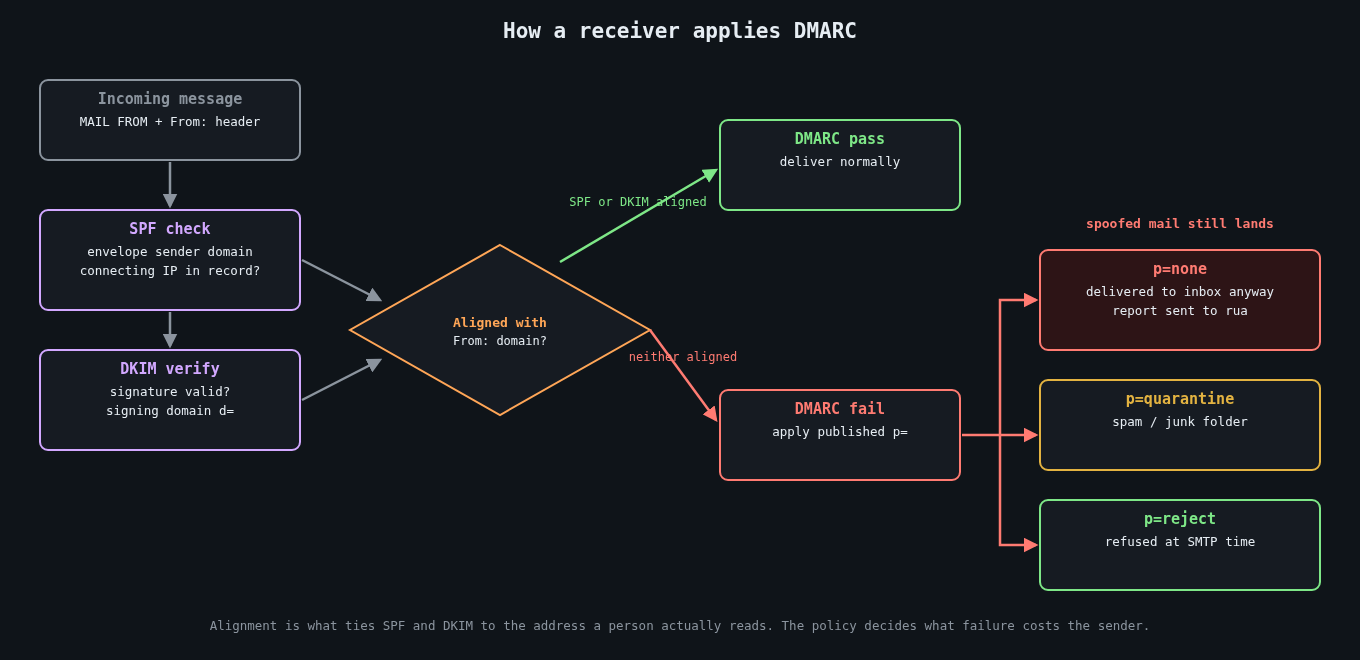
Sender Policy Framework (RFC 7208) lets a domain publish, in DNS, the list of servers allowed to send mail for it. A receiving server takes the domain from the SMTP envelope sender (the MAIL FROM, also called the return path), looks up its SPF record, and checks whether the connecting IP is on the list.
example.com. IN TXT "v=spf1 ip4:198.51.100.0/24 include:_spf.google.com include:sendgrid.net -all"SPF has two well-known weaknesses. It checks the envelope sender, not the visible From: header, so on its own it does nothing to stop someone spoofing your domain in the address the recipient sees. And it breaks on forwarding, because a forwarding server isn’t in your list.
There’s also a hard limit that bites growing companies: evaluating an SPF record may trigger at most 10 DNS lookups (include, a, mx, ptr, exists and redirect each count). Every SaaS tool you add with an include: eats into that budget, and when you exceed it the result is a permerror, which many receivers treat as a failure. I’ve seen marketing teams take down a company’s outbound mail by adding one more vendor.
DKIM: a signature on the message
DomainKeys Identified Mail (RFC 6376) has the sending server sign selected headers and the body with a private key. The signature goes in a DKIM-Signature header naming the signing domain (d=) and a selector (s=). The receiver fetches the public key from DNS at selector._domainkey.domain and verifies.
s1._domainkey.example.com. IN TXT "v=DKIM1; k=rsa; p=MIIBIjANBgkqhkiG9w0BAQEFAAOCAQ8AMIIBCgKCAQEA..."DKIM survives plain forwarding because the signature travels with the message, though it breaks if a mailing list rewrites the subject or appends a footer. Use 2048-bit RSA keys, and rotate them. In 2012 a mathematician found that Google was signing with a 512-bit key that he could factor, which led to a quick round of key upgrades across large providers.
The catch, again, is that DKIM proves a message was signed by d= some domain. It doesn’t, by itself, say that domain has anything to do with the From: address.
DMARC: tying it to the From header
DMARC (RFC 7489) is what makes the first two useful against spoofing. It adds the concept of alignment: a message passes DMARC only if SPF passes for a domain that matches the From: domain, or DKIM passes with a d= that matches the From: domain. Relaxed alignment (the default) accepts the same organisational domain, so mail.example.com aligns with example.com. Strict alignment requires an exact match.
The DMARC record then tells receivers what to do with mail that fails, and where to send reports:
_dmarc.example.com. IN TXT "v=DMARC1; p=reject; rua=mailto:[email protected]; adkim=r; aspf=r"The p= tag is the policy: none, quarantine or reject.
Why p=none isn’t protection
A p=none policy tells receivers: evaluate DMARC, send me reports, but deliver failing mail exactly as you would have anyway. It’s a monitoring mode. Anyone can still send mail with your domain in the From: header to your customers, your suppliers or your own finance team, and DMARC will do nothing to stop it.
Monitoring is the right first step, and that’s why p=none exists. The problem is that a lot of organisations treat publishing it as finishing the job. Google and Yahoo’s bulk sender requirements, which took effect in February 2024, made a DMARC record mandatory for anyone sending more than 5,000 messages a day to their users, but the minimum they ask for is p=none. That pushed a lot of domains into publishing a record, and many of them stopped there.
Business email compromise is where this hurts. A convincing invoice from [email protected] that passes every visual check is a lot easier to pull off when your domain doesn’t ask receivers to reject spoofs. With p=reject, major mailbox providers will drop exact-domain spoofs outright. Attackers then have to fall back on lookalike domains, which is still a problem, but a much more detectable one.
Getting from none to reject
The path is boring and it works.
First, publish p=none with an rua address and actually read the aggregate reports. They’re XML, so use a parser or a reporting service rather than reading them by hand. Within a couple of weeks you’ll see every source sending mail as your domain: your mail platform, the CRM, the ticketing system, the HR tool somebody bought on a credit card, and the spoofers.
Second, fix each legitimate source. Ideally each one signs with DKIM using your domain as d=, which most SaaS senders support through a CNAME to their key. Where you can only get SPF alignment, make sure the vendor uses a return path on your domain. Retire sources nobody can explain.
Third, move to p=quarantine, then to p=reject. RFC 7489 provides the pct= tag to apply the policy to a percentage of failing mail, which lets you ramp up gradually. Be aware that the DMARCbis revision in the IETF drops pct in favour of a simpler testing flag, so don’t build long-term tooling around it.
Don’t forget domains that send no mail at all. Parked and unused domains are attractive for spoofing precisely because nobody watches them. Lock them down completely:
parked-example.com.          IN TXT  "v=spf1 -all"
_dmarc.parked-example.com.   IN TXT  "v=DMARC1; p=reject;"
Also check the sp= tag, which sets the policy for subdomains. If you leave it out, subdomains inherit p=, which is usually what you want.
What DMARC doesn’t do
DMARC protects the exact domain. It does nothing about examp1e.com or example-billing.com, nor display-name tricks where the friendly name says “Example Payroll” over an unrelated address. Those need receiver-side defences, user training and monitoring for newly registered lookalikes. MTA-STS (RFC 8461) and TLS reporting are separate pieces that protect mail in transit, and BIMI only becomes available once you’re at quarantine or reject.
If you run a domain and its DMARC record still says p=none after a few months, you’ve built the monitoring and switched off the alarm. Read the reports, fix your senders, and finish the rollout.