
Most private keys in production live in a file. The application reads the PEM at startup, parses it, and keeps it in heap memory for as long as the process runs. Anything that can read that process’s memory, or the file, or a core dump, or a backup of the disk, can walk away with the key. And a stolen private key isn’t like a stolen password you can reset quietly. It’s the ability to be you, cryptographically, until every relying party stops trusting it.
A hardware security module flips the model. The key is generated inside a tamper-resistant device, it’s marked non-exportable, and the application never holds it. The app sends data in and gets a signature or a decrypted value back. I think that one design change is worth more than most of the controls we stack around key files, and it’s a lot cheaper to adopt than it used to be.
Keys have leaked from memory, repeatedly
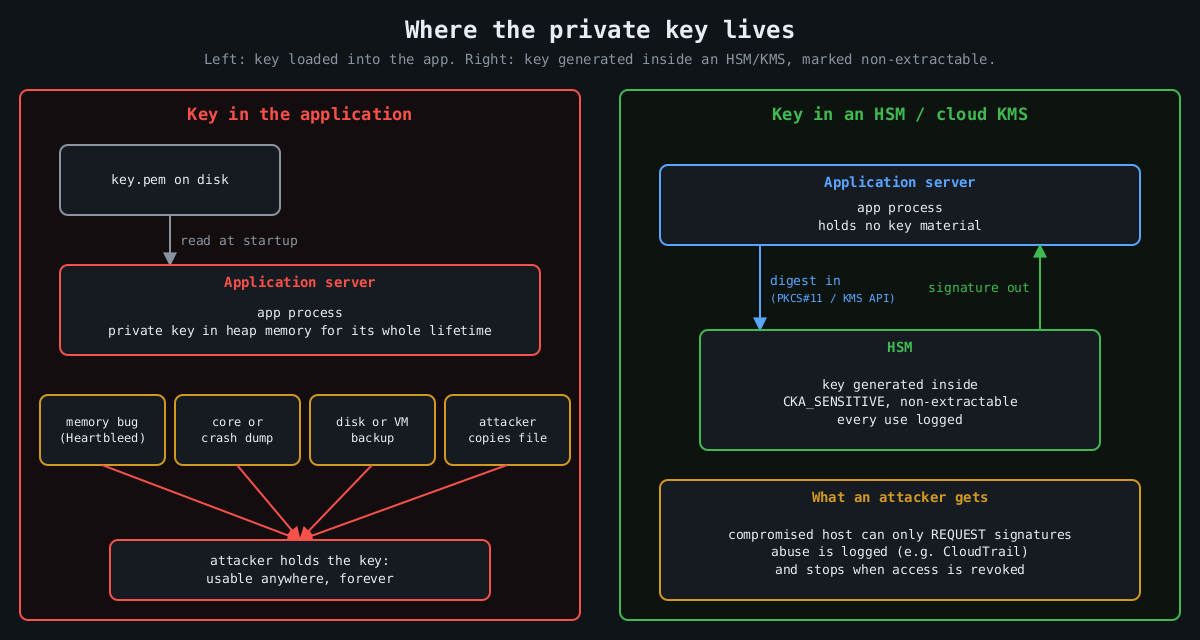
The canonical case is Heartbleed (CVE-2014-0160). A missing bounds check in OpenSSL’s TLS heartbeat extension, present in 1.0.1 through 1.0.1f, let a remote client read up to 64 KB of server memory per request. Whether a server’s private key could be extracted that way was debated for about a day. Then Cloudflare put up a challenge server, and several people independently recovered its private key from heartbeat responses. Every affected site then had to revoke and reissue certificates, because nobody could prove their key hadn’t been read.
The Storm-0558 intrusion disclosed in 2023 is a more recent and more uncomfortable example. An attacker got hold of a Microsoft consumer account signing key and used it to forge authentication tokens that were accepted for Exchange Online mailboxes at roughly two dozen organizations, including US government agencies. Microsoft’s first explanation was that the key had ended up in a crash dump that later moved from an isolated environment into a debugging environment. It later said it had not found that crash dump. The US Cyber Safety Review Board’s report was blunt about the broader failures either way. Whatever the exact path, the key existed somewhere it could be copied.
Code signing has the same history. Stuxnet’s drivers were signed with certificates stolen from Realtek and JMicron, which let them load on Windows without warnings. Signing keys are about the most valuable thing a software vendor owns, and a lot of them still sit on a build server’s disk.
What an HSM actually guarantees
An HSM is a dedicated device (a PCIe card, a network appliance, a USB token, or a cloud service backed by such hardware) that generates and stores keys and performs operations with them internally. Applications talk to it over a standard interface, usually PKCS#11, or through a cloud API. The security properties come from a few hardware and firmware decisions:
Key attribute          Effect
CKA_SENSITIVE=true     key value can never be read out in plaintext
CKA_EXTRACTABLE=false  key can't be wrapped and exported at all
CKA_SIGN=true          key may be used for signing, nothing else
Validated devices are certified against FIPS 140-2 or its successor FIPS 140-3, and at the higher levels the device is built to detect physical tampering and wipe itself. For most of us the physical tamper resistance matters less than the logical boundary. Code execution on your app server, a memory disclosure bug, a leaked backup: none of them yield the key, because the key was never there.
You can try the programming model on a laptop with SoftHSM, a software implementation of the PKCS#11 interface intended for testing:
softhsm2-util --init-token --free --label app-signing
pkcs11-tool --module /usr/lib/softhsm/libsofthsm2.so --login \
  --keypairgen --key-type EC:prime256v1 --label release-key
pkcs11-tool --module /usr/lib/softhsm/libsofthsm2.so --login \
  --sign --mechanism ECDSA-SHA256 --label release-key \
  --input-file release.tar.gz --output-file release.sig
SoftHSM obviously isn’t a security boundary, since its keys live in files. It’s useful because the same code then works against a real HSM by swapping the module path.
Cloud KMS is the HSM most teams will actually use
Most cloud providers sell this as a managed service: AWS KMS and CloudHSM, Google Cloud KMS with its HSM protection level, Azure Key Vault and Managed HSM. The managed KMS services are backed by FIPS-validated HSMs, charge per key and per request, and integrate with IAM. Signing a release artifact without ever touching a key looks like this:
openssl dgst -sha256 -binary release.tar.gz > release.sha256
aws kms sign --key-id alias/release-signing \
  --message fileb://release.sha256 --message-type DIGEST \
  --signing-algorithm ECDSA_SHA_256 \
  --query Signature --output text | base64 -d > release.sig
For bulk encryption, the pattern is envelope encryption. You ask KMS for a data key, it returns the key in plaintext plus a copy encrypted under a master key that never leaves the HSM. You encrypt the data locally, store the encrypted data key next to it, and discard the plaintext key. The data keys do pass through your app’s memory briefly, so this isn’t the same guarantee as signing inside the HSM. The master key, the one that unlocks everything, stays put.
The part people miss: an HSM is still a signing oracle
Here’s the honest caveat. If an attacker owns the application, they can’t steal the key, but they can ask the HSM to use it. A compromised CI runner with permission to call kms:Sign can sign malware with your release key for as long as it keeps access. What you’ve bought is that the abuse stops the moment you evict the attacker, and that every use is logged, instead of a stolen key that works from anywhere, forever.
So the HSM has to come with the controls that make that log useful. Give each key a single purpose and narrow IAM permissions, so the web tier can’t touch the release key. Alert on unusual usage, since KMS calls land in CloudTrail and a signing key used 400 times at 3 a.m. should page someone. Require quorum approval (M of N administrators) for key export, deletion or policy changes on hardware that supports it. Keep key creation and key use in different roles.
Where I’d start
Not everything needs an HSM. Session cookie keys that rotate hourly probably don’t justify the latency. Root CA keys, code signing keys, token signing keys for an identity provider, and the master keys for encrypted data at rest absolutely do. Those are the keys where one leak means rebuilding trust from scratch, and they’re also the ones that are used rarely enough that a network call per operation doesn’t matter. Start there.