Tag: key management

  • Flipper Zero, part 2: why so many office badges are weaker than they look

    Flipper Zero, part 2: why so many office badges are weaker than they look

    Part 2 of 5 in the Flipper Zero series. Part 1: what it actually is and what it can’t do.

    Most buildings I have walked into run on one of four card technologies, and the reception desk usually cannot tell you which. That matters, because the four have wildly different security properties and they look identical in a wallet. This part is about the two badge radios on the Flipper Zero, 125 kHz and 13.56 MHz, and what they reveal when you point them at your own cards.

    Same rules as part 1: hardware I own, cards I own, and a defender’s goal. A work badge usually belongs to your employer, so treat it as someone else’s card and get written permission before testing it. If you are auditing a site, get written permission first.

    Two radios, four families
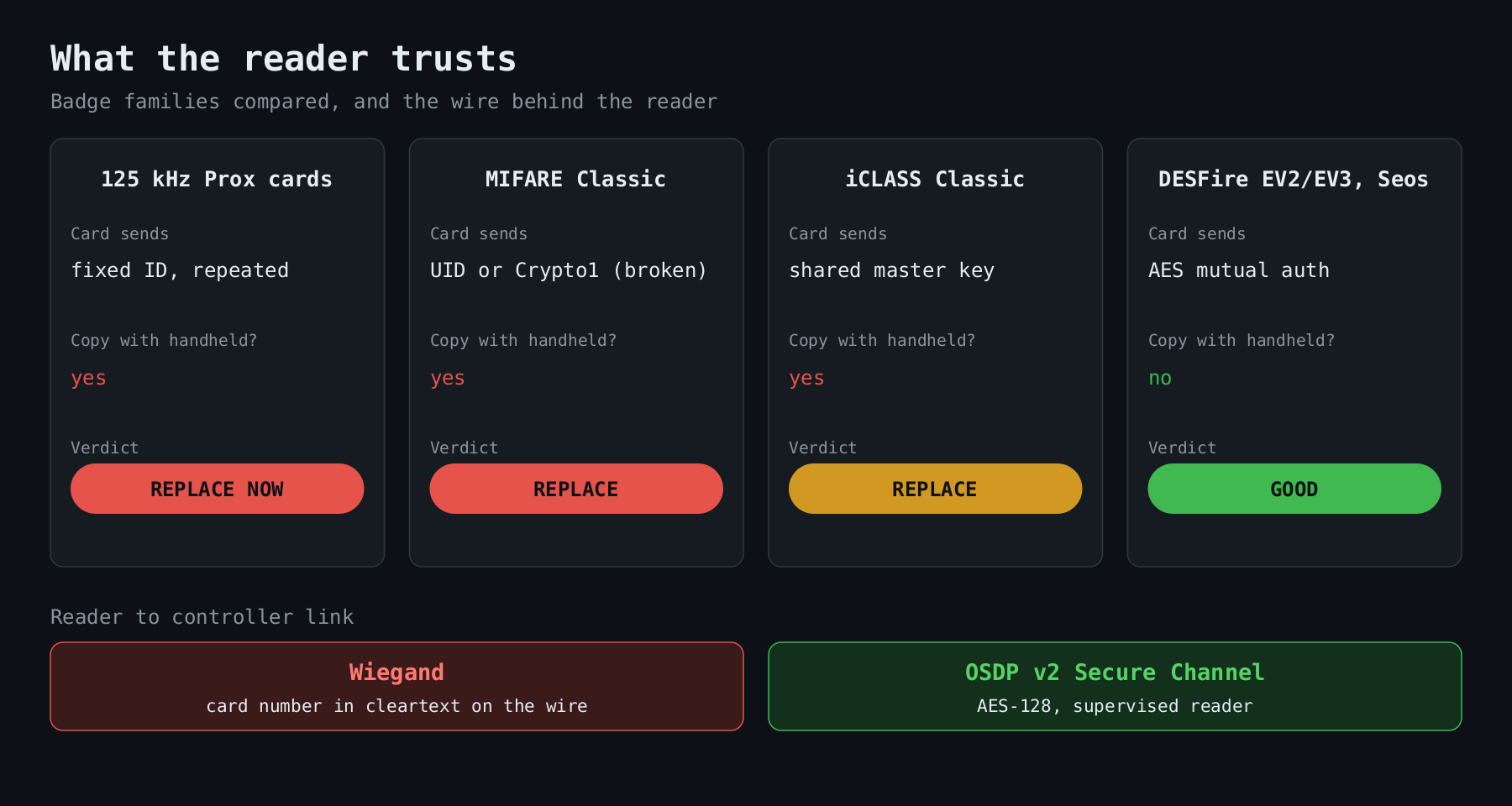
    Comparison of four badge families (125 kHz proximity, MIFARE Classic, iCLASS Classic, DESFire/Seos) showing what each card sends, whether it can be copied, and a verdict, with Wiegand versus OSDP Secure Channel underneath

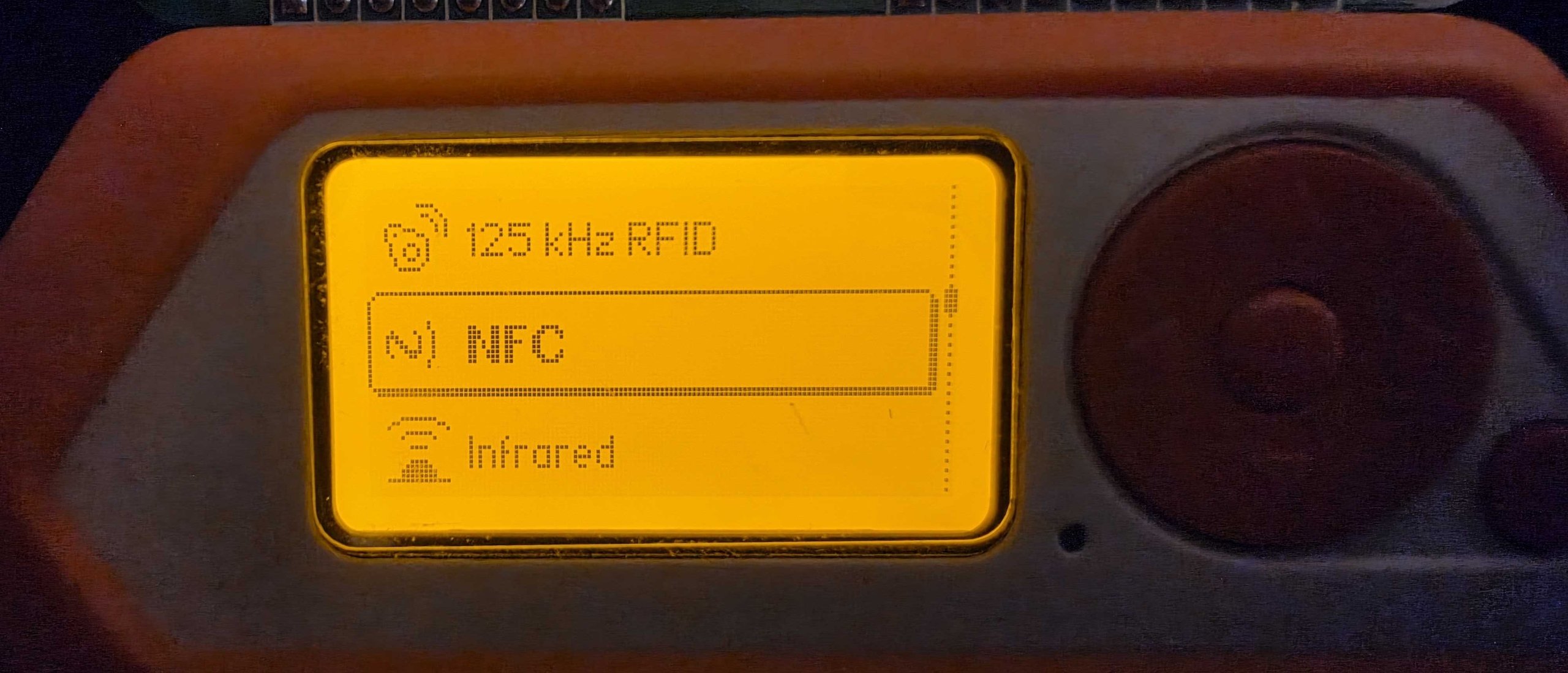
    The low frequency radio at 125 kHz reads old proximity cards. EM4100 and HID Prox are the common ones. The high frequency radio at 13.56 MHz covers ISO 14443 and the NFC family: MIFARE Classic, MIFARE Ultralight, DESFire and the rest. HID’s iCLASS also lives at 13.56 MHz, but it is based on ISO 15693 and Flipper handles it separately in its Picopass app. The Flipper’s main menu sorts the cards under “125 kHz RFID” and “NFC”, and its read screen tells you which family it found for most of them. That screen is the first step of the audit, not the whole of it.

    125 kHz: an ID, not a credential

    An EM4100 tag transmits a 40 bit value, over and over, to anything that powers it up. There is no key, no challenge and no secret. HID Prox is much the same idea wrapped in the 26 bit Wiegand format called H10301: one parity bit, an 8 bit facility code, a 16 bit card number and a closing parity bit.

    You can decode that yourself in a few lines:

    def parse_h10301(bits: str):
        assert len(bits) == 26
        facility = int(bits[1:9], 2)
        card = int(bits[9:25], 2)
        return facility, card
    
    print(parse_h10301("00000001100000000000011111"))  # (3, 15)

    Sixteen bits of card number means 65,536 possible values per facility code, and facility codes are 8 bits. Nothing in the card proves it is the original. Copying one to a blank tag takes seconds with a Flipper or a ten dollar reader. I have never seen a reason to defend this technology beyond “we have not got round to replacing it”.

    MIFARE Classic: encryption that did not hold

    MIFARE Classic is the long-lived 13.56 MHz card from NXP, and it shipped with a proprietary cipher called Crypto1 and 48 bit keys. In 2008 researchers at Radboud University Nijmegen (Garcia and colleagues) published “Dismantling MIFARE Classic” at ESORICS, after Karsten Nohl and Henryk Plötz had reverse engineered the cipher from the chip. In 2009 a nested attack from the same group (IEEE S&P) recovered every key on a card given one known key, and Courtois published a variant that needed none. In 2015 Meijer and Verdult’s “hardnested” attack handled the hardened cards that NXP issued after the first breaks.

    In practice the weak point is often not the cipher at all. Many deployments leave sectors on the factory default key, FFFFFFFFFFFF, and many readers only look at the 4 or 7 byte UID. A UID is not a secret, and there are “magic” cards sold with a rewritable UID block. If your reader just checks the UID, the cryptography is irrelevant.

    You can see what you have without special tools. With libnfc and an ordinary USB reader:

    $ nfc-list
    ISO/IEC 14443A (106 kbps) target:
        ATQA (SENS_RES): 00  04
           UID (NFCID1): 04  a2  3b  1c
          SAK (SEL_RES): 08

    Those values are illustrative, not from a real card, but the SAK byte is real: 0x08 identifies a MIFARE Classic 1K, 0x18 a 4K. A DESFire card answers differently, with a SAK of 0x20 and ISO 14443-4 support. The Flipper shows the same information on its screen without any laptop.

    iCLASS: the shared key problem

    HID’s original iCLASS (now called iCLASS Classic) used a master key shared across the product line. Milosch Meriac extracted it in 2010, and the 2012 paper “Dismantling iClass and iClass Elite” went on to break the Elite key diversification as well. Once a master key is public, every site using the default configuration is exposed, whether it knows or not. HID’s replacements, iCLASS SE and the Seos credential, moved to modern cryptography.

    What good looks like

    The fix is a card that authenticates with a per-card key, using a standard algorithm, and a reader that actually checks. MIFARE DESFire EV2 and EV3 use AES with mutual authentication, and Seos does too. Whichever you choose, ask your vendor four questions:

    1. Does the card use AES, and are keys diversified per card?
    2. Does the reader verify the credential, or only read a UID?
    3. Is the reader-to-controller link OSDP with Secure Channel enabled and a unique key, not Wiegand or the default install key?
    4. Who holds the master keys, and where do they live?

    The third question is the one people forget. Wiegand sends the card number down a few wires in cleartext, so a tap on the cable behind the reader defeats the best card on the market. OSDP v2 adds an AES-128 secure channel and also lets you supervise the reader, so a pulled or replaced one raises an alarm. I would put reader wiring on the same priority list as the cards.

    One caveat, since I like to be straight about limits: even a strong card can be relayed. An attacker who stands near the victim and near the door can pass the radio exchange along in real time, and the crypto will happily succeed. Distance bounding is the research answer. Some cards, DESFire EV2 and EV3 among them, offer a proximity check feature, but I rarely see it switched on. Defend with a second factor at sensitive doors, or camera coverage, rather than assuming the card solves it.

    Migrating without a big bang

    Nobody swaps every card in a weekend. Dual technology readers that accept the old and new credential let you issue new cards gradually, with a cutoff date after which the legacy mode is disabled in the controller. Skipping that last step is the usual failure, so put it in the project plan with a name next to it. I have seen buildings run “temporary” legacy support for six years.

    Start with the audit. Tap your own badge on a reader that tells you what it is, write down the family, and compare it with the list above. If the answer is 125 kHz or MIFARE Classic, you have your project.

    Part 3 moves to Sub-GHz remotes, rolling codes and how gates should be built.

    Other parts of the Flipper Zero series: part 1, part 2, part 3, part 4, part 5.
  • Hardware security modules, and why private keys shouldn’t live in application memory

    Hardware security modules, and why private keys shouldn’t live in application memory

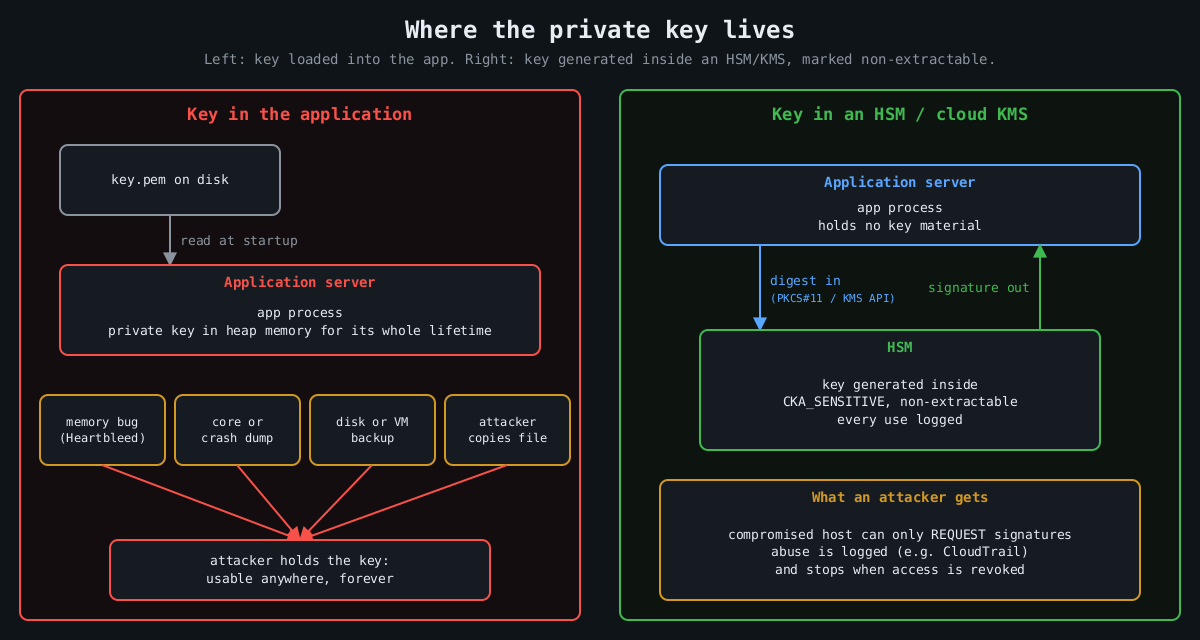
    Most private keys in production live in a file. The application reads the PEM at startup, parses it, and keeps it in heap memory for as long as the process runs. Anything that can read that process’s memory, or the file, or a core dump, or a backup of the disk, can walk away with the key. And a stolen private key isn’t like a stolen password you can reset quietly. It’s the ability to be you, cryptographically, until every relying party stops trusting it.

    A hardware security module flips the model. The key is generated inside a tamper-resistant device, it’s marked non-exportable, and the application never holds it. The app sends data in and gets a signature or a decrypted value back. I think that one design change is worth more than most of the controls we stack around key files, and it’s a lot cheaper to adopt than it used to be.

    Keys have leaked from memory, repeatedly

    Comparison: a key loaded into application memory leaks through memory bugs, dumps, backups and file theft, while a key inside an HSM never leaves it and a compromised host can only request logged signatures

    The canonical case is Heartbleed (CVE-2014-0160). A missing bounds check in OpenSSL’s TLS heartbeat extension, present in 1.0.1 through 1.0.1f, let a remote client read up to 64 KB of server memory per request. Whether a server’s private key could be extracted that way was debated for about a day. Then Cloudflare put up a challenge server, and several people independently recovered its private key from heartbeat responses. Every affected site then had to revoke and reissue certificates, because nobody could prove their key hadn’t been read.

    The Storm-0558 intrusion disclosed in 2023 is a more recent and more uncomfortable example. An attacker got hold of a Microsoft consumer account signing key and used it to forge authentication tokens that were accepted for Exchange Online mailboxes at roughly two dozen organizations, including US government agencies. Microsoft’s first explanation was that the key had ended up in a crash dump that later moved from an isolated environment into a debugging environment. It later said it had not found that crash dump. The US Cyber Safety Review Board’s report was blunt about the broader failures either way. Whatever the exact path, the key existed somewhere it could be copied.

    Code signing has the same history. Stuxnet’s drivers were signed with certificates stolen from Realtek and JMicron, which let them load on Windows without warnings. Signing keys are about the most valuable thing a software vendor owns, and a lot of them still sit on a build server’s disk.

    What an HSM actually guarantees

    An HSM is a dedicated device (a PCIe card, a network appliance, a USB token, or a cloud service backed by such hardware) that generates and stores keys and performs operations with them internally. Applications talk to it over a standard interface, usually PKCS#11, or through a cloud API. The security properties come from a few hardware and firmware decisions:

    Key attribute          Effect
    CKA_SENSITIVE=true     key value can never be read out in plaintext
    CKA_EXTRACTABLE=false  key can't be wrapped and exported at all
    CKA_SIGN=true          key may be used for signing, nothing else

    Validated devices are certified against FIPS 140-2 or its successor FIPS 140-3, and at the higher levels the device is built to detect physical tampering and wipe itself. For most of us the physical tamper resistance matters less than the logical boundary. Code execution on your app server, a memory disclosure bug, a leaked backup: none of them yield the key, because the key was never there.

    You can try the programming model on a laptop with SoftHSM, a software implementation of the PKCS#11 interface intended for testing:

    softhsm2-util --init-token --free --label app-signing
    pkcs11-tool --module /usr/lib/softhsm/libsofthsm2.so --login \
      --keypairgen --key-type EC:prime256v1 --label release-key
    pkcs11-tool --module /usr/lib/softhsm/libsofthsm2.so --login \
      --sign --mechanism ECDSA-SHA256 --label release-key \
      --input-file release.tar.gz --output-file release.sig

    SoftHSM obviously isn’t a security boundary, since its keys live in files. It’s useful because the same code then works against a real HSM by swapping the module path.

    Cloud KMS is the HSM most teams will actually use

    Most cloud providers sell this as a managed service: AWS KMS and CloudHSM, Google Cloud KMS with its HSM protection level, Azure Key Vault and Managed HSM. The managed KMS services are backed by FIPS-validated HSMs, charge per key and per request, and integrate with IAM. Signing a release artifact without ever touching a key looks like this:

    openssl dgst -sha256 -binary release.tar.gz > release.sha256
    aws kms sign --key-id alias/release-signing \
      --message fileb://release.sha256 --message-type DIGEST \
      --signing-algorithm ECDSA_SHA_256 \
      --query Signature --output text | base64 -d > release.sig

    For bulk encryption, the pattern is envelope encryption. You ask KMS for a data key, it returns the key in plaintext plus a copy encrypted under a master key that never leaves the HSM. You encrypt the data locally, store the encrypted data key next to it, and discard the plaintext key. The data keys do pass through your app’s memory briefly, so this isn’t the same guarantee as signing inside the HSM. The master key, the one that unlocks everything, stays put.

    The part people miss: an HSM is still a signing oracle

    Here’s the honest caveat. If an attacker owns the application, they can’t steal the key, but they can ask the HSM to use it. A compromised CI runner with permission to call kms:Sign can sign malware with your release key for as long as it keeps access. What you’ve bought is that the abuse stops the moment you evict the attacker, and that every use is logged, instead of a stolen key that works from anywhere, forever.

    So the HSM has to come with the controls that make that log useful. Give each key a single purpose and narrow IAM permissions, so the web tier can’t touch the release key. Alert on unusual usage, since KMS calls land in CloudTrail and a signing key used 400 times at 3 a.m. should page someone. Require quorum approval (M of N administrators) for key export, deletion or policy changes on hardware that supports it. Keep key creation and key use in different roles.

    Where I’d start

    Not everything needs an HSM. Session cookie keys that rotate hourly probably don’t justify the latency. Root CA keys, code signing keys, token signing keys for an identity provider, and the master keys for encrypted data at rest absolutely do. Those are the keys where one leak means rebuilding trust from scratch, and they’re also the ones that are used rarely enough that a network call per operation doesn’t matter. Start there.