
Tag: Kubernetes

  • Kubernetes RBAC and admission control: how one compromised pod becomes a compromised cluster

    Kubernetes RBAC and admission control: how one compromised pod becomes a compromised cluster

    Most Kubernetes incident write-ups I read start the same way. Somebody finds a remote code execution bug in an ordinary web app, lands in a pod, and twenty minutes later they are reading secrets from every namespace. The bug in the app was a normal bug. The part that turned it into a cluster compromise was a handful of RBAC and admission settings nobody had looked at since the cluster was stood up.

    I’ll assume you already run Kubernetes and know what a Role is.

    What the attacker finds in the pod
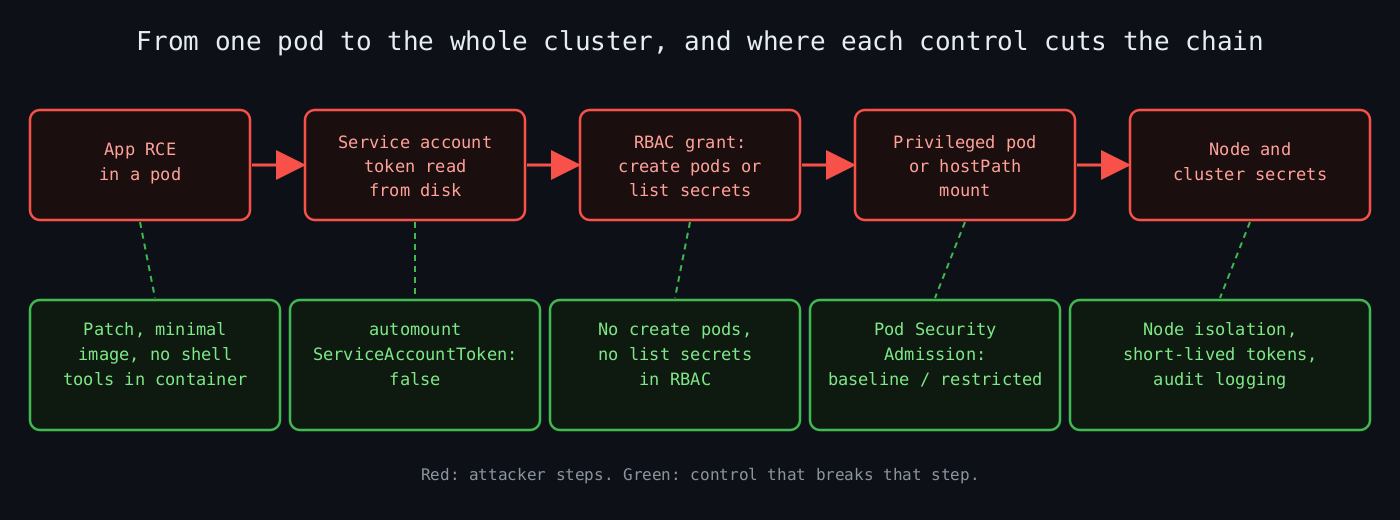
    Flowchart of the attack chain from an application bug in a pod through a service account token, an RBAC grant, a privileged pod and the node, with the control that breaks each step

    The diagram shows the chain an attacker follows from an application bug to the node, and the control that breaks each step.

    Every pod gets a service account, and unless you say otherwise, a projected token for it is mounted at /var/run/secrets/kubernetes.io/serviceaccount/token. Since 1.24 that token is short-lived and bound to the pod, which is better than the old never-expiring secrets. It still works against the API server for as long as the pod lives, and the attacker lives inside the pod.

    The first thing they run is the equivalent of this:

    kubectl auth can-i --list

    You should run it yourself, from the outside, impersonating the service account of each workload:

    kubectl auth can-i --list \
      --as=system:serviceaccount:shop:web \
      -n shop

    Most web apps need no Kubernetes API access at all. If the answer is anything beyond the default discovery permissions, ask why. Then turn the token off where it isn’t needed:

    apiVersion: v1
    kind: ServiceAccount
    metadata:
      name: web
      namespace: shop
    automountServiceAccountToken: false

    The usual cause is a token nobody asked for and a RoleBinding inherited from a copy-pasted Helm chart.

    RBAC verbs that are really something else

    RBAC is purely additive. There are no deny rules, so the only way to be safe is to grant less. The documented behaviour that matters most is that the API stops you from creating or editing a Role that grants permissions you don’t hold yourself, unless you have the escalate verb on roles. The same goes for bind on creating RoleBindings. Hand those two out and you’ve handed out cluster-admin with extra steps. impersonate is the third one to grep for.

    The quieter problems are verbs that look read-only or small:

    • get, list and watch on secrets all return the secret data. A role that can list secrets in a namespace can read every secret in it. This is the one people get wrong because list sounds harmless.
    • create on pods in a namespace is, in practice, access to every secret and service account in that namespace. The attacker creates a pod that mounts the secret or runs as the more privileged service account. The Kubernetes docs call this out under privilege escalation via workload creation.
    • create on pods/exec is a shell in any pod in scope.
    • Wildcards. resources: ["*"] and verbs: ["*"] also match resources that don’t exist yet, including whatever the next CRD you install adds.

    The group system:masters bypasses RBAC entirely, so a client certificate with that group in the subject can’t be restricted by anything you write in a Role. Don’t issue those, and don’t bind cluster-admin to system:authenticated. That binding makes every authenticated identity an admin.

    A sane namespaced role for a controller that only needs to read config looks like this:

    apiVersion: rbac.authorization.k8s.io/v1
    kind: Role
    metadata:
      name: read-config
      namespace: shop
    rules:
      - apiGroups: [""]
        resources: ["configmaps"]
        resourceNames: ["web-config"]
        verbs: ["get", "watch"]

    Note resourceNames. It narrows a grant to specific objects, and it works for get but not for list or create, since the name isn’t known at request time (with a list it only works if the request uses a field selector on metadata.name).

    Admission is the second lock

    RBAC decides whether you may create a pod. It says nothing about what the pod is allowed to contain. A pod with privileged: true, hostPID: true or a hostPath mount of / is a node compromise waiting for a trigger, and from the node the attacker can read the kubelet credentials and every other pod’s tokens on that host.

    That’s what admission controllers are for. Pod Security Admission has been built in since it went stable in 1.25, replacing PodSecurityPolicy, which was removed in that release. It defines three profiles, privileged, baseline and restricted, applied per namespace through labels, in three modes: enforce, audit and warn.

    kubectl label --overwrite ns shop \
      pod-security.kubernetes.io/enforce=restricted \
      pod-security.kubernetes.io/enforce-version=latest

    Before enforcing on a namespace that already has workloads, ask the API server what would break. The documented way is a server-side dry run:

    kubectl label --dry-run=server --overwrite ns --all \
      pod-security.kubernetes.io/enforce=baseline
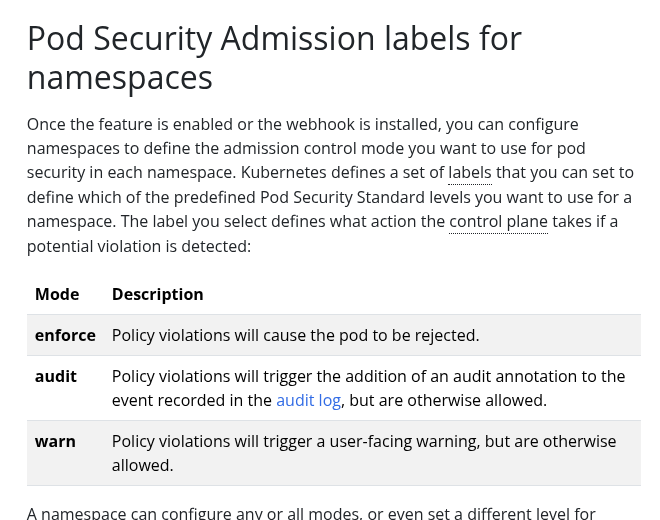
    Screenshot of the Kubernetes documentation page for Pod Security Admission labels, showing the enforce, audit and warn modes

    The screenshot is the real Kubernetes documentation page for the Pod Security Admission labels, listing what enforce, audit and warn each do.

    It returns warnings listing the pods that violate the profile. I roll out warn and audit first, fix what shows up, and only then flip to enforce. Going straight to enforce on a busy namespace breaks deploys at the worst moment.

    Baseline blocks the obvious things: privileged containers, host namespaces, hostPath volumes, most added capabilities. Restricted adds non-root, no privilege escalation, a seccomp profile and dropped capabilities. It breaks a lot of off-the-shelf images, which is a useful thing to find out early.

    When the built-in profiles aren’t enough

    Pod Security Admission is coarse on purpose. For rules like “images only from our registry” or “no hostNetwork unless labelled”, you need a policy engine. Kyverno and OPA Gatekeeper are the established options. Since 1.30 there is also ValidatingAdmissionPolicy, which is stable and runs CEL expressions inside the API server with no webhook to keep alive. A validating webhook that is down either blocks every deploy or, with failurePolicy: Ignore, silently stops protecting you.

    apiVersion: admissionregistration.k8s.io/v1
    kind: ValidatingAdmissionPolicy
    metadata:
      name: no-host-network
    spec:
      failurePolicy: Fail
      matchConstraints:
        resourceRules:
          - apiGroups: [""]
            apiVersions: ["v1"]
            operations: ["CREATE", "UPDATE"]
            resources: ["pods"]
      validations:
        - expression: "!has(object.spec.hostNetwork) || !object.spec.hostNetwork"
          message: "hostNetwork is not allowed"
    ---
    apiVersion: admissionregistration.k8s.io/v1
    kind: ValidatingAdmissionPolicyBinding
    metadata:
      name: no-host-network
    spec:
      policyName: no-host-network
      validationActions: ["Deny"]

    This matches pods directly. Deployments and Jobs create pods through their controllers, so the pod-level check still fires at that point, but the error shows up in the ReplicaSet events and not at kubectl apply, which confuses people the first time.

    A short audit I’d run this week

    Search every ClusterRoleBinding for subjects that are groups like system:authenticated or system:unauthenticated. List every Role and ClusterRole containing secrets with get, list or watch, plus escalate, bind, impersonate, pods/exec and *. Check each namespace for a pod-security.kubernetes.io/enforce label. Check which service accounts have a mounted token and no reason for one.

    None of this is clever. Each check removes a step from the chain in the diagram: app bug, token, a create-pods grant, a privileged pod, the node. Breaking one link stops the attacker at that point, and breaking several is cheap next to writing the incident report.
  • Container image hardening: minimal images, non-root, read-only filesystems

    Container image hardening: minimal images, non-root, read-only filesystems

    Most container images in production are a full Linux distribution with an application on top. A Debian or Ubuntu base, a package manager, a shell, curl, and an application running as root with a writable filesystem. It works, it’s easy to debug, and it hands an attacker who gets code execution everything they need for the next step.

    Hardening an image is a handful of small changes, each removing a capability the application never needed, and that an attacker would very much like to have. None of them are new, and every one of them gets skipped all the time.

    Start with less: minimal and distroless bases

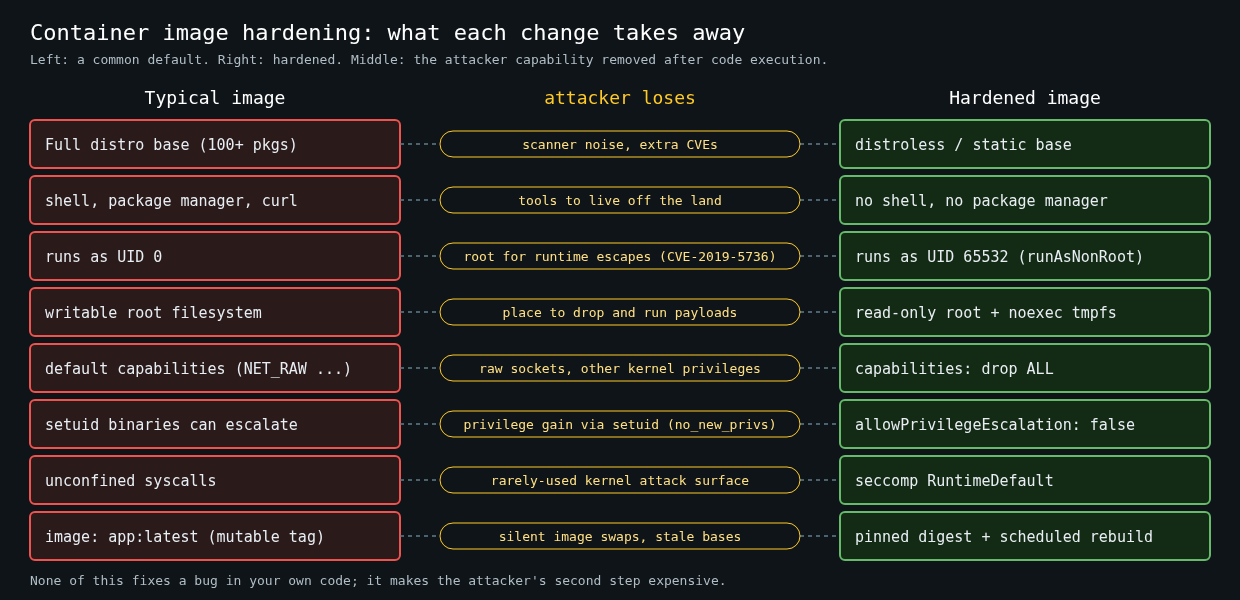
    Side-by-side comparison of a typical container image and a hardened one: distroless base, no shell, non-root UID 65532, read-only root with noexec tmpfs, all capabilities dropped, no privilege escalation, seccomp RuntimeDefault and pinned digests, with the attacker capability each change removes

    The fastest win is shipping fewer things. A typical debian or ubuntu base pulls in a hundred-odd packages, and your scanner will report CVEs against all of them, whether or not your app ever touches them. That noise has a real cost, which I covered in the vulnerability management series earlier this week. Every finding in a package you don’t use is triage time you’re not spending on one that matters.

    There are a few levels of minimal:

    • scratch is empty. Good for fully static binaries, like Go built with CGO_ENABLED=0. You have to bring your own CA certificates and timezone data if you need them.
    • Google’s distroless images contain the runtime pieces an app needs (libc, CA certs, tzdata, sometimes a language runtime) and no shell or package manager.
    • Wolfi-based images from Chainguard and minimal Alpine images sit somewhere in between, with a package manager available at build time.

    For a Go service, a multi-stage build onto distroless looks like this:

    FROM golang:1.25 AS build
    WORKDIR /src
    COPY go.mod go.sum ./
    RUN go mod download
    COPY . .
    RUN CGO_ENABLED=0 go build -trimpath -ldflags="-s -w" -o /out/app ./cmd/app
    
    FROM gcr.io/distroless/static-debian12:nonroot
    COPY --from=build /out/app /app
    USER 65532:65532
    ENTRYPOINT ["/app"]

    The compiler, the source and the module cache stay in the build stage. The final image is your binary plus a few megabytes of support files.

    The objection I always hear is debugging. “How do I exec into it without a shell?” On Kubernetes you don’t need to: an ephemeral debug container shares the target’s process namespace and brings its own tools.

    kubectl debug -it pod/payments-api-7d9f8c --image=busybox:1.36 --target=app

    That’s better than a shell baked into every image anyway, because the tools only exist while someone is actually debugging.

    Don’t run as root

    Containers running as UID 0 are the default, and it’s a bad default. Root inside a container isn’t the same as root on the host, since namespaces and dropped capabilities limit it, but it’s much closer than people assume, and it turns every container runtime bug into a bigger problem.

    CVE-2019-5736 is the classic example. A malicious process in a container could overwrite the host’s runc binary and get root on the host the next time runc ran. The exploit needed root inside the container. A container running as an unprivileged user wasn’t exploitable that way.

    Set the user in the image, with a numeric UID so Kubernetes can verify it:

    USER 65532:65532

    Then enforce it at the platform level so an image that forgets doesn’t get scheduled. In Kubernetes that’s runAsNonRoot: true in the security context, which makes the kubelet refuse to start a container whose user resolves to 0.

    If the app needs to bind to port 80 or 443, don’t give it root. Bind to 8080 and let the Service or the load balancer map the port, or add only NET_BIND_SERVICE.

    Make the root filesystem read-only

    An attacker with code execution usually wants to write something: a downloaded tool, a modified config, a web shell, a cron entry. A read-only root filesystem takes that away, and it catches a surprising number of bugs where an app was quietly writing logs or caches into its own image.

    Most apps need somewhere to write, usually /tmp or a cache directory. Give them exactly that as a tmpfs or an emptyDir volume and nothing else. With plain Docker:

    docker run --read-only \
      --tmpfs /tmp:rw,noexec,nosuid,size=64m \
      --cap-drop=ALL \
      --security-opt=no-new-privileges:true \
      --user 65532:65532 \
      registry.example.com/payments-api@sha256:<digest>

    The noexec on the tmpfs matters. A writable directory that can also execute binaries is half of what an attacker needed from a writable root.

    The Kubernetes security context

    All of this comes together in the pod spec. This is the block I start every deployment from:

    securityContext:
      runAsNonRoot: true
      runAsUser: 65532
      runAsGroup: 65532
      seccompProfile:
        type: RuntimeDefault
    containers:
      - name: app
        image: registry.example.com/payments-api@sha256:<digest>
        securityContext:
          allowPrivilegeEscalation: false
          readOnlyRootFilesystem: true
          capabilities:
            drop: ["ALL"]
        volumeMounts:
          - name: tmp
            mountPath: /tmp
    volumes:
      - name: tmp
        emptyDir:
          medium: Memory
          sizeLimit: 64Mi

    allowPrivilegeEscalation: false sets the kernel’s no_new_privs flag, so setuid binaries can’t raise privileges. Dropping all capabilities removes things like CAP_NET_RAW, which some runtimes still grant by default and which lets a process craft raw packets. RuntimeDefault seccomp blocks a set of syscalls that normal apps never make.

    Kubernetes Pod Security Admission’s restricted profile enforces most of this for you: non-root, no privilege escalation, all capabilities dropped and a seccomp profile. It doesn’t require a read-only root filesystem, so that one you have to enforce with your own policy (Kyverno, Gatekeeper or a ValidatingAdmissionPolicy). Turn restricted on in warn mode for a namespace first, see what breaks, and fix those workloads before switching to enforce.

    Pin what you ship, rebuild what you pin

    Reference images by digest in deployment manifests, not by tag. A tag is a mutable pointer, and :1.42.0 can be repushed. The digest is a hash of the content and can’t.

    Pinning has a cost, though. A pinned base image never gets its security fixes unless you rebuild. Pair digest pinning with an automated job that rebuilds images on a schedule against fresh bases and opens the PR to bump the digest. Pinning without rebuilding is how you end up running a two-year-old OpenSSL with perfect reproducibility.

    What this doesn’t fix

    None of this stops an exploit in your own code. A read-only, non-root, distroless container with a SQL injection bug still has a SQL injection bug, and the attacker still reaches whatever the app’s database credentials can reach. Container runtime escapes still happen too. CVE-2024-21626, the runc file descriptor leak fixed in runc 1.1.12, allowed escape through a crafted working directory, and the fix was patching runc, not anything in the image.

    What hardening does is make the second step expensive. The attacker lands with no shell, no package manager, no writable path that can execute, no root and no extra capabilities. I’ve read enough incident reports to know that “the attacker had a foothold but couldn’t do much with it” is one of the better sentences you can have in one.

  • Patronus dev log 2: Kubernetes, a React UI, and a Rust workspace that wouldn’t build

    Patronus dev log 2: Kubernetes, a React UI, and a Rust workspace that wouldn’t build

    Part 2 in the Patronus dev log series.

    Backdated, written in November 2026 from the git log and CI records. Part 1 covered October 8 to 11.

    October 12 to 14

    The run continues. A Kubernetes operator with a Helm chart and CRD generation (the log calls it Sprint 36 and 37), “Integration Testing & CI/CD Pipeline” as Sprint 39 (October 12), a project status document as Sprint 40, then a topology visualization, LZ4 compression for WAN links, a React dashboard hooked up to the Rust backend, and OpenTelemetry tracing on the 13th. One commit on the 14th, then nothing until December.

    In total, 98 commits in October 2025, and all 15 CI runs that month were skipped.

    December

    December has commits on four days. On the 12th: “Remove GitHub CI/CD configuration”. I moved off GitHub Actions to my own Forgejo, the same week I did it for Horcrux (part 2 of that series). Same reason as there: GitHub likes to block things, and the repo is still mirrored to GitHub.

    December 16: “fix: Complete Rust workspace compilation and dependency resolution”, 54 files. Its message lists missing workspace dependencies (uuid, sysinfo, reqwest, chrono), API breaks from base64, axum and sysinfo upgrades, netlink imports, missing nix features, an async recursion that needed Box::pin, “syntax errors in derive macros and missing brackets” and missing feature flags. The workspace claimed 19 crates and 45,000 lines on day one, and two months later it hadn’t compiled cleanly. That contradicts the “Complete Implementation” commit from part 1.

    December 17, “Comprehensive code review fixes and feature completions”: unwrap() calls replaced in backup and validation code, NaN-safe float comparisons in the detection modules, and “wire web handlers to actual sysinfo metrics (CPU, memory, disk, network)”. So until then the dashboard metrics weren’t coming from the machine. Also: alert conditions now checked against system metrics, CIDR matching for NetworkPolicy completed, and a hardcoded address removed from HA election.

    December 19 added flow tracking, an installer crate and eBPF/XDP enhancements. The repo then goes quiet until September 24, 2026, nine months.

    What I think of this period

    In those weeks the repo’s documents described a finished product, while the code still needed a compile fix, and then a review pass before the dashboard showed real numbers. The 15 skipped runs in October and 11 more in December mean CI never tested any of it.

    The commits from this period say what was done and never why, so I have no design decisions to report.

    Other parts: Part 1.