
Why most hunts go nowhere
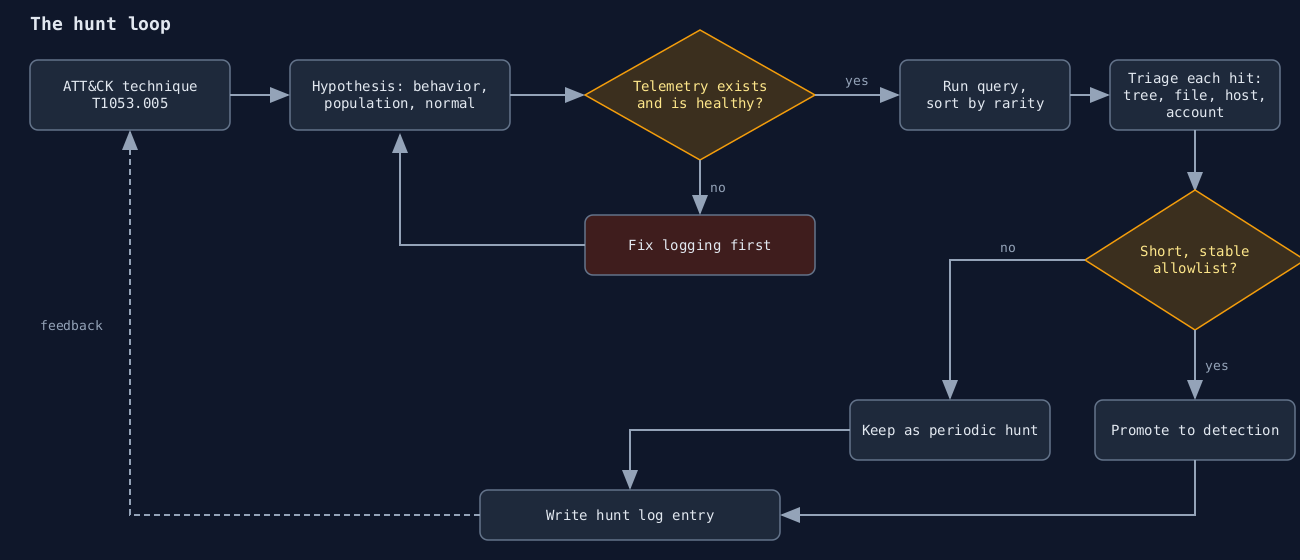
The hunt loop as a flowchart, drawn by me (not a screenshot).
The usual failed hunt starts with “let’s look for anything weird in the logs.” Three hours later someone has a pivot table of 40,000 rare process names, none of them malicious, and the hunt gets written up as “no findings.” That isn’t a hunt. It’s browsing.
A hunt is a falsifiable question about your own environment. “Has an attacker established persistence through scheduled tasks on a server that never creates them?” can be answered yes or no with data you already collect. MITRE ATT&CK is useful here for one reason: it gives you a catalog of behaviors to turn into those questions, so you don’t start from a blank page.
ATT&CK isn’t a detection strategy on its own. It’s a vocabulary, and the work is translating it.
Start from a technique, then add a constraint
Pick one technique and one place it would matter. Scheduled task persistence is T1053.005, and it’s a good teaching case because it is both common in real intrusions and common in legitimate software, which forces you to deal with noise.
The hypothesis needs three parts: the behavior, the population it applies to, and what normal looks like there. Mine:
“On our Windows servers, schtasks.exe creating a task that runs a binary from a user-writable path (Temp, ProgramData, Users\Public) is rare, and nearly all of it is explained by a short list of installers and management tools.”
That sentence tells you the telemetry (process creation with command lines), the filter (create plus a writable path), and the success condition (a short, explainable list). If the data comes back with 900 distinct parents, the hypothesis was wrong and you’ve learned something about your estate, which is a legitimate outcome.
Check that the data exists before you write the query
This is the step people skip. Process creation events with full command lines are Sysmon event ID 1, or Windows Security event 4688 with the “Include command line in process creation events” policy enabled. Without that policy 4688 records the image but not the arguments, and a hunt for /create flags is impossible. Scheduled task creation is also logged directly as Security event 4698, but only if the “Audit Other Object Access Events” subcategory is on, and many baselines leave it off.
Before hunting, count the events per host per day. A server that reports zero process events is not clean. It’s blind. I’ve seen hunts conclude “no activity” on a host where the agent had been dead for three weeks.
A first query
Here is the hypothesis as KQL against the Microsoft Defender for Endpoint DeviceProcessEvents table. The table and column names are real. Adapt the path list to your environment.
DeviceProcessEvents
| where Timestamp > ago(30d)
| where FileName =~ "schtasks.exe"
| where ProcessCommandLine has "/create"
| where ProcessCommandLine has_any (@"\Temp\", @"\ProgramData\", @"\Users\Public\", @"\AppData\")
| summarize runs = count(),
            hosts = dcount(DeviceName),
            first = min(Timestamp),
            last = max(Timestamp)
    by InitiatingProcessFileName, InitiatingProcessParentFileName
| order by hosts asc, runs asc
Sort ascending on hosts. The interesting rows are parents that appear on one or two machines, not the ones appearing on 300. A software deployment tool hits everything. An intruder hits what they can reach.
Then look at the rows that survive and read the actual command lines. Don’t trust the summary. A parent of cmd.exe launched from w3wp.exe on a web server is a very different story from cmd.exe launched by your patching agent, and both would collapse into the same “cmd.exe” row if you stopped at the first column.
Triage the results like an investigator
For each unexplained hit, answer four things and write them down:
- What launched it, and what launched that? Walk the process tree up at least two levels.
- What does the task execute, and does that file exist, and who wrote it?
- What else did that host do in the ten minutes around it: new services, new outbound connections, credential access?
- Is the account that did it one that ever does admin work?
Most hits will be benign, and that’s fine, as long as you record why. “Backup agent vendor X creates this task on install” becomes an allowlist entry with an owner and a date. Next quarter that entry is what keeps the hunt from re-triaging the same 30 rows.
Turn the hunt into a detection
A hunt that finds nothing still produced something: a query with a known false-positive profile. If the allowlist is short and stable, promote it into a scheduled detection. If it’s long and churns every month, don’t. Keep it as a periodic hunt, because an alert nobody trusts is worse than no alert (the previous posts on alert fatigue and Sigma rules cover that tradeoff).
Writing it up as Sigma makes the logic portable. The process_creation category and fields like Image and CommandLine are standard Sigma taxonomy:
title: Scheduled task created pointing at user-writable path
status: experimental
logsource:
  category: process_creation
  product: windows
detection:
  selection_img:
    Image|endswith: '\schtasks.exe'
    CommandLine|contains: '/create'
  selection_path:
    CommandLine|contains:
      - '\Temp\'
      - '\ProgramData\'
      - '\Users\Public\'
  condition: selection_img and selection_path
falsepositives:
  - Software installers and management agents (maintain an allowlist)
level: medium
tags:
  - attack.persistence
  - attack.t1053.005
Keep a hunt log
Each hunt gets a short record: hypothesis, ATT&CK ID, data source, date range, query, results, disposition, and what changed afterward (new detection, new logging, or nothing). It takes ten minutes and it’s the difference between a program and a series of afternoons. It also shows your coverage gaps. If you can’t write the data source line because the telemetry doesn’t exist, the first deliverable of that hunt is a logging change.
I’d rather run six well-scoped hunts a quarter than one sprawling exercise. Pick techniques that your actual intrusions or your peers’ public incident reports use, not the ones that look good on a heatmap. A fully green ATT&CK coverage matrix tells you which boxes someone ticked, and says nothing about whether the detections fire.
What this doesn't do
A hunt of this kind finds behavior that reuses a known technique through a known tool. It won’t find an operator who creates the task through the Task Scheduler COM API, never touching schtasks.exe, which is exactly what several public tools do. That’s why the next iteration of the hypothesis should target the outcome (a new task registered, event 4698 or the task XML files under C:\Windows\System32\Tasks) rather than one binary. Hunting the artifact rather than the tool is slower to write and survives much longer.