Run any site through a header scanner and you’ll get a letter grade and a list of a dozen headers you’re “missing”. Some of them matter a lot. Some do almost nothing in 2026. One of them, if you follow old advice, can make things slightly worse. Chasing the grade is how teams end up with a Content-Security-Policy that allows 'unsafe-inline' from * and a perfect score.
Here’s how I’d split them, roughly in the order I’d spend effort.
HSTS: cheap, high value, one sharp edge
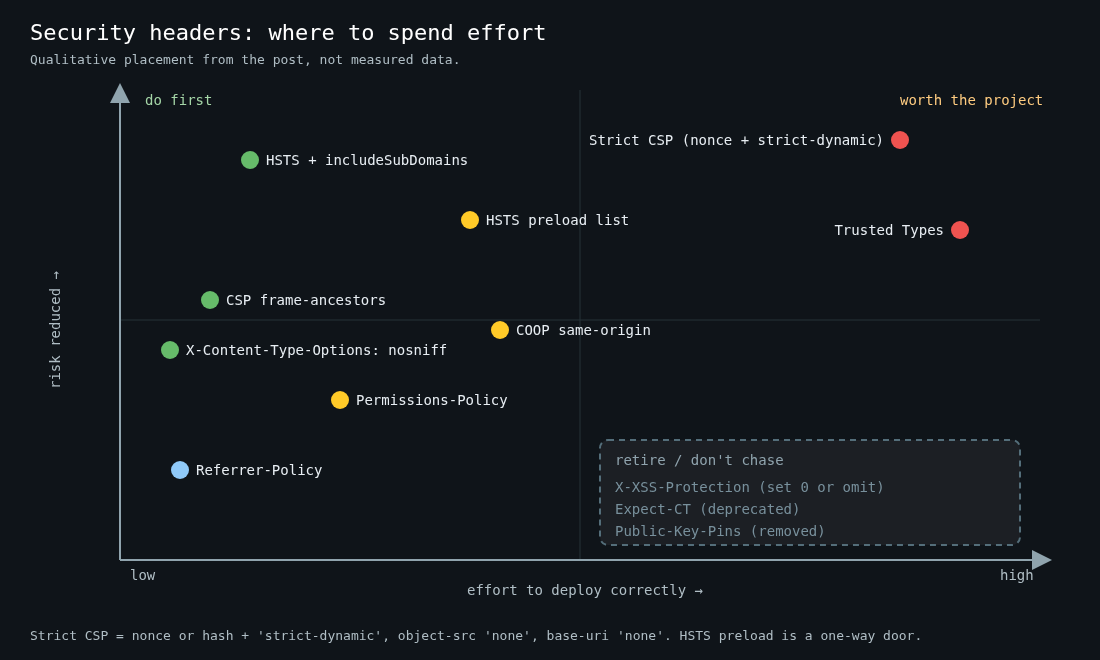
HTTP Strict Transport Security (RFC 6797) tells the browser to only talk to your host over HTTPS for a set period, and to refuse click-through on certificate errors. It closes the gap where a user types example.com, the first request goes out over plain HTTP, and someone on the coffee shop network rewrites the redirect. That’s the SSL stripping attack Moxie Marlinspike demonstrated back in 2009, and it still works against sites without HSTS.
Strict-Transport-Security: max-age=63072000; includeSubDomains; preloadThe sharp edge is includeSubDomains. It applies to every subdomain, including that old internal tool on legacy.example.com that only speaks HTTP. Roll it out with a short max-age first (say 300 seconds), confirm nothing broke, then go to a year or two.
The preload token only matters if you submit the domain to the browser preload list at hstspreload.org, which bakes it into Chrome, Firefox and Safari so even the very first visit is HTTPS. The list requires a max-age of at least a year, includeSubDomains and the preload token. Getting removed later takes months to reach users, so treat preload as a one-way door.
CSP: the one worth real effort
Content-Security-Policy is the only header on the list that meaningfully reduces the impact of cross-site scripting, which is still one of the most common web bugs. It’s also the one most often deployed in a form that does nothing.
The traditional approach was an allowlist of script sources: script-src 'self' https://cdn.example.com https://www.google-analytics.com. Research from Google (Weichselbaum et al., “CSP Is Dead, Long Live CSP!”, ACM CCS 2016) looked at real-world policies and found that around 95% of them could be bypassed, mostly because allowlisted domains hosted JSONP endpoints or old libraries an attacker could abuse. If you allow a large CDN, you allow every script on that CDN.
What works is a nonce-based strict policy (wrapped here for readability, it’s a single header line):
Content-Security-Policy:
  script-src 'nonce-r4nd0mB4se64' 'strict-dynamic' https: 'unsafe-inline';
  object-src 'none';
  base-uri 'none';
  frame-ancestors 'self';
  report-to csp-endpoint
The server generates a fresh random nonce per response and puts it on every legitimate script tag: <script nonce="r4nd0mB4se64">. Injected scripts don’t have the nonce, so they don’t run. 'strict-dynamic' lets scripts you trusted load further scripts, which is what makes this workable with modern bundlers and tag managers. The https: and 'unsafe-inline' entries look alarming, but they’re fallbacks for old browsers: any browser that understands nonces ignores 'unsafe-inline', and any browser that understands 'strict-dynamic' ignores host and scheme sources.
object-src 'none' kills plugin-based injection. base-uri 'none' stops an attacker injecting a <base> tag that silently re-points every relative script URL.
The hard part is the nonce. It has to be unpredictable and unique per response, which doesn’t play well with fully cached HTML. For static sites, hash-based CSP ('sha256-...' per inline script) is the alternative.
Roll it out with Content-Security-Policy-Report-Only first and collect reports for a few weeks. Expect noise from browser extensions injecting scripts. Filter on the source-file and blocked-uri fields before you panic.
If you want to go further, Trusted Types (require-trusted-types-for 'script') makes DOM XSS sinks like innerHTML refuse plain strings. Support started in Chromium-based browsers, so check where the other engines are before relying on it. It takes real refactoring, so I’d do it for high-value apps, not everywhere.
frame-ancestors, not X-Frame-Options
Clickjacking defence is easy. frame-ancestors 'none' (or 'self') in CSP says who’s allowed to frame your page. X-Frame-Options: DENY is the older equivalent and only supports DENY or SAMEORIGIN. Send both if you need to support very old browsers; modern ones use frame-ancestors when both are present.
The small ones that are still worth one line
X-Content-Type-Options: nosniff
Referrer-Policy: strict-origin-when-cross-origin
Permissions-Policy: camera=(), microphone=(), geolocation=(), payment=()
Cross-Origin-Opener-Policy: same-origin
nosniff stops browsers from guessing a response’s type, which matters when users can upload files you later serve. Without it, a “text file” containing HTML or script could be treated as such.
Referrer-Policy: strict-origin-when-cross-origin is already the default in current browsers. Set it explicitly anyway, especially if your URLs ever carry tokens or IDs. I’ve seen password reset tokens leak to third-party analytics through the Referer header more than once.
Permissions-Policy turns off powerful browser features your site doesn’t use, including for any iframes you embed. It’s cheap and it limits what a compromised third-party script can ask for.
Cross-Origin-Opener-Policy: same-origin puts your page in its own browsing context group, so a cross-origin window that opened you (or that you opened) can’t keep a handle to you. That blocks a family of cross-site leak attacks and is a prerequisite for cross-origin isolation. It can break OAuth and payment popups that rely on window.opener, so test those flows. same-origin-allow-popups is the usual compromise.
The ones to stop worrying about
X-XSS-Protection controlled a browser XSS filter that Chrome removed in 2019 and that no current major browser ships. The filter itself could be abused to leak information or selectively disable legitimate scripts. If you set it at all, set it to 0. Don’t set 1; mode=block because a scanner asked for it.
Expect-CT is obsolete. Certificate Transparency is enforced by browsers regardless, and the header is deprecated.
Public-Key-Pins (HPKP) is gone, and it was a footgun while it existed. Pin a key, lose the key, and your site is unreachable for returning visitors until the pin expires.
Setting them without surprises
Set headers in one place, at the edge or reverse proxy, so every response gets them. In nginx, two details catch people:
server {
    add_header Strict-Transport-Security "max-age=63072000; includeSubDomains" always;
    add_header X-Content-Type-Options "nosniff" always;
    add_header Referrer-Policy "strict-origin-when-cross-origin" always;

    location /api/ {
        # Any add_header here means NONE of the server-level ones are inherited.
        add_header Cache-Control "no-store" always;
        include /etc/nginx/snippets/security-headers.conf;
    }
}
Without always, nginx only adds the header to 2xx and 3xx responses, so your error pages ship without them. And add_header directives are inherited from the enclosing level only if the current level has none of its own. Add one header in a location block and you silently drop all the others there. Put the common set in a snippet and include it everywhere.
Then test what’s actually returned, from outside, on a few representative URLs including an error page:
curl -sI https://example.com/does-not-exist | grep -iE 'strict-transport|content-security|x-content-type|referrer|permissions'Headers are a defence-in-depth layer. A strict CSP won’t fix the XSS bug, but it often turns an exploitable one into a blocked one and a report in your inbox. That’s a good trade for a few lines of config and a nonce.