
Part 2 of 4 in the Authentication done right series. Part 1: Password storage in 2026.
In the first part of this series I covered how to store passwords so a database leak doesn’t hand attackers working credentials. This part assumes the password is already gone, because sooner or later it will be. Phished, reused, scraped off an infostealer log. The question is what your second factor does when someone is actively trying to get past it, and the honest answer for most deployed MFA is “less than you’d think”.
Not all second factors are the same control
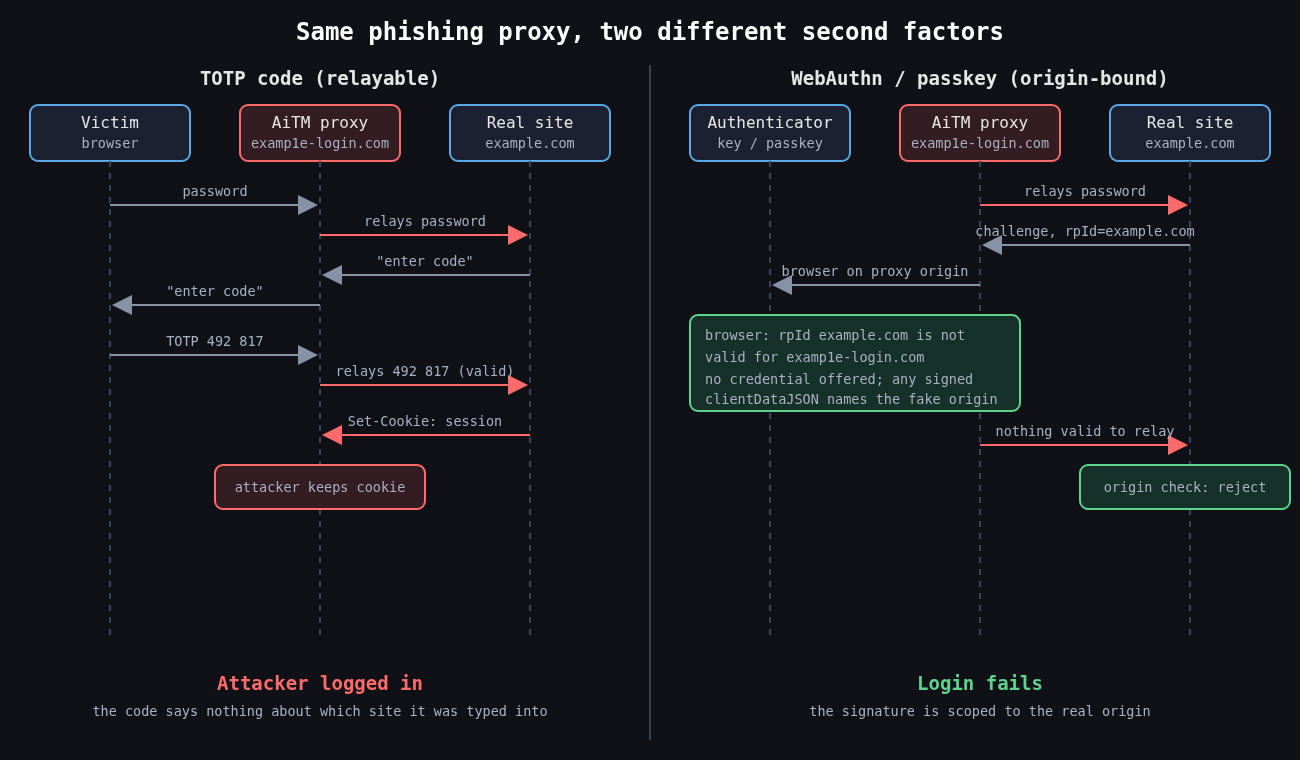
People talk about MFA as if it were one thing. In practice the methods fall into two groups. Shared secret and approval based factors (SMS codes, TOTP apps, push notifications) prove the user has a device, but the proof can be relayed by whoever the user is talking to. Public key factors bound to an origin (FIDO2/WebAuthn security keys and passkeys) produce proof that only works for the site that asked for it. That distinction is what CISA means by phishing resistant MFA in its 2022 guidance, and it’s what OMB memo M-22-09 required US federal agencies to adopt.
SMS is the weakest of the first group. SIM swaps and number porting fraud move the phone number to an attacker, and NIST SP 800-63B has long classed SMS and voice as a restricted authenticator. I’d still take SMS over no second factor, but I wouldn’t let it protect anything I cared about.
TOTP and the relay problem
TOTP (RFC 6238, built on HOTP from RFC 4226) derives a six digit code from a shared secret and the current 30 second time step. It’s offline, cheap and works everywhere. It also has nothing in it that identifies which website the user is typing it into.
That’s the whole weakness. An adversary-in-the-middle kit like Evilginx sits between the victim and the real login page as a reverse proxy. The victim sees what looks like the real site, types their password and their TOTP code, and the proxy forwards both in real time and keeps the resulting session cookie. The code was valid. It just went to the wrong party.
The 2022 “0ktapus” campaign worked this way at scale. SMS messages pointed employees of Twilio and many other companies to lookalike Okta pages that captured credentials and one time codes as they were typed. Cloudflare was targeted by the same campaign, and some of its employees did enter their credentials. The attack still failed there, because Cloudflare required FIDO2 hardware keys and the fake domain couldn’t get a valid assertion from them. Cloudflare’s own write-up of that incident is one of the clearest arguments for WebAuthn I know of.
If you do run TOTP, at least implement it properly. Accept a small clock skew window and reject codes that have already been used.
from datetime import datetime, timezone
import pyotp

def check_totp(user, code):
    totp = pyotp.TOTP(user.totp_secret)
    # accept the current step and one on either side for clock drift
    if not totp.verify(code, valid_window=1):
        return False
    step = totp.timecode(datetime.now(timezone.utc))
    if user.last_totp_step is not None and step <= user.last_totp_step:
        return False  # replayed code
    user.last_totp_step = step
    user.save()
    return True
Rate limit verification attempts too. A six digit code has a million values, which is not a lot if an endpoint lets someone try thousands of codes per account.
Push approval and MFA fatigue
Push MFA looked like an upgrade because the user doesn’t type anything. It created a different failure. If an attacker has the password, they can trigger approval prompts over and over until the user taps Approve to make it stop, or until someone calls pretending to be IT and asks them to accept.
That’s what happened at Uber in September 2022. According to Uber’s own statement, the attacker had a contractor’s password, sent repeated push requests, and the contractor eventually accepted one. Cisco’s breach that year, disclosed in August, combined voice phishing with the same kind of repeated push prompts. In both cases the MFA product behaved exactly as designed.
The fixes are real but partial. Number matching shows a code on the login screen that the user has to enter in the authenticator app, so a blind tap no longer works; Microsoft made it mandatory for Authenticator push in May 2023. Showing the location and application in the prompt helps a little. Limiting how many prompts can be sent per hour and alerting on bursts helps more. None of it stops a real-time phishing proxy, because the user is looking at a page that displays the number too.
Why WebAuthn is different
With WebAuthn, the browser builds a clientDataJSON structure that includes the challenge and the origin the user is actually on, and the authenticator signs it along with the relying party ID hash. Credentials are scoped to the relying party ID, so an authenticator won’t even offer a credential for example.com to a page on examp1e-login.com. There’s no code for the user to copy, so there is nothing to relay.
The server side still has to do its part. Every serious library makes you pass the expected origin and RP ID, and you should never loosen those to make a test environment work.
from webauthn import verify_authentication_response

verification = verify_authentication_response(
    credential=assertion_from_browser,
    expected_challenge=session.pop("webauthn_challenge"),
    expected_rp_id="example.com",
    expected_origin="https://example.com",
    credential_public_key=stored.public_key,
    credential_current_sign_count=stored.sign_count,
    require_user_verification=True,
)
stored.sign_count = verification.new_sign_count
The challenge must be random, single use and tied to the session that requested it. I’ve reviewed implementations that reused a static challenge, which turns a signature scheme back into something replayable.
Passkeys, synced and device bound
Passkeys are WebAuthn credentials, usually discoverable ones, and most are synced through a platform account such as iCloud Keychain or Google Password Manager. That’s great for adoption, because users who lose a phone don’t lose their credentials. It also means the security of the passkey now depends on the security of that cloud account and its recovery process.
For most consumer apps, synced passkeys are a large improvement over passwords plus TOTP. For administrators and production access I still want device bound credentials on hardware keys, and I want attestation checked so I know what kind of authenticator registered.
Recovery is part of your MFA
Attackers go where the controls are weakest, and that’s usually account recovery. A strong factor with a “lost your key? we’ll send an SMS” fallback is an SMS factor with extra steps. Help desk resets are the same problem with a human in the loop. The MGM Resorts intrusion in 2023 was widely reported to have started with a call to the help desk.
So register at least two strong authenticators per user, make recovery require something stronger than knowledge of public facts, and log and alert on every factor reset. Treat a new factor enrolled right after a password reset as a high priority event.
The next part moves from authenticating a person to delegating access between systems, which means OAuth 2.0, OpenID Connect and the token mistakes that come with them.
Other parts: Part 1: Password storage in 2026, Part 3: OAuth 2.0 vs OpenID Connect, Part 4: Session management.