Most local privilege escalation I run into on real systems isn’t a kernel exploit. It’s a configuration someone added three years ago to make a deploy script work, and nobody has looked at since. A binary with a stray setuid bit, a capability granted to an interpreter, a sudoers line with a wildcard in it. Each one is a perfectly legitimate way for an unprivileged user to become root, and the system is doing exactly what it was told.
This post is about auditing those three places and tightening them. It’s defensive: run these on boxes you own.
SUID and SGID binaries
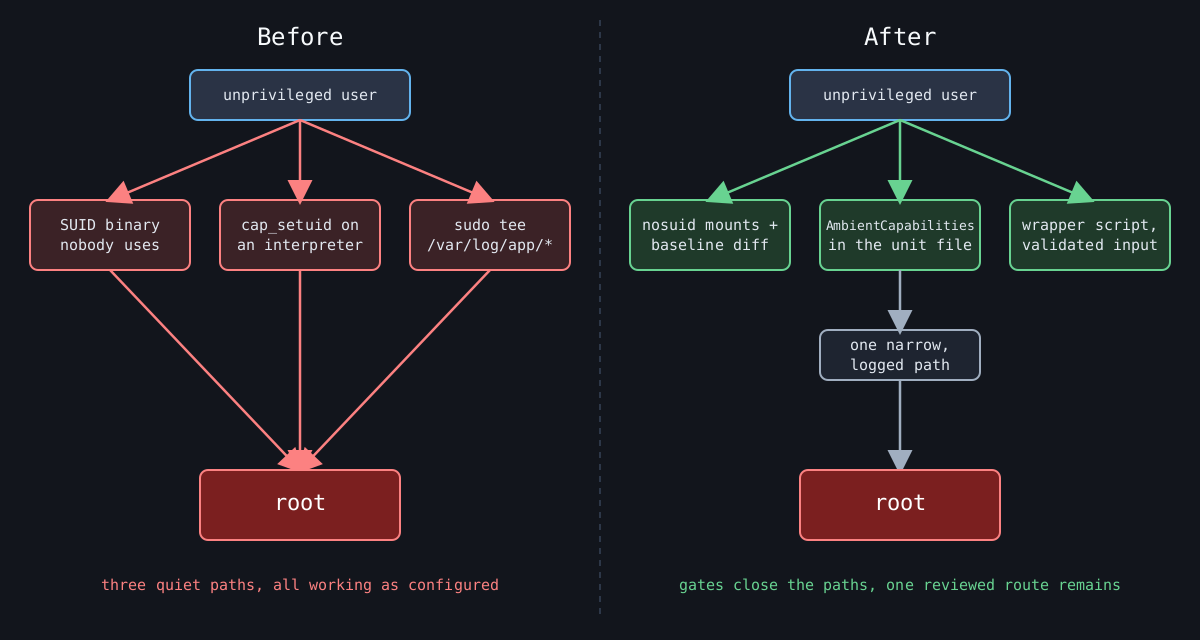
The diagram compares the three paths above before and after the controls described in this post.
A file with the setuid bit runs with the owner’s UID instead of the caller’s. That is how passwd can write to /etc/shadow. It also means every bug in that binary is a root bug, and the bug can be reached by any user who can execute it, through arguments, environment variables, and files it opens.
The history is bad. CVE-2021-4034 (PwnKit) was an out-of-bounds read and write in pkexec, a SUID-root binary shipped on essentially every mainstream distribution, and it sat there for about twelve years. CVE-2023-4911 (Looney Tunables) was a buffer overflow in glibc’s dynamic loader, triggered through the GLIBC_TUNABLES environment variable, which made every SUID binary on affected systems a way in. Neither needed a misconfiguration. The attack surface was just there.
So the first job is an inventory, and a diff against it over time:
find / -xdev -perm -4000 -type f 2>/dev/null | sort > suid.now
find / -xdev -perm -2000 -type f 2>/dev/null | sort > sgid.now
diff suid.baseline suid.now
On a stock Ubuntu 24.04 container image the SUID list is short: chfn, chsh, gpasswd, mount, newgrp, passwd, su, umount. A full server install has more. Anything that isn’t in your baseline needs an owner and a reason.
Three habits remove most of the risk. Mount /tmp, /var/tmp, /home and /dev/shm with nosuid,nodev, so a SUID file dropped by an attacker or a user is inert there. Remove the bit from binaries you don’t use (chfn and chsh are good candidates on a server with no local logins). And alert on new SUID files at creation time. With auditd, a rule on the chmod family catches the bit being set (04000 is 0x800):
-a always,exit -F arch=b64 -S chmod,fchmod -F a1&0x800 -F auid>=1000 -F auid!=unset -k suid_set
-a always,exit -F arch=b64 -S fchmodat -F a2&0x800 -F auid>=1000 -F auid!=unset -k suid_set
That doesn’t catch a SUID file arriving inside a tarball extracted as root, so the periodic find-and-diff stays.
File capabilities
Capabilities split root into pieces, which sounds like a safe improvement. In practice, some of those pieces are root under another name. CAP_SETUID lets a process become any UID, including 0. CAP_DAC_READ_SEARCH bypasses file read permission checks, so it reads /etc/shadow and SSH host keys. CAP_SYS_ADMIN is so broad that the capabilities man page itself describes it as overloaded. CAP_SYS_PTRACE lets you inject into other processes.
The classic mistake is giving a capability to something that can run arbitrary code. I reproduced it in a throwaway container for this post: copy the Python interpreter, give it cap_setuid, and an ordinary user can become root.
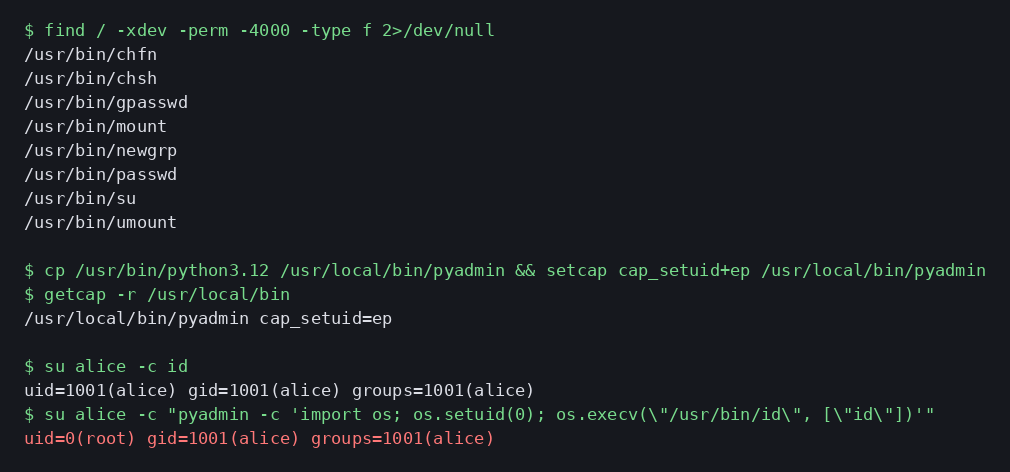
The screenshot is a real run in a disposable Ubuntu 24.04 container, with the output rendered to an image. The user alice has UID 1001 until she calls os.setuid(0) through the capable interpreter. Nothing in that sequence is a vulnerability. The capability does what it says.
To find these on a host:
getcap -r / 2>/dev/nullExpect a few legitimate entries, for example cap_net_bind_service on a web server binary or cap_net_raw on ping on distributions that use capabilities instead of SUID for it. Any capability on a shell, an interpreter, find, tar, cp, vim or an editor is a finding. Check these against GTFOBins, which lists which common binaries turn each capability into a shell or a file write.
For services, don’t set file capabilities at all. Use AmbientCapabilities=CAP_NET_BIND_SERVICE and CapabilityBoundingSet= in the unit file, which scopes the grant to that service and leaves no tagged binary on disk for someone else to execute. I covered the systemd side in the sandboxing post earlier in this blog.
Sudo rules
Sudo is where I find the most variety. The pattern is always the same: a rule meant to allow one narrow action that allows a general one instead.
Anything that can spawn a shell or write arbitrary files is root. NOPASSWD: /usr/bin/vim, less, find, awk, tar, git, man, any interpreter. A user runs the allowed program, then escapes to a shell from inside it, and the shell keeps root. The NOEXEC tag blocks some of these by intercepting execve through LD_PRELOAD, but the sudoers manual is clear that it’s not a defence against a determined user, so I don’t count on it.
Wildcards are the other classic. In sudoers, * matches any characters including slashes and spaces. This rule looks like it restricts writes to a log directory:
deploy ALL=(root) NOPASSWD: /usr/bin/tee /var/log/app/*It allows sudo tee /var/log/app/../../../etc/sudoers.d/x, and it allows extra arguments after the first path, so a second file can be named too. The fix is a wrapper script that validates its input, or better, a design that doesn’t need root for it, like a group-writable log directory.
Sudo itself has had its moments. CVE-2021-3156 (Baron Samedit) was a heap overflow in sudo’s argument handling, exploitable by any local user without being in sudoers, affecting 1.8.2 through 1.8.31p2 and 1.9.0 through 1.9.5p1. CVE-2023-22809 let a user with sudoedit access edit extra files by smuggling them into the EDITOR variable after a --. Keeping sudo patched matters, and so does keeping the number of people with sudo rights small, because those bugs are only reachable by whoever can run it.
Audit with these:
sudo -l -U deploy
grep -rEn 'NOPASSWD|\*|!|env_keep|SETENV' /etc/sudoers /etc/sudoers.d/
visudo -c
Things I’d rather see in a sudoers file: full paths only, sudoedit instead of a bare editor, no SETENV tag, Defaults use_pty and Defaults logfile= or shipped logs, and a Cmnd_Alias per task so a review can read intent. If a rule needs a wildcard, treat it as code and review it like code.
Making it stick
A one-time cleanup decays in a quarter. What has worked for me is boring: put the SUID and capability baselines into configuration management so the expected state is declared, run the find and getcap diffs on a schedule, and ship sudo’s logs and the auditd suid_set key to wherever you already alert. Lynis and OpenSCAP both check parts of this if you’d rather start from a tool than from scripts. Tools like linPEAS are worth running against your own hosts once, because they show you the same list an attacker’s first script sees.
The rule I apply to every entry on these three lists is the same one: if you can’t say who needs it and why, it goes.