
Every npm install or pip install is a decision to run someone else’s code with your build’s permissions. Most of the time that’s a good trade. The attacks I want to cover here don’t exploit a bug in your code at all. They exploit how package managers decide which package to fetch, and how little most organisations know about where their artifacts came from.
Typosquatting is boring and still works
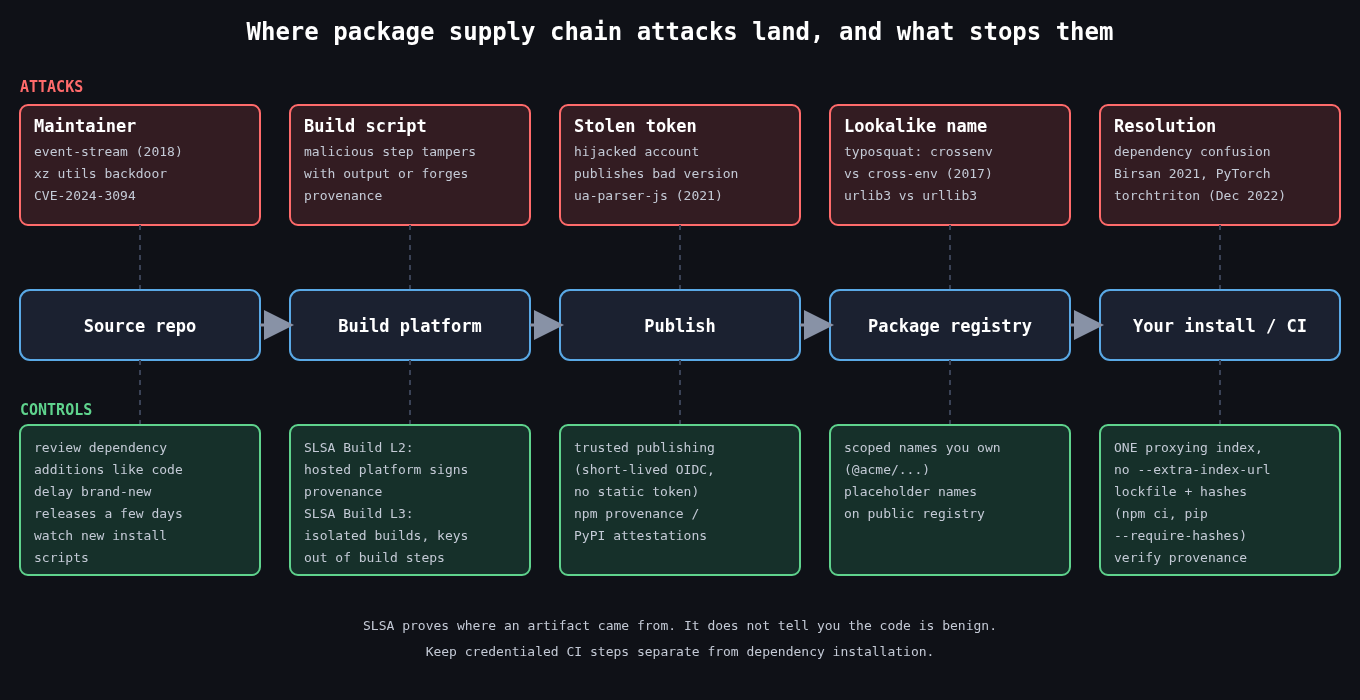
The oldest trick is publishing a package with a name one keystroke away from a popular one. In 2017 an npm package called crossenv (the real one is cross-env) copied the legitimate package’s behaviour and also sent the contents of the environment to a remote server. Environment variables on a CI runner are often the most valuable thing on the box: registry tokens, cloud credentials, signing keys. The same year Slovakia’s national security authority reported a batch of typosquats on PyPI with names like urlib3, and PyPI has been removing waves of them ever since.
The registry operators catch a lot of these now, but not before someone installs them. The defences on your side are unglamorous. Don’t let people add dependencies by typing names into a terminal on a machine that holds credentials. Review dependency additions in pull requests the same way you review code, and look at the package’s age, download count and repository link before approving it. A two week old package with a name almost matching a library with millions of weekly downloads should not get through review.
Dependency confusion
Alex Birsan’s February 2021 research turned a quirk of package resolution into a way to run code inside Apple, Microsoft, PayPal and over thirty other companies, earning more than $130,000 in bug bounties. The idea is simple. Companies use internal package names that never exist on the public registry. Those names leak through public manifests, JavaScript bundles and error messages. If an attacker publishes a public package with the same name and a higher version number, many resolvers happily prefer it.
The classic pip mistake looks like this:
pip install --index-url https://pypi.internal.example/simple \
            --extra-index-url https://pypi.org/simple \
            acme-billing-utils
--extra-index-url doesn’t mean “fall back to PyPI if the internal index doesn’t have it”. pip collects candidates from every index and picks the best version across all of them. If someone publishes acme-billing-utils 99.0.0 on PyPI, that’s what gets installed.
This wasn’t a one-off. In December 2022 the PyTorch project disclosed that its nightly builds installed between December 25 and 30 had pulled a malicious torchtriton package from PyPI, because the legitimate one lived on PyTorch’s own index and PyPI took precedence. The malicious version collected system information and files from the machines that installed it.
The structural fix is to have exactly one place your builds resolve from. Run a proxying repository (Artifactory, Nexus, a pull-through cache) that serves internal packages and mirrors public ones, and configure it so an internal name can never be satisfied from upstream. For npm, put internal packages under a scope you own and pin that scope to your registry:
# .npmrc
@acme:registry=https://npm.internal.example/
registry=https://registry.npmjs.org/
Registering your internal names (or scope) on the public registry as empty placeholders is a reasonable extra layer, but I wouldn’t rely on it alone.
Lockfiles and hashes
A lockfile pins exact versions, and the integrity hashes in it pin exact bytes. That turns “install whatever matches ^4.2” into “install this tarball and fail if it’s different”. Use npm ci rather than npm install in CI, since ci refuses to proceed if package-lock.json and package.json disagree. For Python, pip’s hash checking mode does the same thing:
pip install --require-hashes -r requirements.txtwith each line carrying --hash=sha256:..., which tools like pip-compile --generate-hashes produce. Hashes don’t protect you on the day you add or upgrade a dependency. They do stop a later build from silently picking up something different.
Compromised maintainers
Some attacks don’t need a lookalike name. In 2018 the maintainer of event-stream handed the project to a volunteer, who added a dependency called flatmap-stream carrying code aimed at stealing from a specific cryptocurrency wallet app. In October 2021 the npm account behind ua-parser-js was hijacked and versions shipping a cryptominer and credential stealer were published. And in 2024, CVE-2024-3094 showed a backdoor in xz utils that had been inserted after a multi-year effort to gain maintainer trust, caught largely because one engineer noticed SSH logins getting slower.
Nothing on the consumer side fully prevents this, but you can shrink the window. Delay adopting brand new versions by a few days unless they fix something you need, because most malicious releases are spotted and pulled quickly. Watch for install scripts (preinstall, postinstall) appearing in packages that never had them, and consider npm config set ignore-scripts true for builds that don’t need them.
What SLSA requires
SLSA (Supply-chain Levels for Software Artifacts) is easy to misread as a scanning standard. It’s not. Version 1.0’s Build track is about provenance: a verifiable statement of which source, which build platform and which process produced an artifact.
The levels build on each other. Build L1 means provenance exists and describes how the artifact was built. Build L2 means the build ran on a hosted platform that generates and signs that provenance itself, so a developer laptop can’t produce it. Build L3 means the platform is hardened: builds are isolated from each other, and the signing material is out of reach of the user-defined build steps, so even a malicious build script can’t forge provenance.
What SLSA does not do is tell you whether a dependency is trustworthy. It lets a consumer check that a package came from the repository and workflow it claims to, which is exactly what you want to know after an account takeover. On the publishing side, PyPI’s Trusted Publishing and npm’s provenance support both bind packages to a specific CI workflow using short lived OIDC credentials instead of long lived API tokens. On the consuming side you verify:
npm audit signatures

slsa-verifier verify-artifact ./mytool-linux-amd64 \
  --provenance-path ./mytool-linux-amd64.intoto.jsonl \
  --source-uri github.com/example/mytool \
  --source-tag v1.4.2
I’d prioritise it this way. Get to one resolution source and committed lockfiles with hashes first, because that kills dependency confusion and drift. Move your own publishing to trusted publishing so there’s no static token to steal. Then start verifying provenance for the dependencies that matter most, beginning with anything that runs in your build or release pipeline.
The part people skip
Your build environment is part of the supply chain. A CI job that installs packages while holding production deploy credentials gives every one of those packages production access. Split dependency installation from credentialed steps where you can, give build jobs only the secrets they need, and treat a compromised dependency the same as a compromised server: rotate what it could reach, don’t just bump the version.