Part 2 of 3 in the Surviving ransomware series. Part 1: Backups an attacker can’t delete.
When NotPetya hit in June 2017, it didn’t need anyone to click anything after the first infection. It spread across networks on its own, using the EternalBlue exploit for SMBv1 (MS17-010) and credentials harvested from memory on machines it had already reached, then running itself remotely with legitimate Windows tools. Maersk lost tens of thousands of machines in a few hours. The White House later put the total global damage at more than $10 billion.
What made it so destructive wasn’t novel malware engineering. It was flat networks and shared credentials. Every compromised machine could reach thousands of others, and many of them would accept the same admin password.
Part 1 of this series covered backups an attacker can’t delete. This part is about making the attacker’s path to those backups, and to everything else, as short and noisy as possible.
Two kinds of segmentation
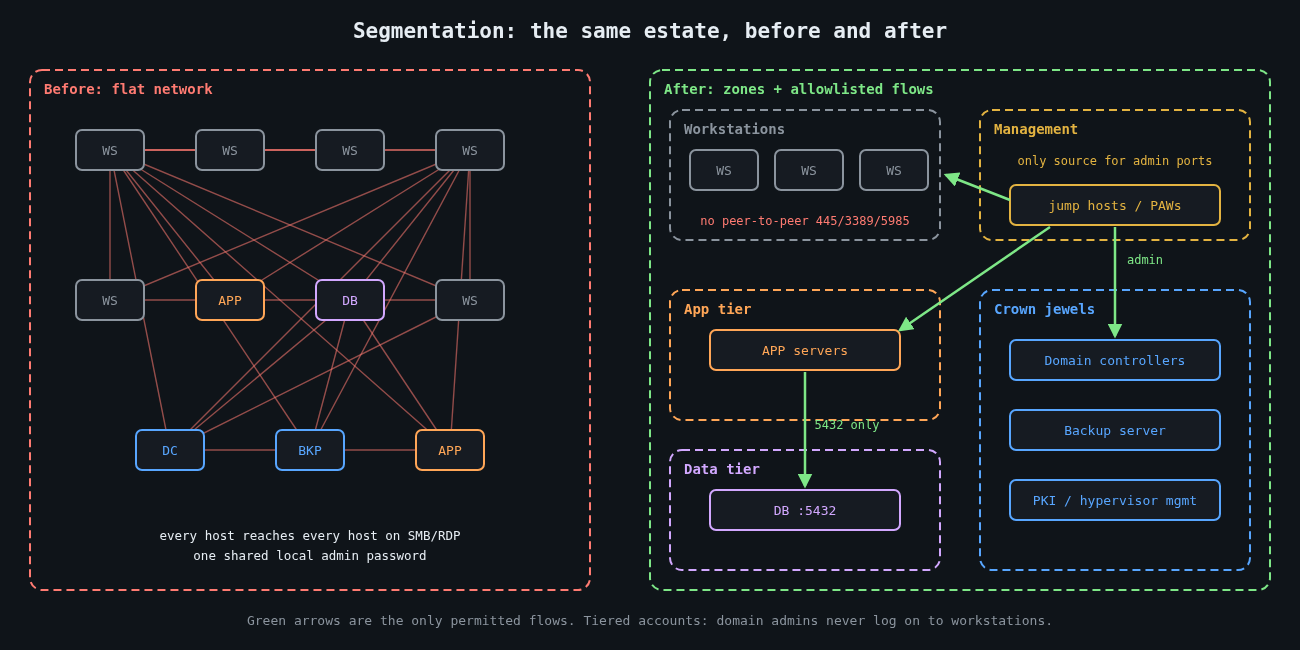
Most people think of segmentation as VLANs and firewalls. That’s half of it. The other half is identity segmentation: which credentials exist on which machines. An attacker moves laterally by combining reachability (can I connect to that host?) with authority (do I have a credential it accepts?). Take away either one and the move fails.
Network segmentation limits reachability. Identity segmentation limits the value of whatever credentials an attacker steals. You need both, and the identity half is usually cheaper.
Workstations shouldn’t talk to each other
In most offices there’s no business reason for one laptop to open an SMB, RDP or WinRM connection to another laptop. Yet in a default Windows domain with file sharing enabled, that’s exactly what’s allowed, and it’s how a single phished laptop becomes fifty.
Block it. Inbound SMB (445), RDP (3389) and WinRM (5985 and 5986) on workstations should only be accepted from a small management subnet where your admin jump hosts and management tools live. In Group Policy you’d scope the inbound firewall rules to that subnet. The PowerShell equivalent on a single machine shows the idea:
# Allow inbound SMB, RDP and WinRM only from the management subnet
$mgmt = "10.20.0.0/24"
Get-NetFirewallRule -DisplayGroup "File and Printer Sharing",
                                  "Remote Desktop",
                                  "Windows Remote Management" |
  Where-Object { $_.Direction -eq "Inbound" -and $_.Enabled -eq "True" } |
  Set-NetFirewallRule -RemoteAddress $mgmt
Then check it from an ordinary workstation, not from the admin network:
Test-NetConnection -ComputerName ws-0142 -Port 445
# TcpTestSucceeded : False   <- what you want to see
I’ve watched this single change turn a domain-wide incident into a handful of machines. It’s dull, it’s cheap, and it breaks almost nothing.
Servers get allowlists, not blocklists
Servers are harder because they do need to talk to each other, just not to everything. Start from observed flows. VPC flow logs, NetFlow from your switches, or a few weeks of host firewall logging will show you what actually connects to what. Then write rules that permit those flows and drop the rest.
On a Linux database server, the host firewall alone can enforce most of it:
# /etc/nftables.conf (excerpt)
table inet filter {
  chain input {
    type filter hook input priority 0; policy drop;
    ct state established,related accept
    iif "lo" accept
    ip saddr 10.20.0.0/24 tcp dport 22 accept     # admin jump hosts only
    ip saddr 10.30.1.0/24 tcp dport 5432 accept   # application tier only
    icmp type echo-request limit rate 5/second accept
  }
}
Host firewalls and network firewalls complement each other. The network layer protects you when a host is misconfigured, and the host layer protects you from the neighbour in the same VLAN. Microsegmentation products automate this at scale, but the principle doesn’t need a product.
Tier your admin accounts
Microsoft’s tiering guidance, now folded into its enterprise access model, boils down to one rule: a credential that controls a high-value system must never be typed into, or cached on, a lower-value system. Domain admin accounts don’t log on to workstations. Server admin accounts don’t log on to workstations either. Help desk accounts that do manage workstations have no rights on servers.
When an attacker dumps credentials from a compromised laptop, tiering decides what they find. With it, they get the laptop user and maybe a workstation-admin account. Without it, they often get domain admin, because someone remoted in to fix a printer driver last month.
The supporting controls are well documented and mostly free:
- Windows LAPS, built into Windows since the April 2023 updates, gives every machine a unique, rotated local administrator password, which kills the “same local admin password everywhere” path NotPetya-style tools rely on.
- The Protected Users group stops its members’ credentials from being cached in ways that are easy to steal, and blocks NTLM authentication for them.
- Credential Guard isolates secrets in virtualisation-based security so that memory scraping on the endpoint returns far less.
- Restricting or auditing NTLM reduces relay and pass-the-hash opportunities. Start in audit mode, because something old in your environment will depend on it.
Admins work from dedicated privileged access workstations or jump hosts in the management subnet. That’s what makes the firewall scoping above workable.
Put the crown jewels behind their own door
Some systems deserve their own zone with its own entry controls: domain controllers, backup infrastructure, hypervisor management, PKI, and identity providers. As covered in part 1, the backup server in particular shouldn’t be reachable from general server networks, and shouldn’t trust the production domain.
The test I use is simple. Pick a random workstation and a random application server, assume both are fully compromised, and ask how many hops it takes to reach a domain controller or the backup console. If the answer is “one” or “it’s in the same VLAN”, that’s your next project.
See the east-west traffic
Segmentation also makes detection easier, because it creates boundaries where unusual traffic stands out. A workstation attempting SMB connections to forty other workstations in five minutes should alert. So should a service account authenticating to hosts it has never touched before, or remote service creation (Windows event 7045) on machines where nobody deploys software that way. Firewall drop logs between zones are a gift here: once the rules are tight, almost every drop is worth a look.
Expect it to be incremental
Nobody segments a flat network in a quarter. Start with the workstation peer-to-peer block and LAPS, which together cover a huge share of real-world spread. Then tier the admin accounts, then wall off the crown jewels, then work through server allowlists one application at a time.
Even perfect segmentation won’t stop every incident. It buys time and turns a company-wide outage into a contained one, which matters a great deal when you get to part 3: actually restoring what was hit, and finding out how long that really takes.
Other parts: Part 1: Backups an attacker can’t delete. Part 3: Restore testing and your real recovery time.