
Most cloud breaches I’ve read about didn’t need a zero-day in the cloud provider. They needed a storage bucket that was readable by the world, or a role that could do far more than its job required, or both. The provider did exactly what it was told. The configuration told it the wrong thing.
The Capital One breach in 2019 is still the best case study I know, because it shows how a small flaw in one place becomes a large one when identity permissions are too broad.
What happened at Capital One
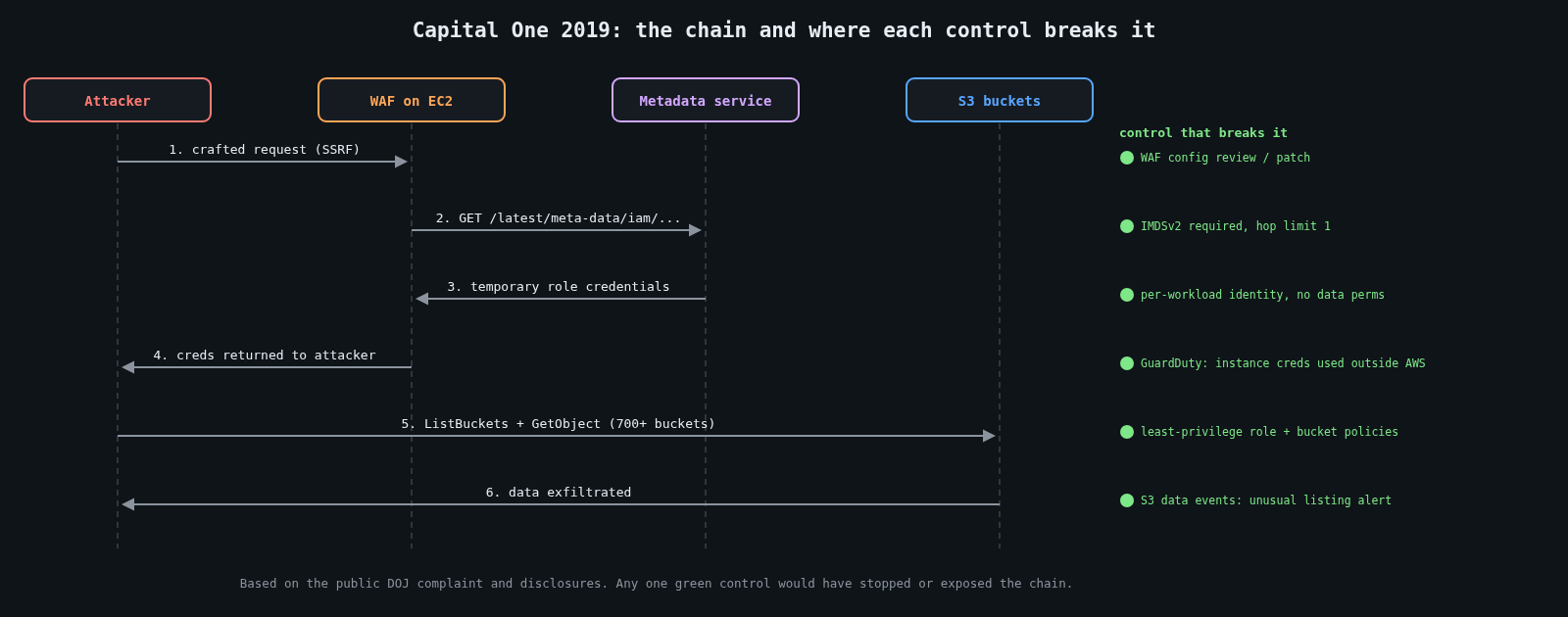
The public record, from the US Department of Justice’s case and the bank’s own disclosures, goes roughly like this. Capital One ran a web application firewall on EC2 in front of some of its applications. That WAF was misconfigured in a way that let an outside attacker make it send requests on their behalf, a server-side request forgery (SSRF).
From the EC2 instance, the attacker requested the instance metadata service at 169.254.169.254. At the time, that service answered any plain HTTP GET from the instance, including the temporary credentials for the IAM role attached to it. So the SSRF returned working AWS credentials.
The role attached to the WAF instance could list and read a large number of S3 buckets, more than 700 according to the criminal complaint, which held credit card application data. The data of about 100 million people in the US and 6 million in Canada was taken. The OCC fined Capital One $80 million in 2020, and the attacker was convicted in 2022.
Notice that no single control failed catastrophically. A WAF had a configuration bug. The metadata service behaved as designed. A role had permissions that were convenient. The breach was the product of all three.
Fix the metadata path first
AWS introduced IMDSv2 in November 2019, a few months after the breach became public. It requires a session token obtained with a PUT request carrying a custom header, and by default it won’t answer requests that have passed through too many network hops. Most SSRF bugs can only make simple GET requests, so IMDSv2 breaks the exact path used at Capital One.
Make it mandatory, not optional. For existing instances:
aws ec2 modify-instance-metadata-options \
  --instance-id i-0123456789abcdef0 \
  --http-tokens required \
  --http-put-response-hop-limit 1
Then stop new instances from launching without it. A service control policy at the organisation level does that for every account:
{
  "Version": "2012-10-17",
  "Statement": [
    {
      "Sid": "RequireIMDSv2",
      "Effect": "Deny",
      "Action": "ec2:RunInstances",
      "Resource": "arn:aws:ec2:*:*:instance/*",
      "Condition": {
        "StringNotEquals": { "ec2:MetadataHttpTokens": "required" }
      }
    }
  ]
}
Containers have the same problem one layer down. A pod on a node that can reach the node’s metadata endpoint can borrow the node’s role. Use per-workload identities (IRSA or EKS Pod Identity on AWS, Workload Identity on GCP and Azure) and keep the hop limit at 1 so containers can’t reach node credentials.
Make roles boring and narrow
The WAF needed, at most, to write its own logs. It didn’t need to read customer data. Broad roles usually happen for understandable reasons: someone was in a hurry, a wildcard made the error go away, and nobody revisited it.
{
  "Effect": "Allow",
  "Action": "s3:*",
  "Resource": "*"
}
That statement is a bug report waiting to be written. A role for a component should name the actions and resources it actually uses:
{
  "Effect": "Allow",
  "Action": ["s3:PutObject"],
  "Resource": "arn:aws:s3:::example-waf-logs/waf/*"
}
Writing these by hand is tedious, so use the tools built for it. IAM Access Analyzer can generate a policy from the role’s real activity in CloudTrail, and the “last accessed” data shows which granted services a role has never touched. Start broad in development if you must, then generate the narrow policy from observed use before production.
Two more patterns keep blast radius small. Put sensitive data in separate accounts from internet-facing workloads, because cross-account access must be granted explicitly on both sides. And add resource policies on the most sensitive buckets that deny access from anything outside your expected principals or network paths, using conditions such as aws:PrincipalOrgID or aws:SourceVpce. Even if a role is over-granted, the bucket says no.
Public buckets: turn the default on everywhere
Accidentally public buckets have exposed voter rolls, military files and plenty of corporate backups over the years. The fix is now mostly a setting. S3 Block Public Access overrides any ACL or bucket policy that would make data public, and since April 2023 AWS enables it, with ACLs disabled, on all new buckets by default. Buckets created before that keep whatever they had, so set it at the account level too:
aws s3control put-public-access-block \
  --account-id 111122223333 \
  --public-access-block-configuration \
  BlockPublicAcls=true,IgnorePublicAcls=true,BlockPublicPolicy=true,RestrictPublicBuckets=true
If something genuinely needs to be public, like static website assets, serve it through a CDN with origin access control from a bucket that stays private, or put it in a dedicated account where public is the expected state and nothing sensitive lives.
Other clouds have equivalents: public access prevention on Google Cloud Storage and disabling anonymous blob access on Azure storage accounts. Same idea, different flag.
Detect what you can’t prevent
Prevention won’t be perfect, so watch for the signs. GuardDuty flags EC2 instance credentials being used from outside AWS, which is the signature of stolen metadata credentials. CloudTrail data events for S3 on sensitive buckets will show a role suddenly listing hundreds of buckets it normally never touches. That pattern was visible in the Capital One case, and it’s a detection worth writing. AWS Config rules or a CSPM tool can continuously report public buckets, roles with wildcard actions, and instances without IMDSv2.
A quick audit you can run this week
Find every role with * in its actions or resources, and work through them starting with roles attached to internet-facing compute. Check that IMDSv2 is required across all instances and launch templates. Confirm account-level Block Public Access everywhere. Pick your three most sensitive buckets and read their access logs for a week.
None of this is exotic. Capital One had a large, capable security team, and the breach still came down to a convenient role and a metadata endpoint that answered too easily. Most of us are working with less, which is all the more reason to make the defaults strict.
Leave a Reply
You must be logged in to post a comment.