Category: Security

  • SBOMs: what they’re actually good for

    SBOMs: what they’re actually good for

    Part 2 of 3 in the Vulnerability management that works series. Part 1: Prioritising vulnerabilities: CVSS vs EPSS vs CISA KEV.

    Software bills of materials had a hype cycle. Executive Order 14028 in May 2021 told US federal suppliers to provide them, vendors rushed out SBOM features, and for a couple of years every security conference had a talk about them. A lot of organisations now generate SBOMs because a contract or a customer questionnaire asked for one, file them somewhere, and never look at them again.

    That’s a shame, because there’s one job SBOMs do very well, and it’s the job that hurt most during Log4Shell. When a new vulnerability lands, they tell you where you’re running the affected component, in minutes instead of days.

    What an SBOM is, concretely
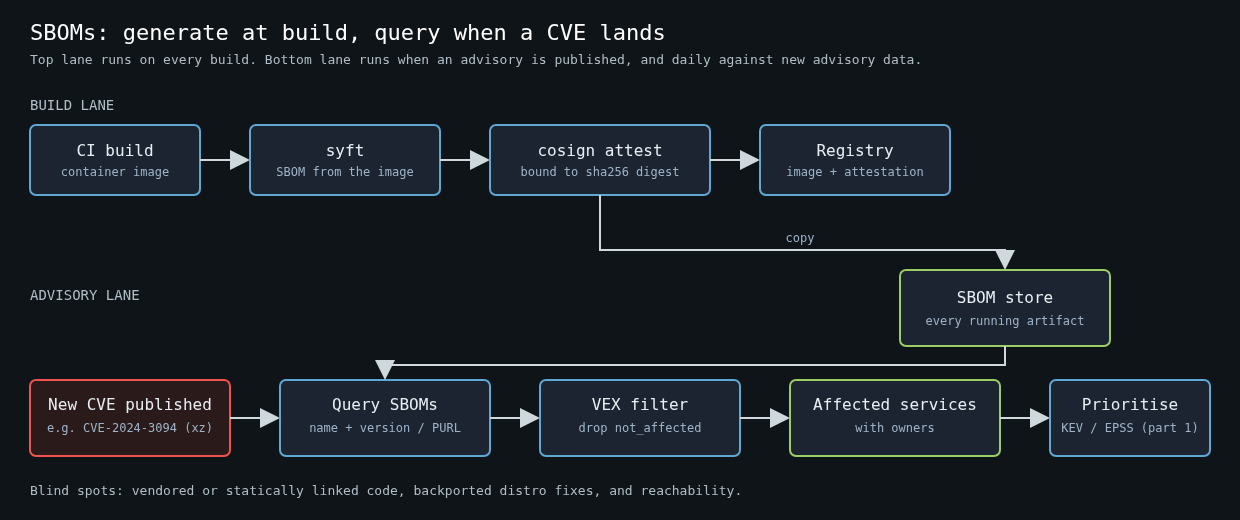
    Pipeline diagram: CI build, syft SBOM, cosign attestation and registry, with SBOM copies in a store that is queried when a new CVE is published, filtered through VEX, producing affected services for prioritisation

    An SBOM is a machine-readable inventory of the components inside a piece of software: package names, versions, identifiers, and ideally the relationships between them. There are two formats that matter. SPDX came out of the Linux Foundation and is published as ISO/IEC 5962:2021. CycloneDX came out of OWASP and has since been standardised by Ecma as ECMA-424. Both are fine. Pick the one your tooling handles best and stop debating it.

    The NTIA’s 2021 minimum elements document lists the fields an SBOM should carry: supplier, component name, version, other unique identifiers, dependency relationships, the author of the SBOM data, and a timestamp. In practice the identifier that does the heavy lifting is the package URL, or PURL, something like pkg:maven/org.apache.logging.log4j/[email protected] or pkg:deb/debian/[email protected]. PURLs are what let a scanner match a component against an advisory database without guessing from file names.

    Generate them at build time, from the artifact

    Where you generate the SBOM matters more than which format you use. An SBOM written from a lockfile describes what you meant to ship. An SBOM generated from the built container image describes what you actually shipped, including the OS packages in the base image that no lockfile in your repo mentions.

    Syft is the tool I reach for. Generating a CycloneDX SBOM for an image in CI is one line:

    syft registry.example.com/payments-api:1.42.0 -o cyclonedx-json=payments-api.cdx.json

    Then attach it to the image, so the inventory travels with the artifact instead of living in a CI log nobody can find:

    cosign attest --yes \
      --predicate payments-api.cdx.json \
      --type cyclonedx \
      registry.example.com/payments-api@sha256:<digest>

    Attest against the digest, not the tag. Tags move. An SBOM attached to :latest is a statement about an image that may no longer exist.

    Also push a copy into something you can query across the fleet. That can be a dedicated platform like OWASP Dependency-Track, or honestly a bucket of JSON files plus an index. The format is less important than being able to ask one question across every artifact you run.

    The question SBOMs answer

    That question is: “which of our running things contain component X at version Y?”

    On 29 March 2024, Andres Freund disclosed the backdoor in xz-utils, CVE-2024-3094, affecting versions 5.6.0 and 5.6.1. If you had SBOMs for every deployed image, the first hour looked like this:

    for f in sboms/*.cdx.json; do
      jq -r --arg f "$f" '.components[]
        | select(.name == "xz-utils" or .name == "liblzma5" or .name == "xz-libs")
        | select(.version | test("^5\\.6\\.[01]"))
        | "\($f)  \(.name)  \(.version)"' "$f"
    done

    If you didn’t, the first hour was a Slack thread asking every team to check their base images, followed by a day of partial answers. I’ve been on both sides of that, and the difference isn’t subtle. During Log4Shell I watched teams spend most of a week just establishing which services bundled log4j-core, because it was often a transitive dependency several levels down, or shaded inside another jar.

    The same SBOM store also feeds continuous matching. Instead of rescanning every image when the vulnerability database updates, you rescan the SBOMs:

    grype sbom:payments-api.cdx.json --fail-on high

    That’s fast, cheap, and it works for images that are already deployed and won’t be rebuilt this week.

    Where SBOMs are blind

    SBOMs are only as complete as the tool that generated them, and every generator has gaps.

    Statically linked and vendored code is the big one. If a C library was copied into your source tree or compiled into a binary, there’s no package manager metadata for a scanner to find. Go is better than most here because the toolchain embeds module information in the binary, which go version -m will print and Syft will read. Rust binaries carry nothing by default unless you build with cargo auditable. Copied-in JavaScript files, a single vendored .c file, or a library someone downloaded and checked in years ago will mostly be invisible.

    Version strings can lie too. Distributions backport security fixes without changing the upstream version, so a Debian package might report a version that looks vulnerable while carrying the patch. Good scanners read the distro’s security tracker data for this. Bad ones generate a stream of false positives that teach engineers to ignore the scanner.

    And an SBOM says nothing about reachability. A vulnerable component that’s present isn’t necessarily loaded, and a loaded library isn’t necessarily being called with attacker-controlled input.

    VEX is what makes SBOMs bearable

    That last gap is where VEX comes in, the Vulnerability Exploitability eXchange. A VEX document is a statement about a specific vulnerability in a specific product, with a status: not_affected, affected, fixed or under_investigation. A not_affected claim has to carry a justification, such as vulnerable_code_not_present or vulnerable_code_not_in_execute_path.

    OpenVEX, CSAF and CycloneDX can all carry VEX statements, and Grype accepts OpenVEX documents to suppress findings you’ve already analysed:

    grype sbom:payments-api.cdx.json --vex payments-api.openvex.json

    The value here is organisational, not technical. Someone investigates a finding once, writes down why it doesn’t apply, and that decision follows the artifact. Without it, the same finding gets triaged by three different people in three different quarters, and the one who’s in a hurry marks it as a false positive with no reason recorded.

    What I’d actually do

    Generate SBOMs from built images in CI, attest them to the digest, and copy them into a queryable store. Rescan the stored SBOMs daily against current advisory data and feed the results into the prioritisation from part one, so a KEV entry on an exposed service jumps to the front. Record triage decisions as VEX next to the SBOM.

    Skip the parts that don’t pay. I wouldn’t spend time on SBOM quality scores, on publishing SBOMs to customers who haven’t asked, or on generating them for every intermediate build. The SBOM that matters is the one for the thing running in production right now.

    Part three covers the last mile: setting patch SLAs that teams can actually meet once you know what to patch and where.

    Other parts: Part 1: Prioritising vulnerabilities: CVSS vs EPSS vs CISA KEV, Part 3: Patch SLAs that teams actually meet.

  • Prioritising vulnerabilities: CVSS vs EPSS vs CISA KEV

    Prioritising vulnerabilities: CVSS vs EPSS vs CISA KEV

    Part 1 of 3 in the Vulnerability management that works series.

    Every vulnerability programme I’ve seen fail failed the same way. The scanner produced thousands of findings, someone decided “fix all criticals and highs within 30 days”, the backlog grew faster than anyone could patch, and within a quarter the SLA dashboard was a wall of red that everyone had learned to ignore. The problem usually isn’t effort. It’s that the team is sorting by the wrong number.

    This series is about running vulnerability management so it actually reduces risk. Part one is about the sorting, because if you get that wrong nothing downstream matters.

    CVSS measures severity, not risk

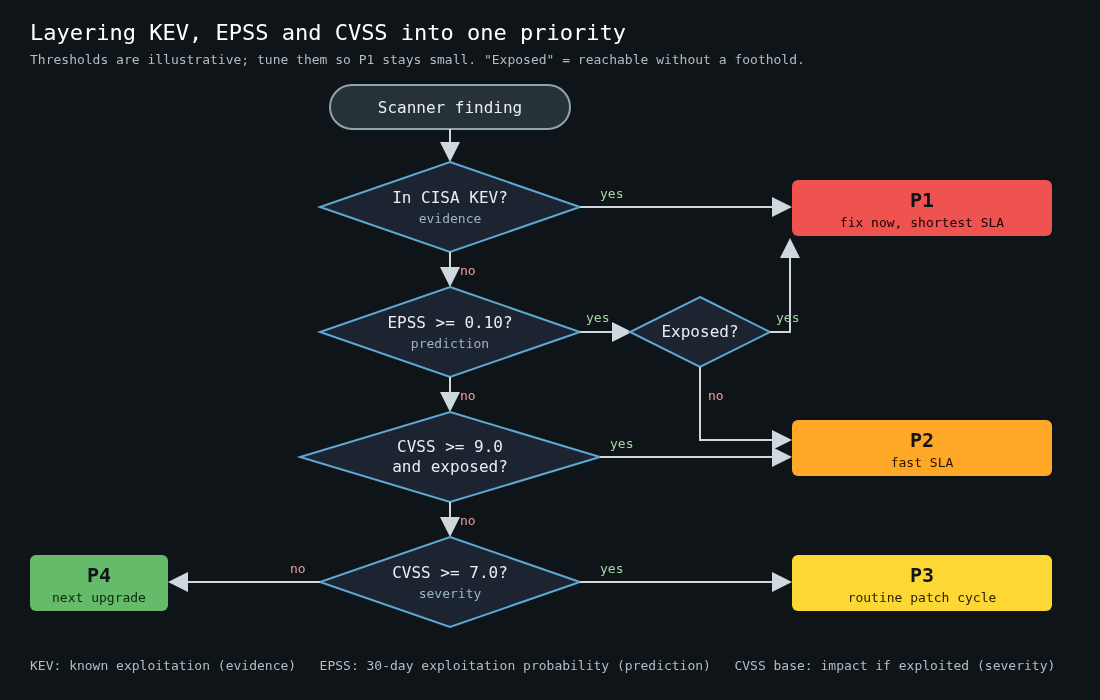
    Flowchart: a scanner finding goes to P1 if in CISA KEV or high EPSS and exposed, P2 for high EPSS or critical CVSS on exposed systems, P3 for CVSS 7 and above, otherwise P4

    The Common Vulnerability Scoring System, maintained by FIRST, is the score everyone knows. A CVSS base score describes the intrinsic characteristics of a vulnerability: attack vector, complexity, privileges required, user interaction, and the impact on confidentiality, integrity and availability. It answers “how bad is this if someone exploits it?”

    It doesn’t answer “will anyone exploit it?”, and the specification says so. The CVSS v3.1 spec states plainly that CVSS measures severity, not risk. Teams use the base score as a risk score anyway, because it’s the column the scanner shows.

    The practical problem is distribution. A large share of published CVEs land at 7.0 or above, so “fix all highs and criticals” means fixing a majority of everything. When half your backlog is priority one, you don’t have priorities.

    CVSS v4.0, released by FIRST in November 2023, tries to address this by making the extra metric groups more visible. There are now Base, Threat, Environmental and Supplemental groups, and the spec asks you to label which ones a score includes (CVSS-B, CVSS-BT, CVSS-BE, CVSS-BTE). The Threat group’s Exploit Maturity metric lets you lower a score when there’s no known exploitation. That’s an improvement in principle. In practice almost every feed you consume publishes base scores only, and the threat data has to come from somewhere else anyway. Which brings us to the other two.

    EPSS estimates likelihood

    The Exploit Prediction Scoring System, also run by a FIRST special interest group, is a model that outputs a probability between 0 and 1 that a given CVE will see exploitation activity in the wild in the next 30 days. It’s retrained periodically and the scores are recomputed daily, using features like whether public exploit code exists, mentions in security lists, the vendor and the vulnerability type, and it’s trained on observed exploitation telemetry.

    Each CVE gets two numbers: the probability and a percentile. The percentile tells you how it ranks against every other scored CVE. Most CVEs have a very low EPSS probability, which is the whole point. The model is telling you that the vast majority of vulnerabilities never get exploited at all, and it’s trying to tell you which few will.

    You can query it for free:

    curl -s "https://api.first.org/data/v1/epss?cve=CVE-2021-44228,CVE-2023-4863" \
      | jq -r '.data[] | "\(.cve)  epss=\(.epss)  pct=\(.percentile)  as_of=\(.date)"'

    FIRST also publishes the full daily score set as a compressed CSV, which is what you want if you’re enriching a whole scanner export rather than looking up a handful.

    EPSS has limits I’d keep in mind. It’s a prediction about the internet at large, not about your environment. A CVE with a low EPSS score in a product exposed directly to the internet on your perimeter deserves more attention than the model gives it. It also lags. A brand new CVE often scores low on day one simply because the model hasn’t seen any signal yet. And it’s a probability, so treat a score of 0.02 as “unlikely”, never as “safe”.

    KEV is evidence, not prediction

    CISA’s Known Exploited Vulnerabilities catalog launched in November 2021 alongside Binding Operational Directive 22-01. A CVE goes into KEV when three things are true: it has a CVE ID, there’s reliable evidence of active exploitation, and there’s clear remediation guidance such as a vendor patch. BOD 22-01 requires US federal civilian agencies to remediate each entry by a due date CISA sets when adding it, often two or three weeks out.

    KEV is small compared to the CVE corpus, well over a thousand entries against hundreds of thousands of CVEs, and that’s its strength. Every entry is something an attacker has actually used. It’s also available as a JSON feed:

    curl -s https://www.cisa.gov/sites/default/files/feeds/known_exploited_vulnerabilities.json \
      | jq -r '.vulnerabilities[] | [.cveID, .dateAdded, .dueDate, .knownRansomwareCampaignUse] | @tsv' \
      > kev.tsv

    The knownRansomwareCampaignUse field is worth carrying into your tooling. “Known” there means CISA has evidence ransomware operators used it, which in my experience is the single fastest way to get an executive to approve an emergency change window.

    What KEV doesn’t give you is coverage. Exploitation that nobody reported to CISA, or that hit products CISA doesn’t track, isn’t in there. Absence from KEV tells you very little.

    Combining them

    None of these three is a prioritisation scheme on its own. Together they’re pretty good. The way I’d layer them:

    1. In KEV: fix now, on the shortest SLA you have. Someone is using this.
    2. High EPSS and exposed: treat almost like KEV. Exposure means reachable by an attacker who doesn’t already have a foothold, so internet-facing services, VPN concentrators, email gateways.
    3. High EPSS or critical CVSS on exposed systems: the next tier, on a normal fast SLA.
    4. Everything else with a high CVSS: the standard backlog, fixed by routine patching and image rebuilds.
    5. The long tail: fixed when the component gets upgraded anyway.

    As code, roughly:

    def priority(cvss: float, epss: float, in_kev: bool, exposed: bool) -> str:
        if in_kev:
            return "P1"
        if epss >= 0.10 and exposed:
            return "P1"
        if epss >= 0.10 or (cvss >= 9.0 and exposed):
            return "P2"
        if cvss >= 7.0:
            return "P3"
        return "P4"

    The 0.10 cutoff is my choice, not a standard. Pick yours by looking at how many of your current findings land in each bucket. If P1 has more than a few dozen items in a mid-sized environment, your thresholds are too loose, or you have a real emergency and should treat it as one.

    If you want something more formal, CISA’s Stakeholder-Specific Vulnerability Categorization (SSVC) is a decision tree that takes exploitation status, exposure, automatability and mission impact and outputs one of four actions: Track, Track*, Attend or Act. It’s the same idea with more rigour, and it’s easier to defend in an audit than a Python function someone wrote on a Friday.

    The part nobody wants to hear

    The inputs that matter most for prioritisation aren’t in any public feed. Whether a vulnerable package is actually loaded at runtime, whether the vulnerable function is reachable, whether the host is exposed to the internet: that’s your asset inventory and your architecture. A Log4Shell finding in a jar that sits in an unused test directory and a Log4Shell finding in your public login service have identical CVSS, EPSS and KEV values. One of them is an incident.

    So the real first step is tagging assets with exposure and ownership. Once you have that, the public scores do most of the remaining work. Part two looks at SBOMs, which are the other half of knowing what you’re actually running.

    Other parts: Part 2: SBOMs: what they’re actually good for, Part 3: Patch SLAs that teams actually meet.
  • Threat modeling with STRIDE for a small team

    Threat modeling with STRIDE for a small team

    Most small teams I talk to think threat modeling is something big companies do with a dedicated security architect, a two-week engagement and a 40-page document nobody reads afterwards. That version exists, and it’s mostly a waste. The version that works for a team of five engineers fits in a 90-minute meeting around a whiteboard and ends with a handful of tickets. STRIDE is the tool I reach for because it gives a room full of people a structured way to ask “what could go wrong here?” without needing a security specialist to lead every question.

    What STRIDE actually is

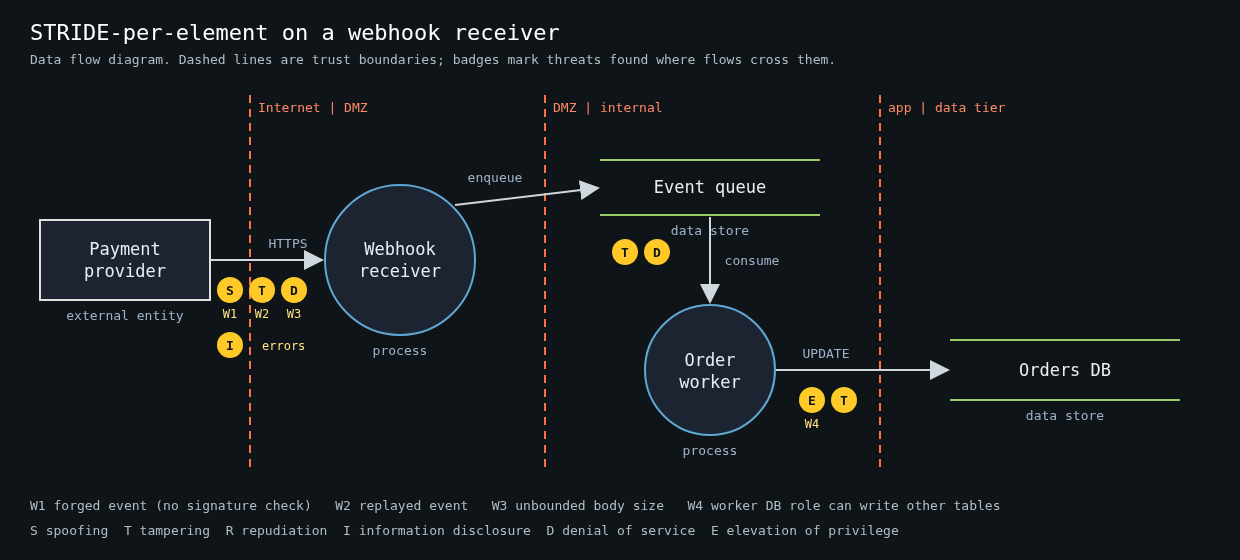
    Data flow diagram of a payment webhook receiver with three trust boundaries and STRIDE threat badges on each boundary-crossing flow

    STRIDE came out of Microsoft in 1999, from Loren Kohnfelder and Praerit Garg, and was popularised by Adam Shostack’s book Threat Modeling: Designing for Security. It’s a mnemonic for six threat categories, each one the violation of a property you want your system to have:

    • Spoofing violates authentication. Someone claims to be a user, a service or a host they aren’t.
    • Tampering violates integrity. Data in transit, at rest or in memory gets modified.
    • Repudiation violates non-repudiation. Someone does something and you can’t prove it.
    • Information disclosure violates confidentiality.
    • Denial of service violates availability.
    • Elevation of privilege violates authorization. A user or component gets capabilities it shouldn’t have.

    That’s it. It isn’t a methodology on its own, and it doesn’t rank anything. It’s a checklist of question shapes. The value is that it stops the discussion from collapsing into whatever the loudest person in the room worried about last week, which in my experience is usually SQL injection.

    Start from four questions, not from the acronym

    Shostack frames the whole exercise as four questions, and the Threat Modeling Manifesto (2020) kept them:

    1. What are we working on?
    2. What can go wrong?
    3. What are we going to do about it?
    4. Did we do a good enough job?

    STRIDE only answers question two. Teams that skip question one end up applying STRIDE to a vague mental picture of “the system”, which produces vague threats like “an attacker could spoof a user”. True, useless.

    So answer question one concretely. Pick one feature or one change, not the whole platform. “We’re adding a webhook receiver that accepts events from our payment provider and updates order status” is a good scope. “Our backend” is not.

    Draw a data flow diagram with trust boundaries

    The diagram is where most of the value comes from, and it should take 15 to 20 minutes. You need four kinds of things:

    • External entities: users, third-party services, anything you don’t control.
    • Processes: your services, workers, lambdas.
    • Data stores: databases, queues, buckets, caches.
    • Data flows: arrows between them, labelled with what moves and over what protocol.

    Then draw trust boundaries, the dashed lines where the level of trust changes. Internet to your load balancer. Your API to the database. Your worker to the third-party API. Your app to the admin interface. If a flow crosses a dashed line, that’s where you spend your time. Flows entirely inside one trust zone rarely produce interesting threats.

    For the webhook example, the boundaries are the payment provider to your public endpoint, your receiver to the queue, and the worker to the orders database. Three crossings. That’s a manageable meeting.

    Walk STRIDE per element

    The variant that works best for small teams is STRIDE-per-element. Not every category applies to every kind of element, and the classic mapping keeps the discussion short:

    • External entities: spoofing and repudiation.
    • Processes: all six.
    • Data stores: tampering, information disclosure, denial of service, and repudiation if the store is a log.
    • Data flows: tampering, information disclosure, denial of service.

    Go element by element along the flows that cross a boundary and ask each applicable question out loud. For the webhook receiver it might go like this:

    • Spoofing: can anyone on the internet POST a fake “payment succeeded” event? Do we verify the provider’s signature, and do we compare it in constant time?
    • Tampering: can a valid event be replayed? Is there a timestamp in the signed payload, and do we reject old ones?
    • Repudiation: if an order flips to paid by mistake, can we show which event did it and where it came from?
    • Information disclosure: do our error responses leak stack traces or internal hostnames to the caller?
    • Denial of service: what happens if someone sends 10,000 large bodies a second? Is there a size limit before we parse JSON?
    • Elevation of privilege: does the worker’s database role need to write to anything except the orders table?

    Every one of those is a concrete, testable question, and most of them are a few lines of code to fix. That’s the point.

    Record threats as tickets, not as a document

    The output of the session is a list of threats, each with a decision. Mitigate, accept, transfer or eliminate the feature. I like a plain table in the repo next to the code, because it gets reviewed in pull requests and it ages with the system:

    | ID | Element            | STRIDE | Threat                                  | Decision  | Ticket   |
    |----|--------------------|--------|-----------------------------------------|-----------|----------|
    | W1 | Webhook endpoint   | S      | Forged event without valid signature    | Mitigate  | PAY-412  |
    | W2 | Webhook endpoint   | T      | Replay of a captured valid event        | Mitigate  | PAY-413  |
    | W3 | Receiver -> queue  | D      | Unbounded body size exhausts memory     | Mitigate  | PAY-414  |
    | W4 | Worker DB role     | E      | Role can write to users table           | Mitigate  | PAY-415  |
    | W5 | Provider outage    | D      | Events delayed for hours                | Accept    | -        |

    Accepted risks are fine. Write down who accepted them. A threat model where everything is “mitigate” usually means nobody was honest about the effort.

    Making it stick on a small team

    The failure mode isn’t doing threat modeling badly. It’s doing it once at a kickoff and never again. A few habits keep it alive.

    Tie it to design review. If a change adds a new trust boundary crossing, a new external entity or a new data store with sensitive data, it gets a STRIDE pass. Everything else doesn’t. That keeps it rare enough that people don’t resent it.

    Rotate who facilitates. The facilitator’s job is to keep the group moving through the elements and to stop the session from becoming a design argument. Any engineer can do that after watching it twice, and the person who facilitates tends to start thinking this way in code review too.

    Keep the diagram in the repo as text. A diagram drawn in a SaaS whiteboard is dead the day the meeting ends. Mermaid, PlantUML or OWASP Threat Dragon’s JSON files all diff fine. Microsoft’s Threat Modeling Tool is also free if your team is on Windows and wants STRIDE suggestions generated from the diagram, though I find the generated list too long for a small team to triage.

    Revisit question four. A month after the feature ships, spend ten minutes asking whether any incident, bug report or pentest finding touched an element you modeled. If one did and the model missed it, that’s the most useful feedback you’ll get about your process.

    Where STRIDE falls short

    STRIDE is good at technical threats along data flows. It’s weak on abuse of legitimate functionality, like a referral program being farmed, and on privacy harms, where LINDDUN is a better fit. It also says nothing about likelihood. When a session produces more threats than you can fix, rank them by what an attacker can reach from outside your trust boundaries first, and by what you’d have to explain in an incident report second. That’s crude, and it’s still better than ranking by gut feeling about which bug sounds scariest.

    I’ve watched a five-person team find a missing webhook signature check, an admin endpoint reachable from the public load balancer and a worker with database superuser rights, all in one 90-minute session. Nobody in the room was a security specialist. They just drew the thing and asked the questions in order.