Tag: detection engineering

  • Alert fatigue: tuning detections without going blind

    Alert fatigue: tuning detections without going blind

    Part 3 of 3 in the Detection engineering series. Part 1: Logging that actually helps an investigation. Part 2: Writing detections as code: Sigma rules tested against real logs.

    In 2013, attackers inside Target’s network set off malware alerts from a detection tool the company had recently deployed. The alerts reached Target’s security team, and the US Senate Commerce Committee’s 2014 kill chain analysis of the breach concluded they weren’t acted on in time. Roughly 40 million payment cards were stolen. The tool worked. The process around it didn’t.

    That pattern repeats everywhere I’ve looked. When a team gets hundreds of alerts a day and nearly all of them are benign, people learn, quite rationally, that alerts are probably nothing. Then the real one gets the same treatment.

    This is part 3 of the series. Part 1 covered collecting the right events and part 2 covered writing and testing detections as code. Now we have to live with them.

    Measure before you tune
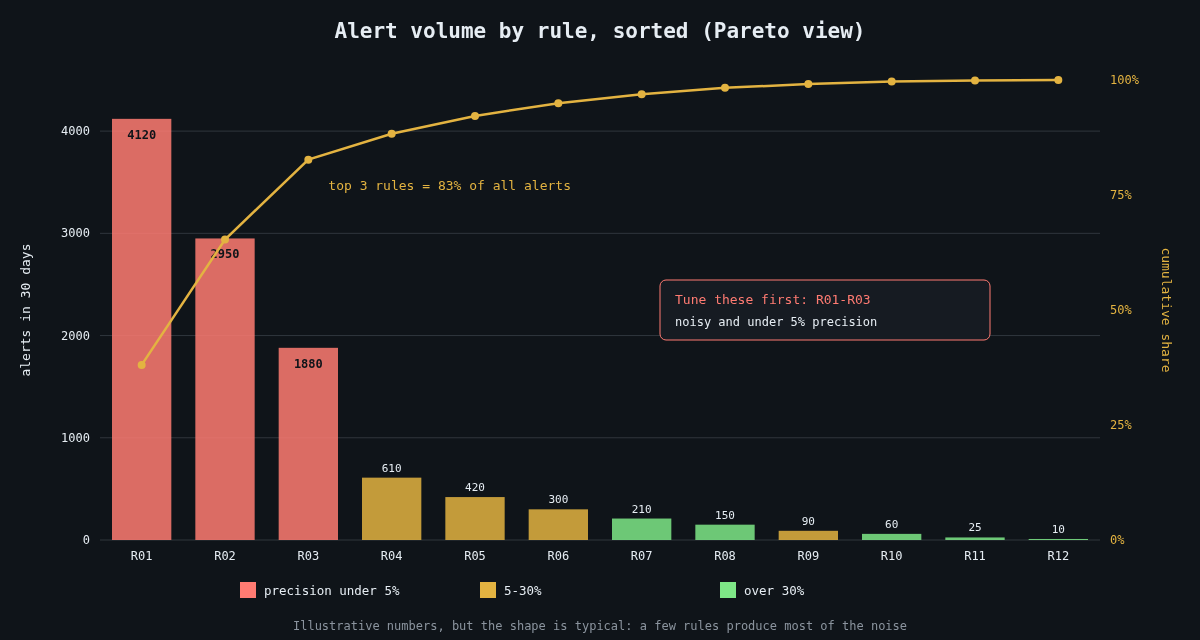
    Illustrative Pareto chart of 30-day alert volume by detection rule, coloured by precision

    You can’t tune what you don’t count. For every rule, track three numbers over a rolling 30 days: how many alerts it produced, how many were true positives after triage, and how long triage took. Precision per rule (true positives divided by total alerts) is the most useful single figure, and it’s almost never on the SIEM dashboard by default.

    That means analysts have to record a disposition when they close an alert. Keep the choices small and honest: true positive, benign true positive (the rule matched what it was meant to, but the activity was authorised), false positive, and needs tuning. The “benign true positive” bucket matters, because an admin running a scanner is not the rule being wrong, and conflating the two leads to deleting good rules.

    When you plot alert volume by rule, you’ll nearly always find that a handful of rules generate most of the noise. That’s good news. You don’t have to fix everything, just the top few.

    Tune narrowly

    The lazy fix for a noisy rule is excluding the whole host, the whole service account, or the whole subnet. Each of those is a hole an intruder can stand in. If your backup server is excluded from the PowerShell rule because its jobs are noisy, then PowerShell on the backup server is now invisible, and backup servers are exactly what ransomware operators go looking for.

    Make exceptions as specific as the evidence allows: the exact parent process, the exact command line or script path, ideally the file hash and the expected account. In Sigma that’s a named filter in the rule itself:

    detection:
      selection:
        Image|endswith: '\powershell.exe'
        CommandLine|contains: ' -EncodedCommand '
      filter_backup_job:
        ParentImage: 'C:\Program Files\BackupAgent\scheduler.exe'
        User: 'CORP\svc-backup'
        CommandLine|contains: 'C:\BackupAgent\scripts\prejob.ps1'
      condition: selection and not filter_backup_job

    If the backup agent is compromised and starts running something else, the filter no longer matches and the alert fires.

    Give every exception an owner and an expiry

    Exceptions accumulate like firewall rules. Nobody remembers why half of them exist, and nobody dares remove them. Store them in the repository with metadata, and let CI enforce it:

    # exceptions/powershell-encoded.yml
    rule_id: 0c4b3a9e-71d2-4f5e-9b8a-6e2d1c7f3a10
    filter: filter_backup_job
    reason: Vendor pre-job script uses encoded commands (ticket SEC-1432)
    owner: infra-backup
    expires: 2027-01-31
    import datetime, glob, sys, yaml
    
    today = datetime.date.today()
    expired = []
    for path in glob.glob("exceptions/*.yml"):
        with open(path) as f:
            doc = yaml.safe_load(f)
        if doc["expires"] <= today:
            expired.append(f'{path}: owner {doc["owner"]}, expired {doc["expires"]}')
    
    if expired:
        print("\n".join(expired))
        sys.exit(1)

    When an exception expires, the owner either renews it with a fresh justification or it goes away. Ninety days is a reasonable default. It’s mildly annoying, and that’s what keeps the list short.

    Change what happens, not just whether it fires

    Not every detection should page a human. A lot of useful signals are weak on their own: a new admin tool on a workstation, a login from an unusual country, a service account authenticating interactively. Individually each one is noisy. Together, on the same host or user within a few hours, they tell a story.

    That’s the idea behind risk-based alerting. Low-fidelity rules don’t create alerts; they add a risk score to the user or host they involve. A separate correlation rule fires when an entity’s accumulated score crosses a threshold, or when signals from several distinct ATT&CK tactics appear together. Splunk documents this approach as its RBA framework, but you can build the same thing in any SIEM that can aggregate by entity over a time window.

    Alongside that, route by confidence. High-precision rules page someone. Medium ones land in a queue that’s worked during business hours. The rest feed risk scores and dashboards. A rule that has never produced a true positive in a year and doesn’t feed anything is a candidate for retirement, but only after you’ve confirmed it can still fire (see the next section), because a rule that never fires might be a rule that’s broken.

    Prove you’re not blind

    Tuning removes alerts. The danger is that you can’t easily see the alerts you removed, or the ones that stopped firing because a log source died. So you need a positive signal that coverage still exists.

    Part 2 described scheduled end-to-end tests: a harmless, known action on a test host that a specific rule must catch within minutes. Run those continuously, track the pass rate per rule, and treat a failure as an incident in the detection pipeline. Combine it with a per-source volume monitor so that a domain controller going quiet raises its own alert.

    I also like a quarterly review of the top 20 noisiest rules and every rule with zero alerts. The noisy ones need tuning. The silent ones need a test proving they still work.

    Watch the humans

    The last metric is the analysts themselves. If one person is triaging 200 alerts per shift, median triage time drops to seconds and the quality goes with it. Track alerts per analyst-hour and the share of alerts closed in under a minute. When those climb, the fix is in the rules, not in telling people to try harder.

    A detection program is healthy when an alert is rare enough that people still feel a small jolt when one arrives. Getting there is mostly unglamorous bookkeeping, and it’s worth every hour.

  • Writing detections as code: Sigma rules tested against real logs

    Writing detections as code: Sigma rules tested against real logs

    Part 2 of 3 in the Detection engineering series. Part 1: Logging that actually helps an investigation.

    Detection logic that lives only inside a SIEM’s web console has the same problems as server config edited by hand over SSH. Nobody reviews the change, nobody knows why a condition was added, and when a rule silently stops matching after a log format change, nobody notices for months. Treating detections as code fixes most of that, and Sigma is the most practical way I know to do it without tying yourself to one vendor.

    In part 1 we covered which events to collect. This part is about turning them into rules you can review, version and, most importantly, test.

    What Sigma actually is

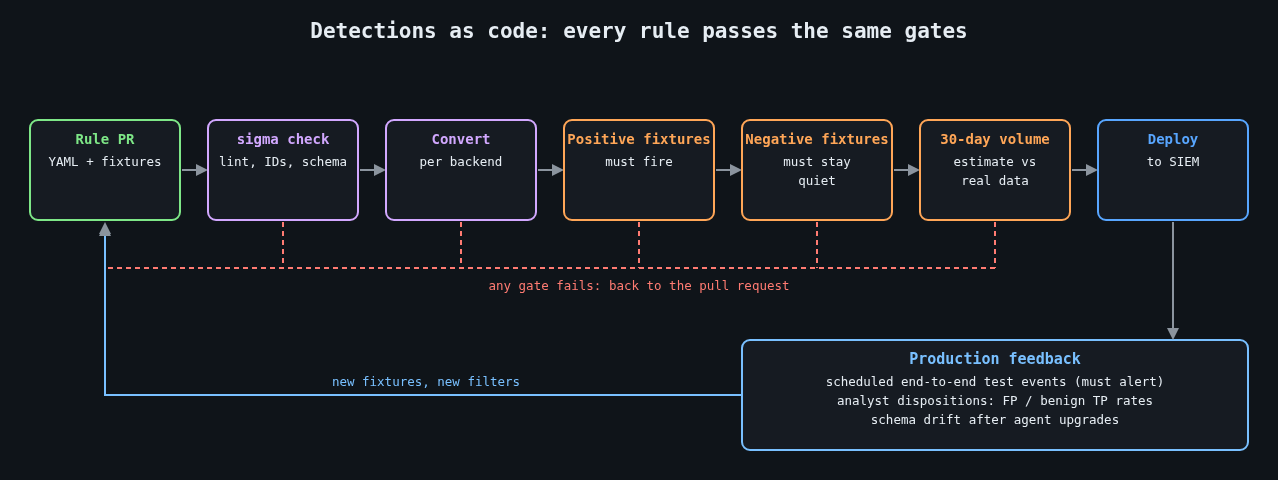
    Detection-as-code pipeline: lint, convert, positive and negative fixtures, volume estimate, deploy, production feedback

    Sigma is an open, YAML-based format for describing log detections, maintained by the SigmaHQ project along with a large public rule repository. A rule describes the log source in abstract terms (process creation on Windows, say) and the matching logic as field conditions. A converter then translates it into your backend’s query language: Splunk SPL, Elasticsearch, Microsoft Sentinel’s KQL and many others through pySigma backends.

    The abstraction is the point. The same rule can run against Sysmon data in one environment and against an EDR’s process events in another, as long as a processing pipeline maps the field names.

    A rule worth having

    Here’s a rule for a pattern that turns up in a lot of web server compromises: the IIS worker process starting a command shell. Web applications rarely have a legitimate reason to do that, and a web shell almost always does.

    title: Command shell spawned by IIS worker process
    id: 6b1f3c52-8f0e-4b8a-9d3e-2c7a5e1f9b40
    status: experimental
    description: >
      Detects cmd.exe or PowerShell started by w3wp.exe, which usually
      indicates a web shell or command injection in a hosted application.
    references:
      - https://attack.mitre.org/techniques/T1505/003/
    author: canutethegreat
    date: 2026-10-14
    tags:
      - attack.persistence
      - attack.t1505.003
    logsource:
      category: process_creation
      product: windows
    detection:
      selection:
        ParentImage|endswith: '\w3wp.exe'
        Image|endswith:
          - '\cmd.exe'
          - '\powershell.exe'
          - '\pwsh.exe'
      filter_health_check:
        CommandLine|contains: '\inetpub\scripts\healthcheck.cmd'
      condition: selection and not filter_health_check
    falsepositives:
      - Application pools that deliberately shell out (document them in a filter)
    level: high

    Notice the filter. Real environments always have the one legacy app that shells out for a reason, and the right place to record that exception is in the rule, in version control, with a commit message saying who asked for it. Part 3 goes deeper on how to keep exceptions from eating your coverage.

    Converting and linting in CI

    The sigma-cli tool wraps pySigma. A minimal CI step that validates and converts every rule looks like this:

    pip install sigma-cli
    sigma plugin install splunk
    sigma plugin install sysmon
    
    # Fail the build on structural problems
    sigma check rules/
    
    # Produce backend queries as a build artifact
    sigma convert -t splunk -p sysmon rules/ -o build/splunk.conf

    sigma check catches malformed YAML, missing fields and duplicate IDs. Conversion failures matter too, because a modifier or field that your backend can’t express means the rule never runs where you think it does. I’ve seen rule sets where a quarter of the rules failed conversion and the failures were simply ignored.

    Testing against real logs

    Linting proves a rule is well formed. It says nothing about whether the rule fires on the activity you care about, or whether it fires on a Tuesday-morning patch run. For that you need recorded events.

    Keep two fixture directories next to each rule set. The positive fixtures contain events that must match, ideally captured from a lab machine where you reproduced the behaviour, or taken from public datasets such as the OTRF Security-Datasets project or the EVTX-ATTACK-SAMPLES collection. The negative fixtures contain normal activity from your own estate that must not match: a day of process events from a busy web server is a good start.

    To evaluate Sigma directly against EVTX files without a SIEM, WithSecure’s open source Chainsaw works well:

    chainsaw hunt tests/positive/ -s rules/ \
      --mapping mappings/sigma-event-logs-all.yml --json > out/positive.json
    chainsaw hunt tests/negative/ -s rules/ \
      --mapping mappings/sigma-event-logs-all.yml --json > out/negative.json

    Then a short script turns those results into pass or fail. The exact JSON layout varies between Chainsaw versions, so treat this as a sketch you adapt to the output you get:

    import json, sys
    
    def hits(path):
        with open(path) as f:
            return {d["name"] for doc in json.load(f) for d in doc.get("detections", [])}
    
    expected = {"Command shell spawned by IIS worker process"}
    pos, neg = hits("out/positive.json"), hits("out/negative.json")
    
    missing = expected - pos
    noisy = expected & neg
    if missing or noisy:
        print("did not fire:", sorted(missing))
        print("fired on benign data:", sorted(noisy))
        sys.exit(1)

    Now a rule change that breaks detection fails the build, and so does a change that would page someone on ordinary traffic. That second check is the one people skip, and it’s the one that keeps analysts from muting your rules.

    Keep production honest too

    Fixtures drift away from reality. Log schemas change when an agent is upgraded, a field gets renamed, or Sysmon’s config stops collecting the event you depended on. Fixture tests won’t catch any of that, because the fixtures still have the old shape.

    The fix is a scheduled end-to-end check. On a dedicated test host, run a harmless action that a specific rule should catch (for the rule above, a test IIS site whose handler starts cmd.exe /c echo detection-test), then query the SIEM a few minutes later and confirm the alert exists. If it doesn’t, that is itself an alert, routed to whoever owns the pipeline. Frameworks like Atomic Red Team provide catalogued, benign test procedures mapped to ATT&CK techniques, which saves you writing your own for common cases.

    Review like you mean it

    A pull request for a detection should answer the same questions as any code review, plus a few of its own. What behaviour does it catch, and what’s the evidence? Which fixtures prove it? What’s the expected alert volume, measured by running the converted query over the last 30 days of real data? Who triages it, and what does the runbook say they should do first?

    That last question gets skipped constantly. A rule without a response plan just moves the problem from “we didn’t see it” to “we saw it and didn’t know what to do”.

    Once you have dozens of tested rules, the next problem shows up fast: too many alerts. That’s the subject of part 3.

    Other parts: Part 1: Logging that actually helps an investigation. Part 3: Alert fatigue: tuning detections without going blind.

  • Logging that actually helps an investigation

    Logging that actually helps an investigation

    Part 1 of 3 in the Detection engineering series.

    Most logging in a typical company was set up by developers to debug things. That’s a fine goal, and it produces logs that are close to useless when a security incident lands. Debug logs tell you a function threw an exception. An investigation needs to know which account did what, from where, against which object, and whether it worked.

    I’ve sat in enough incident calls to know the moment it goes wrong. Someone asks “when did this start, and what else did that account touch?” and the room goes quiet, because the answer either rolled out of retention last week or was never written down. This post is about avoiding that silence.

    Start from the questions, not the log sources

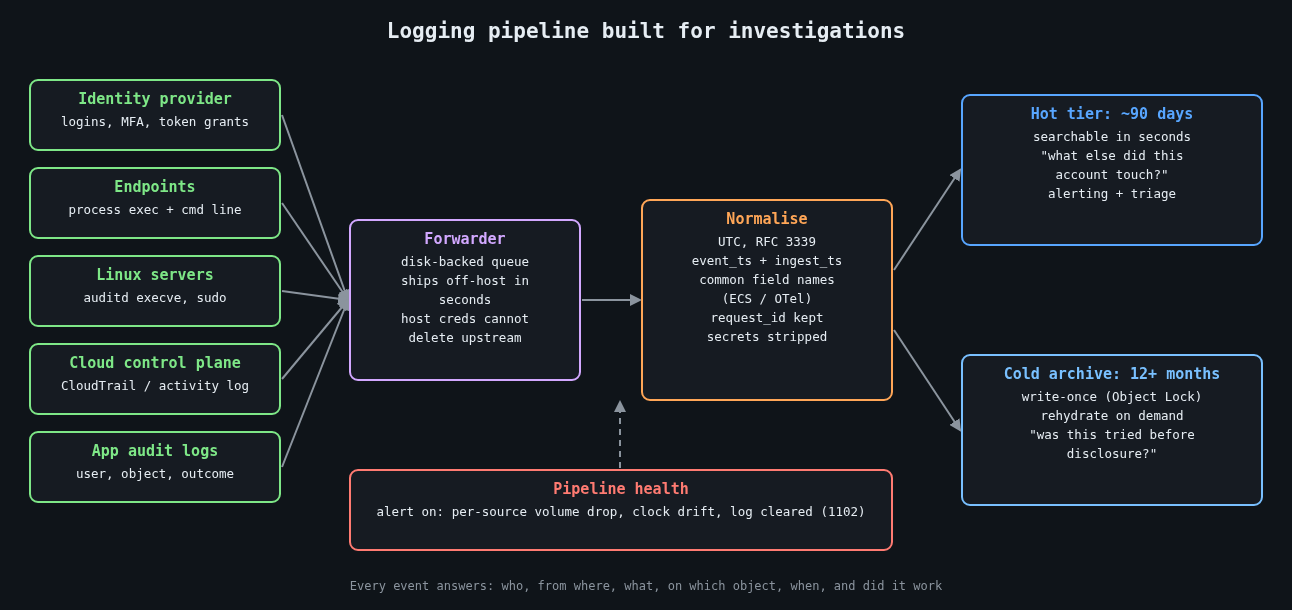
    Logging pipeline built for investigations: sources, forwarder, normalisation, hot and cold tiers

    Before turning on anything, write down the questions an investigator will ask. They’re boringly consistent from incident to incident:

    • Which identity performed the action, and was it a human, a service account or a token?
    • Where did the request come from (source IP, device, user agent, parent process)?
    • What was the action and what object did it touch?
    • When exactly, and in what order relative to other events?
    • Did it succeed?

    Every security-relevant event you emit should answer those. If a log line can’t tell you the actor or the outcome, it’s noise for this purpose. A web access log that records the path but not the authenticated user forces you to join it against session tables you may not have kept, so put the user ID in the access log.

    Time is the join key, so treat it like one

    Investigations are mostly timeline building, and a timeline is only as good as its clocks. Three rules have saved me hours:

    Log in UTC with an explicit offset, in RFC 3339 format. Local time without an offset turns every daylight saving change into an argument. Keep every host synchronised with NTP (chrony is the sane default on Linux) and alert when a host drifts. And record both the event time and the time the pipeline received it, because the gap between them is how you spot a host that buffered logs for an hour or a clock that jumped.

    A structured event that actually answers the questions looks something like this:

    {
      "ts": "2026-10-13T13:47:12.381Z",
      "ingest_ts": "2026-10-13T13:47:13.020Z",
      "event": "auth.login",
      "outcome": "failure",
      "reason": "bad_password",
      "user": "j.smith",
      "src_ip": "203.0.113.24",
      "user_agent": "Mozilla/5.0 ...",
      "mfa": "none",
      "request_id": "9f2c1e7a-4c1b-4a8e-b0a2-1d5f6c3e8b90",
      "service": "sso"
    }

    The request_id matters more than it looks. When the same ID flows through your load balancer, API and database audit logs, you can follow a single request across systems without guessing from timestamps.

    The events that earn their storage

    You can’t log everything forever, so spend the budget on events that show up in nearly every investigation. Authentication, both successes and failures, comes first. Privilege changes (group membership, role assignments, new API keys, sudo) come next. On endpoints and servers, process execution with full command lines is the single most useful source I know of. On Windows that means event 4688 with the “Include command line in process creation events” policy enabled, or Sysmon event ID 1. On Linux, auditd can record execve calls:

    # /etc/audit/rules.d/50-exec.rules
    -a always,exit -F arch=b64 -S execve -F key=exec
    -a always,exit -F arch=b32 -S execve -F key=exec
    -w /etc/sudoers -p wa -k sudoers
    -w /etc/sudoers.d/ -p wa -k sudoers

    Execve logging on a busy build server is loud, so measure the volume before rolling it out everywhere. Config changes to cloud accounts (CloudTrail, Azure activity logs) and data access on your most sensitive stores round out the list.

    Then log the logging. Windows event 1102 means the security log was cleared. A sudden drop in event volume from a host usually means an agent died, a disk filled up, or someone stopped the service on purpose. All three deserve an alert.

    Retention is a decision, so make it on purpose

    Default retention settings were chosen by whoever priced the product, not by your threat model. Mandiant’s M-Trends 2024 report put the global median dwell time at 10 days for 2023, and a median hides a long tail of intrusions discovered months later.

    Log4Shell is the example I keep coming back to. CVE-2021-44228 went public on December 9, 2021, and Cloudflare later reported seeing exploitation attempts as early as December 1. Teams with seven days of searchable logs couldn’t answer the most basic question, which was whether anyone had tried this against them before the disclosure.

    The US federal baseline in OMB memo M-21-31 asks for 12 months of active storage and a further 18 months in cold storage for most log categories. You don’t need to copy that exactly, but it’s a useful reference point when someone suggests 14 days is plenty. A two-tier setup works well: a few months hot and searchable, a year or more in cheap object storage that you can rehydrate when needed.

    The 2023 Storm-0558 intrusion into Microsoft-hosted email made the cost of missing logs very public. The US State Department spotted it because it had access to the MailItemsAccessed audit event, which at the time came with a premium licence tier. Many other affected organisations didn’t have that event at all. Microsoft later expanded default logging, but the point stands: find out which audit events your SaaS providers keep behind a paywall before you need them.

    Make the logs outlive the attacker

    An attacker with root on a box can edit its local log files, so local logs are a convenience, not evidence. Ship events off the host within seconds, to a system that the host’s own credentials can’t modify or delete. For the archive tier, write-once storage such as S3 Object Lock removes the “delete the evidence” option entirely, including for a compromised admin account if you use compliance mode.

    Keep the pipeline’s buffering in mind too. A forwarder with a small in-memory queue will drop events during exactly the network trouble an incident tends to cause. A disk-backed queue costs very little.

    Things you should not be logging

    Secrets, session tokens and passwords should never land in a log. The classic leak is a failed login where the user typed their password into the username field, so be careful about logging submitted usernames verbatim on failure paths. Bearer tokens in URLs end up in access logs and proxy logs, which is one more reason to keep them in headers.

    Log4Shell also taught a second lesson: the logger itself parses what you hand it. Treat attacker-controlled strings as data, keep logging libraries patched, and prefer structured fields over string interpolation.

    Test it before you need it

    Pick an incident from your own history, or a public one, and try to rebuild its timeline using only what your logging pipeline holds today. Time yourself. Every question you can’t answer, or that takes an hour of joining CSV exports, is a concrete gap with a concrete fix. Repeat it every quarter, since logging coverage quietly decays as services get added.

    The next part of this series turns these events into detections that are written, reviewed and tested like code.

    Other parts: Part 2: Writing detections as code: Sigma rules tested against real logs. Part 3: Alert fatigue: tuning detections without going blind.