
Part 2 of 3 in the Detection engineering series. Part 1: Logging that actually helps an investigation.
Detection logic that lives only inside a SIEM’s web console has the same problems as server config edited by hand over SSH. Nobody reviews the change, nobody knows why a condition was added, and when a rule silently stops matching after a log format change, nobody notices for months. Treating detections as code fixes most of that, and Sigma is the most practical way I know to do it without tying yourself to one vendor.
In part 1 we covered which events to collect. This part is about turning them into rules you can review, version and, most importantly, test.
What Sigma actually is
Sigma is an open, YAML-based format for describing log detections, maintained by the SigmaHQ project along with a large public rule repository. A rule describes the log source in abstract terms (process creation on Windows, say) and the matching logic as field conditions. A converter then translates it into your backend’s query language: Splunk SPL, Elasticsearch, Microsoft Sentinel’s KQL and many others through pySigma backends.
The abstraction is the point. The same rule can run against Sysmon data in one environment and against an EDR’s process events in another, as long as a processing pipeline maps the field names.
A rule worth having
Here’s a rule for a pattern that turns up in a lot of web server compromises: the IIS worker process starting a command shell. Web applications rarely have a legitimate reason to do that, and a web shell almost always does.
title: Command shell spawned by IIS worker process
id: 6b1f3c52-8f0e-4b8a-9d3e-2c7a5e1f9b40
status: experimental
description: >
  Detects cmd.exe or PowerShell started by w3wp.exe, which usually
  indicates a web shell or command injection in a hosted application.
references:
  - https://attack.mitre.org/techniques/T1505/003/
author: canutethegreat
date: 2026-10-14
tags:
  - attack.persistence
  - attack.t1505.003
logsource:
  category: process_creation
  product: windows
detection:
  selection:
    ParentImage|endswith: '\w3wp.exe'
    Image|endswith:
      - '\cmd.exe'
      - '\powershell.exe'
      - '\pwsh.exe'
  filter_health_check:
    CommandLine|contains: '\inetpub\scripts\healthcheck.cmd'
  condition: selection and not filter_health_check
falsepositives:
  - Application pools that deliberately shell out (document them in a filter)
level: high
Notice the filter. Real environments always have the one legacy app that shells out for a reason, and the right place to record that exception is in the rule, in version control, with a commit message saying who asked for it. Part 3 goes deeper on how to keep exceptions from eating your coverage.
Converting and linting in CI
The sigma-cli tool wraps pySigma. A minimal CI step that validates and converts every rule looks like this:
pip install sigma-cli
sigma plugin install splunk
sigma plugin install sysmon

# Fail the build on structural problems
sigma check rules/

# Produce backend queries as a build artifact
sigma convert -t splunk -p sysmon rules/ -o build/splunk.conf
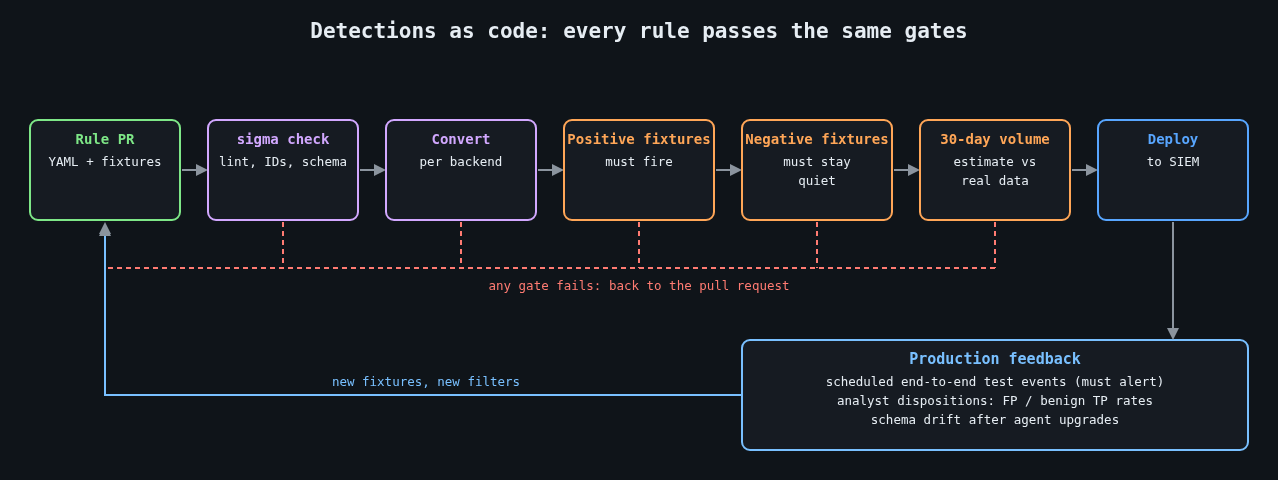
sigma check catches malformed YAML, missing fields and duplicate IDs. Conversion failures matter too, because a modifier or field that your backend can’t express means the rule never runs where you think it does. I’ve seen rule sets where a quarter of the rules failed conversion and the failures were simply ignored.
Testing against real logs
Linting proves a rule is well formed. It says nothing about whether the rule fires on the activity you care about, or whether it fires on a Tuesday-morning patch run. For that you need recorded events.
Keep two fixture directories next to each rule set. The positive fixtures contain events that must match, ideally captured from a lab machine where you reproduced the behaviour, or taken from public datasets such as the OTRF Security-Datasets project or the EVTX-ATTACK-SAMPLES collection. The negative fixtures contain normal activity from your own estate that must not match: a day of process events from a busy web server is a good start.
To evaluate Sigma directly against EVTX files without a SIEM, WithSecure’s open source Chainsaw works well:
chainsaw hunt tests/positive/ -s rules/ \
  --mapping mappings/sigma-event-logs-all.yml --json > out/positive.json
chainsaw hunt tests/negative/ -s rules/ \
  --mapping mappings/sigma-event-logs-all.yml --json > out/negative.json
Then a short script turns those results into pass or fail. The exact JSON layout varies between Chainsaw versions, so treat this as a sketch you adapt to the output you get:
import json, sys

def hits(path):
    with open(path) as f:
        return {d["name"] for doc in json.load(f) for d in doc.get("detections", [])}

expected = {"Command shell spawned by IIS worker process"}
pos, neg = hits("out/positive.json"), hits("out/negative.json")

missing = expected - pos
noisy = expected & neg
if missing or noisy:
    print("did not fire:", sorted(missing))
    print("fired on benign data:", sorted(noisy))
    sys.exit(1)
Now a rule change that breaks detection fails the build, and so does a change that would page someone on ordinary traffic. That second check is the one people skip, and it’s the one that keeps analysts from muting your rules.
Keep production honest too
Fixtures drift away from reality. Log schemas change when an agent is upgraded, a field gets renamed, or Sysmon’s config stops collecting the event you depended on. Fixture tests won’t catch any of that, because the fixtures still have the old shape.
The fix is a scheduled end-to-end check. On a dedicated test host, run a harmless action that a specific rule should catch (for the rule above, a test IIS site whose handler starts cmd.exe /c echo detection-test), then query the SIEM a few minutes later and confirm the alert exists. If it doesn’t, that is itself an alert, routed to whoever owns the pipeline. Frameworks like Atomic Red Team provide catalogued, benign test procedures mapped to ATT&CK techniques, which saves you writing your own for common cases.
Review like you mean it
A pull request for a detection should answer the same questions as any code review, plus a few of its own. What behaviour does it catch, and what’s the evidence? Which fixtures prove it? What’s the expected alert volume, measured by running the converted query over the last 30 days of real data? Who triages it, and what does the runbook say they should do first?
That last question gets skipped constantly. A rule without a response plan just moves the problem from “we didn’t see it” to “we saw it and didn’t know what to do”.
Once you have dozens of tested rules, the next problem shows up fast: too many alerts. That’s the subject of part 3.
Other parts: Part 1: Logging that actually helps an investigation. Part 3: Alert fatigue: tuning detections without going blind.
Leave a Reply
You must be logged in to post a comment.