
Part 3 of 4 in the Hardening a Linux server series. Earlier parts: Part 1, SSH hardening and Part 2, systemd sandboxing.
The first question in almost every Linux intrusion investigation is “what did they run?”, and the honest answer on most servers is “no idea”. Shell history is a file the attacker controls; clearing it is common enough to have its own MITRE ATT&CK entry (T1070.003). The application logs show the request that got them in and then nothing. The auth log shows a sudo or two. Everything in between is gone.
The Linux audit subsystem fixes that, and it’s been in the kernel since 2.6. The kernel emits records for the events you ask about, auditd writes them to disk, and the records carry the one field that makes them worth having: the audit UID.
Why auid is the whole point
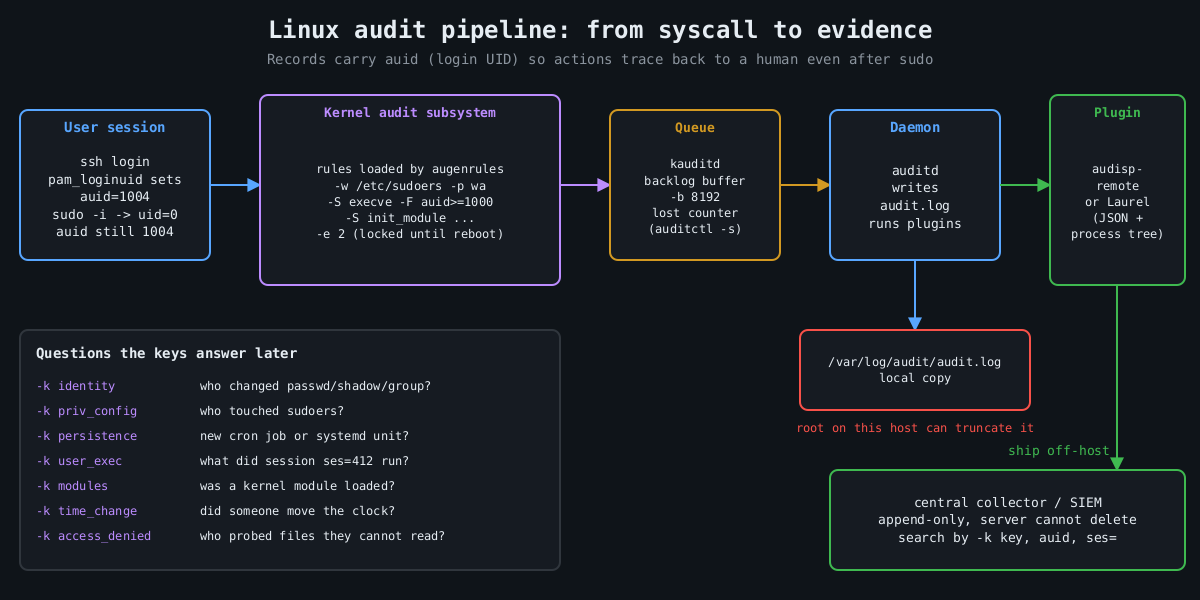
When a user logs in, pam_loginuid stamps their session with a login UID, auid in audit records. It survives sudo, su, setuid binaries and daemonizing. So when someone runs sudo -i and then deletes a log file, the event says uid=0 and also auid=1004, which is the human who logged in. Syslog can’t give you that.
Services started by systemd at boot have no login UID. Unset shows up as 4294967295 (newer auditctl also accepts unset). Filtering on auid>=1000 -F auid!=4294967295 therefore means “actions traceable to a human session”, which is how you keep the volume sane.
A rule set that answers real questions
Rules live in /etc/audit/rules.d/*.rules and are compiled by augenrules --load. Here is a compact starting point. I’m not trying to be exhaustive; Florian Roth’s public auditd rule set on GitHub is a good, much longer reference.
## buffer and failure behaviour
-D
-b 8192
--backlog_wait_time 60000
-f 1

## identity and privilege configuration
-w /etc/passwd -p wa -k identity
-w /etc/shadow -p wa -k identity
-w /etc/group -p wa -k identity
-w /etc/sudoers -p wa -k priv_config
-w /etc/sudoers.d/ -p wa -k priv_config
-w /etc/ssh/sshd_config -p wa -k sshd_config
-w /etc/ssh/sshd_config.d/ -p wa -k sshd_config

## persistence locations
-w /etc/cron.d/ -p wa -k persistence
-w /etc/crontab -p wa -k persistence
-w /var/spool/cron/ -p wa -k persistence
-w /etc/systemd/system/ -p wa -k persistence
-w /root/.ssh/ -p wa -k persistence

## commands run by humans (both ABIs)
-a always,exit -F arch=b64 -S execve -F auid>=1000 -F auid!=4294967295 -k user_exec
-a always,exit -F arch=b32 -S execve -F auid>=1000 -F auid!=4294967295 -k user_exec

## kernel modules, time, tracing
-a always,exit -F arch=b64 -S init_module -S finit_module -S delete_module -k modules
-a always,exit -F arch=b64 -S adjtimex -S settimeofday -S clock_settime -k time_change
-a always,exit -F arch=b64 -S ptrace -k tracing

## access denied to humans
-a always,exit -F arch=b64 -S open -S openat -S truncate -S ftruncate -F exit=-EACCES -F auid>=1000 -F auid!=4294967295 -k access_denied
-a always,exit -F arch=b64 -S open -S openat -S truncate -S ftruncate -F exit=-EPERM -F auid>=1000 -F auid!=4294967295 -k access_denied

## lock the configuration until reboot
-e 2
Every rule has a -k key. That’s what you search by later, and it’s what your SIEM will alert on. Name them for the question they answer.
The arch=b32 execve rule is there on purpose. A 64-bit kernel with 32-bit compatibility still accepts 32-bit syscalls, and a rule that only matches b64 misses a statically linked 32-bit binary entirely. Older hardening benchmarks list both for this reason.
Choices that matter more than the rules
-e 2 makes the audit configuration immutable until the next reboot. Without it, an attacker who gets root runs auditctl -D and your logging stops silently. With it, they have to reboot the machine to change the rules, and a reboot is loud.
-f sets what happens when the kernel can’t log: 0 is silent, 1 logs a kernel message, 2 panics the machine. Panic-on-audit-failure sounds strict and is occasionally a compliance requirement, but on most servers it hands an attacker who can flood the audit backlog a way to crash the box. I use 1 and alert on lost events instead. auditctl -s shows the lost counter, and it should stay at zero.
-b and --backlog_wait_time size the kernel buffer and how long a process blocks when that buffer is full. Too small and you drop events during a burst, which is exactly when the attacker is busy.
Then there’s volume. Full execve logging on a build server or a box running a lot of short-lived processes generates enormous logs. That’s why the rule above only covers human sessions. If a service account matters (the one your web app runs as, say), add a targeted rule with -F uid= for that account rather than logging every process on the machine.
Reading it back
Raw audit.log is famously unpleasant, one event split across several records. ausearch stitches them together and -i translates numeric IDs to names:
ausearch -k user_exec --start today -i
ausearch -k identity -ts 10/09/2026 06:00:00 -i
aureport -x --summary
aureport --login --failed
For anything beyond a single host, send the records somewhere else. The audisp-remote plugin ships them over the network to a central auditd, or you can have a log shipper tail the file. Laurel, a plugin from the threathunters.io folks, rewrites the multi-record mess into one JSON line per event with the process tree attached, which SIEMs handle much better.
Following a session
Here’s why the keys and the auid field pay off. Say the persistence key fires because something wrote into /etc/cron.d/. The event shows the executable that did the write, the working directory, auid, and a ses= value, which is the kernel’s ID for that login session. That session number is the thread you pull:
ausearch -k persistence --start recent -i
ausearch --session 412 --raw | aureport -x -i
ausearch -ua 1004 --start today -k user_exec -i
The second command lists every executable that login session ran, in order, including the ones run through sudo. In practice that’s the difference between “someone added a cron job” and “this account logged in from this address, downloaded this file, ran it as root, then added a cron job”, which is the story an incident report needs.
The things auditd doesn’t cover
A few more pieces round it out. Make the journal persistent (Storage=persistent in journald.conf), otherwise it lives in /run and disappears at reboot. Set LogLevel VERBOSE in sshd so logins record the key fingerprint, as covered in part 1. Make sure every host runs chrony or another NTP client, because an investigation across five machines with clocks four minutes apart turns into an argument about ordering.
And send everything off the host quickly. Logs that sit only on the compromised machine are evidence the attacker can edit. The immutable flag stops them changing the rules. It doesn’t stop root from truncating /var/log/audit/audit.log after the fact. A remote copy that the server can append to and never delete from is what turns these logs into evidence.
The final part of this series is about patching, which is how you keep most of these investigations from being needed in the first place.
Other parts of the Hardening a Linux server series: Part 1: SSH hardening beyond “disable root login”, Part 2: Least privilege with systemd sandboxing, Part 4: Patching without fear.