
Part 4 of 4 in the Hardening a Linux server series. Earlier parts: Part 1, SSH hardening, Part 2, systemd sandboxing and Part 3, auditd.
The first three parts of this series were about making a compromise harder and easier to investigate. This one is about the boring thing that prevents most compromises in the first place. Equifax is still the example I reach for. The Apache Struts bug (CVE-2017-5638) was disclosed and patched in early March 2017, attackers were in by mid-May, and they weren’t discovered until the end of July. Nobody needed a zero-day. They needed one unpatched server.
Most teams don’t skip patching because they think it’s unimportant. They skip it because they’re afraid of it: an update broke something once, a reboot took down a service once, and now patching is a quarterly ritual with a change ticket. The fix for that fear isn’t courage. It’s a process where updates are small, automatic, staged and reversible.
Let the machine install security updates
On Debian and Ubuntu, unattended-upgrades does this out of the box. Two files matter. /etc/apt/apt.conf.d/20auto-upgrades turns it on:
APT::Periodic::Update-Package-Lists "1";
APT::Periodic::Unattended-Upgrade "1";
And 50unattended-upgrades decides what gets installed and what happens afterwards:
Unattended-Upgrade::Origins-Pattern {
    "origin=Debian,codename=${distro_codename}-security,label=Debian-Security";
};
Unattended-Upgrade::Automatic-Reboot "false";
Unattended-Upgrade::Remove-Unused-Kernel-Packages "true";
On RHEL and its relatives, dnf-automatic is the equivalent:
# /etc/dnf/automatic.conf
[commands]
upgrade_type = security
apply_updates = yes

sudo systemctl enable --now dnf-automatic.timer
I’ve heard every objection to this, and the one with real weight is “an update could break production”. That’s true. A security update from a stable distribution branch is about the most conservative change your servers will ever receive, though. Debian security and RHEL errata backport fixes rather than shipping new upstream versions, exactly so behaviour doesn’t change. The risk from a backported fix is smaller than the risk of running a known-vulnerable OpenSSL for a quarter. And the staging below handles the rest.
Installing isn’t the same as running
Here’s the trap. A library update replaces the file on disk, but every process that already mapped the old version keeps running it. Your server says “OpenSSL updated” while nginx happily serves TLS from the vulnerable copy in memory. Kernel updates don’t take effect at all until a reboot.
Check what’s actually stale:
# Debian/Ubuntu
sudo needrestart -b          # batch output: stale services and kernel status
cat /var/run/reboot-required.pkgs

# RHEL family
sudo dnf needs-restarting -r   # exit code 1 means a reboot is needed
sudo dnf needs-restarting -s   # services still using old files
needrestart can restart affected services automatically after each upgrade, which closes the userspace gap with no human involved. The kernel still needs a reboot, and that’s where live patching comes in.
Live patching buys time, not immunity
Kernel live patching (kpatch on RHEL, Canonical Livepatch on Ubuntu, both built on the upstream livepatch infrastructure merged in Linux 4.0) replaces vulnerable kernel functions in memory using ftrace redirection. For a critical kernel CVE on a Friday afternoon, it is excellent.
It has limits that vendors are honest about if you read the fine print. Not every fix can be live patched. Changes to data structure layouts are hard or impossible, so some CVEs simply don’t get a live patch. Live patches are also cumulative patches against a specific kernel build, and vendors only produce them for a support window per kernel. Eventually you’re running a kernel that’s been patched in memory a dozen times and isn’t getting new patches. So treat live patching as a way to move the reboot from “tonight, in a panic” to “next scheduled window”. It doesn’t remove the reboot.
Reboots should be routine, which means coordinated
If rebooting a server is scary, that’s a finding about your architecture. A service that can’t survive one node restarting can’t survive one node dying either, and hardware doesn’t schedule its failures for maintenance windows. Once services can tolerate it, reboots should happen on a cadence, automatically, one node at a time.
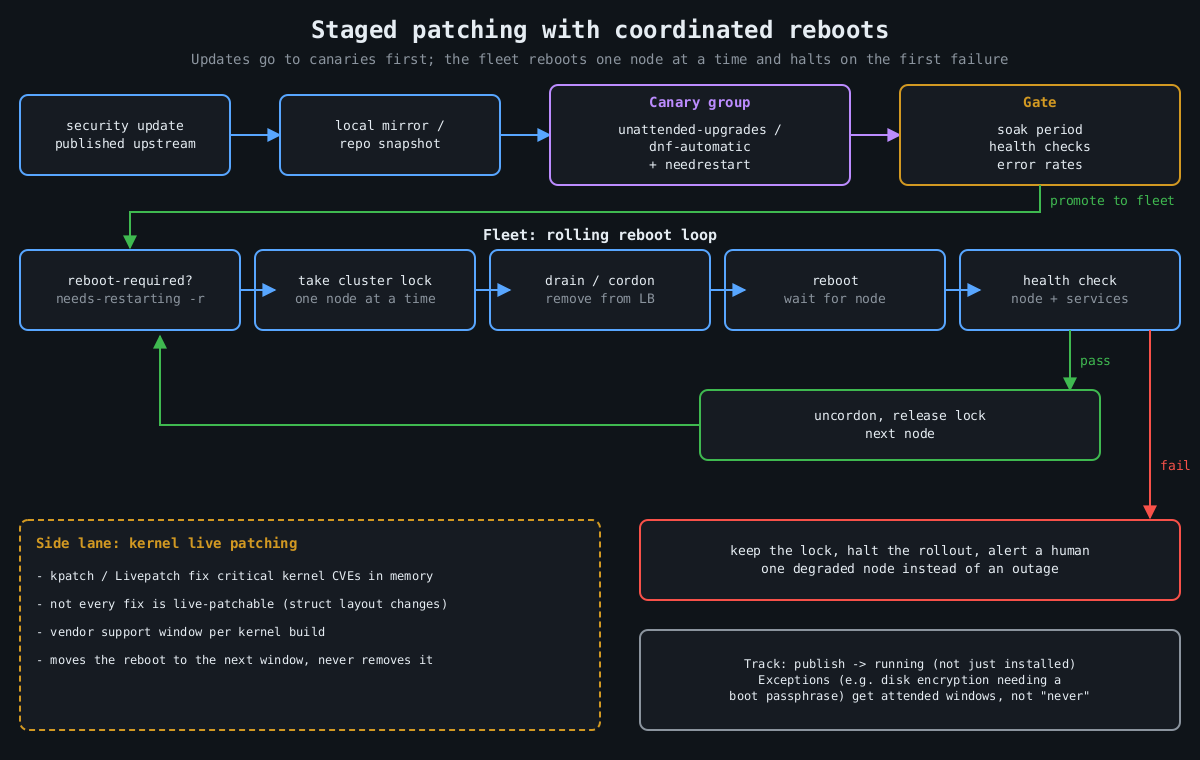
The coordination logic is the same everywhere:
1. Is a reboot needed? (reboot-required, needs-restarting -r)
2. Take a cluster-wide lock so only one node reboots at a time.
3. Drain: remove the node from the load balancer / cordon it.
4. Reboot, wait for it to come back.
5. Health check the node and its services.
6. Only on success: put it back, release the lock.
7. On failure: keep the lock, stop the rollout, alert a human.
For Kubernetes nodes, kured (the Kubernetes Reboot Daemon) does exactly this: it watches for the reboot sentinel file, takes a lock, cordons and drains the node, reboots, and uncordons it. For VMs and bare metal, the same loop fits in a small Ansible playbook with serial: 1 and max_fail_percentage: 0, or whatever orchestration you already have. The important part is step 7. A rollout that stops itself after the first failed health check turns a bad update into one degraded node instead of an outage.
Keep one exception list and keep it short. Machines that can’t reboot unattended (anything with full-disk encryption that needs a passphrase at boot, for example) should get a scheduled human-attended window, not “never”.
Stage it like any other deploy
The last piece is ordering. Updates should hit a small group of servers first, ideally the ones that look most like production without being the most important, and only spread after those survive a soak period. If you run a local mirror or use repository snapshots (Pulp, Aptly, or your cloud provider’s equivalent), the fleet installs the exact package set the canaries tested, not whatever landed in the repository an hour later. For VMs, take a hypervisor snapshot before the update on anything stateful, so a bad update is a rollback rather than a restore.
Put numbers on it. Track the time from a fix being published to it running (not just installed) on every host. When the next regreSSHion lands, as covered in part 1, the teams that patch in a day are the ones that already patch every week.
That wraps up this series. None of it is exotic, and together it’s most of what separates a server that gets popped by commodity tooling from one that doesn’t.
Leave a Reply
You must be logged in to post a comment.