
Tag: patch management

  • Patch SLAs that teams actually meet

    Patch SLAs that teams actually meet

    Part 3 of 3 in the Vulnerability management that works series. Part 1: Prioritising vulnerabilities: CVSS vs EPSS vs CISA KEV. Part 2: SBOMs: what they’re actually good for.

    Most patch SLAs I’ve reviewed were written once, by a security team, copied from a compliance framework, and then missed every month for years. Everyone knows they’re missed. The dashboard is red, the quarterly report says “remediation velocity is improving”, and the actual exposure doesn’t change much. An SLA that’s always missed isn’t a control. It’s a number people have stopped reading.

    The first two parts of this series covered deciding what matters and knowing where it runs. This one is about the commitment itself: how to write an SLA that engineering teams can actually hit, and how to measure it so the number tells you something.

    Why SLAs get missed
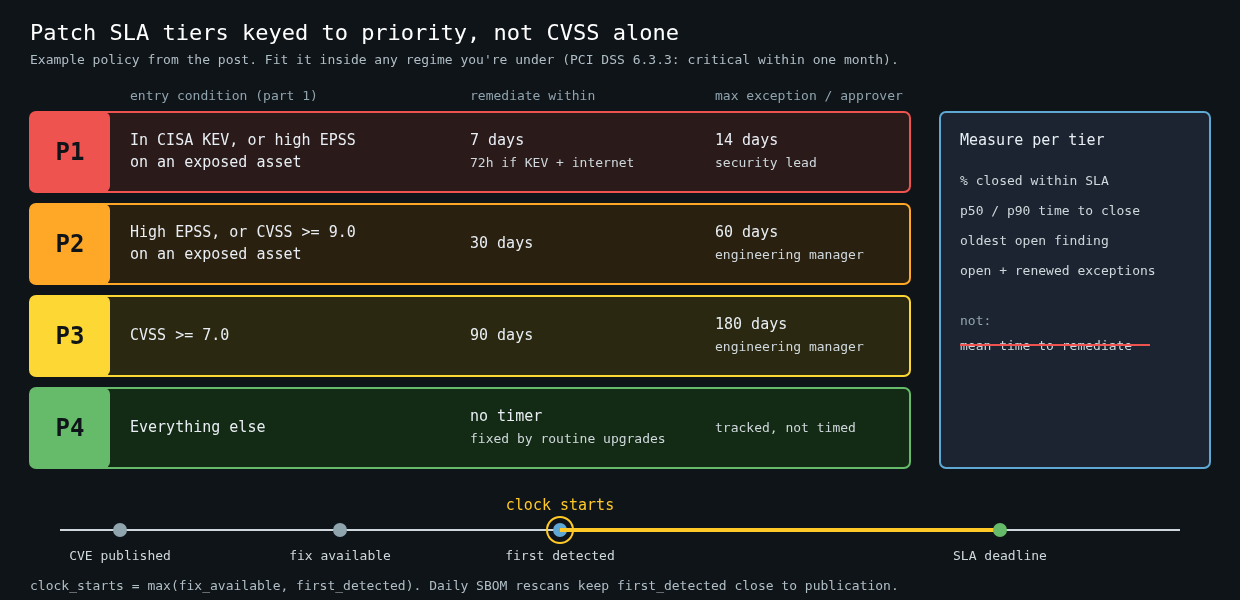
    Table of patch SLA tiers: P1 7 days (72 hours for KEV on internet-facing assets), P2 30 days, P3 90 days, P4 untimed, with exception limits, per-tier metrics and a timeline showing the clock starting at the later of fix availability and first detection

    In my experience it’s rarely laziness. The usual causes are structural.

    The SLA is keyed to CVSS. “Criticals in 15 days, highs in 30” sounds reasonable until you see that a big share of your findings are high or critical, most of them in packages nobody can exploit. Teams triage by ignoring, and the ones that matter get lost in the pile.

    The clock starts at the wrong time. If the timer starts when the CVE is published, but your scanner only picks it up eleven days later, a team with a 15-day SLA has four days left before they’ve even heard about it.

    The fix isn’t in the team’s hands. A vulnerable OpenSSL in a base image maintained by a platform team, or a library pinned by a vendor’s SDK, can’t be fixed by the team that gets the ticket. They miss the SLA and learn that the SLA is noise.

    There’s no legitimate way to say no. Without an exception process, a team facing a fix that would break a major integration has two options: silently miss, or mark the finding as a false positive. Both destroy the data.

    Tie tiers to priority, not severity

    Use the priority tiers from part one as the SLA tiers. Something like this, written as policy in a file that lives in a repo and gets reviewed like code:

    # vuln-sla.yaml
    tiers:
      P1:   # in CISA KEV, or high EPSS on an exposed asset
        remediate_within: 7d
        emergency_if: [kev, internet_facing]
        emergency_within: 72h
        max_exception: 14d
        exception_approver: security-lead
      P2:   # high EPSS, or CVSS >= 9.0 on an exposed asset
        remediate_within: 30d
        max_exception: 60d
        exception_approver: engineering-manager
      P3:   # CVSS >= 7.0
        remediate_within: 90d
        max_exception: 180d
        exception_approver: engineering-manager
      P4:
        remediate_within: null   # fixed by routine upgrades, tracked not timed
    clock_starts: max(fix_available, first_detected)

    These numbers aren’t arbitrary, though they aren’t magic either. PCI DSS v4.0 requirement 6.3.3 asks for critical patches to be installed within one month of release. FedRAMP’s continuous monitoring expects high-risk findings fixed within 30 days, moderate within 90 and low within 180. If you’re under one of those regimes, your tiers have to fit inside them. If you’re not, they’re still a sane reference point.

    P1 is deliberately short. The 72-hour emergency path exists because the gap between a fix being available and mass exploitation can be very short for internet-facing products. Equifax is the case everyone cites for a reason: the Apache Struts fix for CVE-2017-5638 was out in early March 2017, and attackers were in through an unpatched dispute portal by mid-May. That’s about two months, and the exploit was public within days of the advisory.

    Start the clock fairly

    Starting the clock at max(fix_available, first_detected) sounds generous. It’s actually the version that makes detection your problem, which is where it belongs. If your SBOM store gets rescanned daily (part two), first detection is within a day of the advisory for anything you’ve inventoried, and the gap stops mattering. If it isn’t, the SLA report shows a lot of findings detected weeks after publication, and that’s a scanning problem you can fix.

    Starting at fix availability matters too. Holding a team to a 7-day SLA for a vulnerability with no patch measures nothing. For no-fix cases, the P1 action is a mitigation, such as a WAF rule, disabling the feature or pulling the service off the internet, and the SLA applies to the mitigation.

    Route the ticket to whoever can fix it

    The single most effective change I’ve seen is sending findings to the team that controls the fix instead of the team that owns the running service. A vulnerable package in a shared base image becomes one ticket for the platform team, not forty tickets for forty application teams who all have to wait on the same rebuild.

    That requires the asset inventory to know two owners per artifact: who runs it and who builds each layer. It’s worth the effort. Duplicate tickets for an unfixable root cause are the fastest way to teach people that the SLA isn’t real.

    Make the cheap path the default

    Teams meet SLAs when patching is boring. Concretely:

    • Rebuild container images on a schedule, not only when the app changes. A nightly rebuild against the latest base image clears most OS-package findings without anyone opening a ticket.
    • Let Renovate or Dependabot open dependency PRs continuously, and auto-merge patch-level updates when tests pass. The SLA work then becomes reviewing a PR that already exists.
    • Run unattended security updates on long-lived hosts, with a reboot window, so kernel and library fixes don’t wait for a human.
    • Keep a test suite good enough that people trust an automated upgrade. This is the hidden dependency of everything above.

    If a P3 finding requires a human to notice it, research it, write the fix and deploy it, a 90-day SLA will be missed in any organisation with more findings than engineers.

    Measure the distribution, not the average

    Mean time to remediate is the metric everyone reports and it’s nearly useless. A few ancient findings drag it up, a flood of auto-merged fixes drags it down, and it moves for reasons unrelated to risk. Report three things per tier instead: the percentage closed within SLA, the median and 90th percentile time to close, and the age of the oldest open finding.

    SELECT priority,
           round(100.0 * count(*) FILTER (WHERE closed_at - clock_start <= sla) / count(*), 1) AS pct_within_sla,
           percentile_cont(0.5) WITHIN GROUP (ORDER BY closed_at - clock_start) AS p50,
           percentile_cont(0.9) WITHIN GROUP (ORDER BY closed_at - clock_start) AS p90
    FROM findings
    WHERE closed_at >= now() - interval '90 days'
    GROUP BY priority
    ORDER BY priority;

    That query only sees closed findings, which flatters you. Pair it with the oldest open finding per tier, because a P1 that has been open for 40 days is the one an incident report will be about.

    Exceptions get reported too: how many are open, how many were renewed, and which teams hold most of them. An exception renewed three times isn’t an exception. It’s an accepted risk that someone senior should sign by name.

    The test of a good SLA

    An SLA is working when the percentage within SLA is high enough that a miss is surprising, and when a miss leads to a conversation about why. If your P1 compliance is 95% and every miss gets a short write-up, people will treat P1 seriously. If it’s 40%, nobody will, no matter what the policy document says.

    So start with tiers you can meet today, even if they feel loose, and tighten them as automation catches up. A 30-day P2 that’s met 95% of the time beats a 15-day P2 that’s met half the time, both for actual risk and for whether anyone believes the number.

  • Patching without fear: unattended upgrades, live patching and coordinated reboots

    Patching without fear: unattended upgrades, live patching and coordinated reboots

    Part 4 of 4 in the Hardening a Linux server series. Earlier parts: Part 1, SSH hardening, Part 2, systemd sandboxing and Part 3, auditd.

    The first three parts of this series were about making a compromise harder and easier to investigate. This one is about the boring thing that prevents most compromises in the first place. Equifax is still the example I reach for. The Apache Struts bug (CVE-2017-5638) was disclosed and patched in early March 2017, attackers were in by mid-May, and they weren’t discovered until the end of July. Nobody needed a zero-day. They needed one unpatched server.

    Most teams don’t skip patching because they think it’s unimportant. They skip it because they’re afraid of it: an update broke something once, a reboot took down a service once, and now patching is a quarterly ritual with a change ticket. The fix for that fear isn’t courage. It’s a process where updates are small, automatic, staged and reversible.

    Let the machine install security updates

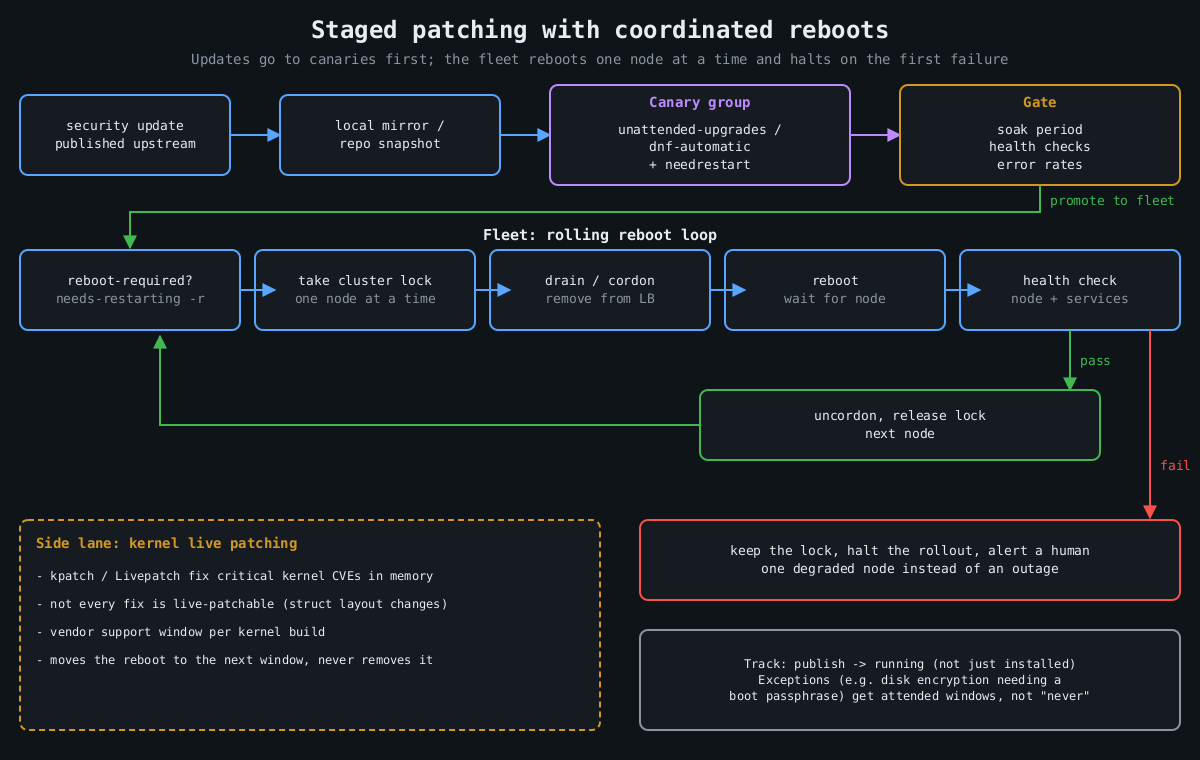
    Flowchart: updates go through a mirror to a canary group and a health gate, then a rolling reboot loop takes a lock, drains, reboots and health checks each node, halting on failure

    On Debian and Ubuntu, unattended-upgrades does this out of the box. Two files matter. /etc/apt/apt.conf.d/20auto-upgrades turns it on:

    APT::Periodic::Update-Package-Lists "1";
    APT::Periodic::Unattended-Upgrade "1";

    And 50unattended-upgrades decides what gets installed and what happens afterwards:

    Unattended-Upgrade::Origins-Pattern {
        "origin=Debian,codename=${distro_codename}-security,label=Debian-Security";
    };
    Unattended-Upgrade::Automatic-Reboot "false";
    Unattended-Upgrade::Remove-Unused-Kernel-Packages "true";

    On RHEL and its relatives, dnf-automatic is the equivalent:

    # /etc/dnf/automatic.conf
    [commands]
    upgrade_type = security
    apply_updates = yes
    
    sudo systemctl enable --now dnf-automatic.timer

    I’ve heard every objection to this, and the one with real weight is “an update could break production”. That’s true. A security update from a stable distribution branch is about the most conservative change your servers will ever receive, though. Debian security and RHEL errata backport fixes rather than shipping new upstream versions, exactly so behaviour doesn’t change. The risk from a backported fix is smaller than the risk of running a known-vulnerable OpenSSL for a quarter. And the staging below handles the rest.

    Installing isn’t the same as running

    Here’s the trap. A library update replaces the file on disk, but every process that already mapped the old version keeps running it. Your server says “OpenSSL updated” while nginx happily serves TLS from the vulnerable copy in memory. Kernel updates don’t take effect at all until a reboot.

    Check what’s actually stale:

    # Debian/Ubuntu
    sudo needrestart -b          # batch output: stale services and kernel status
    cat /var/run/reboot-required.pkgs
    
    # RHEL family
    sudo dnf needs-restarting -r   # exit code 1 means a reboot is needed
    sudo dnf needs-restarting -s   # services still using old files

    needrestart can restart affected services automatically after each upgrade, which closes the userspace gap with no human involved. The kernel still needs a reboot, and that’s where live patching comes in.

    Live patching buys time, not immunity

    Kernel live patching (kpatch on RHEL, Canonical Livepatch on Ubuntu, both built on the upstream livepatch infrastructure merged in Linux 4.0) replaces vulnerable kernel functions in memory using ftrace redirection. For a critical kernel CVE on a Friday afternoon, it is excellent.

    It has limits that vendors are honest about if you read the fine print. Not every fix can be live patched. Changes to data structure layouts are hard or impossible, so some CVEs simply don’t get a live patch. Live patches are also cumulative patches against a specific kernel build, and vendors only produce them for a support window per kernel. Eventually you’re running a kernel that’s been patched in memory a dozen times and isn’t getting new patches. So treat live patching as a way to move the reboot from “tonight, in a panic” to “next scheduled window”. It doesn’t remove the reboot.

    Reboots should be routine, which means coordinated

    If rebooting a server is scary, that’s a finding about your architecture. A service that can’t survive one node restarting can’t survive one node dying either, and hardware doesn’t schedule its failures for maintenance windows. Once services can tolerate it, reboots should happen on a cadence, automatically, one node at a time.

    The coordination logic is the same everywhere:

    1. Is a reboot needed? (reboot-required, needs-restarting -r)
    2. Take a cluster-wide lock so only one node reboots at a time.
    3. Drain: remove the node from the load balancer / cordon it.
    4. Reboot, wait for it to come back.
    5. Health check the node and its services.
    6. Only on success: put it back, release the lock.
    7. On failure: keep the lock, stop the rollout, alert a human.

    For Kubernetes nodes, kured (the Kubernetes Reboot Daemon) does exactly this: it watches for the reboot sentinel file, takes a lock, cordons and drains the node, reboots, and uncordons it. For VMs and bare metal, the same loop fits in a small Ansible playbook with serial: 1 and max_fail_percentage: 0, or whatever orchestration you already have. The important part is step 7. A rollout that stops itself after the first failed health check turns a bad update into one degraded node instead of an outage.

    Keep one exception list and keep it short. Machines that can’t reboot unattended (anything with full-disk encryption that needs a passphrase at boot, for example) should get a scheduled human-attended window, not “never”.

    Stage it like any other deploy

    The last piece is ordering. Updates should hit a small group of servers first, ideally the ones that look most like production without being the most important, and only spread after those survive a soak period. If you run a local mirror or use repository snapshots (Pulp, Aptly, or your cloud provider’s equivalent), the fleet installs the exact package set the canaries tested, not whatever landed in the repository an hour later. For VMs, take a hypervisor snapshot before the update on anything stateful, so a bad update is a rollback rather than a restore.

    Put numbers on it. Track the time from a fix being published to it running (not just installed) on every host. When the next regreSSHion lands, as covered in part 1, the teams that patch in a day are the ones that already patch every week.

    That wraps up this series. None of it is exotic, and together it’s most of what separates a server that gets popped by commodity tooling from one that doesn’t.