
Part 2 of 4 in the Hardening a Linux server series. Previously: Part 1, SSH hardening beyond “disable root login”.
Most services on a Linux box run with far more access than they need. A web app that reads a config file, writes to one data directory and listens on one port can, by default, read most of the filesystem, write anywhere its user owns, call every syscall the kernel offers and open any kind of socket. When that app gets popped through a deserialization bug, all of that becomes the attacker’s starting position.
systemd has grown a large set of sandboxing directives that fix this with a few lines in a unit file. No containers, no AppArmor profiles to maintain, no code changes. I think they’re the best return on effort in Linux hardening right now, and they’re still rarely used outside of the units systemd itself ships.
Measure first
systemd-analyze security scores every running service from 0 (locked down) to 10 (wide open) and lists each check it applied:
systemd-analyze security
systemd-analyze security nginx.service
The number is a heuristic, a weighted sum of which directives are set, so don’t treat 2.1 versus 2.4 as meaningful. It is very good at showing you the gaps. On most distributions the bulk of third-party services score 9 or above.
Measured: one unit, hardened step by step
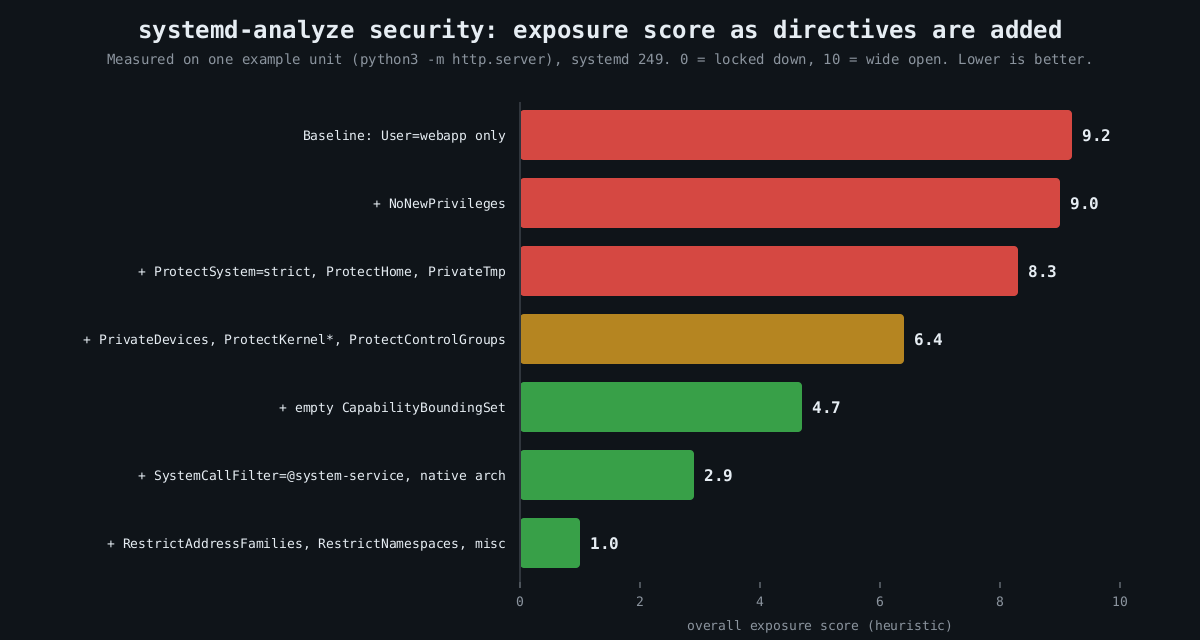
I took a trivial unit (python3 -m http.server running as a dedicated user) and added directives in groups, scoring each version with systemd-analyze security on systemd 249. The chart near the top of this post shows the result. The baseline scored 9.2. The final unit scored 1.0.
Here is roughly what that final unit looks like, adjusted for a real service:
[Service]
ExecStart=/opt/webapp/bin/webapp
DynamicUser=yes
StateDirectory=webapp
ConfigurationDirectory=webapp

NoNewPrivileges=yes
ProtectSystem=strict
ProtectHome=yes
PrivateTmp=yes
PrivateDevices=yes
ProtectKernelTunables=yes
ProtectKernelModules=yes
ProtectKernelLogs=yes
ProtectControlGroups=yes
ProtectClock=yes
ProtectHostname=yes
ProtectProc=invisible

CapabilityBoundingSet=CAP_NET_BIND_SERVICE
AmbientCapabilities=CAP_NET_BIND_SERVICE

SystemCallArchitectures=native
SystemCallFilter=@system-service
SystemCallFilter=~@privileged @resources
SystemCallErrorNumber=EPERM

RestrictAddressFamilies=AF_UNIX AF_INET  "AF_INET6
RestrictNamespaces=yes
RestrictSUIDSGID=yes
RestrictRealtime=yes
LockPersonality=yes
MemoryDenyWriteExecute=yes
UMask" =0077
That looks like a lot. Each line is cheap, though, and they fall into a few families.
Privilege escalation inside the service
NoNewPrivileges=yes sets the kernel’s no_new_privs flag, so nothing the service executes can gain privileges through setuid binaries or file capabilities. An attacker with code execution as the service user can’t then run a vulnerable setuid helper to become root. Several other directives quietly turn it on as well, which is fine.
Capabilities are the other half. CapabilityBoundingSet= with an empty value drops every capability for good. The example keeps exactly one, CAP_NET_BIND_SERVICE, and grants it as an ambient capability so a non-root process can bind port 443. That is the right shape for most daemons that historically started as root just to grab a low port.
DynamicUser=yes allocates a throwaway UID when the service starts. It implies a stricter set of defaults (read-only system, private /tmp, no setuid), and combined with StateDirectory= systemd creates and chowns /var/lib/webapp for you. If the service doesn’t need a stable UID shared with other software, use it.
Filesystem view
ProtectSystem=strict mounts the entire filesystem read-only for the service, apart from the API filesystems like /proc and /sys. Writable paths are then opt-in through StateDirectory=, CacheDirectory=, LogsDirectory= or ReadWritePaths=. This is the directive that stops an attacker dropping a cron job, a systemd unit or a modified binary for persistence. ProtectHome=yes hides /home, /root and /run/user entirely, which matters more than people think, since home directories are where SSH keys and cloud credentials live.
PrivateTmp=yes gives the service its own /tmp, which closes off the classic symlink and race games other local users can play in a shared /tmp.
Kernel attack surface
A sandbox that lives in userspace can’t save you from a kernel bug, but it can make most kernel bugs unreachable. SystemCallFilter=@system-service is an allowlist of syscalls that ordinary services use, curated by systemd. The second line then removes @privileged and @resources. By default a blocked syscall kills the process with SIGSYS; SystemCallErrorNumber=EPERM makes it fail with an error instead, which is friendlier while you’re tuning.
RestrictNamespaces=yes deserves a specific mention. A good number of recent Linux privilege escalation bugs are only reachable by unprivileged users through user namespaces, because creating one hands you capabilities inside it. CVE-2022-0185, a heap overflow in the filesystem context code, is the textbook case: exploitation needed CAP_SYS_ADMIN in a user namespace, which any unprivileged user could get on distributions that allowed unprivileged user namespaces. A service that can’t create namespaces can’t reach that code path at all.
PrivateDevices=yes, ProtectKernelModules=yes and ProtectKernelTunables=yes take away raw device nodes, module loading and writes to /proc/sys. SystemCallArchitectures=native blocks the 32-bit syscall ABI on 64-bit hosts, a path that has been used to dodge seccomp filters written for one ABI only.
Network
RestrictAddressFamilies= limits which socket types the service may open. Most need AF_UNIX, AF_INET and AF_INET6, nothing else, and certainly not AF_PACKET or AF_NETLINK. If you want per-service egress control, IPAddressDeny=any with a narrow IPAddressAllow= uses a cgroup BPF filter to drop traffic to anything else. A compromised internal API that can’t reach the internet is a lot less useful as a staging point.
Rolling it out without breaking things
Don’t edit vendor units. Use systemctl edit webapp.service to write a drop-in under /etc/systemd/system/webapp.service.d/, which survives package upgrades. You can try options on a throwaway command before committing to them:
sudo systemd-run --pty --wait -p ProtectSystem=strict -p PrivateTmp=yes \
  -p SystemCallFilter=@system-service /opt/webapp/bin/webapp --selftest
The usual breakage is predictable. MemoryDenyWriteExecute=yes breaks anything with a JIT, so Node, the JVM and PCRE’s JIT mode will fail in confusing ways. ProtectSystem=strict breaks services that write somewhere surprising, which the journal will show as EROFS errors. Syscall filters occasionally catch a library doing something unusual, and with SystemCallErrorNumber=EPERM the audit log or strace -f tells you which call. Add one family at a time and run your integration tests between each.
This doesn’t replace patching or a proper MAC policy, and it isn’t a VM boundary. What it does is shrink the blast radius of the next RCE in your app from “the box” to “one directory and a socket”. Part 3 covers auditd, so that when something does get through you can see what it tried to do.
Other parts of the Hardening a Linux server series: Part 1: SSH hardening beyond “disable root login”, Part 3: auditd and what to log, Part 4: Patching without fear.