Every engineer I know has either committed a secret to a repository or reviewed a change that did. It’s one of the most ordinary security mistakes there is, and it keeps showing up at the start of serious breaches because a credential in git is durable, copyable and easy to search for at scale.
Two well-documented cases set the stakes. In 2016, attackers got into a private GitHub repository used by Uber engineers, found AWS credentials in it, and used them to download personal data on about 57 million riders and drivers from S3. In 2022 Toyota disclosed that source code for its T-Connect service had sat in a public GitHub repository for nearly five years, with an access key for a data server that held around 296,000 customer email addresses. Neither required anything clever. Someone read a file.
How secrets actually end up in history
The obvious path is a config file with a real value in it. A .env that wasn’t in .gitignore yet, a settings.py with a database password “just for local testing”, a Terraform variables file. The less obvious paths cause more trouble:
- A secret is committed, noticed in review, and removed in the next commit. It’s still in history, and in every clone and fork made in between.
- A test fixture or recorded HTTP cassette captures a real
Authorizationheader. - A Jupyter notebook saves its output cells, including the token someone printed while debugging.
- A Dockerfile copies the whole build context into an image layer,
.envincluded. That’s not git, but the same people push both.
The scale is large. A 2019 NDSS paper by Meli, McNiece and Reaves scanned public GitHub over several months and found secret leakage in over 100,000 repositories, with thousands of new, unique secrets leaking every day. Attackers run the same kind of scanning continuously. Assume a key pushed to a public repository is found within minutes, not days.
Private repositories are not a vault either. The Uber repository was private. Anyone with read access, every laptop clone, every CI runner and every third-party integration with repo scope has a copy of the full history.
Scanning: before commit and across history
There are good open source scanners, and they complement each other. Gitleaks is fast and regex-based, and works well as a pre-commit hook. TruffleHog’s distinguishing feature is verification: for many credential types it calls the provider’s API to check whether a found key is live, which cuts the noise enormously when you’re scanning years of history.
Scan the whole history, all branches, once:
gitleaks git -v .              # older releases: gitleaks detect --source . -v
trufflehog git file://. --only-verified
Then stop new ones at the developer’s machine. With the pre-commit framework:
# .pre-commit-config.yaml
repos:
  - repo: https://github.com/gitleaks/gitleaks
    rev: v8.30.1
    hooks:
      - id: gitleaks
A local hook is easy to skip with --no-verify, so run the same scanner in CI on every push and fail the build. On GitHub, push protection blocks pushes containing recognized secret formats at the server, and it has been on by default for pushes to public repositories since early 2024. GitHub’s secret scanning partner program also forwards leaked tokens to the issuing provider. AWS, for one, reacts by attaching a quarantine policy to the affected IAM user, which is a nice safety net and a terrible plan.
Expect false positives and handle them deliberately, with an allowlist entry or an inline ignore comment that a reviewer can see. A scanner everyone has learned to bypass is worse than none, because it gives the impression of coverage.
After a leak, rotate first
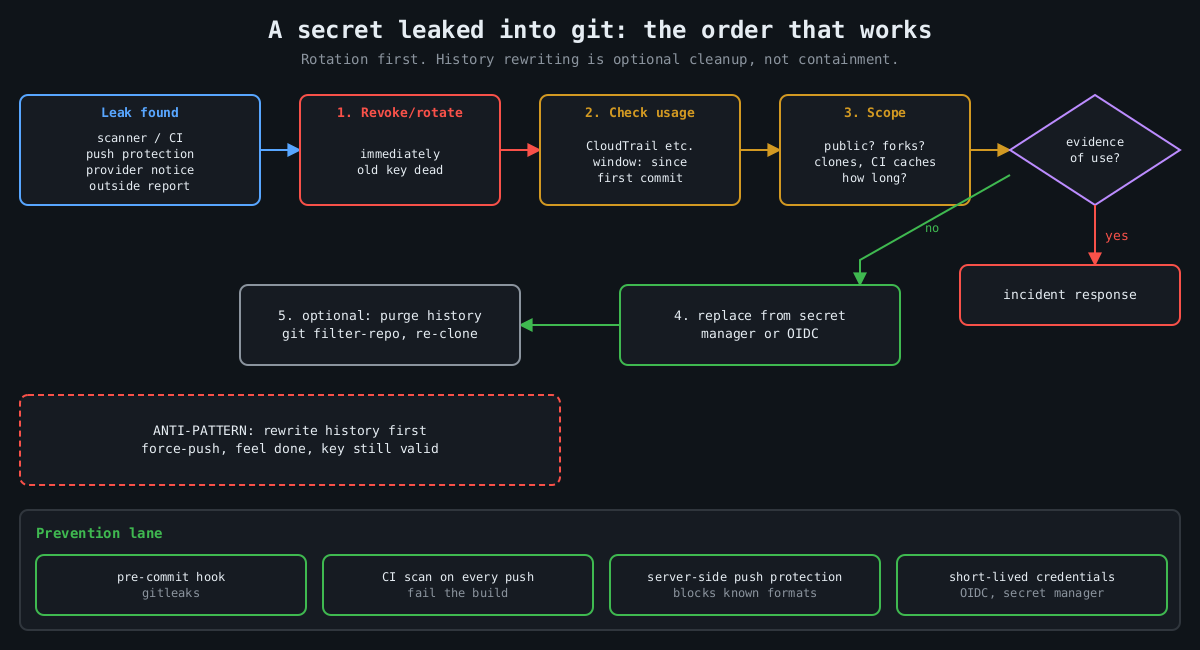
The most common mistake I see after a leak is reaching for history rewriting first. People spend an afternoon with git filter-repo, force-push, and feel done, while the key still works. Rewriting history doesn’t un-leak anything. Clones, forks, CI caches and attackers’ scrapers already have it. On GitHub, old commits can stay reachable by SHA, through pull request refs, and in cached views until support purges them.
The order that works:
1. Revoke or rotate the credential. Now, before anything else.
2. Find out whether it was used:
   aws cloudtrail lookup-events \
     --lookup-attributes AttributeKey=AccessKeyId,AttributeValue=AKIA...
   (or the provider's equivalent audit log)
3. Scope the exposure: when was it committed, who had access, was it public.
4. Deploy the replacement from a secret manager, not a new file in the repo.
5. Then clean history if you still want to.
Step 2 is the one people skip, and it’s the one that tells you whether this was a near miss or an incident. Look at the full window from the first commit, not just since someone noticed. Toyota’s key was exposed for years.
If you do rewrite history, git filter-repo is the maintained tool:
# remove a file from every commit
git filter-repo --invert-paths --path config/.env
# or replace literal values listed one per line in a file
git filter-repo --replace-text leaked-values.txt
Every collaborator then has to re-clone, and the old history lives on in any fork you don’t control. That’s why rotation is step one.
Making it rare
Scanners catch mistakes. The structural fix is having fewer long-lived secrets that can be committed in the first place. CI systems can usually authenticate to cloud providers with short-lived OIDC tokens rather than stored access keys, and GitHub Actions, GitLab CI and others support this with AWS, Azure and Google Cloud. Applications can read secrets at runtime from a secret manager or have them injected by the platform, so the repository only contains the name of the secret, never its value. Give every credential an owner and an expiry, so rotation is a routine job instead of something you discover you can’t do during an incident.
Watch the neighbours of the repository too. A set -x in a deploy script prints every expanded variable into the CI log, and build logs are often readable by far more people than the secret store. Most CI systems mask registered secrets in output, but only the exact registered value, not a base64-encoded or URL-encoded copy of it.
I’d rather have a team that rotates a leaked key in ten minutes than one that never leaks a key, because the second team doesn’t exist. Build the scanning so leaks are caught early, and build the rotation so catching one is boring.
Leave a Reply
You must be logged in to post a comment.