Category: Software Engineering

  • Big-O in Practice: Why Your Database Query Planner Thinks Differently Than You

    Big-O in Practice: Why Your Database Query Planner Thinks Differently Than You

    The gap between asymptotic analysis and real execution
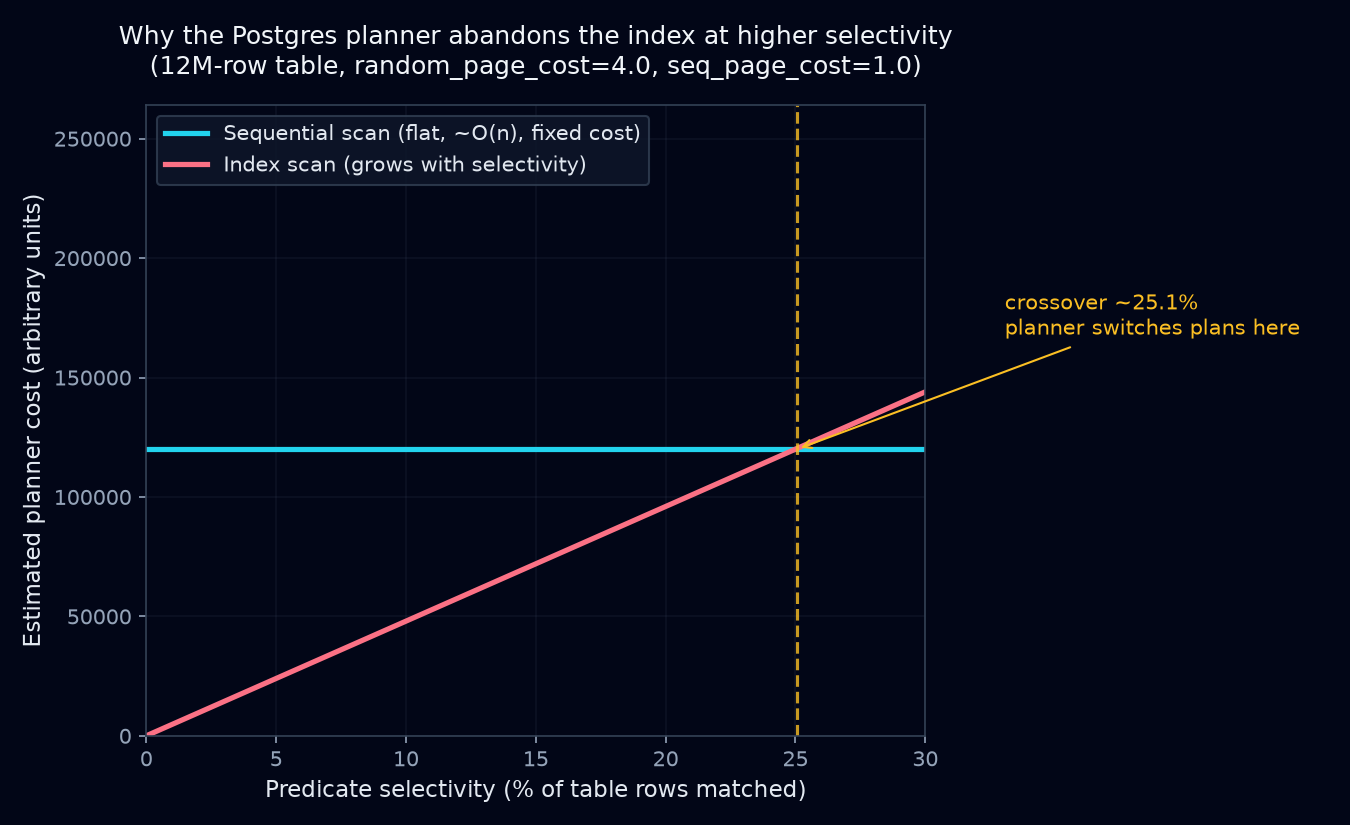
    Chart showing Postgres planner cost crossover between sequential and index scans

    Big-O tells you how a cost grows as input grows, in the limit, with constants thrown away. That’s the right tool for comparing two sorting algorithms in a CS class. It’s the wrong tool, on its own, for predicting how a database executes a query. A query planner isn’t picking between abstract algorithms on an idealized machine. It’s picking between concrete physical operations, sequential reads, random reads, hash builds, sort buffers, running against a measured data distribution, with cost denominated in estimated page fetches and CPU cycles, not big-O classes.

    A B-tree lookup is O(log n). A full table scan is O(n). If you stopped there you’d expect the planner to grab the index every time n gets large. Real planners routinely do the opposite, and they’re right to.

    Index scan vs. sequential scan: what’s actually being compared

    An index scan traverses the B-tree, which is cheap, a handful of comparisons, then for each matching entry fetches the corresponding heap page to get the actual row. That’s a heap fetch, and unless the index is covering, you pay for one per match. Each heap fetch is potentially a random I/O: a different disk page, no locality guarantee, unless the table happens to be physically clustered on that column.

    A sequential scan reads the table page by page in physical order. On spinning disks, and even on SSDs behind a page cache, that order benefits from read-ahead and prefetching, which makes it dramatically cheaper per page than scattered random access.

    So the real comparison isn’t O(log n) vs O(n) in the abstract. It’s:

    index_scan_cost ≈ log(n) [tree traversal]
                     + selectivity * n * random_page_cost  [heap fetches]
    
    seq_scan_cost   ≈ n * seq_page_cost

    Postgres defaults random_page_cost to 4.0 against a seq_page_cost of 1.0 (people tune it down to around 1.1–1.5 on SSD-backed systems, but it’s still at or above sequential cost). Selectivity is the fraction of rows the predicate is expected to match. Once that fraction gets large enough, the selectivity * n * random_page_cost term outgrows the cost of just reading the whole table in one pass. The crossover usually shows up in the single-digit percentages of the table, not some rare edge case. That’s why an index that’s fantastic for a highly selective predicate turns actively harmful for a low-selectivity one, and the planner refusing to use it is the correct call, not a bug.

    The planner doesn’t know Big-O. It knows statistics.

    Postgres’s planner is cost-based. It never reasons “index lookup is logarithmic.” It pulls numbers from pg_statistic, populated by ANALYZE: table row count (reltuples), most-common values and their frequencies, histogram bounds for everything else, and correlation between physical row order and column value. From that it computes an estimated selectivity for your predicate, feeds it into the cost formulas above (plus startup cost, CPU tuple cost, CPU operator cost), and picks whichever plan comes out cheapest.

    Big-O describes a trend as n approaches infinity. The planner cares about one specific n, one specific selectivity, and specific hardware cost ratios, and it has to estimate all of that. When stats are stale or a predicate correlates with something the optimizer doesn’t model, those estimates can be badly wrong.

    An illustrative example (not captured live, representative of real behavior)

    Table: orders, 12 million rows, B-tree index on status.

    CREATE INDEX idx_orders_status ON orders(status);
    ANALYZE orders;

    Querying a common status:

    EXPLAIN ANALYZE
    SELECT * FROM orders WHERE status = 'pending';
    Seq Scan on orders  (cost=0.00..305412.00 rows=4812000 width=96)
                         (actual time=0.019..1847.332 rows=4798213 loops=1)
      Filter: (status = 'pending'::text)
      Rows Removed by Filter: 7201787
    Planning Time: 0.112 ms
    Execution Time: 1958.410 ms

    ‘pending’ covers roughly 40% of the table. Even with idx_orders_status sitting right there, the planner skips it and does a full scan. That’s correct: fetching 4.8M heap pages randomly through the index would cost far more than one sequential pass, even though the index path is “O(log n) + k” and the seq scan is “O(n).” The constant on the random-access term swamps the asymptotic advantage.

    Now a selective status:

    EXPLAIN ANALYZE
    SELECT * FROM orders WHERE status = 'chargeback_disputed';
    Index Scan using idx_orders_status on orders
                (cost=0.43..892.17 rows=214 width=96)
                (actual time=0.038..0.291 rows=211 loops=1)
      Index Cond: (status = 'chargeback_disputed'::text)
    Planning Time: 0.098 ms
    Execution Time: 0.324 ms

    Selectivity here is about 0.0018%. The heap-fetch term is negligible, and the index wins by roughly four orders of magnitude in wall-clock time, matching the intuitive big-O expectation, because at this selectivity the random-access constant never gets a chance to dominate.

    Same table, same index, same schema. The only thing that changed is the data distribution behind the predicate, and that’s exactly what you can’t see by analyzing the index structure in isolation.

    Why this matters practically

    None of this means indexes are unreliable or seq scans are secretly fast. It means complexity class is necessary but not sufficient for predicting real execution cost. A few things follow from that directly.

    Run EXPLAIN (ANALYZE, BUFFERS) before arguing about a plan from intuition. ANALYZE without BUFFERS only shows estimated vs. actual rows and time. BUFFERS shows actual page hits and reads, which is where you’ll catch cases where estimated and actual plans diverge because the stats are stale.

    Keep ANALYZE current. Autovacuum handles this most of the time, but bulk loads and fast-churning tables can outrun it, and a bad selectivity estimate produces a bad plan no matter how well you designed the index.

    Don’t assume “it has an index, so it’ll use it.” If a predicate commonly matches a large chunk of the table, a partial index (WHERE status != 'pending') or a different approach entirely, covering index, BRIN for correlated columns, partitioning by status, is usually the real fix. Forcing index usage with planner hints is treating the symptom.

    When you’re comparing two query shapes, compare their actual costs on your actual data, not their theoretical complexity class. A nested loop join, asymptotically worse at O(n*m), can still beat a hash join on small, highly selective inner relations, because the hash build’s fixed overhead dominates at small n.

    Big-O tells you how a cost scales. The planner’s job, and yours when you’re staring at its output, is figuring out what that cost actually is: for this table, this data, this hardware, right now. Trust the EXPLAIN output over your asymptotic intuition. The planner is optimizing a cost function you don’t have memorized, using statistics you’ve probably never looked at.

  • Threat modeling with STRIDE for a small team

    Threat modeling with STRIDE for a small team

    Most small teams I talk to think threat modeling is something big companies do with a dedicated security architect, a two-week engagement and a 40-page document nobody reads afterwards. That version exists, and it’s mostly a waste. The version that works for a team of five engineers fits in a 90-minute meeting around a whiteboard and ends with a handful of tickets. STRIDE is the tool I reach for because it gives a room full of people a structured way to ask “what could go wrong here?” without needing a security specialist to lead every question.

    What STRIDE actually is

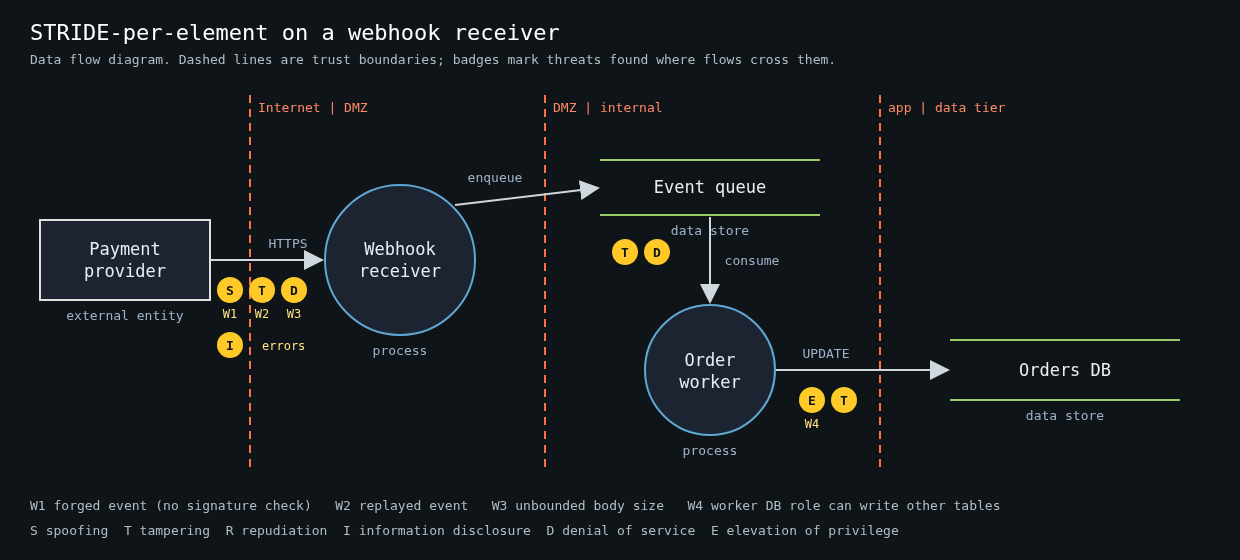
    Data flow diagram of a payment webhook receiver with three trust boundaries and STRIDE threat badges on each boundary-crossing flow

    STRIDE came out of Microsoft in 1999, from Loren Kohnfelder and Praerit Garg, and was popularised by Adam Shostack’s book Threat Modeling: Designing for Security. It’s a mnemonic for six threat categories, each one the violation of a property you want your system to have:

    • Spoofing violates authentication. Someone claims to be a user, a service or a host they aren’t.
    • Tampering violates integrity. Data in transit, at rest or in memory gets modified.
    • Repudiation violates non-repudiation. Someone does something and you can’t prove it.
    • Information disclosure violates confidentiality.
    • Denial of service violates availability.
    • Elevation of privilege violates authorization. A user or component gets capabilities it shouldn’t have.

    That’s it. It isn’t a methodology on its own, and it doesn’t rank anything. It’s a checklist of question shapes. The value is that it stops the discussion from collapsing into whatever the loudest person in the room worried about last week, which in my experience is usually SQL injection.

    Start from four questions, not from the acronym

    Shostack frames the whole exercise as four questions, and the Threat Modeling Manifesto (2020) kept them:

    1. What are we working on?
    2. What can go wrong?
    3. What are we going to do about it?
    4. Did we do a good enough job?

    STRIDE only answers question two. Teams that skip question one end up applying STRIDE to a vague mental picture of “the system”, which produces vague threats like “an attacker could spoof a user”. True, useless.

    So answer question one concretely. Pick one feature or one change, not the whole platform. “We’re adding a webhook receiver that accepts events from our payment provider and updates order status” is a good scope. “Our backend” is not.

    Draw a data flow diagram with trust boundaries

    The diagram is where most of the value comes from, and it should take 15 to 20 minutes. You need four kinds of things:

    • External entities: users, third-party services, anything you don’t control.
    • Processes: your services, workers, lambdas.
    • Data stores: databases, queues, buckets, caches.
    • Data flows: arrows between them, labelled with what moves and over what protocol.

    Then draw trust boundaries, the dashed lines where the level of trust changes. Internet to your load balancer. Your API to the database. Your worker to the third-party API. Your app to the admin interface. If a flow crosses a dashed line, that’s where you spend your time. Flows entirely inside one trust zone rarely produce interesting threats.

    For the webhook example, the boundaries are the payment provider to your public endpoint, your receiver to the queue, and the worker to the orders database. Three crossings. That’s a manageable meeting.

    Walk STRIDE per element

    The variant that works best for small teams is STRIDE-per-element. Not every category applies to every kind of element, and the classic mapping keeps the discussion short:

    • External entities: spoofing and repudiation.
    • Processes: all six.
    • Data stores: tampering, information disclosure, denial of service, and repudiation if the store is a log.
    • Data flows: tampering, information disclosure, denial of service.

    Go element by element along the flows that cross a boundary and ask each applicable question out loud. For the webhook receiver it might go like this:

    • Spoofing: can anyone on the internet POST a fake “payment succeeded” event? Do we verify the provider’s signature, and do we compare it in constant time?
    • Tampering: can a valid event be replayed? Is there a timestamp in the signed payload, and do we reject old ones?
    • Repudiation: if an order flips to paid by mistake, can we show which event did it and where it came from?
    • Information disclosure: do our error responses leak stack traces or internal hostnames to the caller?
    • Denial of service: what happens if someone sends 10,000 large bodies a second? Is there a size limit before we parse JSON?
    • Elevation of privilege: does the worker’s database role need to write to anything except the orders table?

    Every one of those is a concrete, testable question, and most of them are a few lines of code to fix. That’s the point.

    Record threats as tickets, not as a document

    The output of the session is a list of threats, each with a decision. Mitigate, accept, transfer or eliminate the feature. I like a plain table in the repo next to the code, because it gets reviewed in pull requests and it ages with the system:

    | ID | Element            | STRIDE | Threat                                  | Decision  | Ticket   |
    |----|--------------------|--------|-----------------------------------------|-----------|----------|
    | W1 | Webhook endpoint   | S      | Forged event without valid signature    | Mitigate  | PAY-412  |
    | W2 | Webhook endpoint   | T      | Replay of a captured valid event        | Mitigate  | PAY-413  |
    | W3 | Receiver -> queue  | D      | Unbounded body size exhausts memory     | Mitigate  | PAY-414  |
    | W4 | Worker DB role     | E      | Role can write to users table           | Mitigate  | PAY-415  |
    | W5 | Provider outage    | D      | Events delayed for hours                | Accept    | -        |

    Accepted risks are fine. Write down who accepted them. A threat model where everything is “mitigate” usually means nobody was honest about the effort.

    Making it stick on a small team

    The failure mode isn’t doing threat modeling badly. It’s doing it once at a kickoff and never again. A few habits keep it alive.

    Tie it to design review. If a change adds a new trust boundary crossing, a new external entity or a new data store with sensitive data, it gets a STRIDE pass. Everything else doesn’t. That keeps it rare enough that people don’t resent it.

    Rotate who facilitates. The facilitator’s job is to keep the group moving through the elements and to stop the session from becoming a design argument. Any engineer can do that after watching it twice, and the person who facilitates tends to start thinking this way in code review too.

    Keep the diagram in the repo as text. A diagram drawn in a SaaS whiteboard is dead the day the meeting ends. Mermaid, PlantUML or OWASP Threat Dragon’s JSON files all diff fine. Microsoft’s Threat Modeling Tool is also free if your team is on Windows and wants STRIDE suggestions generated from the diagram, though I find the generated list too long for a small team to triage.

    Revisit question four. A month after the feature ships, spend ten minutes asking whether any incident, bug report or pentest finding touched an element you modeled. If one did and the model missed it, that’s the most useful feedback you’ll get about your process.

    Where STRIDE falls short

    STRIDE is good at technical threats along data flows. It’s weak on abuse of legitimate functionality, like a referral program being farmed, and on privacy harms, where LINDDUN is a better fit. It also says nothing about likelihood. When a session produces more threats than you can fix, rank them by what an attacker can reach from outside your trust boundaries first, and by what you’d have to explain in an incident report second. That’s crude, and it’s still better than ranking by gut feeling about which bug sounds scariest.

    I’ve watched a five-person team find a missing webhook signature check, an admin endpoint reachable from the public load balancer and a worker with database superuser rights, all in one 90-minute session. Nobody in the room was a security specialist. They just drew the thing and asked the questions in order.

  • Secrets in git: how credentials leak, how to find them, and what to do after a leak

    Secrets in git: how credentials leak, how to find them, and what to do after a leak

    Every engineer I know has either committed a secret to a repository or reviewed a change that did. It’s one of the most ordinary security mistakes there is, and it keeps showing up at the start of serious breaches because a credential in git is durable, copyable and easy to search for at scale.

    Two well-documented cases set the stakes. In 2016, attackers got into a private GitHub repository used by Uber engineers, found AWS credentials in it, and used them to download personal data on about 57 million riders and drivers from S3. In 2022 Toyota disclosed that source code for its T-Connect service had sat in a public GitHub repository for nearly five years, with an access key for a data server that held around 296,000 customer email addresses. Neither required anything clever. Someone read a file.

    How secrets actually end up in history

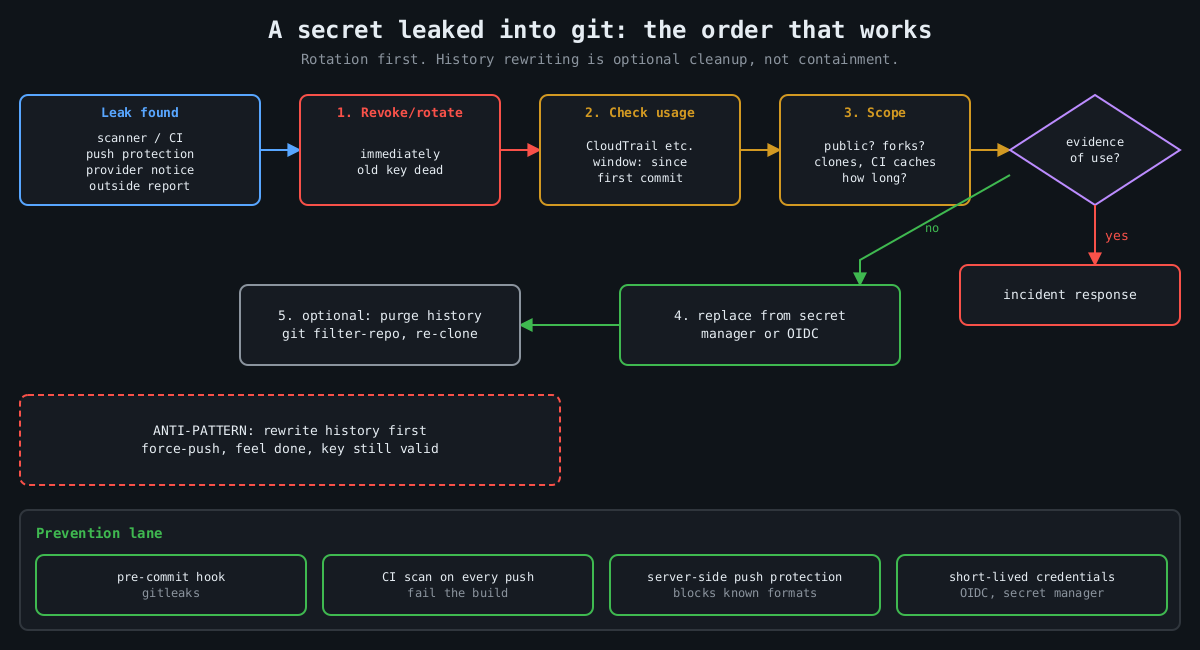
    Flowchart: when a secret leaks into git, revoke it first, check audit logs for use, scope the exposure, replace it from a secret manager, and only then optionally purge history; prevention via hooks, CI scanning, push protection and short-lived credentials

    The obvious path is a config file with a real value in it. A .env that wasn’t in .gitignore yet, a settings.py with a database password “just for local testing”, a Terraform variables file. The less obvious paths cause more trouble:

    • A secret is committed, noticed in review, and removed in the next commit. It’s still in history, and in every clone and fork made in between.
    • A test fixture or recorded HTTP cassette captures a real Authorization header.
    • A Jupyter notebook saves its output cells, including the token someone printed while debugging.
    • A Dockerfile copies the whole build context into an image layer, .env included. That’s not git, but the same people push both.

    The scale is large. A 2019 NDSS paper by Meli, McNiece and Reaves scanned public GitHub over several months and found secret leakage in over 100,000 repositories, with thousands of new, unique secrets leaking every day. Attackers run the same kind of scanning continuously. Assume a key pushed to a public repository is found within minutes, not days.

    Private repositories are not a vault either. The Uber repository was private. Anyone with read access, every laptop clone, every CI runner and every third-party integration with repo scope has a copy of the full history.

    Scanning: before commit and across history

    There are good open source scanners, and they complement each other. Gitleaks is fast and regex-based, and works well as a pre-commit hook. TruffleHog’s distinguishing feature is verification: for many credential types it calls the provider’s API to check whether a found key is live, which cuts the noise enormously when you’re scanning years of history.

    Scan the whole history, all branches, once:

    gitleaks git -v .              # older releases: gitleaks detect --source . -v
    trufflehog git file://. --only-verified

    Then stop new ones at the developer’s machine. With the pre-commit framework:

    # .pre-commit-config.yaml
    repos:
      - repo: https://github.com/gitleaks/gitleaks
        rev: v8.30.1
        hooks:
          - id: gitleaks

    A local hook is easy to skip with --no-verify, so run the same scanner in CI on every push and fail the build. On GitHub, push protection blocks pushes containing recognized secret formats at the server, and it has been on by default for pushes to public repositories since early 2024. GitHub’s secret scanning partner program also forwards leaked tokens to the issuing provider. AWS, for one, reacts by attaching a quarantine policy to the affected IAM user, which is a nice safety net and a terrible plan.

    Expect false positives and handle them deliberately, with an allowlist entry or an inline ignore comment that a reviewer can see. A scanner everyone has learned to bypass is worse than none, because it gives the impression of coverage.

    After a leak, rotate first

    The most common mistake I see after a leak is reaching for history rewriting first. People spend an afternoon with git filter-repo, force-push, and feel done, while the key still works. Rewriting history doesn’t un-leak anything. Clones, forks, CI caches and attackers’ scrapers already have it. On GitHub, old commits can stay reachable by SHA, through pull request refs, and in cached views until support purges them.

    The order that works:

    1. Revoke or rotate the credential. Now, before anything else.
    2. Find out whether it was used:
       aws cloudtrail lookup-events \
         --lookup-attributes AttributeKey=AccessKeyId,AttributeValue=AKIA...
       (or the provider's equivalent audit log)
    3. Scope the exposure: when was it committed, who had access, was it public.
    4. Deploy the replacement from a secret manager, not a new file in the repo.
    5. Then clean history if you still want to.

    Step 2 is the one people skip, and it’s the one that tells you whether this was a near miss or an incident. Look at the full window from the first commit, not just since someone noticed. Toyota’s key was exposed for years.

    If you do rewrite history, git filter-repo is the maintained tool:

    # remove a file from every commit
    git filter-repo --invert-paths --path config/.env
    # or replace literal values listed one per line in a file
    git filter-repo --replace-text leaked-values.txt

    Every collaborator then has to re-clone, and the old history lives on in any fork you don’t control. That’s why rotation is step one.

    Making it rare

    Scanners catch mistakes. The structural fix is having fewer long-lived secrets that can be committed in the first place. CI systems can usually authenticate to cloud providers with short-lived OIDC tokens rather than stored access keys, and GitHub Actions, GitLab CI and others support this with AWS, Azure and Google Cloud. Applications can read secrets at runtime from a secret manager or have them injected by the platform, so the repository only contains the name of the secret, never its value. Give every credential an owner and an expiry, so rotation is a routine job instead of something you discover you can’t do during an incident.

    Watch the neighbours of the repository too. A set -x in a deploy script prints every expanded variable into the CI log, and build logs are often readable by far more people than the secret store. Most CI systems mask registered secrets in output, but only the exact registered value, not a base64-encoded or URL-encoded copy of it.

    I’d rather have a team that rotates a leaked key in ten minutes than one that never leaks a key, because the second team doesn’t exist. Build the scanning so leaks are caught early, and build the rotation so catching one is boring.