Category: Security

  • Cloud IAM misconfigurations: public buckets, broad roles and Capital One

    Cloud IAM misconfigurations: public buckets, broad roles and Capital One

    Most cloud breaches I’ve read about didn’t need a zero-day in the cloud provider. They needed a storage bucket that was readable by the world, or a role that could do far more than its job required, or both. The provider did exactly what it was told. The configuration told it the wrong thing.

    The Capital One breach in 2019 is still the best case study I know, because it shows how a small flaw in one place becomes a large one when identity permissions are too broad.

    What happened at Capital One
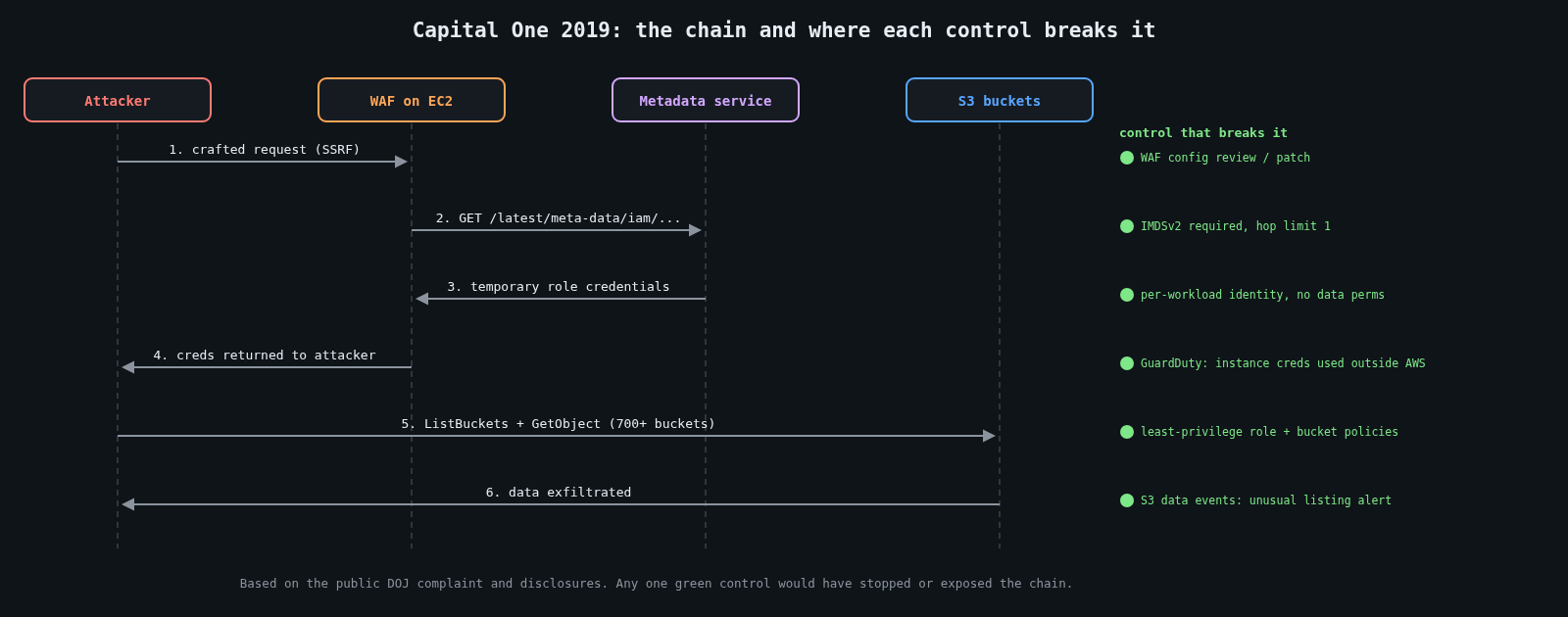
    Sequence diagram of the Capital One 2019 breach chain with the control that breaks each step

    The public record, from the US Department of Justice’s case and the bank’s own disclosures, goes roughly like this. Capital One ran a web application firewall on EC2 in front of some of its applications. That WAF was misconfigured in a way that let an outside attacker make it send requests on their behalf, a server-side request forgery (SSRF).

    From the EC2 instance, the attacker requested the instance metadata service at 169.254.169.254. At the time, that service answered any plain HTTP GET from the instance, including the temporary credentials for the IAM role attached to it. So the SSRF returned working AWS credentials.

    The role attached to the WAF instance could list and read a large number of S3 buckets, more than 700 according to the criminal complaint, which held credit card application data. The data of about 100 million people in the US and 6 million in Canada was taken. The OCC fined Capital One $80 million in 2020, and the attacker was convicted in 2022.

    Notice that no single control failed catastrophically. A WAF had a configuration bug. The metadata service behaved as designed. A role had permissions that were convenient. The breach was the product of all three.

    Fix the metadata path first

    AWS introduced IMDSv2 in November 2019, a few months after the breach became public. It requires a session token obtained with a PUT request carrying a custom header, and by default it won’t answer requests that have passed through too many network hops. Most SSRF bugs can only make simple GET requests, so IMDSv2 breaks the exact path used at Capital One.

    Make it mandatory, not optional. For existing instances:

    aws ec2 modify-instance-metadata-options \
      --instance-id i-0123456789abcdef0 \
      --http-tokens required \
      --http-put-response-hop-limit 1

    Then stop new instances from launching without it. A service control policy at the organisation level does that for every account:

    {
      "Version": "2012-10-17",
      "Statement": [
        {
          "Sid": "RequireIMDSv2",
          "Effect": "Deny",
          "Action": "ec2:RunInstances",
          "Resource": "arn:aws:ec2:*:*:instance/*",
          "Condition": {
            "StringNotEquals": { "ec2:MetadataHttpTokens": "required" }
          }
        }
      ]
    }

    Containers have the same problem one layer down. A pod on a node that can reach the node’s metadata endpoint can borrow the node’s role. Use per-workload identities (IRSA or EKS Pod Identity on AWS, Workload Identity on GCP and Azure) and keep the hop limit at 1 so containers can’t reach node credentials.

    Make roles boring and narrow

    The WAF needed, at most, to write its own logs. It didn’t need to read customer data. Broad roles usually happen for understandable reasons: someone was in a hurry, a wildcard made the error go away, and nobody revisited it.

    {
      "Effect": "Allow",
      "Action": "s3:*",
      "Resource": "*"
    }

    That statement is a bug report waiting to be written. A role for a component should name the actions and resources it actually uses:

    {
      "Effect": "Allow",
      "Action": ["s3:PutObject"],
      "Resource": "arn:aws:s3:::example-waf-logs/waf/*"
    }

    Writing these by hand is tedious, so use the tools built for it. IAM Access Analyzer can generate a policy from the role’s real activity in CloudTrail, and the “last accessed” data shows which granted services a role has never touched. Start broad in development if you must, then generate the narrow policy from observed use before production.

    Two more patterns keep blast radius small. Put sensitive data in separate accounts from internet-facing workloads, because cross-account access must be granted explicitly on both sides. And add resource policies on the most sensitive buckets that deny access from anything outside your expected principals or network paths, using conditions such as aws:PrincipalOrgID or aws:SourceVpce. Even if a role is over-granted, the bucket says no.

    Public buckets: turn the default on everywhere

    Accidentally public buckets have exposed voter rolls, military files and plenty of corporate backups over the years. The fix is now mostly a setting. S3 Block Public Access overrides any ACL or bucket policy that would make data public, and since April 2023 AWS enables it, with ACLs disabled, on all new buckets by default. Buckets created before that keep whatever they had, so set it at the account level too:

    aws s3control put-public-access-block \
      --account-id 111122223333 \
      --public-access-block-configuration \
      BlockPublicAcls=true,IgnorePublicAcls=true,BlockPublicPolicy=true,RestrictPublicBuckets=true

    If something genuinely needs to be public, like static website assets, serve it through a CDN with origin access control from a bucket that stays private, or put it in a dedicated account where public is the expected state and nothing sensitive lives.

    Other clouds have equivalents: public access prevention on Google Cloud Storage and disabling anonymous blob access on Azure storage accounts. Same idea, different flag.

    Detect what you can’t prevent

    Prevention won’t be perfect, so watch for the signs. GuardDuty flags EC2 instance credentials being used from outside AWS, which is the signature of stolen metadata credentials. CloudTrail data events for S3 on sensitive buckets will show a role suddenly listing hundreds of buckets it normally never touches. That pattern was visible in the Capital One case, and it’s a detection worth writing. AWS Config rules or a CSPM tool can continuously report public buckets, roles with wildcard actions, and instances without IMDSv2.

    A quick audit you can run this week

    Find every role with * in its actions or resources, and work through them starting with roles attached to internet-facing compute. Check that IMDSv2 is required across all instances and launch templates. Confirm account-level Block Public Access everywhere. Pick your three most sensitive buckets and read their access logs for a week.

    None of this is exotic. Capital One had a large, capable security team, and the breach still came down to a convenient role and a metadata endpoint that answered too easily. Most of us are working with less, which is all the more reason to make the defaults strict.

  • SPF, DKIM and DMARC, and why p=none isn’t enough

    SPF, DKIM and DMARC, and why p=none isn’t enough

    Email was designed in an era when every host on the network trusted every other host. SMTP lets any server claim to send mail from any address, and the From: header that a person actually reads is just text the sender typed. Three standards were bolted on afterwards to fix that: SPF, DKIM and DMARC. Most domains I look at have all three records published. A surprising number of them are still not protected, because the DMARC policy says p=none.

    SPF: which servers may send

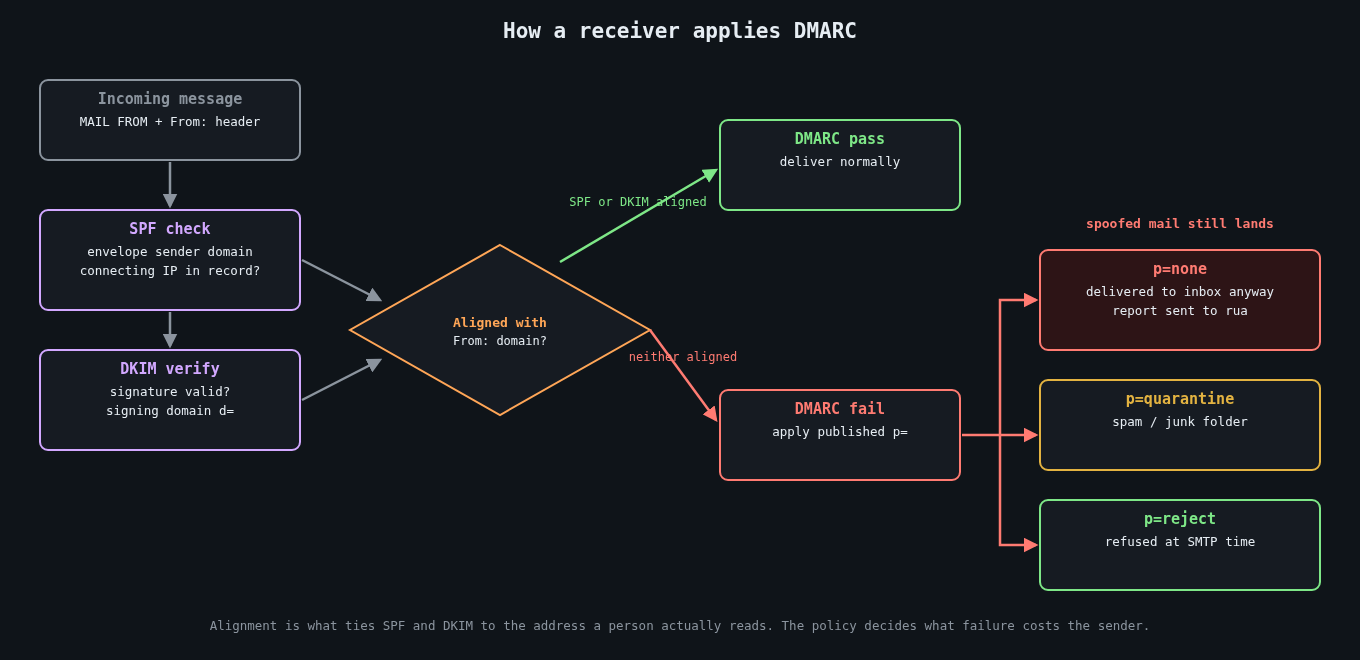
    Flowchart of how a receiving mail server evaluates SPF, DKIM, alignment and the DMARC policy

    Sender Policy Framework (RFC 7208) lets a domain publish, in DNS, the list of servers allowed to send mail for it. A receiving server takes the domain from the SMTP envelope sender (the MAIL FROM, also called the return path), looks up its SPF record, and checks whether the connecting IP is on the list.

    example.com.  IN TXT  "v=spf1 ip4:198.51.100.0/24 include:_spf.google.com include:sendgrid.net -all"

    SPF has two well-known weaknesses. It checks the envelope sender, not the visible From: header, so on its own it does nothing to stop someone spoofing your domain in the address the recipient sees. And it breaks on forwarding, because a forwarding server isn’t in your list.

    There’s also a hard limit that bites growing companies: evaluating an SPF record may trigger at most 10 DNS lookups (include, a, mx, ptr, exists and redirect each count). Every SaaS tool you add with an include: eats into that budget, and when you exceed it the result is a permerror, which many receivers treat as a failure. I’ve seen marketing teams take down a company’s outbound mail by adding one more vendor.

    DKIM: a signature on the message

    DomainKeys Identified Mail (RFC 6376) has the sending server sign selected headers and the body with a private key. The signature goes in a DKIM-Signature header naming the signing domain (d=) and a selector (s=). The receiver fetches the public key from DNS at selector._domainkey.domain and verifies.

    s1._domainkey.example.com.  IN TXT  "v=DKIM1; k=rsa; p=MIIBIjANBgkqhkiG9w0BAQEFAAOCAQ8AMIIBCgKCAQEA..."

    DKIM survives plain forwarding because the signature travels with the message, though it breaks if a mailing list rewrites the subject or appends a footer. Use 2048-bit RSA keys, and rotate them. In 2012 a mathematician found that Google was signing with a 512-bit key that he could factor, which led to a quick round of key upgrades across large providers.

    The catch, again, is that DKIM proves a message was signed by d= some domain. It doesn’t, by itself, say that domain has anything to do with the From: address.

    DMARC: tying it to the From header

    DMARC (RFC 7489) is what makes the first two useful against spoofing. It adds the concept of alignment: a message passes DMARC only if SPF passes for a domain that matches the From: domain, or DKIM passes with a d= that matches the From: domain. Relaxed alignment (the default) accepts the same organisational domain, so mail.example.com aligns with example.com. Strict alignment requires an exact match.

    The DMARC record then tells receivers what to do with mail that fails, and where to send reports:

    _dmarc.example.com.  IN TXT  "v=DMARC1; p=reject; rua=mailto:[email protected]; adkim=r; aspf=r"

    The p= tag is the policy: none, quarantine or reject.

    Why p=none isn’t protection

    A p=none policy tells receivers: evaluate DMARC, send me reports, but deliver failing mail exactly as you would have anyway. It’s a monitoring mode. Anyone can still send mail with your domain in the From: header to your customers, your suppliers or your own finance team, and DMARC will do nothing to stop it.

    Monitoring is the right first step, and that’s why p=none exists. The problem is that a lot of organisations treat publishing it as finishing the job. Google and Yahoo’s bulk sender requirements, which took effect in February 2024, made a DMARC record mandatory for anyone sending more than 5,000 messages a day to their users, but the minimum they ask for is p=none. That pushed a lot of domains into publishing a record, and many of them stopped there.

    Business email compromise is where this hurts. A convincing invoice from [email protected] that passes every visual check is a lot easier to pull off when your domain doesn’t ask receivers to reject spoofs. With p=reject, major mailbox providers will drop exact-domain spoofs outright. Attackers then have to fall back on lookalike domains, which is still a problem, but a much more detectable one.

    Getting from none to reject

    The path is boring and it works.

    First, publish p=none with an rua address and actually read the aggregate reports. They’re XML, so use a parser or a reporting service rather than reading them by hand. Within a couple of weeks you’ll see every source sending mail as your domain: your mail platform, the CRM, the ticketing system, the HR tool somebody bought on a credit card, and the spoofers.

    Second, fix each legitimate source. Ideally each one signs with DKIM using your domain as d=, which most SaaS senders support through a CNAME to their key. Where you can only get SPF alignment, make sure the vendor uses a return path on your domain. Retire sources nobody can explain.

    Third, move to p=quarantine, then to p=reject. RFC 7489 provides the pct= tag to apply the policy to a percentage of failing mail, which lets you ramp up gradually. Be aware that the DMARCbis revision in the IETF drops pct in favour of a simpler testing flag, so don’t build long-term tooling around it.

    Don’t forget domains that send no mail at all. Parked and unused domains are attractive for spoofing precisely because nobody watches them. Lock them down completely:

    parked-example.com.          IN TXT  "v=spf1 -all"
    _dmarc.parked-example.com.   IN TXT  "v=DMARC1; p=reject;"

    Also check the sp= tag, which sets the policy for subdomains. If you leave it out, subdomains inherit p=, which is usually what you want.

    What DMARC doesn’t do

    DMARC protects the exact domain. It does nothing about examp1e.com or example-billing.com, nor display-name tricks where the friendly name says “Example Payroll” over an unrelated address. Those need receiver-side defences, user training and monitoring for newly registered lookalikes. MTA-STS (RFC 8461) and TLS reporting are separate pieces that protect mail in transit, and BIMI only becomes available once you’re at quarantine or reject.

    If you run a domain and its DMARC record still says p=none after a few months, you’ve built the monitoring and switched off the alarm. Read the reports, fix your senders, and finish the rollout.

  • Restore testing and your real recovery time

    Restore testing and your real recovery time

    Part 3 of 3 in the Surviving ransomware series. Part 1: Backups an attacker can’t delete. Part 2: Segmentation and limiting lateral movement.

    Ask a team for its recovery time objective and you’ll usually get a confident number, often 4 hours or 24 hours. Ask when they last restored a whole system from backup and timed it, and the confidence fades. In my experience the RTO on the slide and the recovery time you’d actually get differ by a factor of several, and nobody finds out until the day it matters.

    This is the final part of the series. Part 1 was about backups an attacker can’t delete, and part 2 about segmentation that limits how much gets hit. Now the unglamorous question: once you have clean backups, how long does it really take to be running again?

    Two numbers, defined honestly

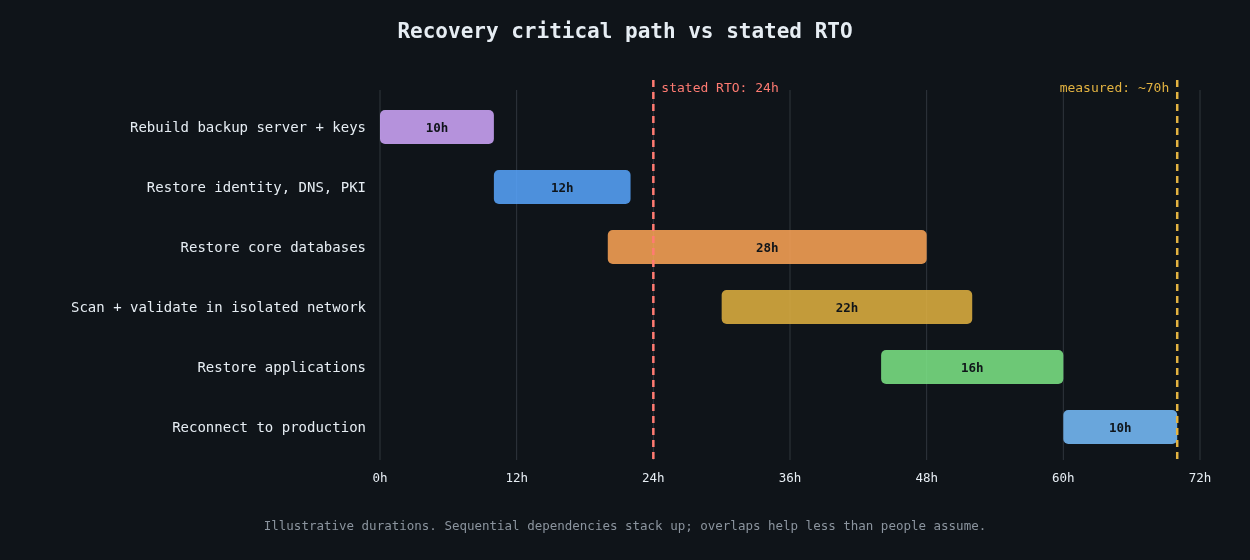
    Illustrative recovery timeline in dependency order compared with a 24-hour stated RTO

    The recovery point objective (RPO) is how much data you can afford to lose, measured as time between the last good copy and the incident. The recovery time objective (RTO) is how long you can afford to be down. Both are business decisions. Neither is something the backup software sets for you.

    The trap is that people derive RTO from the time it takes to restore one file or one VM, then quietly assume the whole estate restores in parallel at that speed. It doesn’t, for two reasons: bandwidth and dependencies.

    Do the arithmetic before the drill

    Restore throughput is usually far below the vendor’s quoted ingest speed, because restores are bottlenecked by whatever’s slowest: deduplication rehydration, the network link, the target storage’s write rate, or the cloud egress path. Measure it, then do the multiplication.

    # Wall-clock hours to move data at a sustained restore rate
    def restore_hours(terabytes, mb_per_sec):
        return terabytes * 1_000_000 / mb_per_sec / 3600
    
    for tb, rate in [(5, 500), (50, 500), (50, 200), (200, 1000)]:
        print(f"{tb:>4} TB at {rate:>4} MB/s: {restore_hours(tb, rate):6.1f} h")
       5 TB at  500 MB/s:    2.8 h
      50 TB at  500 MB/s:   27.8 h
      50 TB at  200 MB/s:   69.4 h
     200 TB at 1000 MB/s:   55.6 h

    If your critical data is 50 TB and your measured restore rate from the immutable tier is 200 MB/s, a 24-hour RTO isn’t achievable, regardless of how good everything else is. You find that out with a calculator in five minutes, or during an incident in three days.

    Dependencies decide the order

    You can’t restore the order system until there’s something for it to authenticate against. A realistic recovery runs in layers. First the backup infrastructure itself has to be up, along with its catalogue and its encryption keys. If the backup server was encrypted too, you’re rebuilding it from scratch before restoring anything else. Then identity and core network services: Active Directory or your identity provider, DNS, DHCP, PKI and time. Then the data stores, then the applications on top of them, then everything else.

    Maersk’s NotPetya recovery is the famous example of how fragile that first layer can be. As reported by Wired, its domain controllers had all been wiped except one in Ghana, which survived only because a power outage had taken it offline before the attack. That single machine became the seed for rebuilding the company’s Active Directory. Don’t plan on a lucky power cut.

    Write the dependency order down, along with who restores each layer and roughly how long each takes. Then look at the critical path. Sequential layers add up, and the result is usually much longer than the RTO anyone quotes.

    Pick a clean restore point

    After ransomware, the newest backup is often the wrong one. The attacker may have been inside for days or weeks, with tools planted, accounts created and scheduled tasks waiting. Restoring last night’s backup can restore the intrusion.

    This is where the logging work from the Detection engineering series pays off. To pick a restore point you need a reasonably confident time of first compromise for each affected system. Then you restore into an isolated recovery network, scan the restored systems, check them against known indicators from the investigation, reset every credential, and only then reconnect them. Budget time for this. In a real incident it often takes longer than the data copy.

    Automate the boring restore tests

    A backup you haven’t restored is a hypothesis. The cheapest way to keep testing it is to automate small restores constantly and big ones regularly.

    Automated tests should check the application, not just the files. A database restore test that confirms the dump file exists proves very little. One that restores into a scratch instance, runs real queries and records how long it took proves a lot:

    #!/usr/bin/env bash
    set -euo pipefail
    start=$(date +%s)
    
    dropdb --if-exists -h restore-test.internal orders_check
    createdb -h restore-test.internal orders_check
    pg_restore -h restore-test.internal -d orders_check --jobs=8 \
      /restore/latest/orders.dump
    
    # The data should be recent and non-trivial
    recent=$(psql -h restore-test.internal -d orders_check -Atc \
      "select count(*) from orders where created_at > now() - interval '2 days'")
    [ "$recent" -gt 0 ] || { echo "restore is stale or empty"; exit 1; }
    
    echo "restore_seconds=$(( $(date +%s) - start )) recent_rows=$recent"

    Run something like this weekly against a randomly chosen system, ship the timing to your metrics system, and alert when a test fails or when restore time creeps past what the RTO allows. Over a few months you get a real, measured recovery time per system, which is worth more than any number on a slide.

    Run a full drill at least once a year

    Automated tests cover individual systems. They don’t cover the dependency chain, the people, or the coordination. Once a year, more often for critical services, run a drill that restores a meaningful slice of production into an isolated environment from the immutable or offline copies, in dependency order, with the people who’d actually do it.

    Assume the worst during the drill: the primary backup server is gone, the identity provider is down, and the wiki with the runbooks is encrypted. Keep printed copies of the recovery runbook, the dependency order, key contacts and break-glass procedures somewhere physical. Have an out-of-band way to communicate, since your email and chat may be part of what’s down.

    Time every step. The drill’s output isn’t a pass or fail. It’s a list of measured durations and a list of things that surprised you.

    Report the real number

    After the drill, publish the measured recovery time next to the RTO, per service, to the people who set the RTO. If they differ, that’s a business decision to make with real data: spend money on faster restores, change the architecture, or accept a longer outage knowingly. Any of those is fine. Finding out during an incident isn’t.

    If you only do one thing after reading this, pick a single important system, restore it somewhere isolated this week, and time it. That number will tell you more about your ransomware readiness than any policy document.