Category: Security

  • SPF, DKIM and DMARC, and why p=none isn’t enough

    SPF, DKIM and DMARC, and why p=none isn’t enough

    Email was designed in an era when every host on the network trusted every other host. SMTP lets any server claim to send mail from any address, and the From: header that a person actually reads is just text the sender typed. Three standards were added later to patch that: SPF, DKIM and DMARC. Most domains I look at have all three records published, and a fair number still aren’t protected, because their DMARC policy says p=none.

    SPF: which servers may send
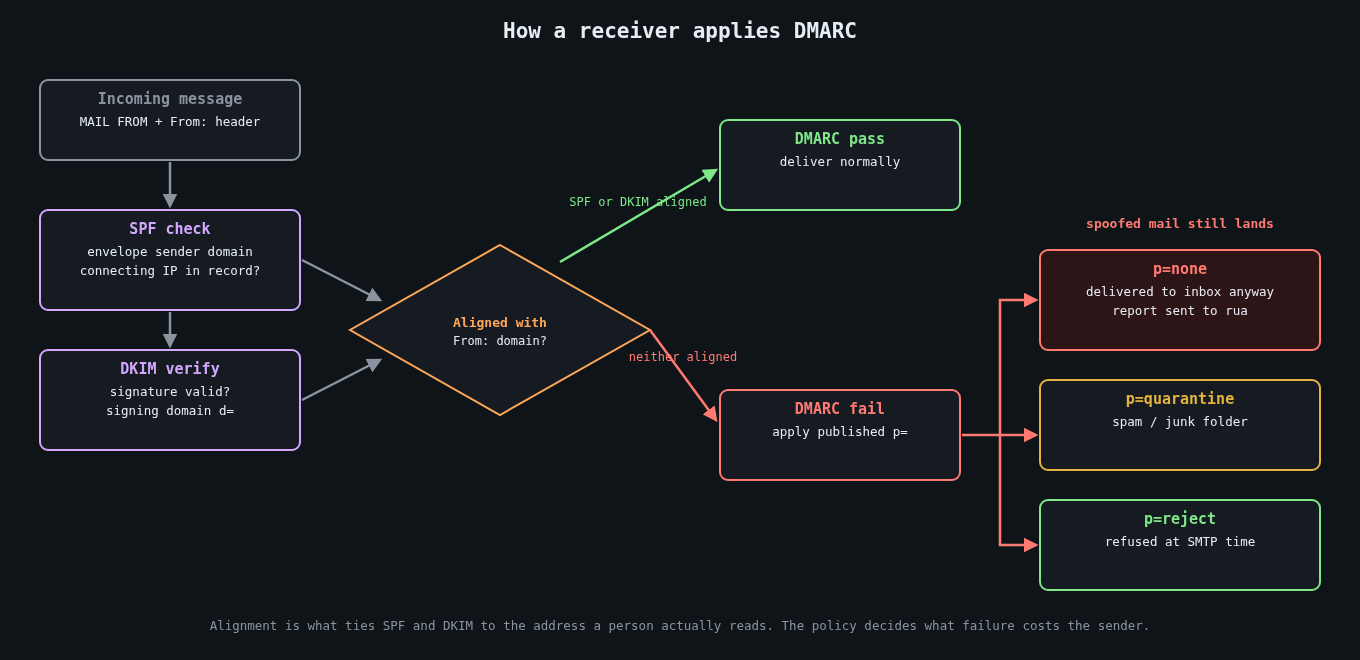
    Flowchart of how a receiving mail server evaluates SPF, DKIM, alignment and the DMARC policy

    Sender Policy Framework (RFC 7208) lets a domain publish, in DNS, the list of servers allowed to send mail for it. A receiving server takes the domain from the SMTP envelope sender (the MAIL FROM, also called the return path), looks up its SPF record, and checks whether the connecting IP is on the list.

    example.com.  IN TXT  "v=spf1 ip4:198.51.100.0/24 include:_spf.google.com include:sendgrid.net -all"

    SPF has two well-known weak spots. It checks the envelope sender, not the From: header the recipient sees, so on its own it does nothing against spoofing that address. It also breaks on forwarding, because the forwarding server isn’t on your list.

    There’s also a hard limit that catches growing companies: evaluating an SPF record may trigger at most 10 DNS lookups (include, a, mx, ptr, exists and redirect each count). Every SaaS tool you add with an include: eats into that budget, and when you exceed it the result is a permerror, which many receivers treat as a failure. I’ve seen a marketing team knock out a company’s outbound mail by adding one more vendor.

    DKIM: a signature on the message

    DomainKeys Identified Mail (RFC 6376) has the sending server sign selected headers and the body with a private key. The signature goes in a DKIM-Signature header naming the signing domain (d=) and a selector (s=). The receiver fetches the public key from DNS at selector._domainkey.domain and verifies.

    s1._domainkey.example.com.  IN TXT  "v=DKIM1; k=rsa; p=MIIBIjANBgkqhkiG9w0BAQEFAAOCAQ8AMIIBCgKCAQEA..."

    DKIM survives plain forwarding because the signature travels with the message, though it breaks if a mailing list rewrites the subject or appends a footer. Use 2048-bit RSA keys, and rotate them. In 2012 a mathematician found that Google was signing with a 512-bit key that he could factor, which led to a quick round of key upgrades across large providers.

    The catch: DKIM proves a message was signed by some domain (d=). It doesn’t, on its own, say that domain has anything to do with the From: address.

    DMARC: tying it to the From header

    DMARC (RFC 7489) is what makes the first two useful against spoofing. It adds alignment: a message passes DMARC only if SPF passes for a domain that matches the From: domain, or DKIM passes with a d= that matches the From: domain. Relaxed alignment (the default) accepts the same organisational domain, so mail.example.com aligns with example.com. Strict alignment requires an exact match.

    The DMARC record says what receivers should do with failing mail, and where to send reports:

    _dmarc.example.com.  IN TXT  "v=DMARC1; p=reject; rua=mailto:[email protected]; adkim=r; aspf=r"

    The p= tag is the policy: none, quarantine or reject.

    Why p=none isn’t protection

    A p=none policy tells receivers: evaluate DMARC, send me reports, but deliver failing mail exactly as you would have anyway. It’s monitoring only. Anyone can still send mail with your domain in the From: header to your customers, suppliers or finance team, and DMARC won’t stop them.

    Monitoring is the right first step, which is why p=none exists. The trouble is that many organisations treat publishing it as the finish line. Google and Yahoo’s bulk sender rules, in effect since February 2024, require a DMARC record for anyone sending more than 5,000 messages a day to their users, but the minimum they ask for is p=none. Plenty of domains published a record and stopped there.

    Business email compromise is where this hurts most. A convincing invoice from [email protected] is much easier to pull off when your domain doesn’t ask receivers to reject spoofs. With p=reject, major mailbox providers drop exact-domain spoofs outright. Attackers then fall back to lookalike domains. That’s still a problem, but a more detectable one.

    Getting from none to reject

    The path is boring, and it works.

    First, publish p=none with an rua address and actually read the aggregate reports. They’re XML, so use a parser or a reporting service rather than reading them by hand. Within a couple of weeks you’ll see every source sending mail as your domain: your mail platform, the CRM, the ticketing system, the HR tool somebody bought on a credit card, and the spoofers.

    Second, fix each legitimate source. Ideally each one signs with DKIM using your domain as d=, which most SaaS senders support through a CNAME to their key. Where you can only get SPF alignment, make sure the vendor uses a return path on your domain. Retire sources nobody can explain.

    Third, move to p=quarantine, then to p=reject. RFC 7489 provides the pct= tag to apply the policy to a percentage of failing mail, which lets you ramp up gradually. Note that the DMARCbis revision in the IETF drops pct in favour of a simpler testing flag, so don’t build long-term tooling around it.

    Don’t forget domains that send no mail at all. Parked domains are attractive for spoofing because nobody watches them. Lock them down completely:

    parked-example.com.          IN TXT  "v=spf1 -all"
    _dmarc.parked-example.com.   IN TXT  "v=DMARC1; p=reject;"

    Also check the sp= tag, which sets the policy for subdomains. If you leave it out, subdomains inherit p=, which is usually what you want.

    What DMARC doesn’t do

    DMARC protects the exact domain. It does nothing about examp1e.com or example-billing.com, nor display-name tricks where the friendly name says “Example Payroll” over an unrelated address. Those need receiver-side defences, user training and monitoring for newly registered lookalikes. MTA-STS (RFC 8461) and TLS reporting are separate pieces that protect mail in transit, and BIMI only becomes available once you’re at quarantine or reject.

    If you run a domain and its DMARC record still says p=none after a few months, you’ve built the monitoring and switched off the alarm. Read the reports, fix your senders, and finish the rollout.

  • Restore testing and your real recovery time

    Restore testing and your real recovery time

    Part 3 of 3 in the Surviving ransomware series. Part 1: Backups an attacker can’t delete. Part 2: Segmentation and limiting lateral movement.

    Ask a team for its recovery time objective and you’ll usually get a confident number, often 4 hours or 24 hours. Ask when they last restored a whole system from backup and timed it, and the confidence drops fast. In my experience the RTO on the slide and the time you’d actually get differ by a factor of several. Nobody finds out until the day it matters.

    This is the last part of the series. Part 1 covered backups an attacker can’t delete, and part 2 covered segmentation that limits how much gets hit. This one is the dull question: once you have clean backups, how long until you’re running again?

    Two numbers, defined plainly

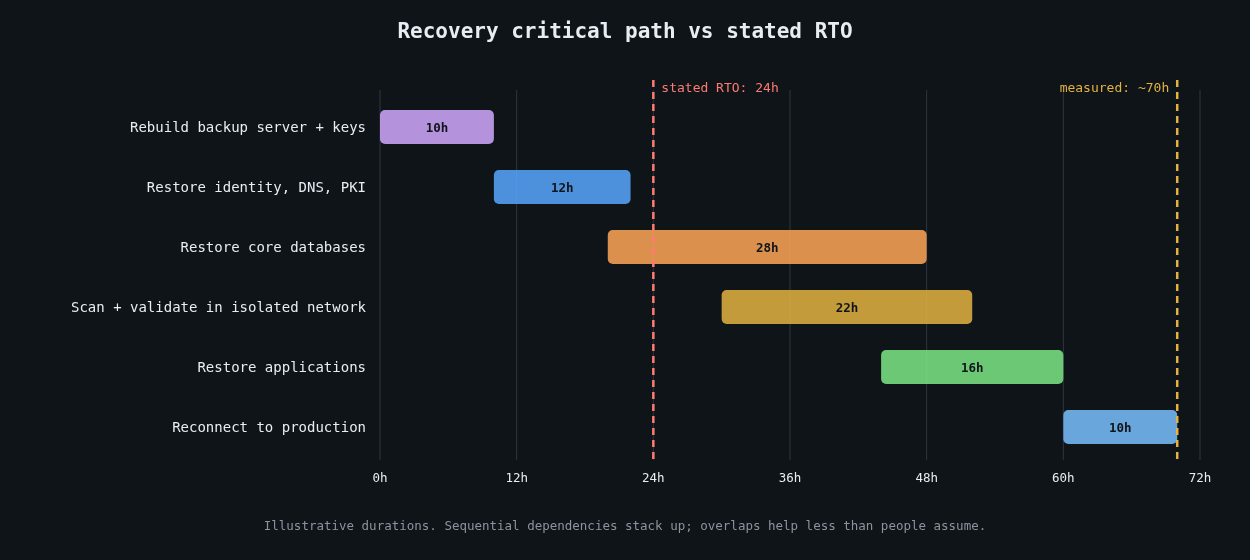
    Illustrative recovery timeline in dependency order compared with a 24-hour stated RTO

    The recovery point objective (RPO) is how much data you can afford to lose, measured as time between the last good copy and the incident. The recovery time objective (RTO) is how long you can afford to be down. Both are business decisions, and the backup software doesn’t set either one for you.

    The trap is that people derive RTO from the time it takes to restore one file or one VM, then quietly assume the whole estate restores in parallel at that speed. It doesn’t, for two reasons: bandwidth and dependencies.

    Do the arithmetic before the drill

    Restore throughput is usually far below the vendor’s quoted ingest speed, because restores are bottlenecked by whatever’s slowest: deduplication rehydration, the network link, the target storage’s write rate, or the cloud egress path. Measure it, then do the multiplication.

    # Wall-clock hours to move data at a sustained restore rate
    def restore_hours(terabytes, mb_per_sec):
        return terabytes * 1_000_000 / mb_per_sec / 3600
    
    for tb, rate in [(5, 500), (50, 500), (50, 200), (200, 1000)]:
        print(f"{tb:>4} TB at {rate:>4} MB/s: {restore_hours(tb, rate):6.1f} h")
       5 TB at  500 MB/s:    2.8 h
      50 TB at  500 MB/s:   27.8 h
      50 TB at  200 MB/s:   69.4 h
     200 TB at 1000 MB/s:   55.6 h

    If your critical data is 50 TB and your measured restore rate from the immutable tier is 200 MB/s, a 24-hour RTO isn’t achievable, regardless of how good everything else is. You can find that out with a calculator in five minutes, or during an incident that drags on for three days.

    Dependencies decide the order

    You can’t restore the order system until there’s something for it to authenticate against. A realistic recovery happens in layers. First the backup infrastructure itself has to be up, along with its catalogue and its encryption keys. If the backup server was encrypted too, you’re rebuilding it from scratch before restoring anything else. Then identity and core network services: Active Directory or your identity provider, DNS, DHCP, PKI and time. Then the data stores, then the applications on top of them, then everything else.

    Maersk’s NotPetya recovery is the best-known example of how fragile that first layer can be. As reported by Wired, its domain controllers had all been wiped except one in Ghana, which survived only because a power outage had taken it offline before the attack. That single machine became the seed for rebuilding the company’s Active Directory. Don’t count on a lucky power cut.

    Write the dependency order down, along with who restores each layer and roughly how long each takes. Then look at the critical path. Sequential layers add up, and the result is usually much longer than the RTO anyone quotes.

    Pick a clean restore point

    After ransomware, the newest backup is often the wrong one. The attacker may have been inside for days or weeks, with tools planted, accounts created and scheduled tasks waiting. Restoring last night’s backup can bring the intrusion back with it.

    This is where the logging work from the Detection engineering series pays off. Choosing a restore point means you need a reasonably confident time of first compromise for each affected system. Then you restore into an isolated recovery network, scan the restored systems, check them against known indicators from the investigation, reset every credential, and only then reconnect them. Budget time for this. In a real incident it often takes longer than the data copy.

    Automate restore tests

    A backup you haven’t restored is a hypothesis. The cheapest way to keep testing is to automate small restores often and big ones on a schedule.

    Automated tests should check the application, not just the files. A database restore test that confirms the dump file exists proves very little. One that restores into a scratch instance, runs real queries and records how long it took proves a lot:

    #!/usr/bin/env bash
    set -euo pipefail
    start=$(date +%s)
    
    dropdb --if-exists -h restore-test.internal orders_check
    createdb -h restore-test.internal orders_check
    pg_restore -h restore-test.internal -d orders_check --jobs=8 \
      /restore/latest/orders.dump
    
    # The data should be recent and non-trivial
    recent=$(psql -h restore-test.internal -d orders_check -Atc \
      "select count(*) from orders where created_at > now() - interval '2 days'")
    [ "$recent" -gt 0 ] || { echo "restore is stale or empty"; exit 1; }
    
    echo "restore_seconds=$(( $(date +%s) - start )) recent_rows=$recent"

    Run something like this weekly against a randomly chosen system, ship the timing to your metrics system, and alert when a test fails or when restore time creeps past what the RTO allows. Over a few months you have a measured recovery time for each system. That’s worth more than any number on a slide.

    Run a full drill at least once a year

    Automated tests cover individual systems. They don’t cover the dependency chain, the people, or the coordination. Once a year, more often for critical services, run a drill that restores a meaningful slice of production into an isolated environment from the immutable or offline copies, in dependency order, with the people who’d actually do it.

    Assume the worst during the drill: the primary backup server is gone, the identity provider is down, and the wiki with the runbooks is encrypted. Keep printed copies of the recovery runbook, the dependency order, key contacts and break-glass procedures somewhere physical. Have an out-of-band way to communicate, since your email and chat may be part of what’s down.

    Time every step. The drill’s output isn’t a pass or fail. It’s a list of measured durations and a list of things that surprised you.

    Report the real number

    After the drill, publish the measured recovery time next to the RTO, per service, to the people who set the RTO. If they differ, that’s a business decision to make with real data: spend money on faster restores, change the architecture, or accept a longer outage knowingly. Any of those is fine. Finding out during an incident isn’t.

    If you do one thing after reading this, pick one important system, restore it somewhere isolated this week, and time it. That number will tell you more about your ransomware readiness than any policy document.

  • Horcrux dev log 5: auditing my own project, and what turned out to be fake

    Horcrux dev log 5: auditing my own project, and what turned out to be fake

    Part 5 in the Horcrux dev log series.

    Backdated: written in November 2026 from the repo, CI and my QA ledger. Part 4 ended with a feature list I didn’t trust.

    On October 16 I compared Horcrux against Proxmox VE. I listed every route in the router (418 .route( calls), listed every route the UI calls, matched the two with a script, and then checked whether anything actually calls each feature’s code. The output was a document with a section called “what is fake today”.

    The first results were bad. VMs couldn’t install an OS or get a network: the QEMU command line was memory, CPUs, one disk and -display none, with no ISO, no NIC, no boot order, no UEFI and no way to edit a VM after creating it. Nothing created a QMP socket, so snapshots, migration health checks and “suspend” backups quietly did nothing. Backups tarred a directory the code itself had just created empty and never touched the VM disk. And all configuration lived in memory, so storage pools, firewall rules, HA groups, templates, alert rules, replication jobs and backup jobs vanished on restart.

    The QA ledger from the same day has more. Firewall Apply installed no rules at all (the builder emitted tcp tcp dport, and the UI posted to a route that didn’t exist). Directory storage pools reported 0 GB free, so every volume create failed. VM consoles didn’t work since QEMU ran with no display and no VNC or SPICE listener. Several UI buttons had no handler: monitoring “Configure Alerts” and “Export Data”, NAS “Create Group”, the user edit icon.

    The worst entry is marked critical. /api/auth/register was public and the RBAC middleware was never applied, so any self-registered account had full control, and the API ran over plain HTTP.

    Finding that a week after calling it feature complete was painful. The ledger got 44 new rows on the 16th and 39 on the 17th.

    The fixing week

    Forgejo for October 16 to 21: 348 runs, 208 success, 44 failure, 34 cancelled, 62 skipped, over about 170 commits. Everything in memory moved into the database with migrations. VM backups became real (QMP pause or snapshot, flushed disks, restore, retention, verify). VNC, SPICE with audio, clipboard and USB redirection, and serial consoles got wired up, plus in-browser consoles for LXD and Incus. Auth got rewritten: users, roles, groups, ACLs, LDAP/AD/OIDC/PAM realms, 2FA, RBAC on every route, HTTPS by default, and a test that runs every built-in role against every route. VMs got NICs, an ISO library, boot order, multiple disks, UEFI, edit, reboot and a per-VM firewall. Peer-to-peer migration between nodes works now.

    What a real run caught

    On the 17th a test caught this one, which I’ll quote:

    QEMU adds a default user-mode (SLIRP) e1000 NIC when no -nic/-netdev is
    given. It NATs the guest through the host's own network stack, so on an
    EC2 host a guest read the host's instance metadata (CirrOS printed the
    host's instance-id) and could fetch its IAM role credentials.

    The fix always passes an explicit no-NIC option, and a test boots a real VM and asks QEMU over QMP that it has none.

    Same class of bug, over the next few days: disk import followed qcow2 external data files and read other files on the host (Oct 19). URL downloads for disks and ISOs could reach the node’s own services (Oct 19 and 20). Volume names could escape their storage pool by path traversal (Oct 20).

    Mutation testing

    I also added cargo-mutants runs per module group. The first storage measurement was awful. The commit says it flatly: “StorageManager – mutation baseline was 0%”. Killing survivors became routine; 17 surviving mutants in the VM snapshot code was one batch. I also split the giant API binary into crates on the 17th (core, nas, k8s, sdn, auth, vm, container, cluster, backup), with CI moving to mold and line-tables-only builds the same day.

    Still broken on the 21st

    Some features existed in the API and not the UI, or the reverse. The cluster code had been tested with containers as nodes, not on separate real machines, as far as I can tell from the CI. On the 21st I rewrote the status line to “in active development, not yet suitable for production use” and cut the stale ones.

    Decisions

    No implicit NIC: a VM with no network configuration gets no network at all rather than QEMU’s default user-mode one, because that default NATs through the host and a guest reached the host’s cloud metadata service. URL downloads got the same rule (they can’t reach the node’s own services or metadata). HTTPS by default with a node-local CA came in with the auth rewrite.

    Snapshot-mode backups don’t pause a running VM. On the 16th it paused (QMP stop and cont); on the 19th the commit “backs up a running VM without pausing it” made it a block-level snapshot. The earlier QA entry says why: consistent but not pause-free, and Proxmox-style backup needs a copy-before-write job.

    One decision about the test jobs is on record: on October 18 mutation and chaos jobs went back to every runner, because the colo-only lane’s backlog was too big.

    Other parts: Part 1, Part 2, Part 3, Part 4, Part 6. The series continues with the latest Horcrux dev log post.