In the first part of this series I covered how to store passwords so a database leak doesn’t hand attackers working credentials. This part assumes the password is already gone, because sooner or later it will be. Phished, reused, scraped off an infostealer log. The question is what your second factor does when someone is actively trying to get past it, and the honest answer for most deployed MFA is “less than you’d think”.
Not all second factors are the same control
People talk about MFA as if it were one thing. In practice the methods fall into two groups. Shared secret and approval based factors (SMS codes, TOTP apps, push notifications) prove the user has a device, but the proof can be relayed by whoever the user is talking to. Public key factors bound to an origin (FIDO2/WebAuthn security keys and passkeys) produce proof that only works for the site that asked for it. That distinction is what CISA means by phishing resistant MFA in its 2022 guidance, and it’s what OMB memo M-22-09 required US federal agencies to adopt.
SMS is the weakest of the first group. SIM swaps and number porting fraud move the phone number to an attacker, and NIST SP 800-63B has long classed SMS and voice as a restricted authenticator. I’d still take SMS over no second factor, but I wouldn’t let it protect anything I cared about.
TOTP and the relay problem
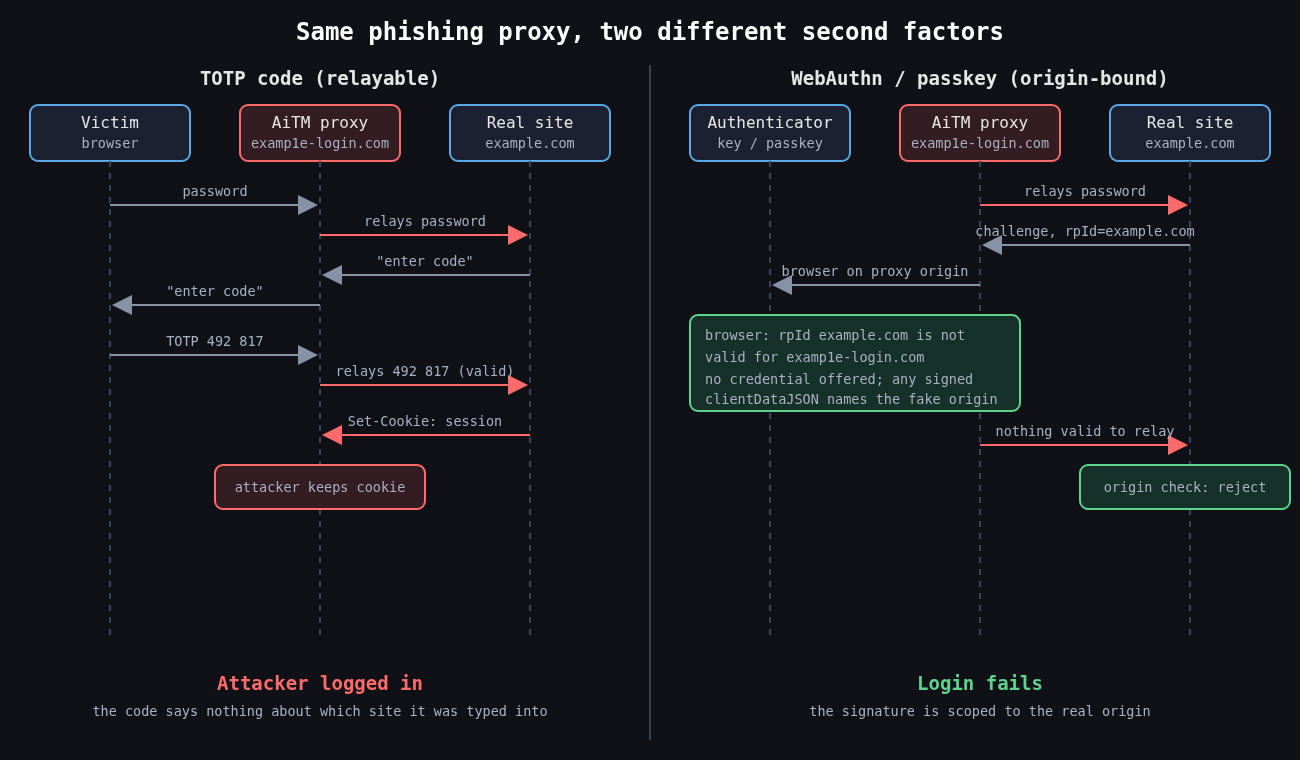
TOTP (RFC 6238, built on HOTP from RFC 4226) derives a six digit code from a shared secret and the current 30 second time step. It’s offline, cheap and works everywhere. It also has nothing in it that identifies which website the user is typing it into.
That’s the whole weakness. An adversary-in-the-middle kit like Evilginx sits between the victim and the real login page as a reverse proxy. The victim sees what looks like the real site, types their password and their TOTP code, and the proxy forwards both in real time and keeps the resulting session cookie. The code was valid. It just went to the wrong party.
The 2022 “0ktapus” campaign worked this way at scale. SMS messages pointed employees of Twilio and many other companies to lookalike Okta pages that captured credentials and one time codes as they were typed. Cloudflare was targeted by the same campaign, and some of its employees did enter their credentials. The attack still failed there, because Cloudflare required FIDO2 hardware keys and the fake domain couldn’t get a valid assertion from them. Cloudflare’s own write-up of that incident is one of the clearest arguments for WebAuthn I know of.
If you do run TOTP, at least implement it properly. Accept a small clock skew window and reject codes that have already been used.
from datetime import datetime, timezone
import pyotp

def check_totp(user, code):
    totp = pyotp.TOTP(user.totp_secret)
    # accept the current step and one on either side for clock drift
    if not totp.verify(code, valid_window=1):
        return False
    step = totp.timecode(datetime.now(timezone.utc))
    if user.last_totp_step is not None and step <= user.last_totp_step:
        return False  # replayed code
    user.last_totp_step = step
    user.save()
    return True
Rate limit verification attempts too. A six digit code has a million values, which is not a lot if an endpoint lets someone try thousands of codes per account.
Push approval and MFA fatigue
Push MFA looked like an upgrade because the user doesn’t type anything. It created a different failure. If an attacker has the password, they can trigger approval prompts over and over until the user taps Approve to make it stop, or until someone calls pretending to be IT and asks them to accept.
That’s what happened at Uber in September 2022. According to Uber’s own statement, the attacker had a contractor’s password, sent repeated push requests, and the contractor eventually accepted one. Cisco’s breach that year, disclosed in August, combined voice phishing with the same kind of repeated push prompts. In both cases the MFA product behaved exactly as designed.
The fixes are real but partial. Number matching shows a code on the login screen that the user has to enter in the authenticator app, so a blind tap no longer works; Microsoft made it mandatory for Authenticator push in May 2023. Showing the location and application in the prompt helps a little. Limiting how many prompts can be sent per hour and alerting on bursts helps more. None of it stops a real-time phishing proxy, because the user is looking at a page that displays the number too.
Why WebAuthn is different
With WebAuthn, the browser builds a clientDataJSON structure that includes the challenge and the origin the user is actually on, and the authenticator signs it along with the relying party ID hash. Credentials are scoped to the relying party ID, so an authenticator won’t even offer a credential for example.com to a page on examp1e-login.com. There’s no code for the user to copy, so there is nothing to relay.
The server side still has to do its part. Every serious library makes you pass the expected origin and RP ID, and you should never loosen those to make a test environment work.
The challenge must be random, single use and tied to the session that requested it. I’ve reviewed implementations that reused a static challenge, which turns a signature scheme back into something replayable.
Passkeys, synced and device bound
Passkeys are WebAuthn credentials, usually discoverable ones, and most are synced through a platform account such as iCloud Keychain or Google Password Manager. That’s great for adoption, because users who lose a phone don’t lose their credentials. It also means the security of the passkey now depends on the security of that cloud account and its recovery process.
For most consumer apps, synced passkeys are a large improvement over passwords plus TOTP. For administrators and production access I still want device bound credentials on hardware keys, and I want attestation checked so I know what kind of authenticator registered.
Recovery is part of your MFA
Attackers go where the controls are weakest, and that’s usually account recovery. A strong factor with a “lost your key? we’ll send an SMS” fallback is an SMS factor with extra steps. Help desk resets are the same problem with a human in the loop. The MGM Resorts intrusion in 2023 was widely reported to have started with a call to the help desk.
So register at least two strong authenticators per user, make recovery require something stronger than knowledge of public facts, and log and alert on every factor reset. Treat a new factor enrolled right after a password reset as a high priority event.
The next part moves from authenticating a person to delegating access between systems, which means OAuth 2.0, OpenID Connect and the token mistakes that come with them.
Part 1 of 4 in the Authentication done right series.
Most teams I talk to already know they shouldn’t store passwords with plain SHA-256. Fewer can tell me what cost parameters their hash uses, when those were last revisited, or what happens to the users who signed up five years ago under weaker settings. Picking the algorithm is the easy part. The parameters and the upgrade path are where real systems fall behind.
Why fast hashes fail
A password hash has one job: make each guess expensive for someone who has stolen your database. General purpose hashes like SHA-256 are designed to be fast, and a single modern GPU computes billions of them per second. When LinkedIn’s 2012 dump of unsalted SHA-1 hashes surfaced publicly in 2016 with roughly 117 million credentials, most of it was cracked quickly. Salting would have stopped the precomputed table attacks. It would not have helped much against brute force, because each individual guess still cost almost nothing.
Adobe’s 2013 breach is the other cautionary tale. Those passwords were encrypted with 3DES in ECB mode, not hashed, so identical passwords produced identical ciphertext and the plaintext password hints sitting next to them did the rest. Encryption is the wrong tool here. You never need to recover a password, only to check one.
So the requirements are a unique random salt per password and a function that is deliberately slow and, ideally, memory hungry. Memory hardness matters because GPUs and ASICs have lots of compute but limited fast memory per core. Forcing every guess to touch tens of megabytes destroys their parallelism advantage.
The three you should consider
bcrypt dates from 1999 and is still fine. It’s CPU hard with a tunable cost (each increment doubles the work), it’s in every language, and it has a long track record. It has two sharp edges. It is not memory hard in any meaningful sense (it uses about 4 KB), and it silently ignores input past 72 bytes.
That second one is not academic. In late 2024 Okta disclosed that its AD/LDAP delegated authentication cache keys were bcrypt hashes of the user ID, username and password concatenated together. With a username long enough (52 characters or more), the password fell past the 72 byte cutoff, so a cached login could succeed with any password. Nothing was wrong with bcrypt’s math. The input simply got truncated without an error.
scrypt (RFC 7914) was the first widely used memory hard function. It’s tunable through N (CPU/memory cost), r (block size) and p (parallelism), and memory use is roughly 128 x N x r bytes. N=2^17, r=8, p=1 works out to 128 MiB per hash, which is the OWASP baseline.
Argon2id won the Password Hashing Competition in 2015 and is specified in RFC 9106. It takes memory in KiB, a number of passes, and a degree of parallelism. The “id” variant mixes data independent and data dependent memory access, giving reasonable resistance to both side channel and GPU attacks. It’s my default for anything new.
PBKDF2 stays on the list only because FIPS-140 environments sometimes require it. If you’re stuck with it, OWASP currently says 600,000 iterations of HMAC-SHA256. It is not memory hard, so treat it as the compliance option, not the good one.
Choosing parameters with real numbers
The published recommendations are a floor, not a target. OWASP’s Password Storage Cheat Sheet lists Argon2id at a minimum of m=19 MiB, t=2, p=1, with equivalent tradeoffs like m=46 MiB, t=1. RFC 9106 is more aggressive: its second recommended option is t=3, m=64 MiB, p=4, and the first option uses 2 GiB, which is meant for settings like disk encryption rather than a login endpoint.
What I actually do is benchmark on the production hardware and work backwards from two constraints. The first is latency: how long can a login take before users notice? Somewhere around 100 to 500 ms of hashing is usually acceptable. The second is concurrency: memory cost times the number of simultaneous logins you need to survive. At 64 MiB per hash, 50 concurrent logins need 3.2 GiB just for hashing. Get that wrong and a credential stuffing wave becomes an out-of-memory event on your auth service.
The reference argon2 CLI makes the measurement easy. Note that -m is the base-2 log of the memory in KiB, so 16 means 64 MiB.
Increase memory first until you hit your concurrency budget, then add passes until you hit your latency budget. Memory is what hurts attackers most.
Store parameters with the hash, and rehash on login
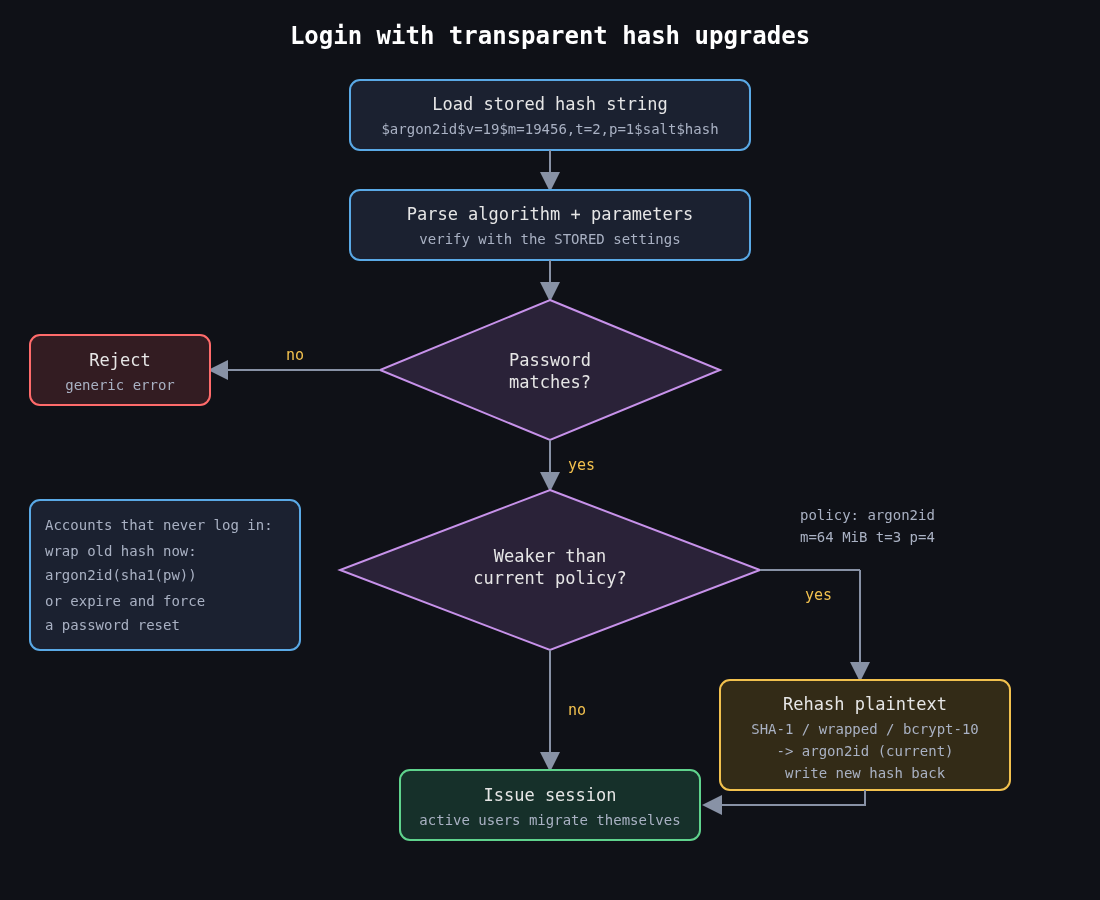
The encoded string format (the $argon2id$v=19$m=65536,t=3,p=4$salt$hash form above) carries the algorithm and parameters alongside the salt and hash. That’s what makes upgrades possible. You verify with whatever parameters the stored hash says, and if they’re weaker than your current policy, you rehash the plaintext you just verified and write the new value back.
Active users migrate themselves within a few months. For the long tail of accounts that never log in, you have two options. You can wrap the old hash (store argon2id(old_sha1_hash) and verify by computing both layers), which upgrades everyone immediately without needing their passwords. Or you can expire those passwords and force a reset. I’ve used wrapping for legacy MD5 and SHA-1 tables and it works well, as long as you mark which rows are wrapped.
Peppers and pre-hashing
A pepper is a secret key applied to every password, kept outside the database, ideally in a KMS or HSM. The common construction is to HMAC the password with the pepper before hashing it. If an attacker gets a SQL injection dump but not the application secrets, the hashes are useless to them. The cost is operational: rotating a pepper means keeping old keys around and tracking which one each hash used.
Pre-hashing is also how people get around bcrypt’s 72 byte limit, and it’s easy to get wrong. If you bcrypt a raw SHA-256 digest, the binary output can contain NUL bytes that some bcrypt implementations treat as the end of the string. Base64 encode the digest first. And use HMAC with a pepper rather than a bare hash, otherwise an attacker holding a separate leak of unsalted SHA-256 hashes can test them directly against your bcrypt values without cracking anything, a technique known as password shucking.
The cleaner answer is to use Argon2id and not need any of this. If you’re on bcrypt and staying there, at least reject or explicitly handle inputs over 72 bytes so the truncation is never silent.
What I’d check on any existing system
Open the users table and look at a few hash prefixes. $2b$10$ is bcrypt at cost 10, $argon2id$ tells you parameters inline, and a bare 40 or 64 character hex string is a fast hash you need to fix this quarter. Then check whether the login path rehashes, whether the memory cost was ever benchmarked against peak concurrency, and whether anything concatenates fields before passing them to bcrypt. Most of what I find in reviews sits in that last check.
Storing passwords well protects users after a breach. Next in this series is about making a stolen or phished password much less useful in the first place, which means MFA that holds up against phishing.
Network packet analysis and replay techniques represent fundamental methodologies in cybersecurity assessment, intrusion detection system (IDS) validation, and security education. This article examines both the theoretical foundations and practical applications of using Wireshark for packet capture in conjunction with packet replay utilities such as Tcpreplay to simulate network attacks in controlled environments. By capturing and re-sending valid network packets, security practitioners and students can demonstrate vulnerabilities in protocols that lack robust replay protection while validating defensive measures. The methodology aligns with NIST Special Publication 800-115 guidelines for information security testing and assessment. Topics addressed include the PCAP file format, protocols vulnerable to replay attacks, configuration of Wireshark for effective packet capture, utilization of the Tcpreplay suite for traffic injection, validation of IDS/IPS solutions, and the ethical considerations essential for responsible security testing.
The effective identification and mitigation of network attacks require a deep understanding of packet-level communication. The proliferation of network-based threats has made rigorous security testing an essential component of organizational cybersecurity programs. According to the National Institute of Standards and Technology (NIST), security testing is mandated under the Federal Information Security Management Act (FISMA) and other regulations, requiring periodic testing and evaluation of security policies, procedures, and practices (Scarfone, Souppaya, Cody, & Orebaugh, 2008).
Wireshark, developed by Gerald Combs and the Wireshark Foundation, has become the industry standard for network protocol analysis (Wireshark Foundation, n.d.). Described as “the world’s most popular network protocol analyzer,” the software enables deep inspection of hundreds of protocols and provides capabilities for capturing live traffic from network interfaces as well as analyzing previously recorded captures. As noted in the official documentation, Wireshark “will not manipulate things on the network” but rather serves as a measurement and analysis tool (Wireshark User’s Guide, 2025).
A critical skill in the cybersecurity toolkit is the ability to simulate an attack without compromising live production networks. Packet replay attacks, a fundamental concept in cryptography and network security, involve intercepting valid data and later resending it to elicit a malicious response (Kaufman, Perlman, & Speciner, 2011). This article provides a comprehensive examination of methodologies for utilizing Wireshark in conjunction with packet replay utilities to simulate network attacks, encompassing theoretical foundations, practical implementation, and alignment with established security testing frameworks.
2. Theoretical Framework
2.1 Network Packet Capture and the PCAP Format
The packet capture (PCAP) file format serves as the standard mechanism for storing network traffic captures. According to the IETF Operations and Management Area Working Group draft specification, the format “describes the format used by the libpcap library to record captured packets to a file” and has its origins in the late 1980s when Van Jacobson, Steve McCanne, and colleagues at Lawrence Berkeley National Laboratory developed the tcpdump program (IETF, 2025).
The PCAP format stores packet data with timestamp information, enabling faithful reproduction of network traffic timing characteristics. As documented by Endace (2025), “a PCAP file includes an exact copy of every byte of every packet as seen on the network, including OSI layers 2-7.” This comprehensive capture enables detailed protocol analysis and accurate traffic replay.
The libpcap library, maintained by the tcpdump.org project, provides the underlying capture mechanism. According to the official documentation, the library enables applications to “capture network traffic and analyze it, or to read a saved capture and analyze it” (tcpdump.org, 2025). Windows implementations include Npcap, which utilizes NDIS 6.x APIs for modern operating system compatibility.
2.2 NIST Security Testing Framework
NIST Special Publication 800-115, “Technical Guide to Information Security Testing and Assessment,” establishes the framework for conducting security assessments. The document defines three assessment methods: testing, examination, and interviewing. Testing is characterized as “the process of exercising one or more assessment objects under specified conditions to compare actual and expected behaviors” (Scarfone et al., 2008, p. 2-1).
The publication identifies network sniffing as a passive examination technique that “monitors network communication, decodes protocols, and examines headers and payloads to flag information of interest” (Scarfone et al., 2008, p. 3-4). Documented use cases include:
Capturing and replaying network traffic
Performing passive network discovery
Identifying operating systems, applications, services, and protocols
Identifying unauthorized activities
Collecting information such as unencrypted credentials
The four-phase penetration testing methodology outlined in NIST SP 800-115 comprises: planning, discovery, attack, and reporting phases. Packet capture and replay techniques are particularly relevant during the discovery and attack phases, where they enable identification and validation of system vulnerabilities.
3. Packet Capture and Export Mechanics
The foundation of replay simulation lies in the ability to capture network traffic and export it for subsequent analysis or injection. Wireshark operates by capturing raw packets as they traverse a network interface card and presenting them in a human-readable format.
To simulate an attack, an analyst first identifies the specific packet sequence that represents a valid action—for example, a valid TCP three-way handshake or an authentication request. Wireshark allows the user to save this traffic to a file in PCAP format, which is compatible with numerous external analysis tools (Chappell, 2017).
The simulation process typically involves three steps:
Capture: Identifying and saving the specific payload to a file
Export: Using the saved file or exporting specific packets from Wireshark
Replay: Injecting the saved packets into a network using tools such as Tcpreplay, Scapy, or tcpdump
4. Wireshark Configuration for Packet Capture
4.1 Interface Selection and Promiscuous Mode
Effective packet capture requires proper configuration of the network interface. According to the libpcap documentation, “on broadcast LANs such as Ethernet, if the network isn’t switched, or if the adapter is connected to a ‘mirror port’ on a switch to which all packets passing through the switch are sent, it will be possible to capture all packets” (tcpdump.org, 2025).
Promiscuous mode configuration enables the Network Interface Card (NIC) to capture all packets on the network segment rather than only those addressed to the local system. This mode “allows it to view all packets on the network segment, not just those addressed to your system” (GeeksforGeeks, 2020).
4.2 Capture and Display Filters
Wireshark provides two distinct filtering mechanisms:
Capture Filters: Based on Berkeley Packet Filter (BPF) syntax, these restrict which packets are recorded during the capture process. The Wireshark User’s Guide (2025) documents that capture filters “filter packets, reducing the amount of data to be captured.”
Common capture filter syntax includes: – Host-based filtering: host 192.168.1.10 – Network-based filtering: net 192.168.1.0/24 – Port-based filtering: port 80
Display Filters: These enable post-capture analysis by narrowing the packets displayed for examination. Display filters provide more sophisticated filtering capabilities, including protocol-specific options such as tcp.port == 80 or http.request.uri pattern matching.
5. Protocols Vulnerable to Replay Attacks
Not all network protocols are susceptible to replay attacks, nor do all replay attacks result in successful breaches. However, Wireshark is frequently used to simulate attacks on protocols lacking timestamp verification or sequence number validation.
5.1 ARP Spoofing (Address Resolution Protocol)
ARP protocols are stateless and lack mutual authentication. An attacker can capture an ARP reply from a valid gateway and replay it to a victim. The victim, believing it is communicating with the legitimate gateway, will forward traffic to the attacker. In an educational simulation, this demonstrates the necessity of ARP caching and static ARP tables.
5.2 TCP Handshake Replay
A TCP connection relies on a “SYN,” “SYN-ACK,” and “ACK” sequence. While modern operating systems enforce Sequence Number validation to prevent replay, a replay attack can be simulated if the packets are stripped of headers and resent in a controlled environment. This demonstrates why the TCP sequence number is a critical anti-replay mechanism (Stevens, 1994).
5.3 HTTP Authentication
Simple HTTP Basic Authentication is susceptible to replay if the authentication header is intercepted. Wireshark can be used to capture a request containing valid credentials. While a client usually requires a new handshake for subsequent requests, the simulation illustrates the failure of “stateless” authentication mechanisms in the face of network layer interception (Fielding & Reschke, 2014).
6. The Tcpreplay Suite for Traffic Replay
6.1 Overview and Capabilities
Tcpreplay is “a suite of GPLv3 licensed utilities for UNIX (and Win32 under Cygwin) operating systems for editing and replaying network traffic which was previously captured by tools like tcpdump and Wireshark” (AppNeta, 2025). The suite “allows you to classify traffic as client or server, rewrite Layer 2, 3 and 4 packets and finally replay the traffic back onto the network and through other devices such as switches, routers, firewalls, NIDS and IPS’s.”
The suite comprises several component utilities:
Utility
Purpose
tcpreplay
Packet injection
tcprewrite
Packet modification
tcpprep
Traffic classification
tcpliveplay
TCP session replay
tcpbridge
Bridging functionality
According to Kali Linux documentation, tcpreplay is “aimed at testing the performance of a NIDS by replaying real background network traffic in which to hide attacks” (Kali Linux Tools, 2025).
6.2 Use Cases for Security Testing
TechTarget identifies several primary use cases for tcpreplay in security contexts:
Test intrusion detection systems (IDSes) by resending malicious packets hidden in real traffic
Understand standard attack vectors by resending mock malicious packets
Test specific network exploits
Resend test transmissions to check whether router packet filters catch them
Transmit packets representing normal network traffic to confirm firewall settings
The tcpliveplay component, developed with Cisco sponsorship, enables replay of “TCP pcap files directly to servers” to “test the entire network stack and into the application” (AppNeta, 2025).
6.3 Basic Operation and Syntax
Basic tcpreplay operation requires specification of the output interface and source PCAP file:
# Replay traffic at original captured rate
tcpreplay -i eth0 capture.pcap

# Replay at maximum speed
tcpreplay -t -i eth0 capture.pcap

# Replay at specific bandwidth
tcpreplay --mbps=100 -i eth0 capture.pcap

# Replay at specific packets-per-second
tcpreplay --pps=1000 -i eth0 capture.pcap
Packet modification via tcprewrite enables adjustment of source and destination addresses:
Snort is “a powerful open-source intrusion detection system (IDS) and intrusion prevention system (IPS) that provides real-time network traffic analysis and data packet logging” using “a rule-based language that combines anomaly, protocol, and signature inspection methods to detect potentially malicious activity” (Fortinet, 2025).
Suricata, developed by the Open Information Security Foundation (OISF), provides multi-threaded processing capabilities. Suricata “utilizes a multi-threaded architecture, allowing it to handle high-traffic environments more efficiently than Snort’s single-threaded approach” and performs “deep packet inspection” as “one of its core functionalities for network threat detection and intrusion prevention” (Stamus Networks, 2025).
7.2 Testing Methodology
Academic research by Day, Flores, and Matthews (2013) established methodology for IDS comparative analysis using packet replay techniques. Their study employed “replaying packets from the iCTF 2010 capture at the rate which they were originally captured at” with packets “rewritten to make use of the 10.10.1.0/24 network configuration” for testing both Snort and Suricata.
The Dalton system, developed by Secureworks, provides “a system that allows a user to quickly and easily run network packet captures (‘pcaps’) against an intrusion detection system (‘IDS’) sensor of his choice (e.g. Snort, Suricata) using defined rulesets and/or bespoke rules” (Secureworks, 2025).
8. Practical Implementation Methodology
8.1 Environment Preparation
Establishing an isolated test environment is paramount for safe attack simulation. NIST SP 800-115 recommends that “organizations should consider whether testing should be performed on production systems or similarly configured non-production systems, if such alternate systems are available” (Scarfone et al., 2008, p. 6-3).
Factors requiring evaluation include: – Potential impact to production systems – Presence of sensitive personally identifiable information – Configuration parity between test and production environments
Network segmentation through VLANs or dedicated hardware prevents unintended traffic propagation. Tcpreplay documentation cautions that “replaying traffic, especially at high speeds, can potentially disrupt other applications or devices on the network being tested” necessitating proper isolation.
8.2 Capture Acquisition
Traffic captures may be obtained through several sources:
Wireshark Wiki Sample Captures: Including documented attack traffic such as “slammer.pcap” (Slammer worm traffic), “teardrop.cap” (Teardrop attack with overlapping IP fragments), and various DNS exploits
Malware-Traffic-Analysis.net: Provides information on malicious network traffic and malware samples
Custom captures: Generated using Wireshark with appropriate capture filters
8.3 Traffic Replay Execution
Prior to replay, traffic modification via tcprewrite adjusts addressing to match the test environment topology. The process proceeds as follows:
Analyze the original capture to identify required address translations
Apply tcprewrite transformations for Layer 2 and Layer 3 addresses
Optionally utilize tcpprep for client/server classification
Execute replay via tcpreplay with appropriate speed settings
During replay execution, concurrent monitoring through the IDS under test and additional Wireshark instances at strategic network points enables comprehensive assessment.
9. Educational Applications
The use of Wireshark for replay simulations serves several pedagogical functions:
Packet Literacy: Students learn to read hex dumps and interpret protocol fields, moving beyond high-level tool usage to an understanding of the underlying data (Chappell, 2017).
Understanding Anti-Replay Measures: By successfully replaying a packet, students identify what header fields (e.g., Timestamp, Nonce, Sequence Number) are absent in vulnerable protocols. This reinforces the concepts found in cryptographic security standards.
Incident Response: Analyzing replayed packets helps security teams understand how attackers move laterally within a network by reusing valid credentials or communication structures.
10. Ethical and Legal Considerations
Security testing activities require explicit authorization and careful scope definition. While Wireshark is a powerful tool, the simulation of replay attacks is governed by strict ethical and legal boundaries.
10.1 Authorization Requirements
NIST SP 800-115 emphasizes that penetration testing “should be performed only after careful consideration, notification, and planning” and identifies specific documentation requirements including “rules are identified, management approval is finalized and documented, and testing goals are set” during the planning phase (Scarfone et al., 2008, p. 5-2).
Network analysis and intrusion testing must be authorized by the system owner. It is “crucial to cover all legal angles” including “obtaining written consent from system owners and ensuring compliance with relevant laws and regulations” (RSI Security, 2024). Organizations should establish clear Rules of Engagement (ROE) documentation prior to commencing any assessment activities.
10.2 Environment Isolation
Educators and practitioners must ensure that simulations are confined to isolated lab environments (e.g., using Virtual Machines) that do not interact with production data or the public internet. Testing should be confined to systems and networks for which explicit authorization has been obtained. Replay of captured traffic against systems outside the defined scope constitutes unauthorized access under applicable computer crime statutes.
10.3 Data Handling
Captured traffic containing sensitive data requires appropriate handling and destruction procedures in accordance with organizational policies and regulatory requirements. Packet captures often contain personally identifiable information (PII) requiring secure handling (Cisco, 2025).
11. Conclusion
Wireshark serves as an essential instrument in the cybersecurity arsenal, bridging the gap between theory and practice. The combination of Wireshark for packet capture and analysis with the Tcpreplay suite for traffic injection provides security practitioners with robust capabilities for validating network defense mechanisms. This methodology aligns with NIST SP 800-115 guidance for technical security assessment and enables systematic evaluation of intrusion detection and prevention systems against known attack patterns.
By utilizing packet replay capabilities, security professionals and students can simulate specific attack vectors—such as ARP poisoning, TCP replay, and authentication replay—in controlled settings. This hands-on approach fosters a deeper understanding of network protocol mechanics and the importance of robust security headers.
Effective implementation requires understanding of network protocols, proper environment isolation, and strict adherence to ethical and legal requirements. When executed within appropriate governance frameworks, packet replay techniques contribute significantly to organizational security posture assessment, defensive capability validation, and cybersecurity education.
References
AppNeta. (2025). Tcpreplay overview. Retrieved from https://tcpreplay.appneta.com/wiki/overview.html
Chappell, L. (2017). Wireshark Network Analysis: Official Wireshark Certified Network Analyst Study Guide (3rd ed.). John Wiley & Sons.
Cisco. (2025). Capture and analyze network traffic with Wireshark for diagnostics. Retrieved from https://www.cisco.com/c/en/us/support/docs/security/umbrella/225250-capture-and-analyze-network-traffic.html
Day, D., Flores, B., & Matthews, J. (2013). Quantitative analysis of intrusion detection systems: Snort and Suricata. Proceedings of SPIE. Retrieved from https://people.clarkson.edu/~jmatthew/publications/SPIE_SnortSuricata_2013.pdf
Endace. (2025). PCAP files explained. Retrieved from https://www.endace.com/learn/what-is-a-pcap-file
Fielding, R. T., & Reschke, J. (2014). Hypertext Transfer Protocol (HTTP/1.1): Message Syntax and Routing. RFC 7230. Internet Engineering Task Force (IETF). https://tools.ietf.org/html/rfc7230
Fortinet. (2025). SNORT – Network intrusion detection and prevention system. Retrieved from https://www.fortinet.com/resources/cyberglossary/snort
GeeksforGeeks. (2020). Wireshark – Packet capturing and analyzing. Retrieved from https://www.geeksforgeeks.org/computer-networks/wireshark-packet-capturing-and-analyzing/
IETF. (2025). PCAP capture file format (draft-ietf-opsawg-pcap). Retrieved from https://datatracker.ietf.org/doc/draft-ietf-opsawg-pcap/
Kali Linux Tools. (2025). tcpreplay. Retrieved from https://www.kali.org/tools/tcpreplay/
Kaufman, C., Perlman, R., & Speciner, M. (2011). Network Security: Private Communication in a Public World (2nd ed.). Prentice Hall.
NIST. (2013). Computer Security Incident Handling Guide (NIST Special Publication 800-61 Rev. 2). U.S. Department of Commerce.
Scarfone, K., Souppaya, M., Cody, A., & Orebaugh, A. (2008). Technical guide to information security testing and assessment (NIST Special Publication 800-115). National Institute of Standards and Technology. https://doi.org/10.6028/NIST.SP.800-115
Secureworks. (2025). Dalton: Suricata, Snort and Zeek IDS rule and pcap testing system. GitHub. Retrieved from https://github.com/secureworks/dalton
Stamus Networks. (2025). Suricata vs Snort. Retrieved from https://www.stamus-networks.com/suricata-vs-snort
Stevens, W. R. (1994). TCP/IP Illustrated, Volume 1: The Protocols. Addison-Wesley.
tcpdump.org. (2025). pcap(3PCAP) man page. Retrieved from https://www.tcpdump.org/manpages/pcap.3pcap.html
TechTarget. (2025). How to use tcpreplay to replay network packet files. Retrieved from https://www.techtarget.com/searchsecurity/tutorial/How-to-use-tcpreplay-to-replay-network-packet-files