Tag: auditd

  • Logging that actually helps an investigation

    Logging that actually helps an investigation

    Part 1 of 3 in the Detection engineering series.

    Most logging in a typical company was set up by developers to debug things. That’s a fine goal, and it produces logs that are close to useless when a security incident lands. Debug logs tell you a function threw an exception. An investigation needs to know which account did what, from where, against which object, and whether it worked.

    I’ve sat in enough incident calls to know the moment it goes wrong. Someone asks “when did this start, and what else did that account touch?” and the room goes quiet, because the answer either rolled out of retention last week or was never written down. This post is about avoiding that silence.

    Start from the questions, not the log sources
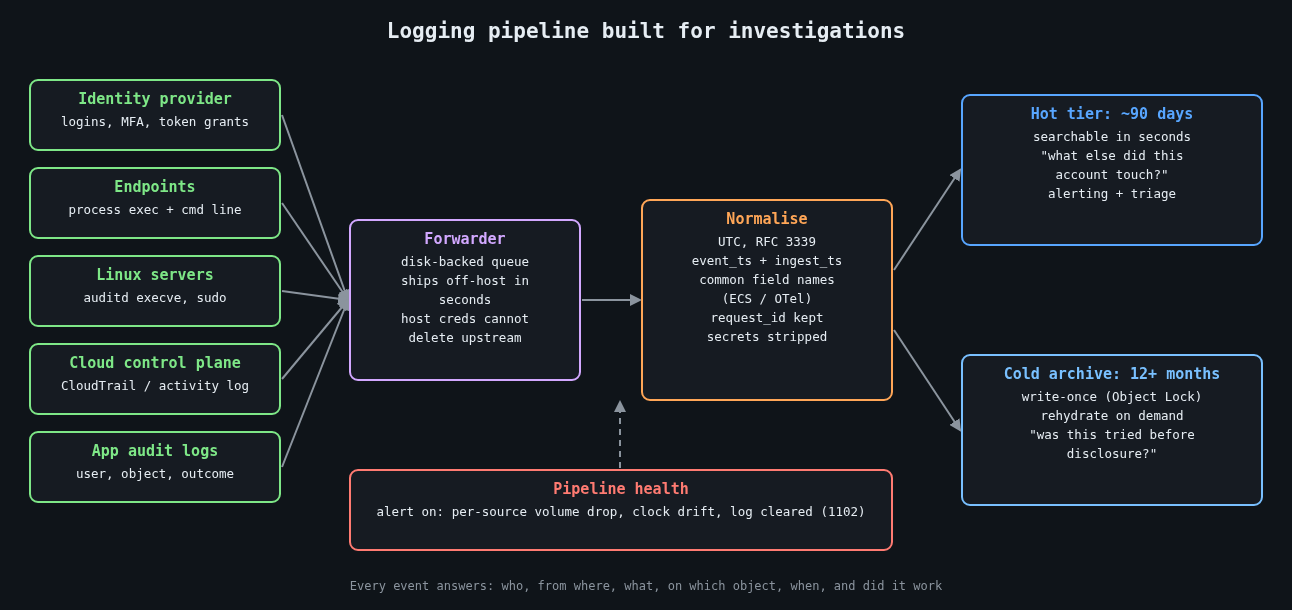
    Logging pipeline built for investigations: sources, forwarder, normalisation, hot and cold tiers

    Before turning on anything, write down the questions an investigator will ask. They’re boringly consistent from incident to incident:

    • Which identity performed the action, and was it a human, a service account or a token?
    • Where did the request come from (source IP, device, user agent, parent process)?
    • What was the action and what object did it touch?
    • When exactly, and in what order relative to other events?
    • Did it succeed?

    Every security-relevant event you emit should answer those. If a log line can’t tell you the actor or the outcome, it’s noise for this purpose. A web access log that records the path but not the authenticated user forces you to join it against session tables you may not have kept, so put the user ID in the access log.

    Time is the join key, so treat it like one

    Investigations are mostly timeline building, and a timeline is only as good as its clocks. Three rules have saved me hours:

    Log in UTC with an explicit offset, in RFC 3339 format. Local time without an offset turns every daylight saving change into an argument. Keep every host synchronised with NTP (chrony is the sane default on Linux) and alert when a host drifts. And record both the event time and the time the pipeline received it, because the gap between them is how you spot a host that buffered logs for an hour or a clock that jumped.

    A structured event that actually answers the questions looks something like this:

    {
      "ts": "2026-10-13T13:47:12.381Z",
      "ingest_ts": "2026-10-13T13:47:13.020Z",
      "event": "auth.login",
      "outcome": "failure",
      "reason": "bad_password",
      "user": "j.smith",
      "src_ip": "203.0.113.24",
      "user_agent": "Mozilla/5.0 ...",
      "mfa": "none",
      "request_id": "9f2c1e7a-4c1b-4a8e-b0a2-1d5f6c3e8b90",
      "service": "sso"
    }

    The request_id matters more than it looks. When the same ID flows through your load balancer, API and database audit logs, you can follow a single request across systems without guessing from timestamps.

    The events that earn their storage

    You can’t log everything forever, so spend the budget on events that show up in nearly every investigation. Authentication, both successes and failures, comes first. Privilege changes (group membership, role assignments, new API keys, sudo) come next. On endpoints and servers, process execution with full command lines is the single most useful source I know of. On Windows that means event 4688 with the “Include command line in process creation events” policy enabled, or Sysmon event ID 1. On Linux, auditd can record execve calls:

    # /etc/audit/rules.d/50-exec.rules
    -a always,exit -F arch=b64 -S execve -F key=exec
    -a always,exit -F arch=b32 -S execve -F key=exec
    -w /etc/sudoers -p wa -k sudoers
    -w /etc/sudoers.d/ -p wa -k sudoers

    Execve logging on a busy build server is loud, so measure the volume before rolling it out everywhere. Config changes to cloud accounts (CloudTrail, Azure activity logs) and data access on your most sensitive stores round out the list.

    Then log the logging. Windows event 1102 means the security log was cleared. A sudden drop in event volume from a host usually means an agent died, a disk filled up, or someone stopped the service on purpose. All three deserve an alert.

    Retention is a decision, so make it on purpose

    Default retention settings were chosen by whoever priced the product, not by your threat model. Mandiant’s M-Trends 2024 report put the global median dwell time at 10 days for 2023, and a median hides a long tail of intrusions discovered months later.

    Log4Shell is the example I keep coming back to. CVE-2021-44228 went public on December 9, 2021, and Cloudflare later reported seeing exploitation attempts as early as December 1. Teams with seven days of searchable logs couldn’t answer the most basic question, which was whether anyone had tried this against them before the disclosure.

    The US federal baseline in OMB memo M-21-31 asks for 12 months of active storage and a further 18 months in cold storage for most log categories. You don’t need to copy that exactly, but it’s a useful reference point when someone suggests 14 days is plenty. A two-tier setup works well: a few months hot and searchable, a year or more in cheap object storage that you can rehydrate when needed.

    The 2023 Storm-0558 intrusion into Microsoft-hosted email made the cost of missing logs very public. The US State Department spotted it because it had access to the MailItemsAccessed audit event, which at the time came with a premium licence tier. Many other affected organisations didn’t have that event at all. Microsoft later expanded default logging, but the point stands: find out which audit events your SaaS providers keep behind a paywall before you need them.

    Make the logs outlive the attacker

    An attacker with root on a box can edit its local log files, so local logs are a convenience, not evidence. Ship events off the host within seconds, to a system that the host’s own credentials can’t modify or delete. For the archive tier, write-once storage such as S3 Object Lock removes the “delete the evidence” option entirely, including for a compromised admin account if you use compliance mode.

    Keep the pipeline’s buffering in mind too. A forwarder with a small in-memory queue will drop events during exactly the network trouble an incident tends to cause. A disk-backed queue costs very little.

    Things you should not be logging

    Secrets, session tokens and passwords should never land in a log. The classic leak is a failed login where the user typed their password into the username field, so be careful about logging submitted usernames verbatim on failure paths. Bearer tokens in URLs end up in access logs and proxy logs, which is one more reason to keep them in headers.

    Log4Shell also taught a second lesson: the logger itself parses what you hand it. Treat attacker-controlled strings as data, keep logging libraries patched, and prefer structured fields over string interpolation.

    Test it before you need it

    Pick an incident from your own history, or a public one, and try to rebuild its timeline using only what your logging pipeline holds today. Time yourself. Every question you can’t answer, or that takes an hour of joining CSV exports, is a concrete gap with a concrete fix. Repeat it every quarter, since logging coverage quietly decays as services get added.

    The next part of this series turns these events into detections that are written, reviewed and tested like code.

    Other parts: Part 2: Writing detections as code: Sigma rules tested against real logs. Part 3: Alert fatigue: tuning detections without going blind.

  • auditd and what to log so an investigation is possible

    auditd and what to log so an investigation is possible

    Part 3 of 4 in the Hardening a Linux server series. Earlier parts: Part 1, SSH hardening and Part 2, systemd sandboxing.

    The first question in almost every Linux intrusion investigation is “what did they run?”, and the honest answer on most servers is “no idea”. Shell history is a file the attacker controls; clearing it is common enough to have its own MITRE ATT&CK entry (T1070.003). The application logs show the request that got them in and then nothing. The auth log shows a sudo or two. Everything in between is gone.

    The Linux audit subsystem fixes that, and it’s been in the kernel since 2.6. The kernel emits records for the events you ask about, auditd writes them to disk, and the records carry the one field that makes them worth having: the audit UID.

    Why auid is the whole point

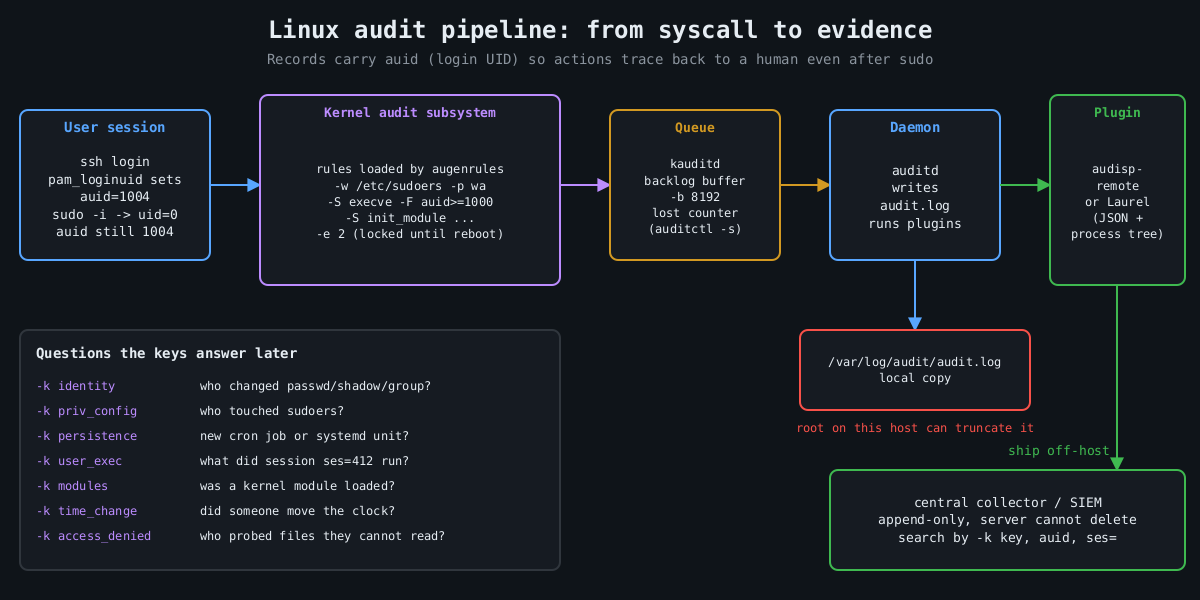
    Pipeline diagram: user session with auid, kernel audit rules, kauditd backlog, auditd writing audit.log, plugins shipping events to an append-only central collector

    When a user logs in, pam_loginuid stamps their session with a login UID, auid in audit records. It survives sudo, su, setuid binaries and daemonizing. So when someone runs sudo -i and then deletes a log file, the event says uid=0 and also auid=1004, which is the human who logged in. Syslog can’t give you that.

    Services started by systemd at boot have no login UID. Unset shows up as 4294967295 (newer auditctl also accepts unset). Filtering on auid>=1000 -F auid!=4294967295 therefore means “actions traceable to a human session”, which is how you keep the volume sane.

    A rule set that answers real questions

    Rules live in /etc/audit/rules.d/*.rules and are compiled by augenrules --load. Here is a compact starting point. I’m not trying to be exhaustive; Florian Roth’s public auditd rule set on GitHub is a good, much longer reference.

    ## buffer and failure behaviour
    -D
    -b 8192
    --backlog_wait_time 60000
    -f 1
    
    ## identity and privilege configuration
    -w /etc/passwd -p wa -k identity
    -w /etc/shadow -p wa -k identity
    -w /etc/group -p wa -k identity
    -w /etc/sudoers -p wa -k priv_config
    -w /etc/sudoers.d/ -p wa -k priv_config
    -w /etc/ssh/sshd_config -p wa -k sshd_config
    -w /etc/ssh/sshd_config.d/ -p wa -k sshd_config
    
    ## persistence locations
    -w /etc/cron.d/ -p wa -k persistence
    -w /etc/crontab -p wa -k persistence
    -w /var/spool/cron/ -p wa -k persistence
    -w /etc/systemd/system/ -p wa -k persistence
    -w /root/.ssh/ -p wa -k persistence
    
    ## commands run by humans (both ABIs)
    -a always,exit -F arch=b64 -S execve -F auid>=1000 -F auid!=4294967295 -k user_exec
    -a always,exit -F arch=b32 -S execve -F auid>=1000 -F auid!=4294967295 -k user_exec
    
    ## kernel modules, time, tracing
    -a always,exit -F arch=b64 -S init_module -S finit_module -S delete_module -k modules
    -a always,exit -F arch=b64 -S adjtimex -S settimeofday -S clock_settime -k time_change
    -a always,exit -F arch=b64 -S ptrace -k tracing
    
    ## access denied to humans
    -a always,exit -F arch=b64 -S open -S openat -S truncate -S ftruncate -F exit=-EACCES -F auid>=1000 -F auid!=4294967295 -k access_denied
    -a always,exit -F arch=b64 -S open -S openat -S truncate -S ftruncate -F exit=-EPERM -F auid>=1000 -F auid!=4294967295 -k access_denied
    
    ## lock the configuration until reboot
    -e 2

    Every rule has a -k key. That’s what you search by later, and it’s what your SIEM will alert on. Name them for the question they answer.

    The arch=b32 execve rule is there on purpose. A 64-bit kernel with 32-bit compatibility still accepts 32-bit syscalls, and a rule that only matches b64 misses a statically linked 32-bit binary entirely. Older hardening benchmarks list both for this reason.

    Choices that matter more than the rules

    -e 2 makes the audit configuration immutable until the next reboot. Without it, an attacker who gets root runs auditctl -D and your logging stops silently. With it, they have to reboot the machine to change the rules, and a reboot is loud.

    -f sets what happens when the kernel can’t log: 0 is silent, 1 logs a kernel message, 2 panics the machine. Panic-on-audit-failure sounds strict and is occasionally a compliance requirement, but on most servers it hands an attacker who can flood the audit backlog a way to crash the box. I use 1 and alert on lost events instead. auditctl -s shows the lost counter, and it should stay at zero.

    -b and --backlog_wait_time size the kernel buffer and how long a process blocks when that buffer is full. Too small and you drop events during a burst, which is exactly when the attacker is busy.

    Then there’s volume. Full execve logging on a build server or a box running a lot of short-lived processes generates enormous logs. That’s why the rule above only covers human sessions. If a service account matters (the one your web app runs as, say), add a targeted rule with -F uid= for that account rather than logging every process on the machine.

    Reading it back

    Raw audit.log is famously unpleasant, one event split across several records. ausearch stitches them together and -i translates numeric IDs to names:

    ausearch -k user_exec --start today -i
    ausearch -k identity -ts 10/09/2026 06:00:00 -i
    aureport -x --summary
    aureport --login --failed

    For anything beyond a single host, send the records somewhere else. The audisp-remote plugin ships them over the network to a central auditd, or you can have a log shipper tail the file. Laurel, a plugin from the threathunters.io folks, rewrites the multi-record mess into one JSON line per event with the process tree attached, which SIEMs handle much better.

    Following a session

    Here’s why the keys and the auid field pay off. Say the persistence key fires because something wrote into /etc/cron.d/. The event shows the executable that did the write, the working directory, auid, and a ses= value, which is the kernel’s ID for that login session. That session number is the thread you pull:

    ausearch -k persistence --start recent -i
    ausearch --session 412 --raw | aureport -x -i
    ausearch -ua 1004 --start today -k user_exec -i

    The second command lists every executable that login session ran, in order, including the ones run through sudo. In practice that’s the difference between “someone added a cron job” and “this account logged in from this address, downloaded this file, ran it as root, then added a cron job”, which is the story an incident report needs.

    The things auditd doesn’t cover

    A few more pieces round it out. Make the journal persistent (Storage=persistent in journald.conf), otherwise it lives in /run and disappears at reboot. Set LogLevel VERBOSE in sshd so logins record the key fingerprint, as covered in part 1. Make sure every host runs chrony or another NTP client, because an investigation across five machines with clocks four minutes apart turns into an argument about ordering.

    And send everything off the host quickly. Logs that sit only on the compromised machine are evidence the attacker can edit. The immutable flag stops them changing the rules. It doesn’t stop root from truncating /var/log/audit/audit.log after the fact. A remote copy that the server can append to and never delete from is what turns these logs into evidence.

    The final part of this series is about patching, which is how you keep most of these investigations from being needed in the first place.

    Other parts of the Hardening a Linux server series: Part 1: SSH hardening beyond “disable root login”, Part 2: Least privilege with systemd sandboxing, Part 4: Patching without fear.