Tag: Hardening a Linux server series

  • Patching without fear: unattended upgrades, live patching and coordinated reboots

    Patching without fear: unattended upgrades, live patching and coordinated reboots

    Part 4 of 4 in the Hardening a Linux server series. Earlier parts: Part 1, SSH hardening, Part 2, systemd sandboxing and Part 3, auditd.

    The first three parts of this series were about making a compromise harder and easier to investigate. This one is about the boring thing that prevents most compromises in the first place. Equifax is still the example I reach for. The Apache Struts bug (CVE-2017-5638) was disclosed and patched in early March 2017, attackers were in by mid-May, and they weren’t discovered until the end of July. Nobody needed a zero-day. They needed one unpatched server.

    Most teams don’t skip patching because they think it’s unimportant. They skip it because they’re afraid of it: an update broke something once, a reboot took down a service once, and now patching is a quarterly ritual with a change ticket. The fix for that fear isn’t courage. It’s a process where updates are small, automatic, staged and reversible.

    Let the machine install security updates
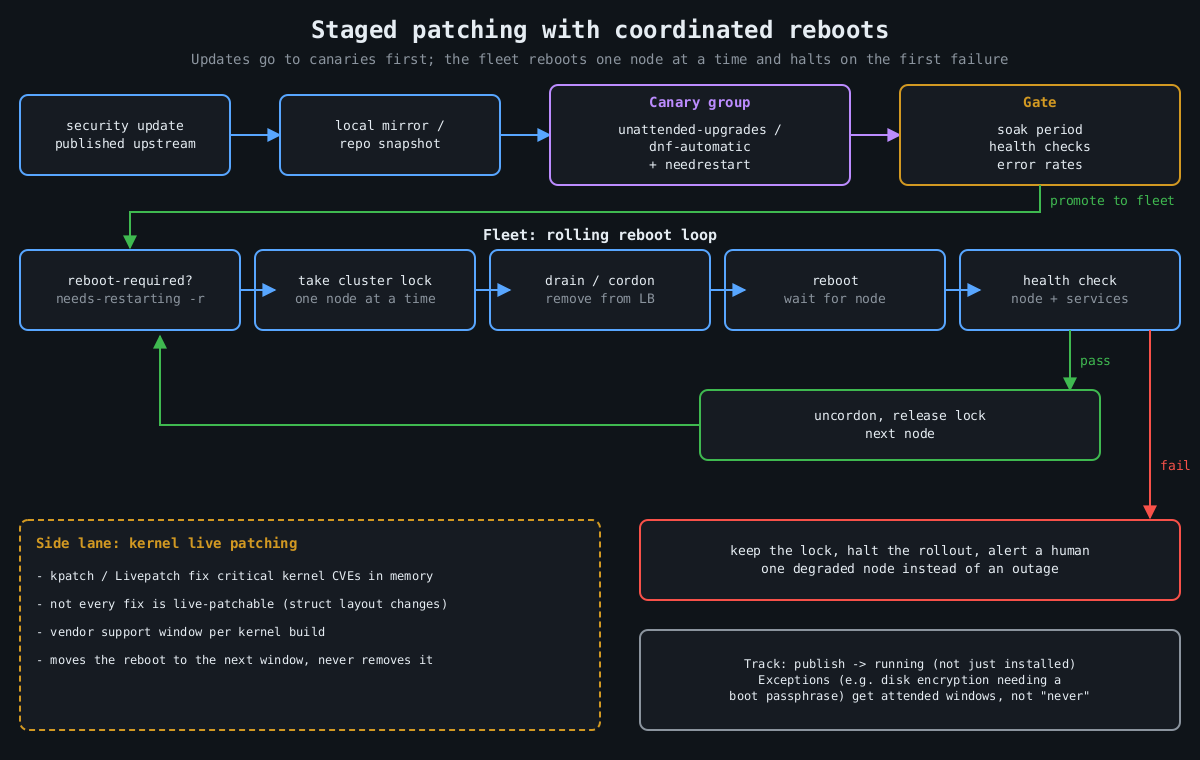
    Flowchart: updates go through a mirror to a canary group and a health gate, then a rolling reboot loop takes a lock, drains, reboots and health checks each node, halting on failure

    On Debian and Ubuntu, unattended-upgrades does this out of the box. Two files matter. /etc/apt/apt.conf.d/20auto-upgrades turns it on:

    APT::Periodic::Update-Package-Lists "1";
    APT::Periodic::Unattended-Upgrade "1";

    And 50unattended-upgrades decides what gets installed and what happens afterwards:

    Unattended-Upgrade::Origins-Pattern {
        "origin=Debian,codename=${distro_codename}-security,label=Debian-Security";
    };
    Unattended-Upgrade::Automatic-Reboot "false";
    Unattended-Upgrade::Remove-Unused-Kernel-Packages "true";

    On RHEL and its relatives, dnf-automatic is the equivalent:

    # /etc/dnf/automatic.conf
    [commands]
    upgrade_type = security
    apply_updates = yes
    
    sudo systemctl enable --now dnf-automatic.timer

    I’ve heard every objection to this, and the one with real weight is “an update could break production”. That’s true. A security update from a stable distribution branch is about the most conservative change your servers will ever receive, though. Debian security and RHEL errata backport fixes rather than shipping new upstream versions, exactly so behaviour doesn’t change. The risk from a backported fix is smaller than the risk of running a known-vulnerable OpenSSL for a quarter. And the staging below handles the rest.

    Installing isn’t the same as running

    Here’s the trap. A library update replaces the file on disk, but every process that already mapped the old version keeps running it. Your server says “OpenSSL updated” while nginx happily serves TLS from the vulnerable copy in memory. Kernel updates don’t take effect at all until a reboot.

    Check what’s actually stale:

    # Debian/Ubuntu
    sudo needrestart -b          # batch output: stale services and kernel status
    cat /var/run/reboot-required.pkgs
    
    # RHEL family
    sudo dnf needs-restarting -r   # exit code 1 means a reboot is needed
    sudo dnf needs-restarting -s   # services still using old files

    needrestart can restart affected services automatically after each upgrade, which closes the userspace gap with no human involved. The kernel still needs a reboot, and that’s where live patching comes in.

    Live patching buys time, not immunity

    Kernel live patching (kpatch on RHEL, Canonical Livepatch on Ubuntu, both built on the upstream livepatch infrastructure merged in Linux 4.0) replaces vulnerable kernel functions in memory using ftrace redirection. For a critical kernel CVE on a Friday afternoon, it is excellent.

    It has limits that vendors are honest about if you read the fine print. Not every fix can be live patched. Changes to data structure layouts are hard or impossible, so some CVEs simply don’t get a live patch. Live patches are also cumulative patches against a specific kernel build, and vendors only produce them for a support window per kernel. Eventually you’re running a kernel that’s been patched in memory a dozen times and isn’t getting new patches. So treat live patching as a way to move the reboot from “tonight, in a panic” to “next scheduled window”. It doesn’t remove the reboot.

    Reboots should be routine, which means coordinated

    If rebooting a server is scary, that’s a finding about your architecture. A service that can’t survive one node restarting can’t survive one node dying either, and hardware doesn’t schedule its failures for maintenance windows. Once services can tolerate it, reboots should happen on a cadence, automatically, one node at a time.

    The coordination logic is the same everywhere:

    1. Is a reboot needed? (reboot-required, needs-restarting -r)
    2. Take a cluster-wide lock so only one node reboots at a time.
    3. Drain: remove the node from the load balancer / cordon it.
    4. Reboot, wait for it to come back.
    5. Health check the node and its services.
    6. Only on success: put it back, release the lock.
    7. On failure: keep the lock, stop the rollout, alert a human.

    For Kubernetes nodes, kured (the Kubernetes Reboot Daemon) does exactly this: it watches for the reboot sentinel file, takes a lock, cordons and drains the node, reboots, and uncordons it. For VMs and bare metal, the same loop fits in a small Ansible playbook with serial: 1 and max_fail_percentage: 0, or whatever orchestration you already have. The important part is step 7. A rollout that stops itself after the first failed health check turns a bad update into one degraded node instead of an outage.

    Keep one exception list and keep it short. Machines that can’t reboot unattended (anything with full-disk encryption that needs a passphrase at boot, for example) should get a scheduled human-attended window, not “never”.

    Stage it like any other deploy

    The last piece is ordering. Updates should hit a small group of servers first, ideally the ones that look most like production without being the most important, and only spread after those survive a soak period. If you run a local mirror or use repository snapshots (Pulp, Aptly, or your cloud provider’s equivalent), the fleet installs the exact package set the canaries tested, not whatever landed in the repository an hour later. For VMs, take a hypervisor snapshot before the update on anything stateful, so a bad update is a rollback rather than a restore.

    Put numbers on it. Track the time from a fix being published to it running (not just installed) on every host. When the next regreSSHion lands, as covered in part 1, the teams that patch in a day are the ones that already patch every week.

    That wraps up this series. None of it is exotic, and together it’s most of what separates a server that gets popped by commodity tooling from one that doesn’t.

  • auditd and what to log so an investigation is possible

    auditd and what to log so an investigation is possible

    Part 3 of 4 in the Hardening a Linux server series. Earlier parts: Part 1, SSH hardening and Part 2, systemd sandboxing.

    The first question in almost every Linux intrusion investigation is “what did they run?”, and the honest answer on most servers is “no idea”. Shell history is a file the attacker controls; clearing it is common enough to have its own MITRE ATT&CK entry (T1070.003). The application logs show the request that got them in and then nothing. The auth log shows a sudo or two. Everything in between is gone.

    The Linux audit subsystem fixes that, and it’s been in the kernel since 2.6. The kernel emits records for the events you ask about, auditd writes them to disk, and the records carry the one field that makes them worth having: the audit UID.

    Why auid is the whole point

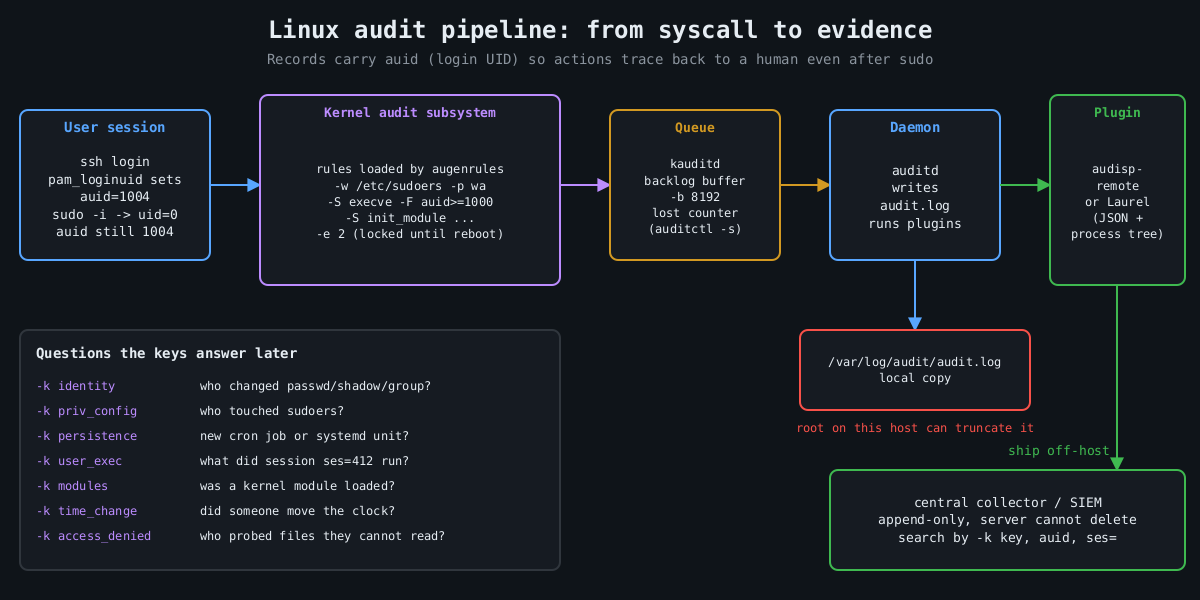
    Pipeline diagram: user session with auid, kernel audit rules, kauditd backlog, auditd writing audit.log, plugins shipping events to an append-only central collector

    When a user logs in, pam_loginuid stamps their session with a login UID, auid in audit records. It survives sudo, su, setuid binaries and daemonizing. So when someone runs sudo -i and then deletes a log file, the event says uid=0 and also auid=1004, which is the human who logged in. Syslog can’t give you that.

    Services started by systemd at boot have no login UID. Unset shows up as 4294967295 (newer auditctl also accepts unset). Filtering on auid>=1000 -F auid!=4294967295 therefore means “actions traceable to a human session”, which is how you keep the volume sane.

    A rule set that answers real questions

    Rules live in /etc/audit/rules.d/*.rules and are compiled by augenrules --load. Here is a compact starting point. I’m not trying to be exhaustive; Florian Roth’s public auditd rule set on GitHub is a good, much longer reference.

    ## buffer and failure behaviour
    -D
    -b 8192
    --backlog_wait_time 60000
    -f 1
    
    ## identity and privilege configuration
    -w /etc/passwd -p wa -k identity
    -w /etc/shadow -p wa -k identity
    -w /etc/group -p wa -k identity
    -w /etc/sudoers -p wa -k priv_config
    -w /etc/sudoers.d/ -p wa -k priv_config
    -w /etc/ssh/sshd_config -p wa -k sshd_config
    -w /etc/ssh/sshd_config.d/ -p wa -k sshd_config
    
    ## persistence locations
    -w /etc/cron.d/ -p wa -k persistence
    -w /etc/crontab -p wa -k persistence
    -w /var/spool/cron/ -p wa -k persistence
    -w /etc/systemd/system/ -p wa -k persistence
    -w /root/.ssh/ -p wa -k persistence
    
    ## commands run by humans (both ABIs)
    -a always,exit -F arch=b64 -S execve -F auid>=1000 -F auid!=4294967295 -k user_exec
    -a always,exit -F arch=b32 -S execve -F auid>=1000 -F auid!=4294967295 -k user_exec
    
    ## kernel modules, time, tracing
    -a always,exit -F arch=b64 -S init_module -S finit_module -S delete_module -k modules
    -a always,exit -F arch=b64 -S adjtimex -S settimeofday -S clock_settime -k time_change
    -a always,exit -F arch=b64 -S ptrace -k tracing
    
    ## access denied to humans
    -a always,exit -F arch=b64 -S open -S openat -S truncate -S ftruncate -F exit=-EACCES -F auid>=1000 -F auid!=4294967295 -k access_denied
    -a always,exit -F arch=b64 -S open -S openat -S truncate -S ftruncate -F exit=-EPERM -F auid>=1000 -F auid!=4294967295 -k access_denied
    
    ## lock the configuration until reboot
    -e 2

    Every rule has a -k key. That’s what you search by later, and it’s what your SIEM will alert on. Name them for the question they answer.

    The arch=b32 execve rule is there on purpose. A 64-bit kernel with 32-bit compatibility still accepts 32-bit syscalls, and a rule that only matches b64 misses a statically linked 32-bit binary entirely. Older hardening benchmarks list both for this reason.

    Choices that matter more than the rules

    -e 2 makes the audit configuration immutable until the next reboot. Without it, an attacker who gets root runs auditctl -D and your logging stops silently. With it, they have to reboot the machine to change the rules, and a reboot is loud.

    -f sets what happens when the kernel can’t log: 0 is silent, 1 logs a kernel message, 2 panics the machine. Panic-on-audit-failure sounds strict and is occasionally a compliance requirement, but on most servers it hands an attacker who can flood the audit backlog a way to crash the box. I use 1 and alert on lost events instead. auditctl -s shows the lost counter, and it should stay at zero.

    -b and --backlog_wait_time size the kernel buffer and how long a process blocks when that buffer is full. Too small and you drop events during a burst, which is exactly when the attacker is busy.

    Then there’s volume. Full execve logging on a build server or a box running a lot of short-lived processes generates enormous logs. That’s why the rule above only covers human sessions. If a service account matters (the one your web app runs as, say), add a targeted rule with -F uid= for that account rather than logging every process on the machine.

    Reading it back

    Raw audit.log is famously unpleasant, one event split across several records. ausearch stitches them together and -i translates numeric IDs to names:

    ausearch -k user_exec --start today -i
    ausearch -k identity -ts 10/09/2026 06:00:00 -i
    aureport -x --summary
    aureport --login --failed

    For anything beyond a single host, send the records somewhere else. The audisp-remote plugin ships them over the network to a central auditd, or you can have a log shipper tail the file. Laurel, a plugin from the threathunters.io folks, rewrites the multi-record mess into one JSON line per event with the process tree attached, which SIEMs handle much better.

    Following a session

    Here’s why the keys and the auid field pay off. Say the persistence key fires because something wrote into /etc/cron.d/. The event shows the executable that did the write, the working directory, auid, and a ses= value, which is the kernel’s ID for that login session. That session number is the thread you pull:

    ausearch -k persistence --start recent -i
    ausearch --session 412 --raw | aureport -x -i
    ausearch -ua 1004 --start today -k user_exec -i

    The second command lists every executable that login session ran, in order, including the ones run through sudo. In practice that’s the difference between “someone added a cron job” and “this account logged in from this address, downloaded this file, ran it as root, then added a cron job”, which is the story an incident report needs.

    The things auditd doesn’t cover

    A few more pieces round it out. Make the journal persistent (Storage=persistent in journald.conf), otherwise it lives in /run and disappears at reboot. Set LogLevel VERBOSE in sshd so logins record the key fingerprint, as covered in part 1. Make sure every host runs chrony or another NTP client, because an investigation across five machines with clocks four minutes apart turns into an argument about ordering.

    And send everything off the host quickly. Logs that sit only on the compromised machine are evidence the attacker can edit. The immutable flag stops them changing the rules. It doesn’t stop root from truncating /var/log/audit/audit.log after the fact. A remote copy that the server can append to and never delete from is what turns these logs into evidence.

    The final part of this series is about patching, which is how you keep most of these investigations from being needed in the first place.

    Other parts of the Hardening a Linux server series: Part 1: SSH hardening beyond “disable root login”, Part 2: Least privilege with systemd sandboxing, Part 4: Patching without fear.

  • Least privilege with systemd sandboxing

    Least privilege with systemd sandboxing

    Part 2 of 4 in the Hardening a Linux server series. Previously: Part 1, SSH hardening beyond “disable root login”.

    Most services on a Linux box run with far more access than they need. A web app that reads a config file, writes to one data directory and listens on one port can, by default, read most of the filesystem, write anywhere its user owns, call every syscall the kernel offers and open any kind of socket. When that app gets popped through a deserialization bug, all of that becomes the attacker’s starting position.

    systemd has grown a large set of sandboxing directives that fix this with a few lines in a unit file. No containers, no AppArmor profiles to maintain, no code changes. I think they’re the best return on effort in Linux hardening right now, and they’re still rarely used outside of the units systemd itself ships.

    Measure first

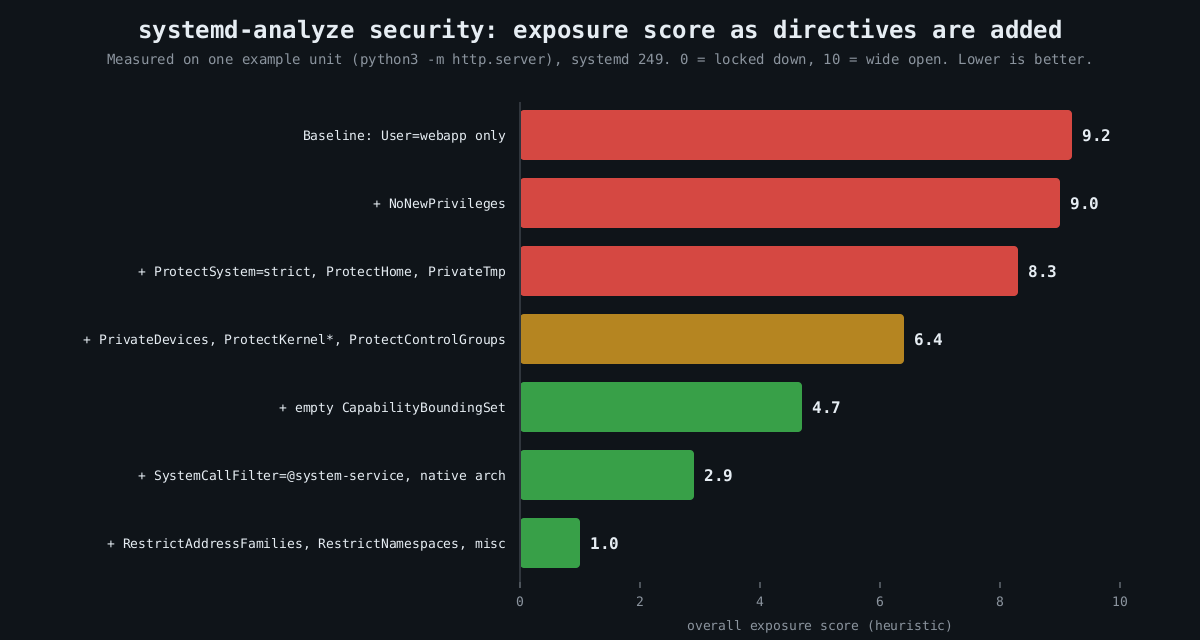
    Bar chart: measured systemd-analyze security exposure score falling from 9.2 at baseline to 1.0 as filesystem, kernel, capability, syscall and network restrictions are added

    systemd-analyze security scores every running service from 0 (locked down) to 10 (wide open) and lists each check it applied:

    systemd-analyze security
    systemd-analyze security nginx.service

    The number is a heuristic, a weighted sum of which directives are set, so don’t treat 2.1 versus 2.4 as meaningful. It is very good at showing you the gaps. On most distributions the bulk of third-party services score 9 or above.

    Measured: one unit, hardened step by step

    I took a trivial unit (python3 -m http.server running as a dedicated user) and added directives in groups, scoring each version with systemd-analyze security on systemd 249. The chart near the top of this post shows the result. The baseline scored 9.2. The final unit scored 1.0.

    Here is roughly what that final unit looks like, adjusted for a real service:

    [Service]
    ExecStart=/opt/webapp/bin/webapp
    DynamicUser=yes
    StateDirectory=webapp
    ConfigurationDirectory=webapp
    
    NoNewPrivileges=yes
    ProtectSystem=strict
    ProtectHome=yes
    PrivateTmp=yes
    PrivateDevices=yes
    ProtectKernelTunables=yes
    ProtectKernelModules=yes
    ProtectKernelLogs=yes
    ProtectControlGroups=yes
    ProtectClock=yes
    ProtectHostname=yes
    ProtectProc=invisible
    
    CapabilityBoundingSet=CAP_NET_BIND_SERVICE
    AmbientCapabilities=CAP_NET_BIND_SERVICE
    
    SystemCallArchitectures=native
    SystemCallFilter=@system-service
    SystemCallFilter=~@privileged @resources
    SystemCallErrorNumber=EPERM
    
    RestrictAddressFamilies=AF_UNIX AF_INET  "AF_INET6
    RestrictNamespaces=yes
    RestrictSUIDSGID=yes
    RestrictRealtime=yes
    LockPersonality=yes
    MemoryDenyWriteExecute=yes
    UMask" =0077

    That looks like a lot. Each line is cheap, though, and they fall into a few families.

    Privilege escalation inside the service

    NoNewPrivileges=yes sets the kernel’s no_new_privs flag, so nothing the service executes can gain privileges through setuid binaries or file capabilities. An attacker with code execution as the service user can’t then run a vulnerable setuid helper to become root. Several other directives quietly turn it on as well, which is fine.

    Capabilities are the other half. CapabilityBoundingSet= with an empty value drops every capability for good. The example keeps exactly one, CAP_NET_BIND_SERVICE, and grants it as an ambient capability so a non-root process can bind port 443. That is the right shape for most daemons that historically started as root just to grab a low port.

    DynamicUser=yes allocates a throwaway UID when the service starts. It implies a stricter set of defaults (read-only system, private /tmp, no setuid), and combined with StateDirectory= systemd creates and chowns /var/lib/webapp for you. If the service doesn’t need a stable UID shared with other software, use it.

    Filesystem view

    ProtectSystem=strict mounts the entire filesystem read-only for the service, apart from the API filesystems like /proc and /sys. Writable paths are then opt-in through StateDirectory=, CacheDirectory=, LogsDirectory= or ReadWritePaths=. This is the directive that stops an attacker dropping a cron job, a systemd unit or a modified binary for persistence. ProtectHome=yes hides /home, /root and /run/user entirely, which matters more than people think, since home directories are where SSH keys and cloud credentials live.

    PrivateTmp=yes gives the service its own /tmp, which closes off the classic symlink and race games other local users can play in a shared /tmp.

    Kernel attack surface

    A sandbox that lives in userspace can’t save you from a kernel bug, but it can make most kernel bugs unreachable. SystemCallFilter=@system-service is an allowlist of syscalls that ordinary services use, curated by systemd. The second line then removes @privileged and @resources. By default a blocked syscall kills the process with SIGSYS; SystemCallErrorNumber=EPERM makes it fail with an error instead, which is friendlier while you’re tuning.

    RestrictNamespaces=yes deserves a specific mention. A good number of recent Linux privilege escalation bugs are only reachable by unprivileged users through user namespaces, because creating one hands you capabilities inside it. CVE-2022-0185, a heap overflow in the filesystem context code, is the textbook case: exploitation needed CAP_SYS_ADMIN in a user namespace, which any unprivileged user could get on distributions that allowed unprivileged user namespaces. A service that can’t create namespaces can’t reach that code path at all.

    PrivateDevices=yes, ProtectKernelModules=yes and ProtectKernelTunables=yes take away raw device nodes, module loading and writes to /proc/sys. SystemCallArchitectures=native blocks the 32-bit syscall ABI on 64-bit hosts, a path that has been used to dodge seccomp filters written for one ABI only.

    Network

    RestrictAddressFamilies= limits which socket types the service may open. Most need AF_UNIX, AF_INET and AF_INET6, nothing else, and certainly not AF_PACKET or AF_NETLINK. If you want per-service egress control, IPAddressDeny=any with a narrow IPAddressAllow= uses a cgroup BPF filter to drop traffic to anything else. A compromised internal API that can’t reach the internet is a lot less useful as a staging point.

    Rolling it out without breaking things

    Don’t edit vendor units. Use systemctl edit webapp.service to write a drop-in under /etc/systemd/system/webapp.service.d/, which survives package upgrades. You can try options on a throwaway command before committing to them:

    sudo systemd-run --pty --wait -p ProtectSystem=strict -p PrivateTmp=yes \
      -p SystemCallFilter=@system-service /opt/webapp/bin/webapp --selftest

    The usual breakage is predictable. MemoryDenyWriteExecute=yes breaks anything with a JIT, so Node, the JVM and PCRE’s JIT mode will fail in confusing ways. ProtectSystem=strict breaks services that write somewhere surprising, which the journal will show as EROFS errors. Syscall filters occasionally catch a library doing something unusual, and with SystemCallErrorNumber=EPERM the audit log or strace -f tells you which call. Add one family at a time and run your integration tests between each.

    This doesn’t replace patching or a proper MAC policy, and it isn’t a VM boundary. What it does is shrink the blast radius of the next RCE in your app from “the box” to “one directory and a socket”. Part 3 covers auditd, so that when something does get through you can see what it tried to do.

    Other parts of the Hardening a Linux server series: Part 1: SSH hardening beyond “disable root login”, Part 3: auditd and what to log, Part 4: Patching without fear.