
Part 1 of 4 in the Hardening a Linux server series.
Every hardening guide starts with PermitRootLogin no, and plenty of them stop there. That setting is fine. It’s also the least interesting thing about securing SSH, because an attacker who can log in as a sudo-capable user with a password has root anyway. The things that actually decide how exposed your SSH daemon is are how users prove who they are, how the server proves who it is, which crypto you still accept, and who is allowed to try at all.
Start from what sshd is really doing
Before changing anything, look at the effective configuration rather than the file. Distributions now ship Include /etc/ssh/sshd_config.d/*.conf near the top of sshd_config, and for most keywords sshd uses the first value it reads, not the last. I’ve watched people append PasswordAuthentication no to the bottom of the main file while a cloud-init drop-in earlier in the include order said yes, and the drop-in won.
sudo sshd -T | grep -Ei 'passwordauth|kbdinteractive|permitroot|pubkeyauth|authenticationmethods'
sudo sshd -T -C user=deploy,host=10.0.0.5,addr=10.0.0.5
The second form evaluates Match blocks for a specific connection, which is the only sane way to test conditional rules. Put your own settings in a drop-in with a low number, like /etc/ssh/sshd_config.d/00-hardening.conf, so they load first.
Keys, and better keys
Passwords on an internet-facing sshd are a credential-stuffing target forever. Turn off both password paths, since keyboard-interactive will happily do password auth through PAM even when PasswordAuthentication is off:
PasswordAuthentication no
KbdInteractiveAuthentication no
PubkeyAuthentication yes
PermitRootLogin no
MaxAuthTries 3
LoginGraceTime 20(KbdInteractiveAuthentication replaced ChallengeResponseAuthentication in OpenSSH 8.7. Older configs use the old name, which is still accepted as an alias.)
For user keys, Ed25519 is the default choice now. The bigger upgrade is hardware-backed keys. Since OpenSSH 8.2 you can generate ed25519-sk keys that live on a FIDO2 token, so the private key file on disk is useless without the physical device and a touch:
ssh-keygen -t ed25519-sk -O resident -O verify-required -C "alice@laptop"verify-required (OpenSSH 8.4+) demands a PIN as well as a touch. Malware on a laptop can steal an ordinary key file in a second. With an -sk key it has to wait for the user to tap the token at the right moment, which is a much harder problem.
Certificates instead of authorized_keys sprawl
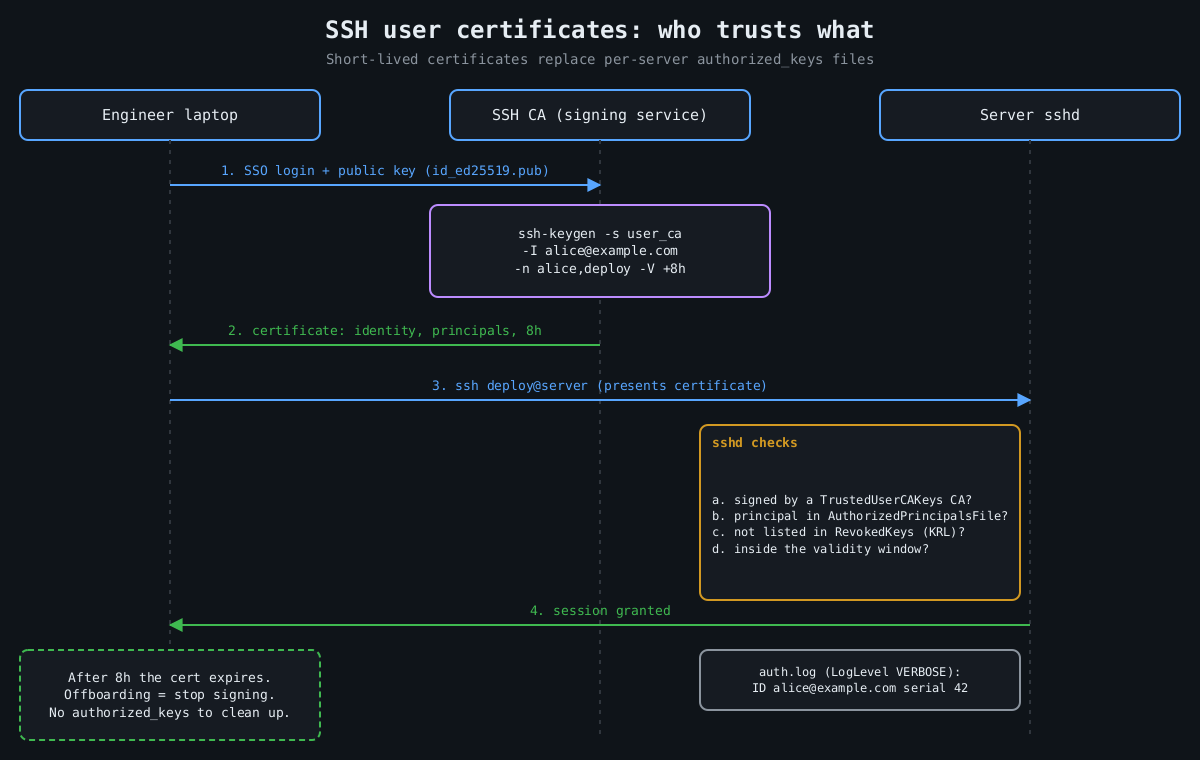
The real weakness of plain public keys is lifecycle. authorized_keys files accumulate keys from people who left two years ago, and nobody can say which key belongs to whom. OpenSSH has had its own certificate format since 5.4, and it’s underused. A CA signs a user’s public key with an identity, a list of principals and a validity window:
ssh-keygen -s user_ca -I [email protected] -n alice,deploy -V +8h id_ed25519.pubThe server trusts the CA rather than individual keys:
TrustedUserCAKeys /etc/ssh/user_ca.pub
AuthorizedPrincipalsFile /etc/ssh/principals/%u
RevokedKeys /etc/ssh/revoked_keys
/etc/ssh/principals/deploy lists which principals may log in as deploy. Now offboarding is mostly automatic, because certificates expire in hours, and the -I identity shows up in the auth log so you know which human used the shared account. Keep an emergency revocation path anyway (ssh-keygen -k builds a key revocation list), and protect the CA key like the crown jewels it is, ideally in a hardware token or a signing service.
Host certificates solve the other half. Sign host keys with ssh-keygen -h, add one @cert-authority *.example.com line to clients’ known_hosts, and the “authenticity of host can’t be established” prompt that everyone trains themselves to click through goes away. Trust on first use is a bet that the first connection wasn’t intercepted. Certificates remove the bet.
Prune the crypto, but don’t fight the defaults
Modern OpenSSH defaults are good, and hand-written cipher lists copied from 2016 blog posts are often worse than the defaults they replace. OpenSSH 8.8 already disabled ssh-rsa signatures using SHA-1. OpenSSH 9.0 made the hybrid post-quantum [email protected] key exchange the default, and 10.0 moved to mlkem768x25519-sha256.
Where explicit lists still pay off is when a specific weakness lands. Terrapin (CVE-2023-48795) was a prefix-truncation attack against the SSH transport that worked when [email protected], or a CBC cipher paired with an encrypt-then-MAC MAC, was negotiated. The fix was “strict kex” in OpenSSH 9.6, which needs both sides patched. Until clients caught up, removing the affected algorithms was a reasonable stopgap. Audit what you expose with ssh-audit rather than guessing:
ssh-audit -p 22 server.example.comDecide who gets to try
Authentication strength matters less if most accounts can’t authenticate at all. An allowlist is short and readable:
AllowGroups ssh-users
AllowTcpForwarding no
AllowAgentForwarding no
AllowStreamLocalForwarding no
X11Forwarding no

Match Group ssh-admins Address 10.20.0.0/16
    AllowTcpForwarding yes

Match User backup
    ForceCommand /usr/local/bin/backup-receive
    PermitTTY no
Forwarding is how an SSH foothold turns into a pivot into the rest of the network, so default it off and turn TCP forwarding back on only for admins coming from the internal range. There’s also DisableForwarding yes (OpenSSH 7.4+), which kills every kind of forwarding in one line, but it overrides the individual switches, so a Match block can’t selectively re-enable one of them without also setting DisableForwarding no there. Explicit switches are easier to reason about.
Network placement still matters. Port knocking and moving sshd to port 2222 cut log noise, nothing more. Putting sshd behind a VPN or a bastion, or at least restricting port 22 to known address ranges at the firewall, actually shrinks who can reach the parser. And the parser has had bad days. regreSSHion (CVE-2024-6387) was a signal-handler race in sshd on glibc Linux that allowed unauthenticated remote code execution, affecting OpenSSH 8.5p1 through 9.7p1 until 9.8p1 fixed it. The temporary mitigation was LoginGraceTime 0, which trades RCE risk for an easy connection-exhaustion DoS. The xz backdoor (CVE-2024-3094) showed that sshd’s attack surface includes whatever libraries your distribution links into it. Nobody’s config file would have stopped either of those. Reachability would have.
OpenSSH 9.8 also added PerSourcePenalties, which is on by default and makes sshd refuse connections for a while from addresses that repeatedly fail auth or crash a child. It’s a built-in, rough fail2ban.
Log enough to answer questions later
Set LogLevel VERBOSE. At that level sshd logs the fingerprint of the key that authenticated each session, and for certificates the key ID and serial. Without it, “which key did this login use?” has no answer. Part 3 of this series covers auditd and shipping those logs somewhere an intruder can’t edit them.
What I’d actually do on a new server, in order: allowlist users, kill passwords, move people to certificates, keep forwarding off, limit reachability, and patch sshd quickly when the next CVE lands. Disabling root login comes for free along the way.
Other parts of the Hardening a Linux server series: Part 2: Least privilege with systemd sandboxing, Part 3: auditd and what to log, Part 4: Patching without fear.