Most Kubernetes incident write-ups I read start the same way. Somebody finds a remote code execution bug in an ordinary web app, lands in a pod, and twenty minutes later they are reading secrets from every namespace. The bug in the app was a normal bug. The part that turned it into a cluster compromise was a handful of RBAC and admission settings nobody had looked at since the cluster was stood up.
I’ll assume you already run Kubernetes and know what a Role is.
What the attacker finds in the pod
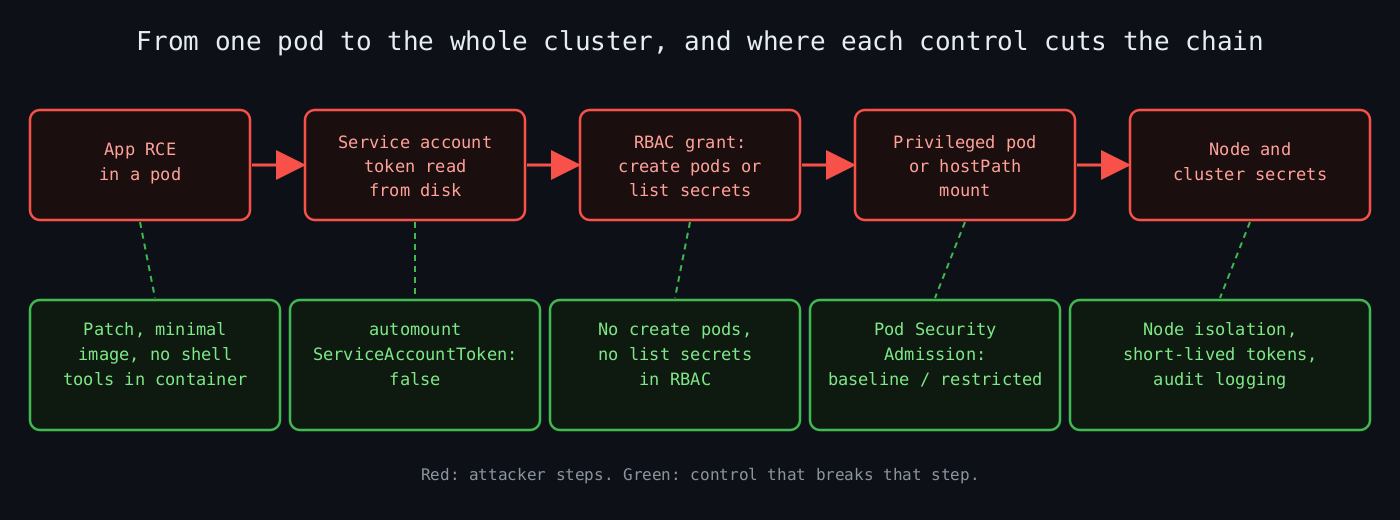
The diagram shows the chain an attacker follows from an application bug to the node, and the control that breaks each step.
Every pod gets a service account, and unless you say otherwise, a projected token for it is mounted at /var/run/secrets/kubernetes.io/serviceaccount/token. Since 1.24 that token is short-lived and bound to the pod, which is a real improvement over the old never-expiring secrets. It still works against the API server for as long as the pod lives, and the attacker lives inside the pod.
The first thing they run is the equivalent of this:
kubectl auth can-i --listYou should run it yourself, from the outside, impersonating the service account of each workload:
kubectl auth can-i --list \
  --as=system:serviceaccount:shop:web \
  -n shop
Most web apps need no Kubernetes API access at all. If the answer is anything beyond the default discovery permissions, ask why. Then turn the token off where it isn’t needed:
apiVersion: v1
kind: ServiceAccount
metadata:
  name: web
  namespace: shop
automountServiceAccountToken: false
The usual cause is a token nobody asked for and a RoleBinding inherited from a copy-pasted Helm chart.
RBAC verbs that are really something else
RBAC is purely additive. There are no deny rules, so the only way to be safe is to grant less. The documented behaviour that matters most is that the API stops you from creating or editing a Role that grants permissions you don’t hold yourself, unless you have the escalate verb on roles. The same goes for bind on creating RoleBindings. Hand those two out and you’ve handed out cluster-admin with extra steps. impersonate is the third one to grep for.
The quieter problems are verbs that look read-only or small:
get,listandwatchonsecretsall return the secret data. A role that canlistsecrets in a namespace can read every secret in it. This is the one people get wrong becauselistsounds harmless.createonpodsin a namespace is, in practice, access to every secret and service account in that namespace. The attacker creates a pod that mounts the secret or runs as the more privileged service account. The Kubernetes docs call this out under privilege escalation via workload creation.createonpods/execis a shell in any pod in scope.- Wildcards.
resources: ["*"]andverbs: ["*"]also match resources that don’t exist yet, including whatever the next CRD you install adds.
The group system:masters bypasses RBAC entirely, so a client certificate with that group in the subject can’t be restricted by anything you write in a Role. Don’t issue those, and don’t bind cluster-admin to system:authenticated. That binding makes every authenticated identity an admin.
A sane namespaced role for a controller that only needs to read config looks like this:
apiVersion: rbac.authorization.k8s.io/v1
kind: Role
metadata:
  name: read-config
  namespace: shop
rules:
  - apiGroups: [""]
    resources: ["configmaps"]
    resourceNames: ["web-config"]
    verbs: ["get", "watch"]
Note resourceNames. It narrows a grant to specific objects, and it works for get but not for list or create, since the name isn’t known at request time (with a list it only works if the request uses a field selector on metadata.name).
Admission is the second lock
RBAC decides whether you may create a pod. It says nothing about what the pod is allowed to contain. A pod with privileged: true, hostPID: true or a hostPath mount of / is a node compromise waiting for a trigger, and from the node the attacker can read the kubelet credentials and every other pod’s tokens on that host.
That’s what admission controllers are for. Pod Security Admission has been built in since it went stable in 1.25, replacing PodSecurityPolicy, which was removed in that release. It defines three profiles, privileged, baseline and restricted, applied per namespace through labels, in three modes: enforce, audit and warn.
kubectl label --overwrite ns shop \
  pod-security.kubernetes.io/enforce=restricted \
  pod-security.kubernetes.io/enforce-version=latest
Before enforcing on a namespace that already has workloads, ask the API server what would break. The documented way is a server-side dry run:
kubectl label --dry-run=server --overwrite ns --all \
  pod-security.kubernetes.io/enforce=baseline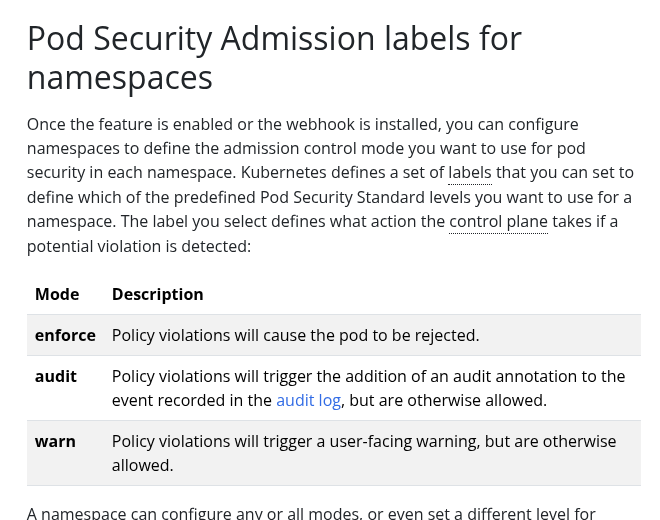
The screenshot is the real Kubernetes documentation page for the Pod Security Admission labels, listing what enforce, audit and warn each do.
It returns warnings listing the pods that violate the profile. I roll out warn and audit first, fix what shows up, and only then flip to enforce. Going straight to enforce on a busy namespace breaks deploys at the worst moment.
Baseline blocks the obvious things: privileged containers, host namespaces, hostPath volumes, most added capabilities. Restricted adds non-root, no privilege escalation, a seccomp profile and dropped capabilities. It breaks a lot of off-the-shelf images, which is a useful thing to find out early.
When the built-in profiles aren’t enough
Pod Security Admission is coarse on purpose. For rules like “images only from our registry” or “no hostNetwork unless labelled”, you need a policy engine. Kyverno and OPA Gatekeeper are the established options. Since 1.30 there is also ValidatingAdmissionPolicy, which is stable and runs CEL expressions inside the API server with no webhook to keep alive. A validating webhook that is down either blocks every deploy or, with failurePolicy: Ignore, silently stops protecting you.
apiVersion: admissionregistration.k8s.io/v1
kind: ValidatingAdmissionPolicy
metadata:
  name: no-host-network
spec:
  failurePolicy: Fail
  matchConstraints:
    resourceRules:
      - apiGroups: [""]
        apiVersions: ["v1"]
        operations: ["CREATE", "UPDATE"]
        resources: ["pods"]
  validations:
    - expression: "!has(object.spec.hostNetwork) || !object.spec.hostNetwork"
      message: "hostNetwork is not allowed"
---
apiVersion: admissionregistration.k8s.io/v1
kind: ValidatingAdmissionPolicyBinding
metadata:
  name: no-host-network
spec:
  policyName: no-host-network
  validationActions: ["Deny"]
This matches pods directly. Deployments and Jobs create pods through their controllers, so the pod-level check still fires at that point, but the error shows up in the ReplicaSet events and not at kubectl apply, which confuses people the first time.
A short audit I’d run this week
Search every ClusterRoleBinding for subjects that are groups like system:authenticated or system:unauthenticated. List every Role and ClusterRole containing secrets with get, list or watch, plus escalate, bind, impersonate, pods/exec and *. Check each namespace for a pod-security.kubernetes.io/enforce label. Check which service accounts have a mounted token and no reason for one.
None of this is clever. Each check removes a step from the chain in the diagram: app bug, token, a create-pods grant, a privileged pod, the node. Breaking one link stops the attacker at that point, and breaking several is cheap next to writing the incident report.
Leave a Reply
You must be logged in to post a comment.