Category: Security

  • Why TLS 1.3 Handshakes Are Faster (And What Changed Under the Hood)

    Why TLS 1.3 Handshakes Are Faster (And What Changed Under the Hood)

    The 1-RTT handshake and what changed
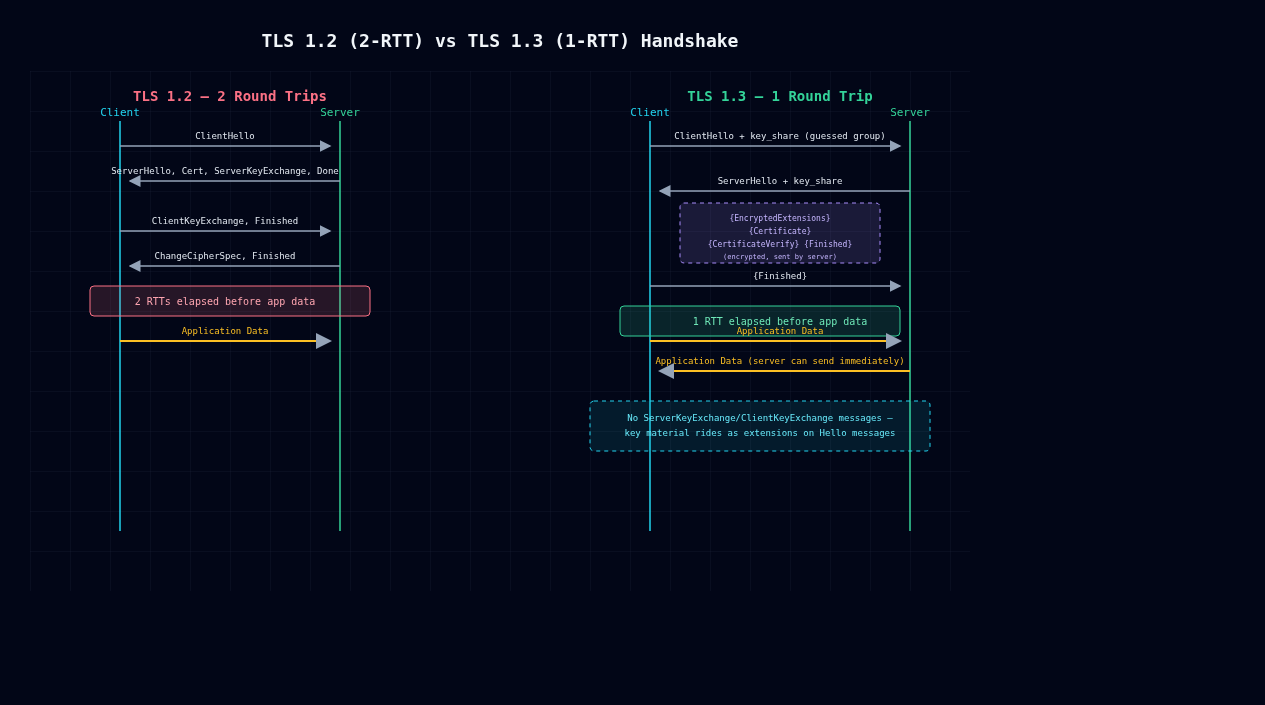
    TLS 1.2 vs TLS 1.3 handshake sequence comparison

    TLS 1.3 (RFC 8446, finalized August 2018) isn’t a tuning pass on TLS 1.2. It’s a different protocol wearing the same name. The headline feature is a 1-RTT handshake instead of 2-RTT, but the interesting part is why that was even possible: an entire class of key exchange got deleted, renegotiation got deleted, and forward secrecy stopped being optional. Here’s what changed on the wire.

    TLS 1.2’s 2-RTT problem

    A full TLS 1.2 handshake looks like this:

    Client                                               Server
      ClientHello  (cipher suites, supported groups, random) -->
                                                  <-- ServerHello (chosen cipher)
                                                  <-- Certificate
                                                  <-- ServerKeyExchange (if DHE/ECDHE)
                                                  <-- ServerHelloDone
      ClientKeyExchange -->
      [ChangeCipherSpec] -->
      Finished -->
                                                  <-- [ChangeCipherSpec]
                                                  <-- Finished
      Application Data <-->

    The client sends a hello, the server replies with everything needed to pin down the cipher and key exchange, and only then can the client respond with its key material and a Finished message. Application data doesn’t move until after that second round trip. On a connection with 80ms RTT to a distant CDN edge, that’s 160ms burned on negotiation before TLS has done anything useful.

    The root cause is ordering: the client has no idea which key exchange group or cipher the server will pick until ServerHello shows up, so it can’t send a key share in the first flight. It’s stuck waiting.

    TLS 1.3’s fix: guess the group instead of negotiating it

    TLS 1.3 collapses the handshake by having the client guess which (EC)DHE group the server prefers and send a key share speculatively, right in the ClientHello:

    Client                                               Server
      ClientHello
        + key_share (e.g. x25519 public value)
        + supported_versions, signature_algorithms -->
                                                  <-- ServerHello
                                                        + key_share
                                                  <-- {EncryptedExtensions}
                                                  <-- {Certificate}
                                                  <-- {CertificateVerify}
                                                  <-- {Finished}
      {Finished} -->
      Application Data <-->                       <-- Application Data

    Everything in {} is encrypted. The server derives handshake traffic keys from its own ephemeral share plus the client’s key_share immediately after ClientHello arrives, so even the certificate exchange is now confidential. That closes a leak that existed in 1.2 for years: certs used to go over the wire in cleartext, which meant any passive eavesdropper could see exactly which server you were talking to. Because the client already sent a key share up front, the server can finish the key agreement and start pushing encrypted application data in its very first response. The client, once it has ServerHello and Finished, can start sending data too, no extra round trip needed to acknowledge anything. That’s your 1-RTT.

    If the client guesses wrong (rare these days since x25519 is close to universal), the server sends a HelloRetryRequest and you’re back to something like 2-RTT. But that’s the exception path, not what happens on a normal connection.

    You can watch this happen directly:

    $ curl -v --tlsv1.3 https://example.com 2>&1 | grep -i 'TLS\|SSL connection'
    * TLSv1.3 (OUT), TLS handshake, Client hello (1):
    * TLSv1.3 (IN), TLS handshake, Server hello (2):
    * TLSv1.3 (IN), TLS handshake, Encrypted Extensions (8):
    * TLSv1.3 (IN), TLS handshake, Certificate (11):
    * TLSv1.3 (IN), TLS handshake, CV (15):
    * TLSv1.3 (IN), TLS handshake, Finished (20):
    * TLSv1.3 (OUT), TLS handshake, Finished (20):
    * SSL connection using TLSv1.3 / TLS_AES_256_GCM_SHA384

    Notice there’s no ServerKeyExchange or ClientKeyExchange message type anymore. Key exchange data rides inside the Hello messages as an extension (key_share) instead of being its own standalone handshake message.

    Static RSA key exchange is gone, and good riddance

    TLS 1.2 allowed TLS_RSA_WITH_* cipher suites, where the client just encrypts a premaster secret directly with the server’s RSA public key. No Diffie-Hellman anywhere. This was fast, one asymmetric operation and no DHE math, but it was a disaster for confidentiality: if the server’s private key is ever compromised, subpoenaed, or pulled out via something like Heartbleed, every past session a passive adversary ever recorded becomes decryptable after the fact. There’s no forward secrecy here, because one static key derives every session’s secret.

    RFC 8446 rips static RSA key exchange out entirely. TLS 1.3 only supports (EC)DHE-based exchange, plus PSK for resumption, which I’ll get to below. Every handshake negotiates a fresh ephemeral key pair, so compromising the server’s long-term signing key lets an attacker impersonate the server from that point forward, but it buys them nothing against traffic captured earlier. Forward secrecy isn’t a cipher-suite setting you can accidentally misconfigure away anymore. It’s just how the protocol works now.

    Renegotiation is gone too. TLS 1.2’s renegotiation, re-running the handshake mid-connection to rotate keys or ask for a client cert, was the root cause of CVE-2009-3555, a plaintext-injection bug that needed the RFC 5746 patch as a partial band-aid. TLS 1.3 replaces that one general-purpose “redo the whole handshake” hammer with two narrower tools: post-handshake authentication (a CertificateRequest sent after the handshake, for mTLS-style client cert checks) and a dedicated KeyUpdate message for rotating keys.

    0-RTT resumption: speed, paid for with replay risk

    For repeat connections, TLS 1.3 offers 0-RTT via PSK resumption. The client reuses a session ticket from an earlier connection and sends encrypted application data in the very first flight, before the server has said a word back:

    Client                                               Server
      ClientHello + early_data + psk extension
      (encrypted with early_data_key)
      Application Data (0-RTT) -->
                                                  <-- ServerHello, ... Finished
      Application Data <-->

    That’s genuinely zero round trips of latency before data moves, which is great for a mobile client reconnecting to a server it already knows. The catch: 0-RTT data has no replay protection. The client sends it before the handshake finishes, specifically before the server’s Finished message, which is the thing that actually proves liveness and ties the exchange together. A network-positioned attacker can just capture that first flight and replay it verbatim. The server has no way to tell a replay apart from a legitimate retransmission at that layer, full stop.

    RFC 8446 Section 8 doesn’t try to fix this cryptographically. It pushes the problem up to the application: only use 0-RTT for idempotent requests (safe GETs, not POST /transfer-funds), and let servers implement their own anti-replay measures, single-use tickets, bounded replay caches, that sort of thing. Those measures claw back some of the latency win in exchange for safety. I’ve seen teams enable 0-RTT and forget this tradeoff exists, then get surprised when a retry storm double-charges something. In practice, most production setups (NGINX, HAProxy, Cloudflare) either disable 0-RTT outside of static content or require the application to opt in per request.

    What this means for your setup

    If you’re terminating TLS yourself, not sitting behind a CDN, confirm your stack is actually negotiating 1.3 and not quietly falling back to 1.2 for compatibility reasons that stopped mattering years ago. Run openssl s_client -connect host:443 -tls1_3 and check for Protocol: TLSv1.3 in the output.

    Drop any RSA key-exchange cipher suites still sitting in your 1.2 fallback config. They’re exactly the forward-secrecy hole TLS 1.3 was built to close.

    If you turn on 0-RTT, go audit which endpoints can actually receive early data. Most servers let you scope this. Default to “none” until you’ve actually confirmed the endpoint is idempotent, not just assumed it.

    TLS 1.3 isn’t TLS 1.2 with a speed boost bolted on. An entire category of key exchange is gone, renegotiation got replaced with purpose-built mechanisms, and there’s a new performance feature that trades away specific security guarantees for latency. Know which guarantees before you flip it on.

  • Hardware security modules, and why private keys shouldn’t live in application memory

    Hardware security modules, and why private keys shouldn’t live in application memory

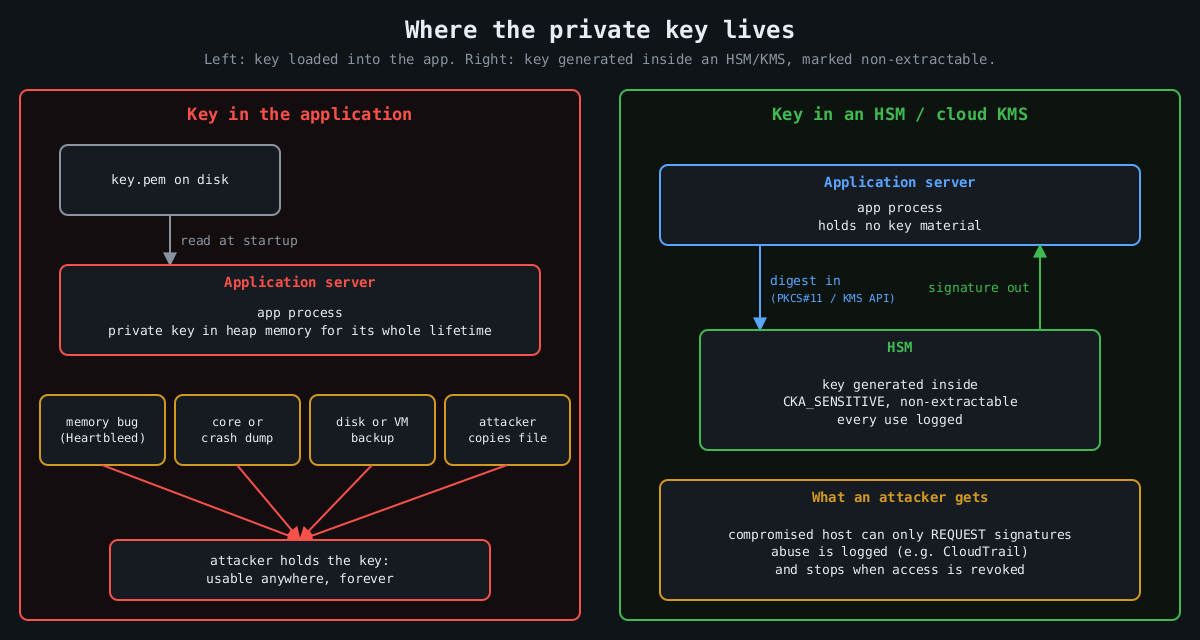
    Most private keys in production live in a file. The application reads the PEM at startup, parses it, and keeps it in heap memory for as long as the process runs. Anything that can read that process’s memory, or the file, or a core dump, or a backup of the disk, can walk away with the key. And a stolen private key isn’t like a stolen password you can reset quietly. It’s the ability to be you, cryptographically, until every relying party stops trusting it.

    A hardware security module flips the model. The key is generated inside a tamper-resistant device, it’s marked non-exportable, and the application never holds it. The app sends data in and gets a signature or a decrypted value back. I think that one design change is worth more than most of the controls we stack around key files, and it’s a lot cheaper to adopt than it used to be.

    Keys have leaked from memory, repeatedly

    Comparison: a key loaded into application memory leaks through memory bugs, dumps, backups and file theft, while a key inside an HSM never leaves it and a compromised host can only request logged signatures

    The canonical case is Heartbleed (CVE-2014-0160). A missing bounds check in OpenSSL’s TLS heartbeat extension, present in 1.0.1 through 1.0.1f, let a remote client read up to 64 KB of server memory per request. Whether a server’s private key could be extracted that way was debated for about a day. Then Cloudflare put up a challenge server, and several people independently recovered its private key from heartbeat responses. Every affected site then had to revoke and reissue certificates, because nobody could prove their key hadn’t been read.

    The Storm-0558 intrusion disclosed in 2023 is a more recent and more uncomfortable example. An attacker got hold of a Microsoft consumer account signing key and used it to forge authentication tokens that were accepted for Exchange Online mailboxes at roughly two dozen organizations, including US government agencies. Microsoft’s first explanation was that the key had ended up in a crash dump that later moved from an isolated environment into a debugging environment. It later said it had not found that crash dump. The US Cyber Safety Review Board’s report was blunt about the broader failures either way. Whatever the exact path, the key existed somewhere it could be copied.

    Code signing has the same history. Stuxnet’s drivers were signed with certificates stolen from Realtek and JMicron, which let them load on Windows without warnings. Signing keys are about the most valuable thing a software vendor owns, and a lot of them still sit on a build server’s disk.

    What an HSM actually guarantees

    An HSM is a dedicated device (a PCIe card, a network appliance, a USB token, or a cloud service backed by such hardware) that generates and stores keys and performs operations with them internally. Applications talk to it over a standard interface, usually PKCS#11, or through a cloud API. The security properties come from a few hardware and firmware decisions:

    Key attribute          Effect
    CKA_SENSITIVE=true     key value can never be read out in plaintext
    CKA_EXTRACTABLE=false  key can't be wrapped and exported at all
    CKA_SIGN=true          key may be used for signing, nothing else

    Validated devices are certified against FIPS 140-2 or its successor FIPS 140-3, and at the higher levels the device is built to detect physical tampering and wipe itself. For most of us the physical tamper resistance matters less than the logical boundary. Code execution on your app server, a memory disclosure bug, a leaked backup: none of them yield the key, because the key was never there.

    You can try the programming model on a laptop with SoftHSM, a software implementation of the PKCS#11 interface intended for testing:

    softhsm2-util --init-token --free --label app-signing
    pkcs11-tool --module /usr/lib/softhsm/libsofthsm2.so --login \
      --keypairgen --key-type EC:prime256v1 --label release-key
    pkcs11-tool --module /usr/lib/softhsm/libsofthsm2.so --login \
      --sign --mechanism ECDSA-SHA256 --label release-key \
      --input-file release.tar.gz --output-file release.sig

    SoftHSM obviously isn’t a security boundary, since its keys live in files. It’s useful because the same code then works against a real HSM by swapping the module path.

    Cloud KMS is the HSM most teams will actually use

    Most cloud providers sell this as a managed service: AWS KMS and CloudHSM, Google Cloud KMS with its HSM protection level, Azure Key Vault and Managed HSM. The managed KMS services are backed by FIPS-validated HSMs, charge per key and per request, and integrate with IAM. Signing a release artifact without ever touching a key looks like this:

    openssl dgst -sha256 -binary release.tar.gz > release.sha256
    aws kms sign --key-id alias/release-signing \
      --message fileb://release.sha256 --message-type DIGEST \
      --signing-algorithm ECDSA_SHA_256 \
      --query Signature --output text | base64 -d > release.sig

    For bulk encryption, the pattern is envelope encryption. You ask KMS for a data key, it returns the key in plaintext plus a copy encrypted under a master key that never leaves the HSM. You encrypt the data locally, store the encrypted data key next to it, and discard the plaintext key. The data keys do pass through your app’s memory briefly, so this isn’t the same guarantee as signing inside the HSM. The master key, the one that unlocks everything, stays put.

    The part people miss: an HSM is still a signing oracle

    Here’s the honest caveat. If an attacker owns the application, they can’t steal the key, but they can ask the HSM to use it. A compromised CI runner with permission to call kms:Sign can sign malware with your release key for as long as it keeps access. What you’ve bought is that the abuse stops the moment you evict the attacker, and that every use is logged, instead of a stolen key that works from anywhere, forever.

    So the HSM has to come with the controls that make that log useful. Give each key a single purpose and narrow IAM permissions, so the web tier can’t touch the release key. Alert on unusual usage, since KMS calls land in CloudTrail and a signing key used 400 times at 3 a.m. should page someone. Require quorum approval (M of N administrators) for key export, deletion or policy changes on hardware that supports it. Keep key creation and key use in different roles.

    Where I’d start

    Not everything needs an HSM. Session cookie keys that rotate hourly probably don’t justify the latency. Root CA keys, code signing keys, token signing keys for an identity provider, and the master keys for encrypted data at rest absolutely do. Those are the keys where one leak means rebuilding trust from scratch, and they’re also the ones that are used rarely enough that a network call per operation doesn’t matter. Start there.

  • auditd and what to log so an investigation is possible

    auditd and what to log so an investigation is possible

    Part 3 of 4 in the Hardening a Linux server series. Earlier parts: Part 1, SSH hardening and Part 2, systemd sandboxing.

    The first question in almost every Linux intrusion investigation is “what did they run?”, and the honest answer on most servers is “no idea”. Shell history is a file the attacker controls; clearing it is common enough to have its own MITRE ATT&CK entry (T1070.003). The application logs show the request that got them in and then nothing. The auth log shows a sudo or two. Everything in between is gone.

    The Linux audit subsystem fixes that, and it’s been in the kernel since 2.6. The kernel emits records for the events you ask about, auditd writes them to disk, and the records carry the one field that makes them worth having: the audit UID.

    Why auid is the whole point

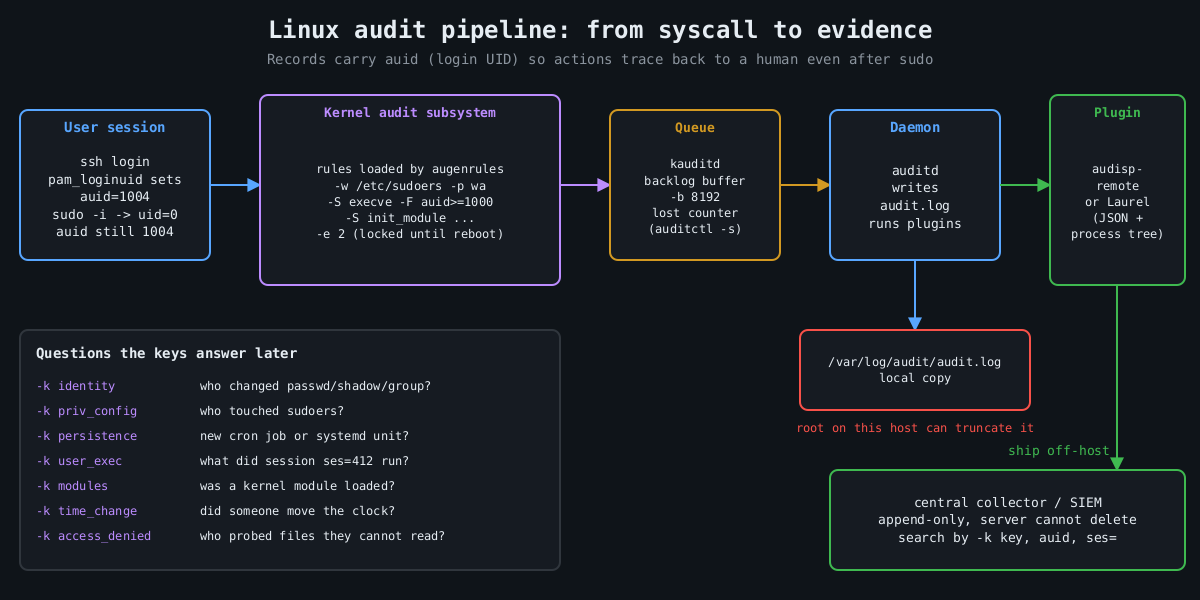
    Pipeline diagram: user session with auid, kernel audit rules, kauditd backlog, auditd writing audit.log, plugins shipping events to an append-only central collector

    When a user logs in, pam_loginuid stamps their session with a login UID, auid in audit records. It survives sudo, su, setuid binaries and daemonizing. So when someone runs sudo -i and then deletes a log file, the event says uid=0 and also auid=1004, which is the human who logged in. Syslog can’t give you that.

    Services started by systemd at boot have no login UID. Unset shows up as 4294967295 (newer auditctl also accepts unset). Filtering on auid>=1000 -F auid!=4294967295 therefore means “actions traceable to a human session”, which is how you keep the volume sane.

    A rule set that answers real questions

    Rules live in /etc/audit/rules.d/*.rules and are compiled by augenrules --load. Here is a compact starting point. I’m not trying to be exhaustive; Florian Roth’s public auditd rule set on GitHub is a good, much longer reference.

    ## buffer and failure behaviour
    -D
    -b 8192
    --backlog_wait_time 60000
    -f 1
    
    ## identity and privilege configuration
    -w /etc/passwd -p wa -k identity
    -w /etc/shadow -p wa -k identity
    -w /etc/group -p wa -k identity
    -w /etc/sudoers -p wa -k priv_config
    -w /etc/sudoers.d/ -p wa -k priv_config
    -w /etc/ssh/sshd_config -p wa -k sshd_config
    -w /etc/ssh/sshd_config.d/ -p wa -k sshd_config
    
    ## persistence locations
    -w /etc/cron.d/ -p wa -k persistence
    -w /etc/crontab -p wa -k persistence
    -w /var/spool/cron/ -p wa -k persistence
    -w /etc/systemd/system/ -p wa -k persistence
    -w /root/.ssh/ -p wa -k persistence
    
    ## commands run by humans (both ABIs)
    -a always,exit -F arch=b64 -S execve -F auid>=1000 -F auid!=4294967295 -k user_exec
    -a always,exit -F arch=b32 -S execve -F auid>=1000 -F auid!=4294967295 -k user_exec
    
    ## kernel modules, time, tracing
    -a always,exit -F arch=b64 -S init_module -S finit_module -S delete_module -k modules
    -a always,exit -F arch=b64 -S adjtimex -S settimeofday -S clock_settime -k time_change
    -a always,exit -F arch=b64 -S ptrace -k tracing
    
    ## access denied to humans
    -a always,exit -F arch=b64 -S open -S openat -S truncate -S ftruncate -F exit=-EACCES -F auid>=1000 -F auid!=4294967295 -k access_denied
    -a always,exit -F arch=b64 -S open -S openat -S truncate -S ftruncate -F exit=-EPERM -F auid>=1000 -F auid!=4294967295 -k access_denied
    
    ## lock the configuration until reboot
    -e 2

    Every rule has a -k key. That’s what you search by later, and it’s what your SIEM will alert on. Name them for the question they answer.

    The arch=b32 execve rule is there on purpose. A 64-bit kernel with 32-bit compatibility still accepts 32-bit syscalls, and a rule that only matches b64 misses a statically linked 32-bit binary entirely. Older hardening benchmarks list both for this reason.

    Choices that matter more than the rules

    -e 2 makes the audit configuration immutable until the next reboot. Without it, an attacker who gets root runs auditctl -D and your logging stops silently. With it, they have to reboot the machine to change the rules, and a reboot is loud.

    -f sets what happens when the kernel can’t log: 0 is silent, 1 logs a kernel message, 2 panics the machine. Panic-on-audit-failure sounds strict and is occasionally a compliance requirement, but on most servers it hands an attacker who can flood the audit backlog a way to crash the box. I use 1 and alert on lost events instead. auditctl -s shows the lost counter, and it should stay at zero.

    -b and --backlog_wait_time size the kernel buffer and how long a process blocks when that buffer is full. Too small and you drop events during a burst, which is exactly when the attacker is busy.

    Then there’s volume. Full execve logging on a build server or a box running a lot of short-lived processes generates enormous logs. That’s why the rule above only covers human sessions. If a service account matters (the one your web app runs as, say), add a targeted rule with -F uid= for that account rather than logging every process on the machine.

    Reading it back

    Raw audit.log is famously unpleasant, one event split across several records. ausearch stitches them together and -i translates numeric IDs to names:

    ausearch -k user_exec --start today -i
    ausearch -k identity -ts 10/09/2026 06:00:00 -i
    aureport -x --summary
    aureport --login --failed

    For anything beyond a single host, send the records somewhere else. The audisp-remote plugin ships them over the network to a central auditd, or you can have a log shipper tail the file. Laurel, a plugin from the threathunters.io folks, rewrites the multi-record mess into one JSON line per event with the process tree attached, which SIEMs handle much better.

    Following a session

    Here’s why the keys and the auid field pay off. Say the persistence key fires because something wrote into /etc/cron.d/. The event shows the executable that did the write, the working directory, auid, and a ses= value, which is the kernel’s ID for that login session. That session number is the thread you pull:

    ausearch -k persistence --start recent -i
    ausearch --session 412 --raw | aureport -x -i
    ausearch -ua 1004 --start today -k user_exec -i

    The second command lists every executable that login session ran, in order, including the ones run through sudo. In practice that’s the difference between “someone added a cron job” and “this account logged in from this address, downloaded this file, ran it as root, then added a cron job”, which is the story an incident report needs.

    The things auditd doesn’t cover

    A few more pieces round it out. Make the journal persistent (Storage=persistent in journald.conf), otherwise it lives in /run and disappears at reboot. Set LogLevel VERBOSE in sshd so logins record the key fingerprint, as covered in part 1. Make sure every host runs chrony or another NTP client, because an investigation across five machines with clocks four minutes apart turns into an argument about ordering.

    And send everything off the host quickly. Logs that sit only on the compromised machine are evidence the attacker can edit. The immutable flag stops them changing the rules. It doesn’t stop root from truncating /var/log/audit/audit.log after the fact. A remote copy that the server can append to and never delete from is what turns these logs into evidence.

    The final part of this series is about patching, which is how you keep most of these investigations from being needed in the first place.

    Other parts of the Hardening a Linux server series: Part 1: SSH hardening beyond “disable root login”, Part 2: Least privilege with systemd sandboxing, Part 4: Patching without fear.