Category: Security

  • Least privilege with systemd sandboxing

    Least privilege with systemd sandboxing

    Part 2 of 4 in the Hardening a Linux server series. Previously: Part 1, SSH hardening beyond “disable root login”.

    Most services on a Linux box run with far more access than they need. A web app that reads a config file, writes to one data directory and listens on one port can, by default, read most of the filesystem, write anywhere its user owns, call every syscall the kernel offers and open any kind of socket. When that app gets popped through a deserialization bug, all of that becomes the attacker’s starting position.

    systemd has grown a large set of sandboxing directives that fix this with a few lines in a unit file. No containers, no AppArmor profiles to maintain, no code changes. I think they’re the best return on effort in Linux hardening right now, and they’re still rarely used outside of the units systemd itself ships.

    Measure first
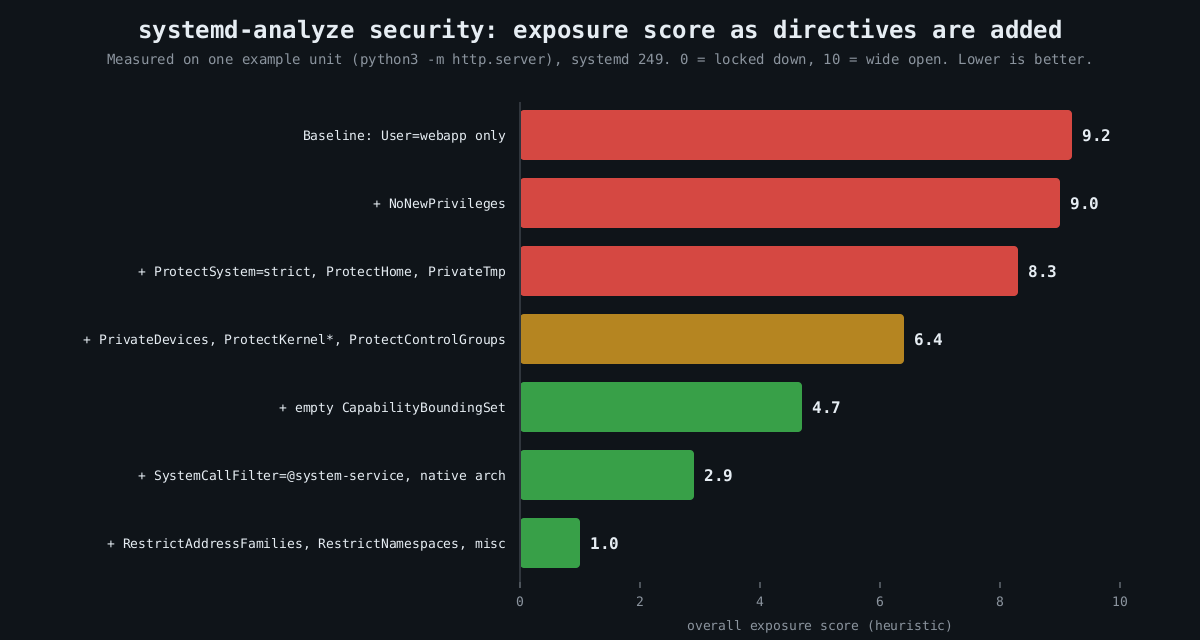
    Bar chart: measured systemd-analyze security exposure score falling from 9.2 at baseline to 1.0 as filesystem, kernel, capability, syscall and network restrictions are added

    systemd-analyze security scores every running service from 0 (locked down) to 10 (wide open) and lists each check it applied:

    systemd-analyze security
    systemd-analyze security nginx.service

    The number is a heuristic, a weighted sum of which directives are set, so don’t treat 2.1 versus 2.4 as meaningful. It is very good at showing you the gaps. On most distributions the bulk of third-party services score 9 or above.

    Measured: one unit, hardened step by step

    I took a trivial unit (python3 -m http.server running as a dedicated user) and added directives in groups, scoring each version with systemd-analyze security on systemd 249. The chart near the top of this post shows the result. The baseline scored 9.2. The final unit scored 1.0.

    Here is roughly what that final unit looks like, adjusted for a real service:

    [Service]
    ExecStart=/opt/webapp/bin/webapp
    DynamicUser=yes
    StateDirectory=webapp
    ConfigurationDirectory=webapp
    
    NoNewPrivileges=yes
    ProtectSystem=strict
    ProtectHome=yes
    PrivateTmp=yes
    PrivateDevices=yes
    ProtectKernelTunables=yes
    ProtectKernelModules=yes
    ProtectKernelLogs=yes
    ProtectControlGroups=yes
    ProtectClock=yes
    ProtectHostname=yes
    ProtectProc=invisible
    
    CapabilityBoundingSet=CAP_NET_BIND_SERVICE
    AmbientCapabilities=CAP_NET_BIND_SERVICE
    
    SystemCallArchitectures=native
    SystemCallFilter=@system-service
    SystemCallFilter=~@privileged @resources
    SystemCallErrorNumber=EPERM
    
    RestrictAddressFamilies=AF_UNIX AF_INET  "AF_INET6
    RestrictNamespaces=yes
    RestrictSUIDSGID=yes
    RestrictRealtime=yes
    LockPersonality=yes
    MemoryDenyWriteExecute=yes
    UMask" =0077

    That looks like a lot. Each line is cheap, though, and they fall into a few families.

    Privilege escalation inside the service

    NoNewPrivileges=yes sets the kernel’s no_new_privs flag, so nothing the service executes can gain privileges through setuid binaries or file capabilities. An attacker with code execution as the service user can’t then run a vulnerable setuid helper to become root. Several other directives quietly turn it on as well, which is fine.

    Capabilities are the other half. CapabilityBoundingSet= with an empty value drops every capability for good. The example keeps exactly one, CAP_NET_BIND_SERVICE, and grants it as an ambient capability so a non-root process can bind port 443. That is the right shape for most daemons that historically started as root just to grab a low port.

    DynamicUser=yes allocates a throwaway UID when the service starts. It implies a stricter set of defaults (read-only system, private /tmp, no setuid), and combined with StateDirectory= systemd creates and chowns /var/lib/webapp for you. If the service doesn’t need a stable UID shared with other software, use it.

    Filesystem view

    ProtectSystem=strict mounts the entire filesystem read-only for the service, apart from the API filesystems like /proc and /sys. Writable paths are then opt-in through StateDirectory=, CacheDirectory=, LogsDirectory= or ReadWritePaths=. This is the directive that stops an attacker dropping a cron job, a systemd unit or a modified binary for persistence. ProtectHome=yes hides /home, /root and /run/user entirely, which matters more than people think, since home directories are where SSH keys and cloud credentials live.

    PrivateTmp=yes gives the service its own /tmp, which closes off the classic symlink and race games other local users can play in a shared /tmp.

    Kernel attack surface

    A sandbox that lives in userspace can’t save you from a kernel bug, but it can make most kernel bugs unreachable. SystemCallFilter=@system-service is an allowlist of syscalls that ordinary services use, curated by systemd. The second line then removes @privileged and @resources. By default a blocked syscall kills the process with SIGSYS; SystemCallErrorNumber=EPERM makes it fail with an error instead, which is friendlier while you’re tuning.

    RestrictNamespaces=yes deserves a specific mention. A good number of recent Linux privilege escalation bugs are only reachable by unprivileged users through user namespaces, because creating one hands you capabilities inside it. CVE-2022-0185, a heap overflow in the filesystem context code, is the textbook case: exploitation needed CAP_SYS_ADMIN in a user namespace, which any unprivileged user could get on distributions that allowed unprivileged user namespaces. A service that can’t create namespaces can’t reach that code path at all.

    PrivateDevices=yes, ProtectKernelModules=yes and ProtectKernelTunables=yes take away raw device nodes, module loading and writes to /proc/sys. SystemCallArchitectures=native blocks the 32-bit syscall ABI on 64-bit hosts, a path that has been used to dodge seccomp filters written for one ABI only.

    Network

    RestrictAddressFamilies= limits which socket types the service may open. Most need AF_UNIX, AF_INET and AF_INET6, nothing else, and certainly not AF_PACKET or AF_NETLINK. If you want per-service egress control, IPAddressDeny=any with a narrow IPAddressAllow= uses a cgroup BPF filter to drop traffic to anything else. A compromised internal API that can’t reach the internet is a lot less useful as a staging point.

    Rolling it out without breaking things

    Don’t edit vendor units. Use systemctl edit webapp.service to write a drop-in under /etc/systemd/system/webapp.service.d/, which survives package upgrades. You can try options on a throwaway command before committing to them:

    sudo systemd-run --pty --wait -p ProtectSystem=strict -p PrivateTmp=yes \
      -p SystemCallFilter=@system-service /opt/webapp/bin/webapp --selftest

    The usual breakage is predictable. MemoryDenyWriteExecute=yes breaks anything with a JIT, so Node, the JVM and PCRE’s JIT mode will fail in confusing ways. ProtectSystem=strict breaks services that write somewhere surprising, which the journal will show as EROFS errors. Syscall filters occasionally catch a library doing something unusual, and with SystemCallErrorNumber=EPERM the audit log or strace -f tells you which call. Add one family at a time and run your integration tests between each.

    This doesn’t replace patching or a proper MAC policy, and it isn’t a VM boundary. What it does is shrink the blast radius of the next RCE in your app from “the box” to “one directory and a socket”. Part 3 covers auditd, so that when something does get through you can see what it tried to do.

    Other parts of the Hardening a Linux server series: Part 1: SSH hardening beyond “disable root login”, Part 3: auditd and what to log, Part 4: Patching without fear.

  • SSH hardening beyond “disable root login”

    SSH hardening beyond “disable root login”

    Part 1 of 4 in the Hardening a Linux server series.

    Every hardening guide starts with PermitRootLogin no, and plenty of them stop there. That setting is fine. It’s also the least interesting thing about securing SSH, because an attacker who can log in as a sudo-capable user with a password has root anyway. The things that actually decide how exposed your SSH daemon is are how users prove who they are, how the server proves who it is, which crypto you still accept, and who is allowed to try at all.

    Start from what sshd is really doing

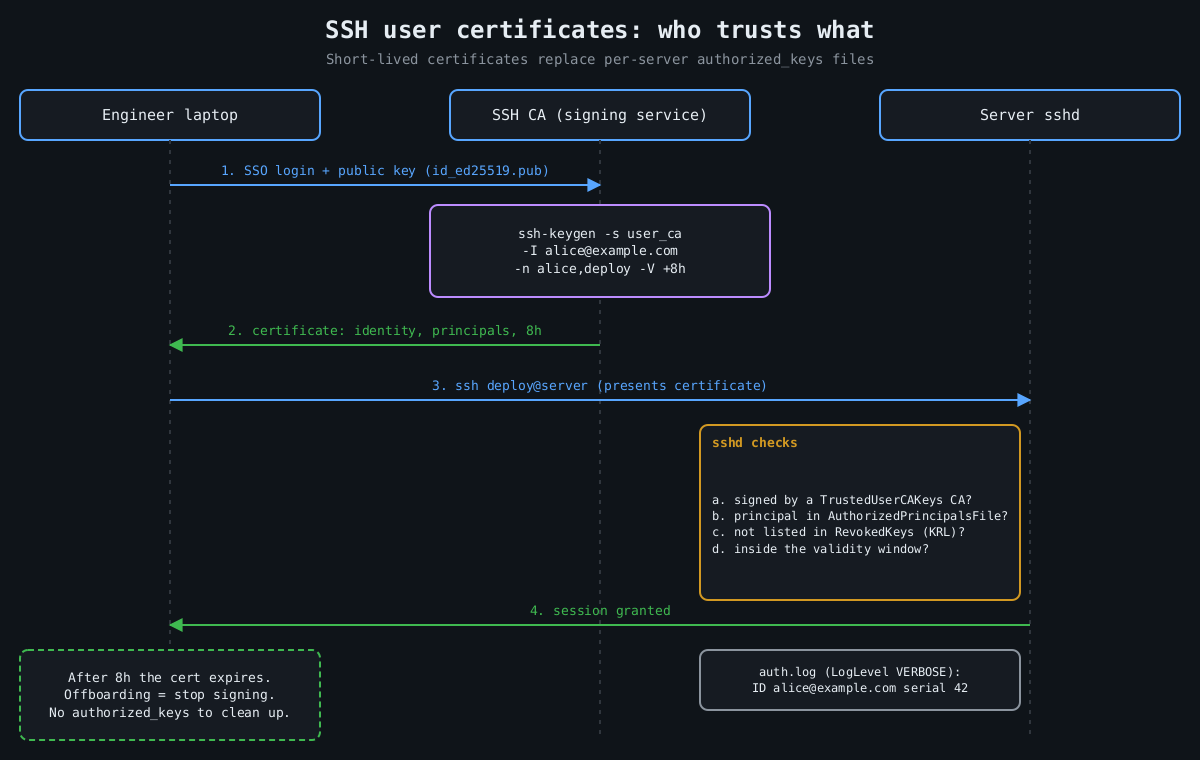
    Sequence diagram: laptop sends a public key to an SSH CA, receives an 8 hour certificate, presents it to sshd, which checks the CA signature, principals, revocation list and validity before granting the session

    Before changing anything, look at the effective configuration rather than the file. Distributions now ship Include /etc/ssh/sshd_config.d/*.conf near the top of sshd_config, and for most keywords sshd uses the first value it reads, not the last. I’ve watched people append PasswordAuthentication no to the bottom of the main file while a cloud-init drop-in earlier in the include order said yes, and the drop-in won.

    sudo sshd -T | grep -Ei 'passwordauth|kbdinteractive|permitroot|pubkeyauth|authenticationmethods'
    sudo sshd -T -C user=deploy,host=10.0.0.5,addr=10.0.0.5

    The second form evaluates Match blocks for a specific connection, which is the only sane way to test conditional rules. Put your own settings in a drop-in with a low number, like /etc/ssh/sshd_config.d/00-hardening.conf, so they load first.

    Keys, and better keys

    Passwords on an internet-facing sshd are a credential-stuffing target forever. Turn off both password paths, since keyboard-interactive will happily do password auth through PAM even when PasswordAuthentication is off:

    PasswordAuthentication no
    KbdInteractiveAuthentication no
    PubkeyAuthentication yes
    PermitRootLogin no
    MaxAuthTries 3
    LoginGraceTime 20

    (KbdInteractiveAuthentication replaced ChallengeResponseAuthentication in OpenSSH 8.7. Older configs use the old name, which is still accepted as an alias.)

    For user keys, Ed25519 is the default choice now. The bigger upgrade is hardware-backed keys. Since OpenSSH 8.2 you can generate ed25519-sk keys that live on a FIDO2 token, so the private key file on disk is useless without the physical device and a touch:

    ssh-keygen -t ed25519-sk -O resident -O verify-required -C "alice@laptop"

    verify-required (OpenSSH 8.4+) demands a PIN as well as a touch. Malware on a laptop can steal an ordinary key file in a second. With an -sk key it has to wait for the user to tap the token at the right moment, which is a much harder problem.

    Certificates instead of authorized_keys sprawl

    The real weakness of plain public keys is lifecycle. authorized_keys files accumulate keys from people who left two years ago, and nobody can say which key belongs to whom. OpenSSH has had its own certificate format since 5.4, and it’s underused. A CA signs a user’s public key with an identity, a list of principals and a validity window:

    ssh-keygen -s user_ca -I [email protected] -n alice,deploy -V +8h id_ed25519.pub

    The server trusts the CA rather than individual keys:

    TrustedUserCAKeys /etc/ssh/user_ca.pub
    AuthorizedPrincipalsFile /etc/ssh/principals/%u
    RevokedKeys /etc/ssh/revoked_keys

    /etc/ssh/principals/deploy lists which principals may log in as deploy. Now offboarding is mostly automatic, because certificates expire in hours, and the -I identity shows up in the auth log so you know which human used the shared account. Keep an emergency revocation path anyway (ssh-keygen -k builds a key revocation list), and protect the CA key like the crown jewels it is, ideally in a hardware token or a signing service.

    Host certificates solve the other half. Sign host keys with ssh-keygen -h, add one @cert-authority *.example.com line to clients’ known_hosts, and the “authenticity of host can’t be established” prompt that everyone trains themselves to click through goes away. Trust on first use is a bet that the first connection wasn’t intercepted. Certificates remove the bet.

    Prune the crypto, but don’t fight the defaults

    Modern OpenSSH defaults are good, and hand-written cipher lists copied from 2016 blog posts are often worse than the defaults they replace. OpenSSH 8.8 already disabled ssh-rsa signatures using SHA-1. OpenSSH 9.0 made the hybrid post-quantum [email protected] key exchange the default, and 10.0 moved to mlkem768x25519-sha256.

    Where explicit lists still pay off is when a specific weakness lands. Terrapin (CVE-2023-48795) was a prefix-truncation attack against the SSH transport that worked when [email protected], or a CBC cipher paired with an encrypt-then-MAC MAC, was negotiated. The fix was “strict kex” in OpenSSH 9.6, which needs both sides patched. Until clients caught up, removing the affected algorithms was a reasonable stopgap. Audit what you expose with ssh-audit rather than guessing:

    ssh-audit -p 22 server.example.com

    Decide who gets to try

    Authentication strength matters less if most accounts can’t authenticate at all. An allowlist is short and readable:

    AllowGroups ssh-users
    AllowTcpForwarding no
    AllowAgentForwarding no
    AllowStreamLocalForwarding no
    X11Forwarding no
    
    Match Group ssh-admins Address 10.20.0.0/16
        AllowTcpForwarding yes
    
    Match User backup
        ForceCommand /usr/local/bin/backup-receive
        PermitTTY no

    Forwarding is how an SSH foothold turns into a pivot into the rest of the network, so default it off and turn TCP forwarding back on only for admins coming from the internal range. There’s also DisableForwarding yes (OpenSSH 7.4+), which kills every kind of forwarding in one line, but it overrides the individual switches, so a Match block can’t selectively re-enable one of them without also setting DisableForwarding no there. Explicit switches are easier to reason about.

    Network placement still matters. Port knocking and moving sshd to port 2222 cut log noise, nothing more. Putting sshd behind a VPN or a bastion, or at least restricting port 22 to known address ranges at the firewall, actually shrinks who can reach the parser. And the parser has had bad days. regreSSHion (CVE-2024-6387) was a signal-handler race in sshd on glibc Linux that allowed unauthenticated remote code execution, affecting OpenSSH 8.5p1 through 9.7p1 until 9.8p1 fixed it. The temporary mitigation was LoginGraceTime 0, which trades RCE risk for an easy connection-exhaustion DoS. The xz backdoor (CVE-2024-3094) showed that sshd’s attack surface includes whatever libraries your distribution links into it. Nobody’s config file would have stopped either of those. Reachability would have.

    OpenSSH 9.8 also added PerSourcePenalties, which is on by default and makes sshd refuse connections for a while from addresses that repeatedly fail auth or crash a child. It’s a built-in, rough fail2ban.

    Log enough to answer questions later

    Set LogLevel VERBOSE. At that level sshd logs the fingerprint of the key that authenticated each session, and for certificates the key ID and serial. Without it, “which key did this login use?” has no answer. Part 3 of this series covers auditd and shipping those logs somewhere an intruder can’t edit them.

    What I’d actually do on a new server, in order: allowlist users, kill passwords, move people to certificates, keep forwarding off, limit reachability, and patch sshd quickly when the next CVE lands. Disabling root login comes for free along the way.

    Other parts of the Hardening a Linux server series: Part 2: Least privilege with systemd sandboxing, Part 3: auditd and what to log, Part 4: Patching without fear.

  • Session management: cookies, SameSite, revocation, and where JWTs go wrong

    Session management: cookies, SameSite, revocation, and where JWTs go wrong

    Part 4 of 4 in the Authentication done right series. Part 1: Password storage in 2026. Part 2: MFA that survives phishing. Part 3: OAuth 2.0 vs OpenID Connect.

    This series started with storing passwords, moved through MFA, then OAuth and OpenID Connect. All of that work produces one thing at the end: a session. From then on, every request is authenticated by whatever token the browser sends, and the password and the security key are no longer involved. If the session is weak, everything before it was ceremony.

    What a session token needs to be

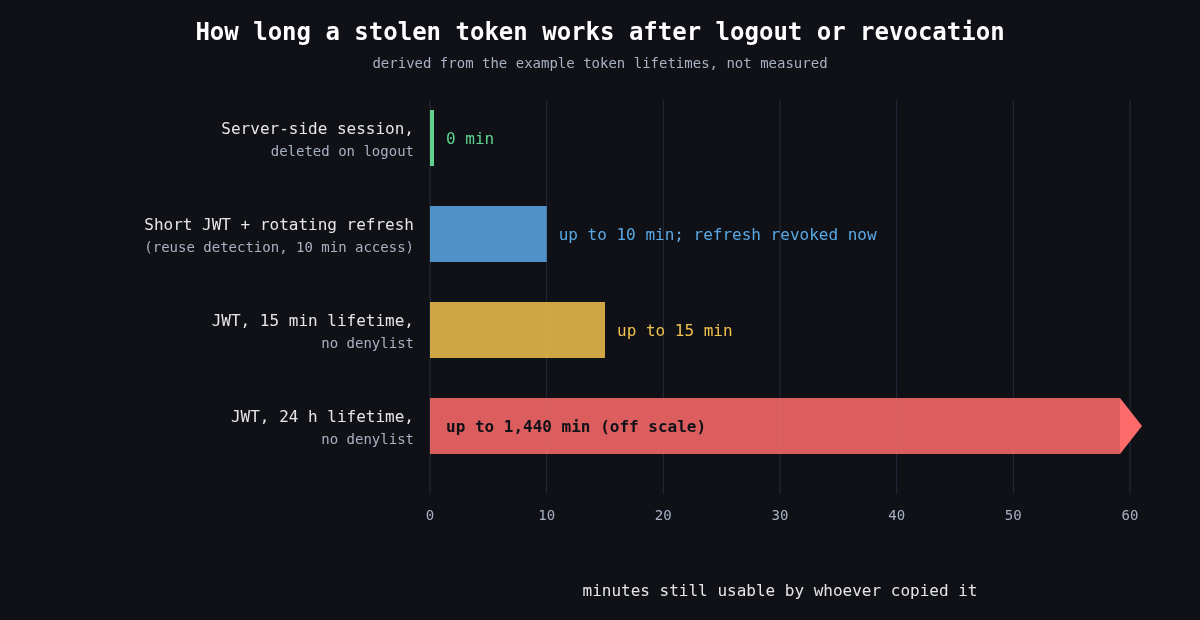
    Bar chart: a server-side session stops working immediately on logout, a short JWT with rotating refresh tokens works up to 10 minutes, a 15 minute JWT up to 15 minutes, and a 24 hour JWT without a denylist up to 1,440 minutes

    Whatever form it takes, a session token has to be unguessable, bound to one login, and revocable. For a classic server side session that means a random identifier with at least 128 bits from a CSPRNG, stored in a server side table or cache, with all the state kept on the server. OWASP’s floor is 64 bits of entropy. I don’t see a reason to stop there when 128 costs nothing.

    Two lifecycle rules catch a lot of bugs. Issue a new session identifier on every privilege change, especially login, or you’re open to session fixation, where an attacker plants a known session ID in the victim’s browser before they log in and then shares the authenticated session. And enforce both an idle timeout and an absolute lifetime, so a session that’s been stolen doesn’t stay useful for months just because something keeps it busy.

    Cookie attributes that matter

    The browser is where sessions get stolen, and cookie attributes are how you tell the browser to protect them. A good default looks like this:

    Set-Cookie: __Host-session=Xq3...; Path=/; Secure; HttpOnly; SameSite=Lax; Max-Age=28800

    Secure keeps the cookie off plaintext HTTP. HttpOnly stops JavaScript from reading it, which won’t prevent an XSS payload from making requests as the user but does stop it from shipping the token off to be used from elsewhere, hours later. The __Host- prefix is underused. The browser only accepts a cookie with that name if it has Secure, Path=/ and no Domain attribute, which means a sibling subdomain can’t overwrite or shadow it. That closes off a whole family of cookie tossing attacks for free.

    What SameSite does and doesn’t do

    SameSite controls whether the browser attaches a cookie to requests that start on another site. Strict never sends it cross site, including when a user follows a link to your app from an email, which makes them look logged out. Lax sends it on top level GET navigations but not on cross site POSTs, iframes or subresource requests. None always sends it and requires Secure. Chrome began treating cookies with no SameSite attribute as Lax in 2020, and other browsers have moved in similar directions, though not identically.

    That made classic CSRF much harder, but I wouldn’t remove CSRF tokens because of it. Three reasons. Lax still sends cookies on top level GETs, so any state changing GET endpoint is still exposed. Chrome’s default-Lax behaviour includes a two minute window in which a freshly set cookie without an explicit attribute is still sent on cross site top level POSTs, to avoid breaking some login flows. And “site” means registrable domain, not origin. evil.example.com and app.example.com are the same site, so a subdomain takeover or an XSS on a marketing subdomain bypasses SameSite completely. Keep the anti-CSRF token or check the Origin header on state changing requests, and treat SameSite as defence in depth.

    Revocation is the real requirement

    Logging out has to end the session on the server. A logout that only deletes the cookie leaves the token valid for whoever copied it. Users also need “sign out of all devices”, support staff need to kill sessions for a compromised account, and a password change or MFA reset should invalidate every other session. With server side sessions all of that is a delete query.

    This is where JWTs get awkward. A signed, self contained token is valid until its exp unless the server checks something on every request. The usual answer is short lived access tokens (5 to 15 minutes) plus a refresh token that the server does track. RFC 9700 describes refresh token rotation: each refresh returns a new refresh token and invalidates the old one, and if an old one is ever presented again you assume theft and revoke the whole family.

    def refresh(presented_token):
        rec = db.refresh_tokens.find(hash(presented_token))
        if rec is None:
            raise Unauthorized()
        if rec.used:
            # a rotated token came back: someone has a copy
            db.refresh_tokens.revoke_family(rec.family_id)
            alert("refresh token reuse", rec.user_id)
            raise Unauthorized()
        rec.used = True
        new_rt = issue_refresh_token(rec.user_id, family_id=rec.family_id)
        return issue_access_token(rec.user_id, ttl=600), new_rt

    Notice that this is a database lookup on every refresh. Once you need revocation, and you will, you have server side state again. That’s fine. Just be honest that a JWT session isn’t really stateless.

    Where JWTs go wrong

    Most JWT vulnerabilities come from verification code trusting the token’s own header. The alg field says how the token claims to be signed, and early libraries used it to choose the verification method. That allowed alg: none tokens with no signature at all, and algorithm confusion, where a token signed with HS256 using the server’s RSA public key as the HMAC secret passed verification. CVE-2015-9235 in Node’s jsonwebtoken is the well known instance of the latter. The fix is to pin the expected algorithms on the server and never read them from the token:

    claims = jwt.decode(
        token,
        public_key,
        algorithms=["ES256"],
        audience="https://api.example.com",
        issuer="https://auth.example.com",
    )

    Library bugs happen even when you do this. CVE-2022-21449, nicknamed Psychic Signatures, made Java 15 through 18 accept ECDSA signatures with both values set to zero as valid for any message, which broke ES256 JWT verification on those runtimes until the April 2022 patch. Keep the JWT library and the runtime patched, and test that a garbage signature is rejected.

    RFC 8725, the JWT Best Current Practices, covers the rest: validate iss and aud, use explicit typing so one kind of token can’t be replayed as another, and don’t put secrets in the payload, since a signed JWT is encoded, not encrypted.

    Storage is the last trap. Single page apps often put tokens in localStorage, where any XSS can read them and send them elsewhere. A backend-for-frontend that holds the tokens server side and gives the browser an HttpOnly, __Host- cookie avoids that, and it fits the OAuth guidance from the previous part of this series.

    What I’d use

    For a typical web app with its own backend, I’d use opaque server side sessions in a hardened cookie. They’re simpler, revocation is trivial, and nothing about them is clever. I reach for JWTs when a token really has to be verified by services that can’t share a session store, and then I keep them short lived, pin the algorithm, and pair them with rotating refresh tokens. Choosing JWTs because they sound modern is how teams end up rebuilding server side sessions badly, one denylist at a time.