
Category: Software Engineering

  • Supply chain attacks on package registries: typosquatting, dependency confusion and what SLSA actually asks for

    Supply chain attacks on package registries: typosquatting, dependency confusion and what SLSA actually asks for

    Every npm install or pip install is a decision to run someone else’s code with your build’s permissions. Most of the time that’s a good trade. The attacks I want to cover here don’t exploit a bug in your code at all. They exploit how package managers decide which package to fetch, and how little most organisations know about where their artifacts came from.

    Typosquatting is boring and still works
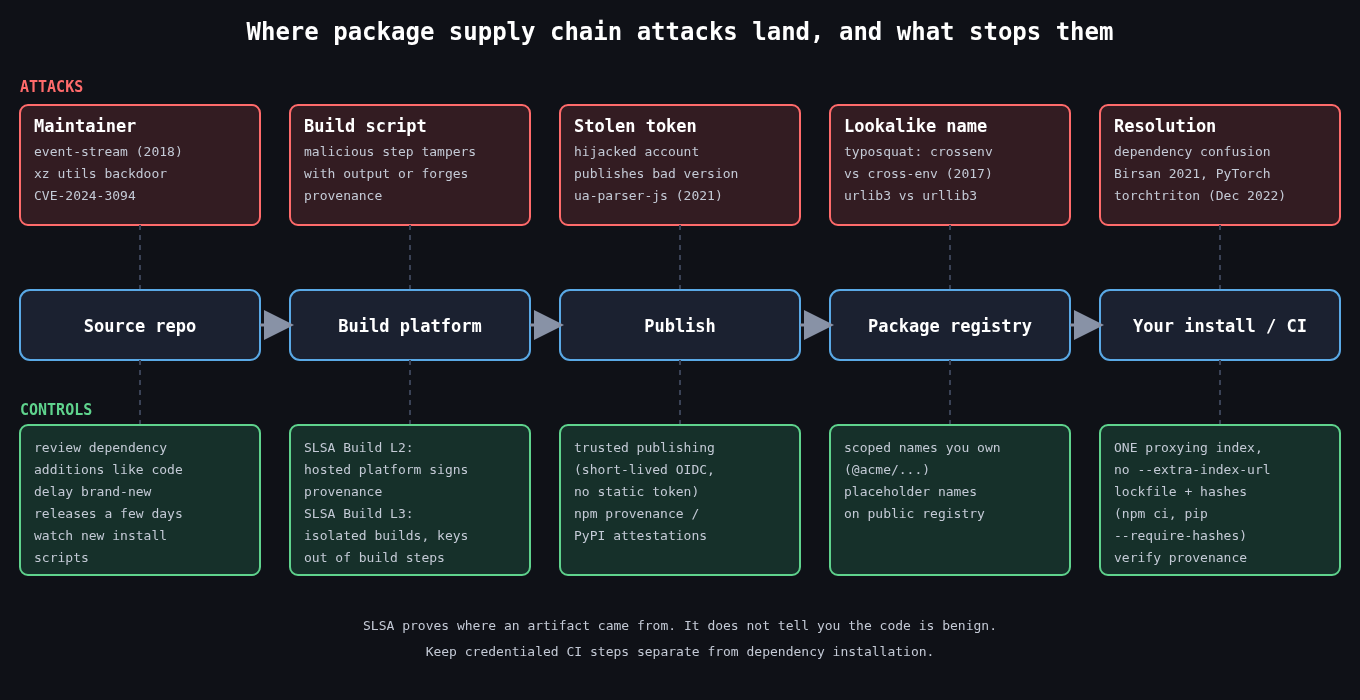
    Pipeline from source repo to build platform, publish, package registry and install, with the attack that lands at each stage above it and the matching control, such as SLSA provenance, trusted publishing, scoped names and lockfile hashes, below it

    The oldest trick is publishing a package with a name one keystroke away from a popular one. In 2017 an npm package called crossenv (the real one is cross-env) copied the legitimate package’s behaviour and also sent the contents of the environment to a remote server. Environment variables on a CI runner are often the most valuable thing on the box: registry tokens, cloud credentials, signing keys. The same year Slovakia’s national security authority reported a batch of typosquats on PyPI with names like urlib3, and PyPI has been removing waves of them ever since.

    The registry operators catch a lot of these now, but not before someone installs them. The defences on your side are unglamorous. Don’t let people add dependencies by typing names into a terminal on a machine that holds credentials. Review dependency additions in pull requests the same way you review code, and look at the package’s age, download count and repository link before approving it. A two week old package with a name almost matching a library with millions of weekly downloads should not get through review.

    Dependency confusion

    Alex Birsan’s February 2021 research turned a quirk of package resolution into a way to run code inside Apple, Microsoft, PayPal and over thirty other companies, earning more than $130,000 in bug bounties. The idea is simple. Companies use internal package names that never exist on the public registry. Those names leak through public manifests, JavaScript bundles and error messages. If an attacker publishes a public package with the same name and a higher version number, many resolvers happily prefer it.

    The classic pip mistake looks like this:

    pip install --index-url https://pypi.internal.example/simple \
                --extra-index-url https://pypi.org/simple \
                acme-billing-utils

    --extra-index-url doesn’t mean “fall back to PyPI if the internal index doesn’t have it”. pip collects candidates from every index and picks the best version across all of them. If someone publishes acme-billing-utils 99.0.0 on PyPI, that’s what gets installed.

    This wasn’t a one-off. In December 2022 the PyTorch project disclosed that its nightly builds installed between December 25 and 30 had pulled a malicious torchtriton package from PyPI, because the legitimate one lived on PyTorch’s own index and PyPI took precedence. The malicious version collected system information and files from the machines that installed it.

    The structural fix is to have exactly one place your builds resolve from. Run a proxying repository (Artifactory, Nexus, a pull-through cache) that serves internal packages and mirrors public ones, and configure it so an internal name can never be satisfied from upstream. For npm, put internal packages under a scope you own and pin that scope to your registry:

    # .npmrc
    @acme:registry=https://npm.internal.example/
    registry=https://registry.npmjs.org/

    Registering your internal names (or scope) on the public registry as empty placeholders is a reasonable extra layer, but I wouldn’t rely on it alone.

    Lockfiles and hashes

    A lockfile pins exact versions, and the integrity hashes in it pin exact bytes. That turns “install whatever matches ^4.2” into “install this tarball and fail if it’s different”. Use npm ci rather than npm install in CI, since ci refuses to proceed if package-lock.json and package.json disagree. For Python, pip’s hash checking mode does the same thing:

    pip install --require-hashes -r requirements.txt

    with each line carrying --hash=sha256:..., which tools like pip-compile --generate-hashes produce. Hashes don’t protect you on the day you add or upgrade a dependency. They do stop a later build from silently picking up something different.

    Compromised maintainers

    Some attacks don’t need a lookalike name. In 2018 the maintainer of event-stream handed the project to a volunteer, who added a dependency called flatmap-stream carrying code aimed at stealing from a specific cryptocurrency wallet app. In October 2021 the npm account behind ua-parser-js was hijacked and versions shipping a cryptominer and credential stealer were published. And in 2024, CVE-2024-3094 showed a backdoor in xz utils that had been inserted after a multi-year effort to gain maintainer trust, caught largely because one engineer noticed SSH logins getting slower.

    Nothing on the consumer side fully prevents this, but you can shrink the window. Delay adopting brand new versions by a few days unless they fix something you need, because most malicious releases are spotted and pulled quickly. Watch for install scripts (preinstall, postinstall) appearing in packages that never had them, and consider npm config set ignore-scripts true for builds that don’t need them.

    What SLSA requires

    SLSA (Supply-chain Levels for Software Artifacts) is easy to misread as a scanning standard. It’s not. Version 1.0’s Build track is about provenance: a verifiable statement of which source, which build platform and which process produced an artifact.

    The levels build on each other. Build L1 means provenance exists and describes how the artifact was built. Build L2 means the build ran on a hosted platform that generates and signs that provenance itself, so a developer laptop can’t produce it. Build L3 means the platform is hardened: builds are isolated from each other, and the signing material is out of reach of the user-defined build steps, so even a malicious build script can’t forge provenance.

    What SLSA does not do is tell you whether a dependency is trustworthy. It lets a consumer check that a package came from the repository and workflow it claims to, which is exactly what you want to know after an account takeover. On the publishing side, PyPI’s Trusted Publishing and npm’s provenance support both bind packages to a specific CI workflow using short lived OIDC credentials instead of long lived API tokens. On the consuming side you verify:

    npm audit signatures
    
    slsa-verifier verify-artifact ./mytool-linux-amd64 \
      --provenance-path ./mytool-linux-amd64.intoto.jsonl \
      --source-uri github.com/example/mytool \
      --source-tag v1.4.2

    I’d prioritise it this way. Get to one resolution source and committed lockfiles with hashes first, because that kills dependency confusion and drift. Move your own publishing to trusted publishing so there’s no static token to steal. Then start verifying provenance for the dependencies that matter most, beginning with anything that runs in your build or release pipeline.

    The part people skip

    Your build environment is part of the supply chain. A CI job that installs packages while holding production deploy credentials gives every one of those packages production access. Split dependency installation from credentialed steps where you can, give build jobs only the secrets they need, and treat a compromised dependency the same as a compromised server: rotate what it could reach, don’t just bump the version.

  • Password storage in 2026: bcrypt, scrypt, Argon2id and parameters that actually mean something

    Password storage in 2026: bcrypt, scrypt, Argon2id and parameters that actually mean something

    Part 1 of 4 in the Authentication done right series.

    Most teams I talk to already know they shouldn’t store passwords with plain SHA-256. Fewer can tell me what cost parameters their hash uses, when those were last revisited, or what happens to the users who signed up five years ago under weaker settings. Picking the algorithm is the easy part. The parameters and the upgrade path are where real systems fall behind.

    Why fast hashes fail

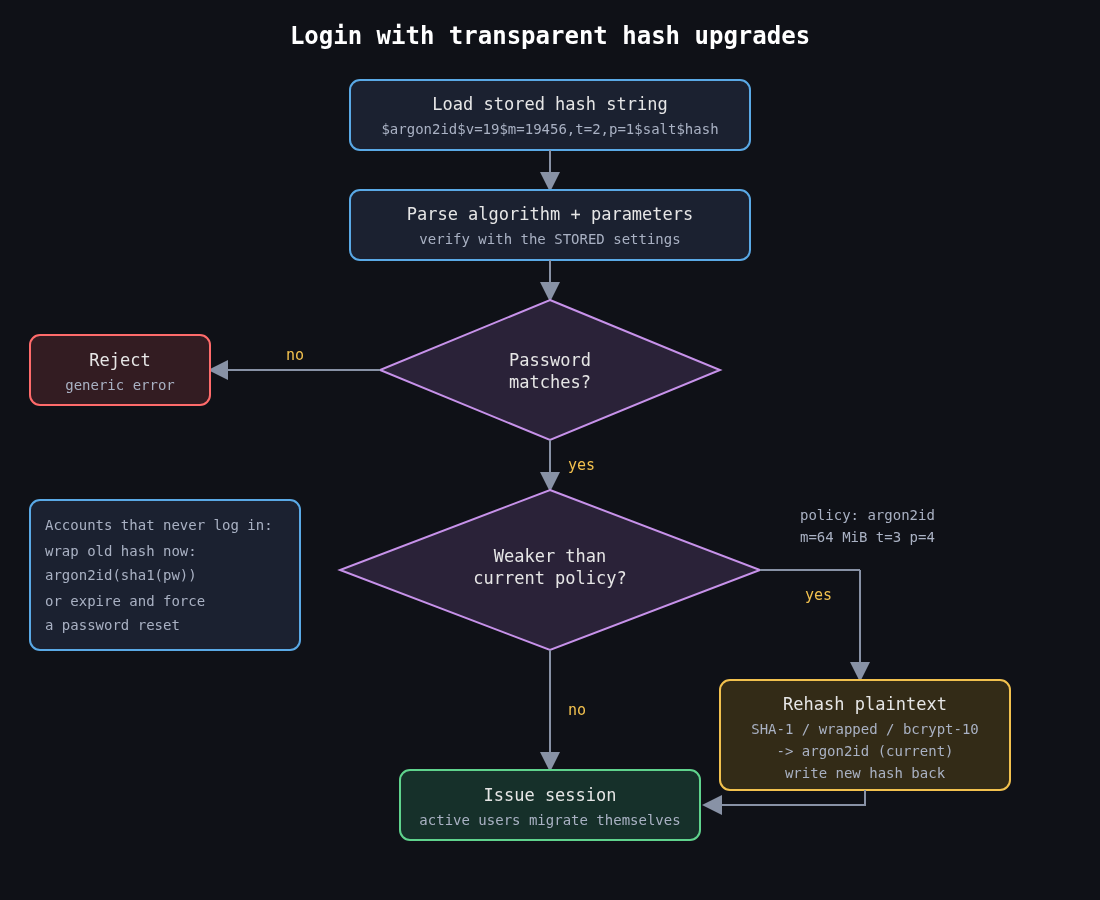
    Flowchart: parse the stored hash parameters, verify the password, then rehash to current Argon2id policy if the stored parameters are weaker, before issuing a session

    A password hash has one job: make each guess expensive for someone who has stolen your database. General purpose hashes like SHA-256 are designed to be fast, and a single modern GPU computes billions of them per second. When LinkedIn’s 2012 dump of unsalted SHA-1 hashes surfaced publicly in 2016 with roughly 117 million credentials, most of it was cracked quickly. Salting would have stopped the precomputed table attacks. It would not have helped much against brute force, because each individual guess still cost almost nothing.

    Adobe’s 2013 breach is the other cautionary tale. Those passwords were encrypted with 3DES in ECB mode, not hashed, so identical passwords produced identical ciphertext and the plaintext password hints sitting next to them did the rest. Encryption is the wrong tool here. You never need to recover a password, only to check one.

    So the requirements are a unique random salt per password and a function that is deliberately slow and, ideally, memory hungry. Memory hardness matters because GPUs and ASICs have lots of compute but limited fast memory per core. Forcing every guess to touch tens of megabytes destroys their parallelism advantage.

    The three you should consider

    bcrypt dates from 1999 and is still fine. It’s CPU hard with a tunable cost (each increment doubles the work), it’s in every language, and it has a long track record. It has two sharp edges. It is not memory hard in any meaningful sense (it uses about 4 KB), and it silently ignores input past 72 bytes.

    That second one is not academic. In late 2024 Okta disclosed that its AD/LDAP delegated authentication cache keys were bcrypt hashes of the user ID, username and password concatenated together. With a username long enough (52 characters or more), the password fell past the 72 byte cutoff, so a cached login could succeed with any password. Nothing was wrong with bcrypt’s math. The input simply got truncated without an error.

    scrypt (RFC 7914) was the first widely used memory hard function. It’s tunable through N (CPU/memory cost), r (block size) and p (parallelism), and memory use is roughly 128 x N x r bytes. N=2^17, r=8, p=1 works out to 128 MiB per hash, which is the OWASP baseline.

    Argon2id won the Password Hashing Competition in 2015 and is specified in RFC 9106. It takes memory in KiB, a number of passes, and a degree of parallelism. The “id” variant mixes data independent and data dependent memory access, giving reasonable resistance to both side channel and GPU attacks. It’s my default for anything new.

    PBKDF2 stays on the list only because FIPS-140 environments sometimes require it. If you’re stuck with it, OWASP currently says 600,000 iterations of HMAC-SHA256. It is not memory hard, so treat it as the compliance option, not the good one.

    Choosing parameters with real numbers

    The published recommendations are a floor, not a target. OWASP’s Password Storage Cheat Sheet lists Argon2id at a minimum of m=19 MiB, t=2, p=1, with equivalent tradeoffs like m=46 MiB, t=1. RFC 9106 is more aggressive: its second recommended option is t=3, m=64 MiB, p=4, and the first option uses 2 GiB, which is meant for settings like disk encryption rather than a login endpoint.

    What I actually do is benchmark on the production hardware and work backwards from two constraints. The first is latency: how long can a login take before users notice? Somewhere around 100 to 500 ms of hashing is usually acceptable. The second is concurrency: memory cost times the number of simultaneous logins you need to survive. At 64 MiB per hash, 50 concurrent logins need 3.2 GiB just for hashing. Get that wrong and a credential stuffing wave becomes an out-of-memory event on your auth service.

    The reference argon2 CLI makes the measurement easy. Note that -m is the base-2 log of the memory in KiB, so 16 means 64 MiB.

    $ echo -n 'correct horse battery staple' | argon2 somesaltvalue -id -t 3 -m 16 -p 4
    Type:           Argon2id
    Iterations:     3
    Memory:         65536 KiB
    Parallelism:    4
    Hash:           ...
    Encoded:        $argon2id$v=19$m=65536,t=3,p=4$...
    0.183 seconds

    Increase memory first until you hit your concurrency budget, then add passes until you hit your latency budget. Memory is what hurts attackers most.

    Store parameters with the hash, and rehash on login

    The encoded string format (the $argon2id$v=19$m=65536,t=3,p=4$salt$hash form above) carries the algorithm and parameters alongside the salt and hash. That’s what makes upgrades possible. You verify with whatever parameters the stored hash says, and if they’re weaker than your current policy, you rehash the plaintext you just verified and write the new value back.

    from argon2 import PasswordHasher
    from argon2.exceptions import VerifyMismatchError
    
    ph = PasswordHasher(time_cost=3, memory_cost=65536, parallelism=4)
    
    def login(user, password):
        try:
            ph.verify(user.password_hash, password)
        except VerifyMismatchError:
            return False
        if ph.check_needs_rehash(user.password_hash):
            user.password_hash = ph.hash(password)
            user.save()
        return True

    Active users migrate themselves within a few months. For the long tail of accounts that never log in, you have two options. You can wrap the old hash (store argon2id(old_sha1_hash) and verify by computing both layers), which upgrades everyone immediately without needing their passwords. Or you can expire those passwords and force a reset. I’ve used wrapping for legacy MD5 and SHA-1 tables and it works well, as long as you mark which rows are wrapped.

    Peppers and pre-hashing

    A pepper is a secret key applied to every password, kept outside the database, ideally in a KMS or HSM. The common construction is to HMAC the password with the pepper before hashing it. If an attacker gets a SQL injection dump but not the application secrets, the hashes are useless to them. The cost is operational: rotating a pepper means keeping old keys around and tracking which one each hash used.

    Pre-hashing is also how people get around bcrypt’s 72 byte limit, and it’s easy to get wrong. If you bcrypt a raw SHA-256 digest, the binary output can contain NUL bytes that some bcrypt implementations treat as the end of the string. Base64 encode the digest first. And use HMAC with a pepper rather than a bare hash, otherwise an attacker holding a separate leak of unsalted SHA-256 hashes can test them directly against your bcrypt values without cracking anything, a technique known as password shucking.

    The cleaner answer is to use Argon2id and not need any of this. If you’re on bcrypt and staying there, at least reject or explicitly handle inputs over 72 bytes so the truncation is never silent.

    What I’d check on any existing system

    Open the users table and look at a few hash prefixes. $2b$10$ is bcrypt at cost 10, $argon2id$ tells you parameters inline, and a bare 40 or 64 character hex string is a fast hash you need to fix this quarter. Then check whether the login path rehashes, whether the memory cost was ever benchmarked against peak concurrency, and whether anything concatenates fields before passing them to bcrypt. Most of what I find in reviews sits in that last check.

    Storing passwords well protects users after a breach. Next in this series is about making a stolen or phished password much less useful in the first place, which means MFA that holds up against phishing.

    Other parts: Part 2: MFA that survives phishing, Part 3: OAuth 2.0 vs OpenID Connect, Part 4: Session management.

  • Humanity is DOOMED!

    Humanity is DOOMED!

    I saw a nice little clip about vibe coding in one of those wired youtube support videos: https://youtube.com/clip/UgkxVFTg0QHtcydHXfXfQDMtAB6zRlwkULMk?si=Y8yImeTFQlNP13EY and wanted to share it. The part about doing it yourself being faster is understated! A project I am attached to had an early requirement of being vibe coded and done as fast as possible. I objected and wrote a nasty memo about how it was going.

    Then later I saw http://youtube.com/shorts/ctu6ZT4rAsI?si=y2h23W47C8ElJ8GO which is spot-on!