Credential stuffing is the dullest attack on the internet and one of the most productive. Nobody exploits your code. Someone takes a list of email and password pairs leaked from other sites, replays them against your login endpoint, and waits for the fraction of people who reused a password. The success rate is low, commonly quoted as around one percent or less, but the lists have millions of lines and the cost per attempt is close to zero.
The 2023 23andMe incident is the one I point people at. The company said attackers got into roughly 14,000 accounts with reused credentials, and because of the DNA Relatives sharing feature the exposed data reached around 6.9 million users. No vulnerability in 23andMe’s software was needed. The same goes for the 2024 Snowflake customer intrusions, where Mandiant tied the access to stolen credentials from infostealer logs used against accounts without MFA.
What the traffic looks like
A brute force attack hammers one account with many passwords. Stuffing is the opposite: many accounts, usually one or two attempts each, every password a real one that worked somewhere. That shape is the first and best signal. Your per-account failure counters never trip, because no account sees more than a couple of failures.
The signals I actually look at, in rough order of usefulness:
- Distinct usernames per client. A browser session that tries 40 different accounts in ten minutes is not a person with a bad memory.
- Failure ratio across the whole login endpoint. Normal traffic has some baseline failure rate you can measure. A stuffing run pushes the global failure rate up, and the unknown-username share of failures tells you whether the list was aimed at you or sprayed generically.
- Client fingerprint reuse. Botnets rotate IPs but the tooling underneath is often one library with one TLS fingerprint (JA3 or the newer JA4) and one header ordering. Thousands of “different” users sharing a fingerprint no real browser emits is a strong tell.
- Hits on old passwords. If you keep the previous hash on password change, a login that succeeds with a password the user retired months ago is almost certainly a replayed list.
- Success from a new device and ASN straight after a burst of failures from the same pool.
This is the first query I run. It assumes a login event table with client_id (fingerprint plus IP bucket), username, success and ts.
SELECT client_id,
       count(*)                       AS attempts,
       count(DISTINCT username)       AS users_tried,
       avg(success::int)              AS success_rate
FROM   login_events
WHERE  ts > now() - interval '15 minutes'
GROUP  BY client_id
HAVING count(DISTINCT username) >= 10
   AND avg(success::int) < 0.2
ORDER  BY users_tried DESC;
The thresholds are guesses until you’ve run it against your own baseline for a week. Shared NAT and corporate proxies will show up as a client with many real users, so I tune with the success rate and the fingerprint, not the distinct-user count alone.
Rate limits and where they stop working
Per-IP limits are the first thing everyone builds and the first thing residential proxy networks defeat. When each request leaves from a different home IP address, a limit of five attempts per minute per IP does nothing, and a tight one blocks real people behind carrier-grade NAT. I keep the per-IP limit as a cheap filter for the lazy attackers and expect nothing from it against the serious ones.
The counters that matter are per account and per target. Slowing down the attempts on one username, and telling the real owner that someone is trying, costs the attacker nothing but it does protect the account that has the weak password. Pair that with a global circuit: when the endpoint-wide failure rate jumps, move every login that is not from a known device into a stricter path (step-up, delay, email confirmation) for the duration of the spike.
Responses should be uniform. If “unknown user” and “wrong password” differ in text, status code or timing, you are handing the attacker a free list validator and making the next run cheaper. This is the same enumeration problem that shows up in password reset flows.
Why the CAPTCHA is the weakest layer
I’ve seen teams answer a stuffing incident by putting a CAPTCHA on the login form and calling it done. It stops the lazy script for a week. Then the attacker buys a solving service or pays people to solve them, and the cost per solve is small next to the value of a hijacked account. Meanwhile your legitimate users lose conversion and accessibility, and you have collected one more signal than you started with and none of the controls you needed.
A CAPTCHA is fine as one input to a risk score, triggered when the other signals are already bad. As the main control it is a tax on your own customers.
Stop the passwords from working
The durable fix is making a replayed password useless. Two controls do that.
First, refuse known-breached passwords. NIST SP 800-63B (revision 4, published in 2025) says verifiers must compare chosen passwords against a blocklist of values known to be compromised, and the Have I Been Pwned Pwned Passwords service gives you a free way to do it without sending the password anywhere. You send the first five hex characters of the SHA-1 hash and get back every suffix in that bucket, then compare locally. This is k-anonymity, and it works at login as well as at signup, which is where it pays off for stuffing: a user whose password is in the corpus gets forced through a reset instead of being let in.
import hashlib, urllib.request

def pwned_count(password: str) -> int:
    sha1 = hashlib.sha1(password.encode()).hexdigest().upper()
    prefix, suffix = sha1[:5], sha1[5:]
    req = urllib.request.Request(
        f"https://api.pwnedpasswords.com/range/{prefix}",
        headers={"Add-Padding": "true"},
    )
    body = urllib.request.urlopen(req, timeout=5).read().decode()
    for line in body.splitlines():
        h, _, n = line.partition(":")
        if h == suffix:
            return int(n)
    return 0
The Add-Padding header makes the response size less informative to anyone watching the connection. I ran the unpadded form by hand to show what comes back:
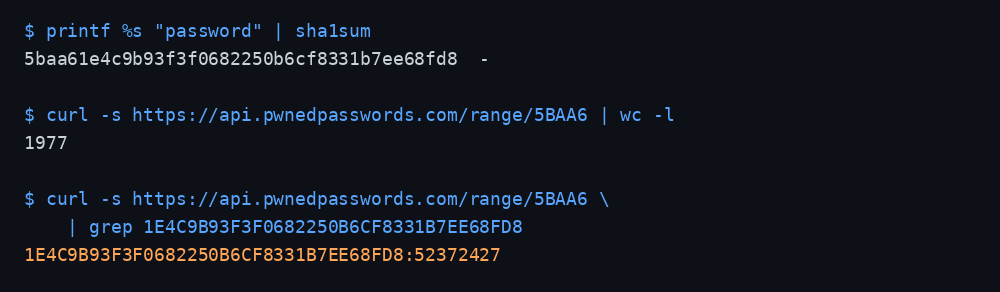
The screenshot is a real run of those commands against the public API. The bucket for the prefix 5BAA6 holds 1,977 suffixes, and the SHA-1 of the word “password” appears in it with a count of 52,372,427. I rendered the terminal text into an image myself, so the colours are mine, the output is not.
Second, add a factor an attacker cannot replay. A passkey or a TOTP code turns a correct password into a necessary but not sufficient credential. Passkeys are better because there is nothing to type into a phishing page or an infostealer log. If you can’t require a second factor for everyone, require it when the risk score says new device, new ASN, or the account’s password appeared in a breach corpus.
Putting it together
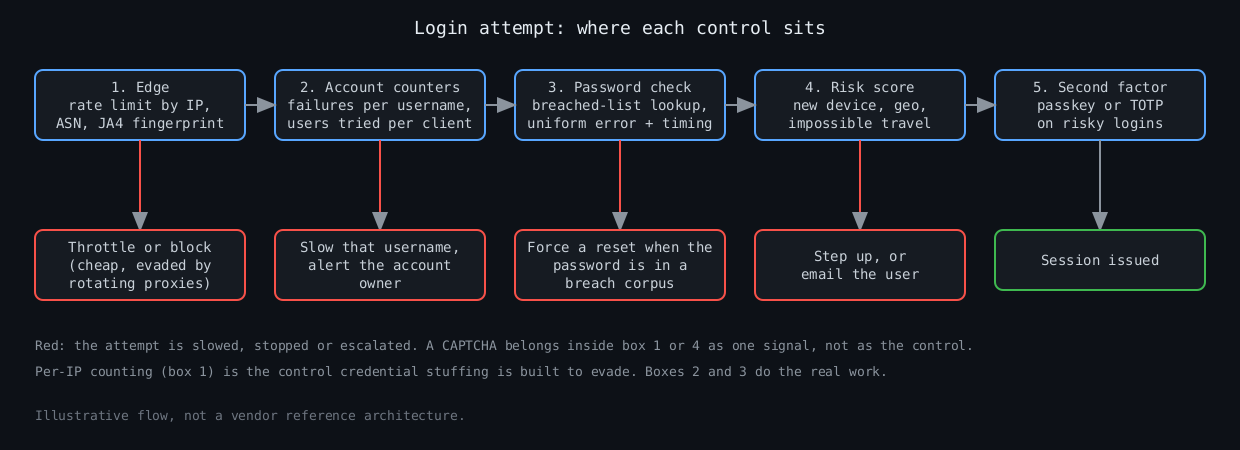
Detection feeds the controls, and none of them is enough alone. If I had to pick the two that matter most, they are the breached-password check and a real second factor, because they work no matter how good the attacker’s proxy pool is. Everything else buys time and gives you telemetry. Start by running the query above against last week’s logs.
Leave a Reply
You must be logged in to post a comment.