Category: Security

  • Logging that actually helps an investigation

    Logging that actually helps an investigation

    Part 1 of 3 in the Detection engineering series.

    Most logging in a typical company was set up by developers to debug things. That’s a fine goal, and it produces logs that are close to useless when a security incident lands. Debug logs tell you a function threw an exception. An investigation needs to know which account did what, from where, against which object, and whether it worked.

    I’ve sat in enough incident calls to know the moment it goes wrong. Someone asks “when did this start, and what else did that account touch?” and the room goes quiet, because the answer either rolled out of retention last week or was never written down.

    Start from the questions, not the log sources
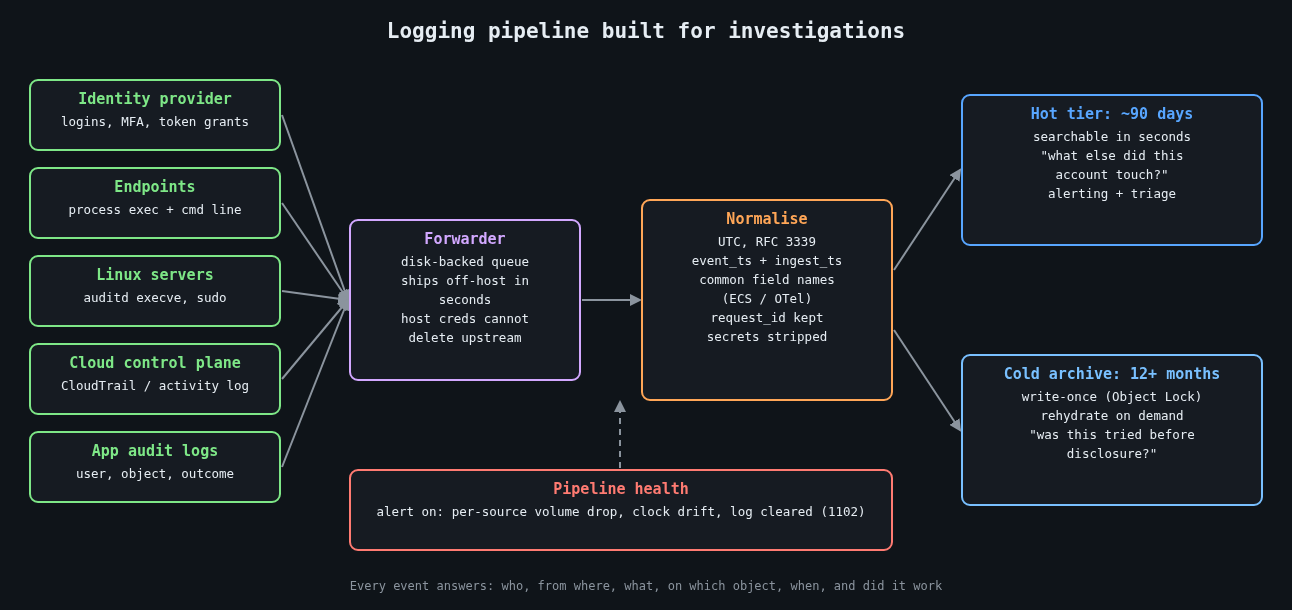
    Logging pipeline built for investigations: sources, forwarder, normalisation, hot and cold tiers

    Before turning on anything, write down the questions an investigator will ask. They’re boringly consistent from incident to incident:

    • Which identity performed the action, and was it a human, a service account or a token?
    • Where did the request come from (source IP, device, user agent, parent process)?
    • What was the action and what object did it touch?
    • When exactly, and in what order relative to other events?
    • Did it succeed?

    Every security-relevant event you emit should answer those. If a log line can’t tell you the actor or the outcome, it’s noise for this purpose. A web access log that records the path but not the authenticated user forces you to join it against session tables you may not have kept, so put the user ID in the access log.

    Time is the join key, so treat it like one

    Investigations are mostly timeline building, and a timeline is only as good as its clocks. Three rules have saved me hours:

    Log in UTC with an explicit offset, in RFC 3339 format. Local time without an offset turns every daylight saving change into an argument. Keep every host synchronised with NTP (chrony is the sane default on Linux) and alert when a host drifts. And record both the event time and the time the pipeline received it, because the gap between them is how you spot a host that buffered logs for an hour or a clock that jumped.

    A structured event that actually answers the questions looks something like this:

    {
      "ts": "2026-10-13T13:47:12.381Z",
      "ingest_ts": "2026-10-13T13:47:13.020Z",
      "event": "auth.login",
      "outcome": "failure",
      "reason": "bad_password",
      "user": "j.smith",
      "src_ip": "203.0.113.24",
      "user_agent": "Mozilla/5.0 ...",
      "mfa": "none",
      "request_id": "9f2c1e7a-4c1b-4a8e-b0a2-1d5f6c3e8b90",
      "service": "sso"
    }

    The request_id is the field I’d fight hardest for. When the same ID flows through your load balancer, API and database audit logs, you can follow a single request across systems without guessing from timestamps.

    The events that earn their storage

    You can’t log everything forever, so spend the budget on events that show up in nearly every investigation. Authentication, both successes and failures, comes first. Privilege changes (group membership, role assignments, new API keys, sudo) come next. On endpoints and servers, process execution with full command lines is the single most useful source I know of. On Windows that means event 4688 with the “Include command line in process creation events” policy enabled, or Sysmon event ID 1. On Linux, auditd can record execve calls:

    # /etc/audit/rules.d/50-exec.rules
    -a always,exit -F arch=b64 -S execve -F key=exec
    -a always,exit -F arch=b32 -S execve -F key=exec
    -w /etc/sudoers -p wa -k sudoers
    -w /etc/sudoers.d/ -p wa -k sudoers

    Execve logging on a busy build server is loud, so measure the volume before rolling it out everywhere. Config changes to cloud accounts (CloudTrail, Azure activity logs) and data access on your most sensitive stores round out the list.

    Log the logging too. Windows event 1102 means the security log was cleared. A sudden drop in event volume from a host usually means an agent died, a disk filled up, or someone stopped the service on purpose. All three deserve an alert.

    Retention is a decision, so make it on purpose

    Default retention settings were chosen by whoever priced the product, not by your threat model. Mandiant’s M-Trends 2024 report put the global median dwell time at 10 days for 2023, and a median hides a long tail of intrusions discovered months later.

    Log4Shell is the example I keep coming back to. CVE-2021-44228 went public on December 9, 2021, and Cloudflare later reported seeing exploitation attempts as early as December 1. Teams with seven days of searchable logs couldn’t answer the most basic question, which was whether anyone had tried this against them before the disclosure.

    The US federal baseline in OMB memo M-21-31 asks for 12 months of active storage and a further 18 months in cold storage for most log categories. You don’t need to copy that exactly, but it’s a useful reference point when someone suggests 14 days is plenty. A two-tier setup works well: a few months hot and searchable, a year or more in cheap object storage that you can rehydrate when needed.

    The 2023 Storm-0558 intrusion into Microsoft-hosted email made the cost of missing logs very public. The US State Department spotted it because it had access to the MailItemsAccessed audit event, which at the time came with a premium licence tier. Many other affected organisations didn’t have that event at all. Microsoft later expanded default logging, but the point stands: find out which audit events your SaaS providers keep behind a paywall before you need them.

    Make the logs outlive the attacker

    Local logs are a convenience. An attacker with root can edit them, so on their own they aren’t evidence. Ship events off the host within seconds, to a system that the host’s own credentials can’t modify or delete. For the archive tier, write-once storage such as S3 Object Lock removes the “delete the evidence” option entirely, including for a compromised admin account if you use compliance mode.

    Keep the pipeline’s buffering in mind too. A forwarder with a small in-memory queue will drop events during exactly the network trouble an incident tends to cause. A disk-backed queue costs very little.

    Things you should not be logging

    Secrets, session tokens and passwords should never land in a log. The classic leak is a failed login where the user typed their password into the username field, so be careful about logging submitted usernames verbatim on failure paths. Bearer tokens in URLs end up in access logs and proxy logs, which is one more reason to keep them in headers.

    Log4Shell also taught a second lesson: the logger itself parses what you hand it. Treat attacker-controlled strings as data, keep logging libraries patched, and prefer structured fields over string interpolation.

    Test it before you need it

    Pick an incident from your own history, or a public one, and try to rebuild its timeline using only what your logging pipeline holds today. Time yourself. Every question you can’t answer, or that takes an hour of joining CSV exports, is a concrete gap with a concrete fix. Repeat it every quarter, since logging coverage quietly decays as services get added.

    The next part of this series turns these events into detections that are written, reviewed and tested like code.

    Other parts: Part 2: Writing detections as code: Sigma rules tested against real logs. Part 3: Alert fatigue: tuning detections without going blind.

  • Patching without fear: unattended upgrades, live patching and coordinated reboots

    Patching without fear: unattended upgrades, live patching and coordinated reboots

    Part 4 of 4 in the Hardening a Linux server series. Earlier parts: Part 1, SSH hardening, Part 2, systemd sandboxing and Part 3, auditd.

    The first three parts of this series were about making a compromise harder and easier to investigate. This one is about the boring thing that prevents most compromises in the first place. Equifax is still the example I reach for. The Apache Struts bug (CVE-2017-5638) was disclosed and patched in early March 2017, attackers were in by mid-May, and they weren’t discovered until the end of July. Nobody needed a zero-day. An unpatched server was enough.

    Most teams don’t skip patching because they think it doesn’t matter. They skip it because it scares them. An update broke something once, a reboot took down a service once, and now patching is a quarterly ritual with a change ticket. What cures that fear is a process where updates are small, automatic, staged and reversible. Bravery has little to do with it.

    Let the machine install security updates

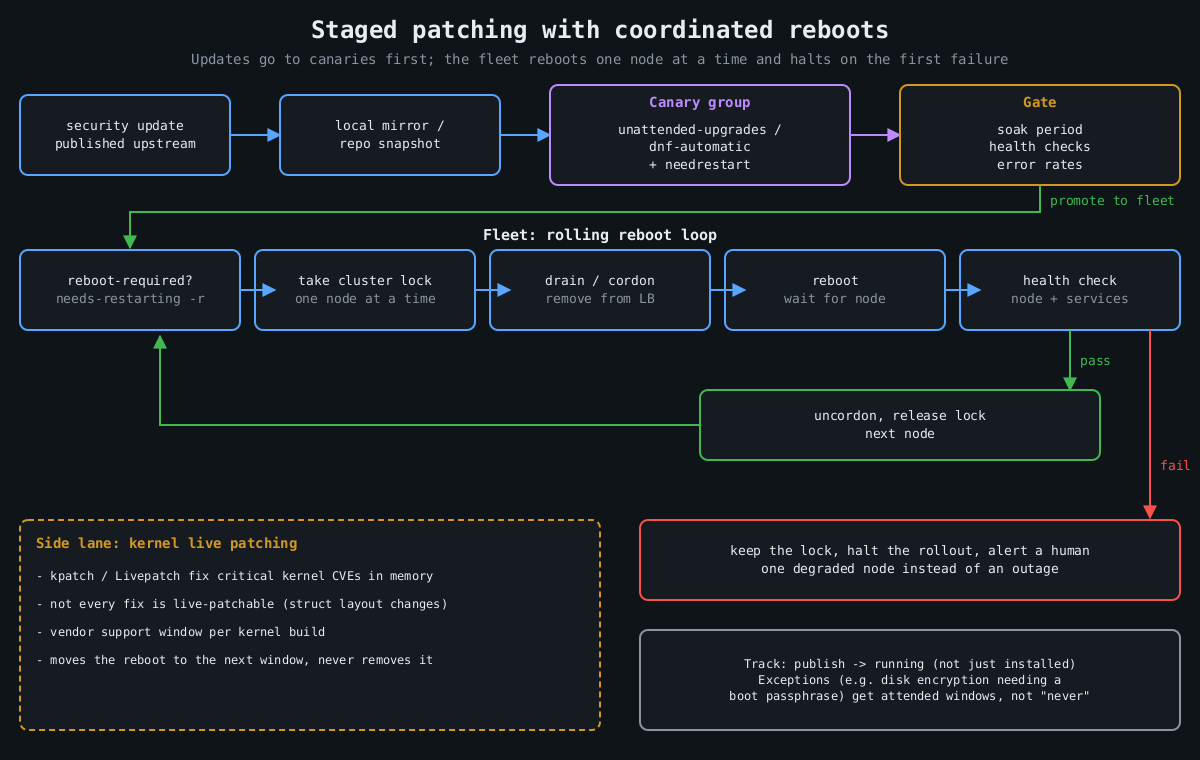
    Flowchart: updates go through a mirror to a canary group and a health gate, then a rolling reboot loop takes a lock, drains, reboots and health checks each node, halting on failure

    On Debian and Ubuntu, unattended-upgrades does this out of the box. Two files matter. /etc/apt/apt.conf.d/20auto-upgrades turns it on:

    APT::Periodic::Update-Package-Lists "1";
    APT::Periodic::Unattended-Upgrade "1";

    And 50unattended-upgrades decides what gets installed and what happens afterwards:

    Unattended-Upgrade::Origins-Pattern {
        "origin=Debian,codename=${distro_codename}-security,label=Debian-Security";
    };
    Unattended-Upgrade::Automatic-Reboot "false";
    Unattended-Upgrade::Remove-Unused-Kernel-Packages "true";

    On RHEL and its relatives, dnf-automatic is the equivalent:

    # /etc/dnf/automatic.conf
    [commands]
    upgrade_type = security
    apply_updates = yes
    
    sudo systemctl enable --now dnf-automatic.timer

    The objection I take seriously is “an update could break production”. Fair enough. Still, a security update from a stable distribution branch is about the most conservative change your servers will ever receive. Debian security and RHEL errata backport fixes rather than shipping new upstream versions, exactly so behaviour doesn’t change. The risk from a backported fix is smaller than the risk of running a known-vulnerable OpenSSL for a quarter. And the staging below handles the rest.

    Installing isn’t the same as running

    This bites people. A library update replaces the file on disk, but every process that already mapped the old version keeps running it. Your server says “OpenSSL updated” while nginx happily serves TLS from the vulnerable copy in memory. Kernel updates don’t take effect at all until a reboot.

    Check what’s actually stale:

    # Debian/Ubuntu
    sudo needrestart -b          # batch output: stale services and kernel status
    cat /var/run/reboot-required.pkgs
    
    # RHEL family
    sudo dnf needs-restarting -r   # exit code 1 means a reboot is needed
    sudo dnf needs-restarting -s   # services still using old files

    needrestart can restart affected services automatically after each upgrade, which closes the userspace gap with no human involved. The kernel still needs a reboot, and that’s where live patching comes in.

    Live patching buys time, not immunity

    Kernel live patching (kpatch on RHEL, Canonical Livepatch on Ubuntu, both built on the upstream livepatch infrastructure merged in Linux 4.0) replaces vulnerable kernel functions in memory using ftrace redirection. For a critical kernel CVE on a Friday afternoon, it’s a lifesaver.

    The limits are in the fine print, if you look. Not every fix can be live patched. Changes to data structure layouts are hard or impossible, so some CVEs simply don’t get a live patch. Live patches are also cumulative patches against a specific kernel build, and vendors only produce them for a support window per kernel. Eventually you’re running a kernel that’s been patched in memory a dozen times and isn’t getting new patches. So think of live patching as a way to move the reboot from “tonight, in a panic” to “next scheduled window”. The reboot is still coming.

    Reboots should be routine, which means coordinated

    If rebooting a server scares you, the problem is more likely the architecture than the server. A service that can’t survive one node restarting can’t survive one node dying either, and hardware doesn’t schedule its failures for maintenance windows. Once services can tolerate it, reboots should happen on a cadence, automatically, one node at a time.

    The coordination logic is the same everywhere:

    1. Is a reboot needed? (reboot-required, needs-restarting -r)
    2. Take a cluster-wide lock so only one node reboots at a time.
    3. Drain: remove the node from the load balancer / cordon it.
    4. Reboot, wait for it to come back.
    5. Health check the node and its services.
    6. Only on success: put it back, release the lock.
    7. On failure: keep the lock, stop the rollout, alert a human.

    For Kubernetes nodes, kured (the Kubernetes Reboot Daemon) does exactly this: it watches for the reboot sentinel file, takes a lock, cordons and drains the node, reboots, and uncordons it. For VMs and bare metal, the same loop fits in a small Ansible playbook with serial: 1 and max_fail_percentage: 0, or whatever orchestration you already have. The important part is step 7. A rollout that stops itself after the first failed health check turns a bad update into one degraded node instead of an outage.

    Keep one exception list and keep it short. Machines that can’t reboot unattended (anything with full-disk encryption that needs a passphrase at boot, for example) should get a scheduled human-attended window, not “never”.

    Stage it like any other deploy

    Ordering is the last piece. Updates should hit a small group of servers first, ideally the ones that look most like production without being the most important, and only spread after those survive a soak period. If you run a local mirror or use repository snapshots (Pulp, Aptly, or your cloud provider’s equivalent), the fleet installs the exact package set the canaries tested, not whatever landed in the repository an hour later. For VMs, take a hypervisor snapshot before the update on anything stateful, so a bad update is a rollback rather than a restore.

    Measure it. Track the time from a fix being published to it running (not just installed) on every host. When the next regreSSHion lands, as covered in part 1, the teams that patch in a day are the ones that already patch every week.

    That’s the end of the series. None of this is exotic. Together, though, it’s most of what separates a server that gets popped by commodity tooling from one that doesn’t.

  • Why TLS 1.3 Handshakes Are Faster (And What Changed Under the Hood)

    Why TLS 1.3 Handshakes Are Faster (And What Changed Under the Hood)

    The 1-RTT handshake and what changed

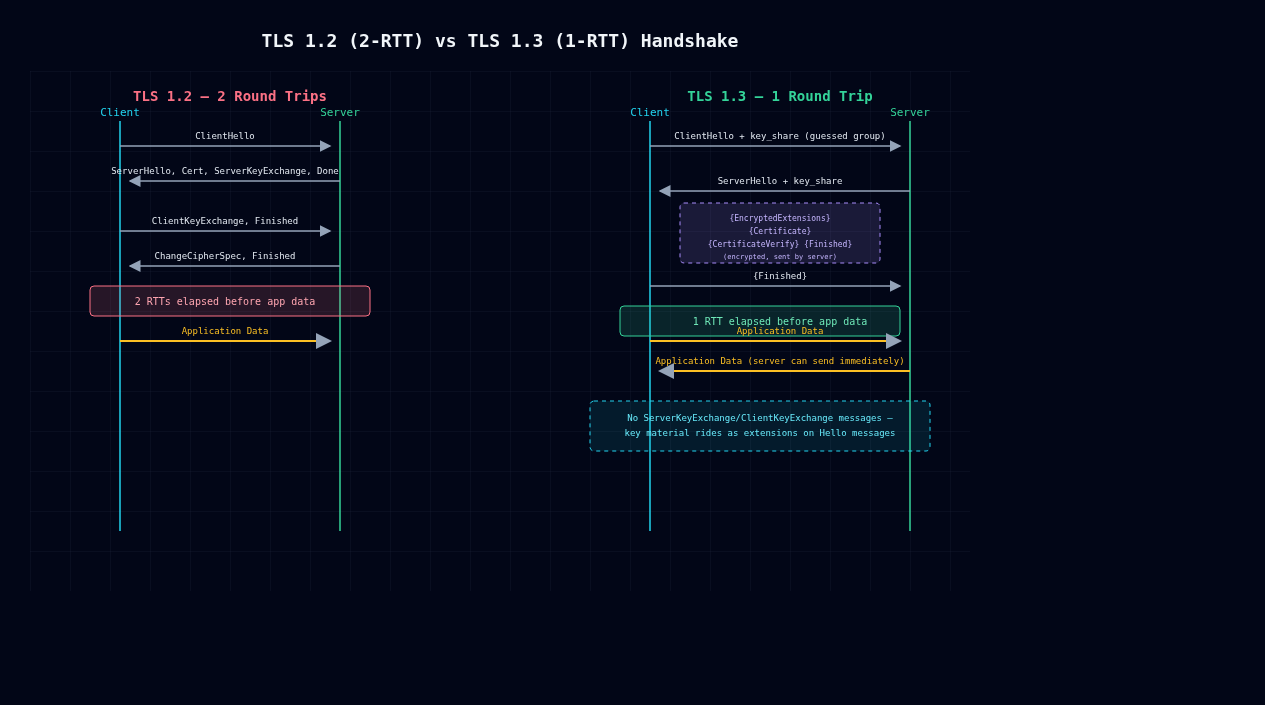
    TLS 1.2 vs TLS 1.3 handshake sequence comparison

    TLS 1.3 (RFC 8446, finalized August 2018) isn’t a tuning pass on TLS 1.2. It’s a different protocol with the same name. The headline feature is a 1-RTT handshake instead of 2-RTT, but what I find more interesting is why that became possible: the designers deleted static RSA key exchange, deleted renegotiation, and made forward secrecy mandatory. This post walks through what changed on the wire.

    TLS 1.2’s 2-RTT problem

    A full TLS 1.2 handshake looks like this:

    Client                                               Server
      ClientHello  (cipher suites, supported groups, random) -->
                                                  <-- ServerHello (chosen cipher)
                                                  <-- Certificate
                                                  <-- ServerKeyExchange (if DHE/ECDHE)
                                                  <-- ServerHelloDone
      ClientKeyExchange -->
      [ChangeCipherSpec] -->
      Finished -->
                                                  <-- [ChangeCipherSpec]
                                                  <-- Finished
      Application Data <-->

    The client sends a hello, the server replies with everything needed to pin down the cipher and key exchange, and only then can the client respond with its key material and a Finished message. Application data doesn’t move until after that second round trip. On a connection with 80ms RTT to a distant CDN edge, that’s 160ms spent on negotiation before any application data moves.

    The root cause is ordering: the client has no idea which key exchange group or cipher the server will pick until ServerHello shows up, so it can’t send a key share in the first flight. So it has to wait.

    TLS 1.3’s fix: guess the group instead of negotiating it

    TLS 1.3 collapses the handshake by having the client guess which (EC)DHE group the server prefers and send a key share speculatively, right in the ClientHello:

    Client                                               Server
      ClientHello
        + key_share (e.g. x25519 public value)
        + supported_versions, signature_algorithms -->
                                                  <-- ServerHello
                                                        + key_share
                                                  <-- {EncryptedExtensions}
                                                  <-- {Certificate}
                                                  <-- {CertificateVerify}
                                                  <-- {Finished}
      {Finished} -->
      Application Data <-->                       <-- Application Data

    Everything in {} is encrypted. The server derives handshake traffic keys from its own ephemeral share plus the client’s key_share immediately after ClientHello arrives, so even the certificate exchange is now confidential. That closes a leak 1.2 had for years: certificates went over the wire in cleartext, so a passive eavesdropper could see which server you were talking to. Because the client already sent a key share up front, the server can finish the key agreement and start pushing encrypted application data in its very first response. Once the client has ServerHello and Finished, it can start sending data too, with no extra round trip to acknowledge anything. That’s the 1-RTT.

    If the client guesses wrong (rare these days since x25519 is close to universal), the server sends a HelloRetryRequest and you’re back to something like 2-RTT. That’s the exception, though, not what happens on a normal connection.

    You can watch this happen directly:

    $ curl -v --tlsv1.3 https://example.com 2>&1 | grep -i 'TLS\|SSL connection'
    * TLSv1.3 (OUT), TLS handshake, Client hello (1):
    * TLSv1.3 (IN), TLS handshake, Server hello (2):
    * TLSv1.3 (IN), TLS handshake, Encrypted Extensions (8):
    * TLSv1.3 (IN), TLS handshake, Certificate (11):
    * TLSv1.3 (IN), TLS handshake, CV (15):
    * TLSv1.3 (IN), TLS handshake, Finished (20):
    * TLSv1.3 (OUT), TLS handshake, Finished (20):
    * SSL connection using TLSv1.3 / TLS_AES_256_GCM_SHA384

    Notice there’s no ServerKeyExchange or ClientKeyExchange message type anymore. Key exchange data rides inside the Hello messages as an extension (key_share) instead of being its own standalone handshake message.

    Static RSA key exchange is gone

    TLS 1.2 allowed TLS_RSA_WITH_* cipher suites, where the client just encrypts a premaster secret directly with the server’s RSA public key. There’s no Diffie-Hellman anywhere. It was fast (one asymmetric operation, no DHE math) but bad for confidentiality: if the server’s private key is ever compromised, subpoenaed, or pulled out via something like Heartbleed, every past session a passive adversary ever recorded becomes decryptable after the fact. There’s no forward secrecy, because one static key protects every session’s secret.

    RFC 8446 removes static RSA key exchange entirely. TLS 1.3 only supports (EC)DHE-based exchange, plus PSK for resumption, which I’ll get to below. Every handshake negotiates a fresh ephemeral key pair, so compromising the server’s long-term signing key lets an attacker impersonate the server from that point forward, but it buys them nothing against traffic captured earlier. You can no longer misconfigure forward secrecy away with a cipher-suite setting, because the protocol always provides it.

    Renegotiation is gone too. TLS 1.2’s renegotiation, re-running the handshake mid-connection to rotate keys or ask for a client cert, was the root cause of CVE-2009-3555, a plaintext-injection bug that needed the RFC 5746 patch as a partial band-aid. TLS 1.3 replaces that general-purpose “redo the whole handshake” mechanism with two narrower ones: post-handshake authentication (a CertificateRequest sent after the handshake, for mTLS-style client cert checks) and a dedicated KeyUpdate message for rotating keys.

    0-RTT resumption trades replay protection for speed

    For repeat connections, TLS 1.3 offers 0-RTT via PSK resumption. The client reuses a session ticket from an earlier connection and sends encrypted application data in the very first flight, before the server has said a word back:

    Client                                               Server
      ClientHello + early_data + psk extension
      (encrypted with early_data_key)
      Application Data (0-RTT) -->
                                                  <-- ServerHello, ... Finished
      Application Data <-->

    That’s zero round trips of latency before data moves, which helps a mobile client reconnecting to a server it already knows. The catch is that 0-RTT data has no replay protection. The client sends it before the handshake finishes, specifically before the server’s Finished message, which is the thing that actually proves liveness and ties the exchange together. A network-positioned attacker can just capture that first flight and replay it verbatim. At that layer the server can’t tell a replay from a legitimate retransmission.

    RFC 8446 Section 8 doesn’t try to fix this cryptographically. It leaves the problem to the application: only use 0-RTT for idempotent requests (safe GETs, not POST /transfer-funds), and let servers implement their own anti-replay measures, such as single-use tickets or bounded replay caches. Those measures give back some of the latency win in exchange for safety. I’ve seen teams enable 0-RTT, forget the tradeoff, and get surprised when a retry storm double-charges something. Most production setups (NGINX, HAProxy, Cloudflare) either disable 0-RTT outside of static content or require the application to opt in per request.

    Checking your own setup

    If you’re terminating TLS yourself, not sitting behind a CDN, confirm your stack is actually negotiating 1.3 and not quietly falling back to 1.2 for compatibility reasons that stopped mattering years ago. Run openssl s_client -connect host:443 -tls1_3 and check for Protocol: TLSv1.3 in the output.

    Drop any RSA key-exchange cipher suites still sitting in your 1.2 fallback config. Those are the forward secrecy hole TLS 1.3 was designed to close.

    If you turn on 0-RTT, go audit which endpoints can actually receive early data. Most servers let you scope this. Default to none until you’ve confirmed an endpoint is idempotent rather than assuming it.

    TLS 1.3 is more than TLS 1.2 with a speed boost. Static RSA key exchange is gone, renegotiation is replaced by narrower mechanisms, and 0-RTT gives up replay protection for latency. Know which guarantees you’re giving up before you turn it on.